If your finance team is still spending hours matching transactions manually, checking ERP records before replying to customers, or tracing the reason behind a variance across multiple spreadsheets, the real problem is not a lack of data. It is the amount of time your team loses just trying to bring that data together. Microsoft 365 Copilot for Finance is designed to reduce that friction by bringing finance-specific AI capabilities into the tools your team already uses. Instead of forcing employees to move constantly between Excel, Outlook, ERP systems, and financial reports, it helps surface relevant financial context closer to the task itself.
Through our work with Microsoft 365 environments at Code Creators, we have seen how much finance work depends on repetitive steps such as comparing records, locating supporting information, investigating differences, and gathering context before making a decision. That experience makes one thing clear: AI becomes useful in finance when it reduces those repetitive steps without taking control away from the people responsible for financial accuracy.
In this article, you will learn what Microsoft 365 Copilot for Finance is, how your finance team can use it in Excel and Outlook, how it connects with financial systems, where its preview capabilities fit today, and why Microsoft 365 Copilot training for finance matters before wider adoption.
What Is Microsoft 365 Copilot for Finance?
Microsoft 365 Copilot for Finance is a finance-focused AI solution designed to help you complete financial work from familiar Microsoft 365 environments.
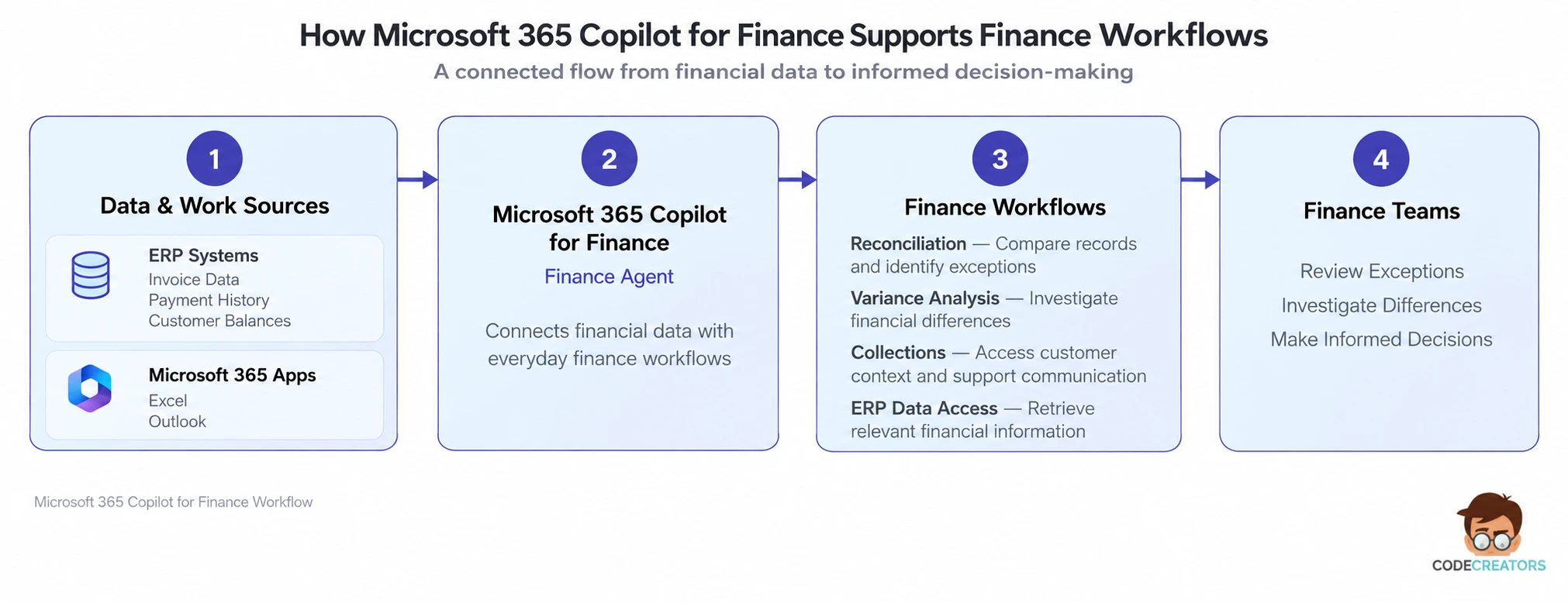
Instead of acting like a general-purpose chatbot, it connects finance workflows with business data. Microsoft now refers to the broader experience as Finance Agent, which brings purpose-built finance capabilities into Excel, Outlook, and Microsoft Copilot.
For your team, this means you can work with financial information closer to where the task already happens.
In finance workflows, Excel often becomes the main workspace for comparing datasets, investigating mismatches, and analyzing financial differences. Copilot can support these tasks directly where the analysis is already taking place. In collections workflows, Outlook can provide access to customer financial context while the communication is already being handled.
The key difference is simple. You are not only asking AI to generate text. You are using AI to support actual finance processes with relevant financial context.
How Microsoft 365 Copilot Works With Financial Systems
Your finance data rarely sits in one place.
You may store transactions in an ERP system, analyze them in Excel, communicate with customers through Outlook, and share results across Microsoft 365. When your team has to move information manually between those systems, the process becomes slower and more difficult to manage.
Microsoft 365 Copilot for Finance helps connect those environments.
It can work with financial systems such as Dynamics 365 Finance, Business Central, and SAP, depending on your setup and available integrations. This allows you to access relevant finance information while staying inside the Microsoft 365 application where you are already working.
One common friction point in finance operations is the need to open an ERP system just to retrieve invoice details before replying to a customer. Bringing that context into Outlook reduces unnecessary switching between systems.
However, Copilot does not bypass your existing security model. Your ERP permissions still determine which information you can access.
This matters because your finance team can gain faster access to relevant information without removing the controls already built into your financial systems.
Financial Reconciliation in Excel
If your team handles regular reconciliation, this is one of the most practical use cases for Microsoft 365 Copilot for Finance.
You may need to compare two datasets containing hundreds or thousands of transactions. Differences in reference numbers, descriptions, dates, or values can make manual matching slow.
Finance Agent in Excel can help you compare financial datasets, identify possible matches, highlight discrepancies, and prepare reconciliation results for review.
This changes how you spend your time.
Instead of manually reviewing every record, you can focus more attention on transactions that do not match correctly or require further investigation.
In reconciliation work, most records often match correctly while a smaller group remains unresolved because of missing references, amount differences, or timing gaps. Copilot can help surface those exceptions faster for review.
Your team can then investigate the real cause rather than spending hours finding the exceptions in the first place.
Microsoft has also introduced unattended reconciliation capabilities for recurring reconciliation work. If you repeat the same reconciliation every day, week, or month, this can reduce the amount of manual comparison your team performs.
The value here is not that AI makes the final accounting decision for you. The value is that it helps move your workflow from manual matching toward exception-based review.
Variance Analysis With Copilot for Finance
Variance analysis often starts with one question: Why did this number change?
However, finding the answer can take much longer.
You may need to compare reporting periods, filter large datasets, inspect account-level changes, and review underlying transactions before you can explain a material variance.
Microsoft 365 Copilot for Finance can support this process in Excel.
You can use natural-language instructions to define what you want to investigate and focus on the accounts, categories, or values that contributed most to the difference.
During variance reviews, a noticeable increase in actual expenses often requires teams to identify which cost categories caused the movement. Copilot can help narrow that investigation so analysts do not need to review every line manually.
This can help FP&A teams, controllers, and finance analysts reach the useful part of the analysis faster.
Microsoft has also continued expanding period-over-period analysis capabilities, including support for comparisons such as month-over-month, quarter-over-quarter, and year-over-year analysis.
For your team, the main benefit is speed. Copilot can help narrow the investigation, while you still decide whether the identified drivers are financially meaningful.
Managing Collections Through Outlook
Collections work often requires more context than the email in front of you provides.
Before you contact a customer about an overdue invoice, you may need to check the outstanding balance, payment history, previous communication, account status, or other ERP information.
Without an integrated workflow, you may have to switch between Outlook and your financial system several times before you can send one response.
Microsoft 365 Copilot for Finance helps bring more of that context into Outlook.
You can access relevant financial information, review customer details, get help drafting communication, and capture important follow-up information without moving through as many separate systems.
This becomes particularly useful when your collections team manages a large number of customer accounts.
Instead of spending time gathering context for every email, your team can spend more time deciding what the next action should be.
You still review the information and control the communication. Copilot simply helps reduce the work needed to collect the supporting context.
Asking Questions About ERP Data
Microsoft’s newer Finance Agent experience also changes how you can interact with ERP information.
Traditionally, even a simple question may require you to know where the relevant data sits inside your financial system.
Routine finance queries often involve checking whether an invoice has been paid, reviewing payment history, or confirming a customer balance. These are the types of questions that can require unnecessary navigation in traditional ERP workflows.
With Finance Agent, you can ask natural-language questions about supported financial data instead of navigating through several screens just to locate one value.
This can make ERP information easier to access for routine queries.
You start with the financial question instead of the system navigation.
That does not mean every finance process should move to natural-language interaction. Complex transactions, approvals, corrections, and controlled accounting activities still require the proper finance workflow.
However, for straightforward information retrieval, reducing unnecessary navigation can save your team a meaningful amount of time.
What Happened to Microsoft 365 Copilot for Finance Preview?
You may still see the term Microsoft 365 Copilot for Finance preview in older articles, announcements, and search results because Microsoft originally introduced several finance capabilities through preview releases.
Since then, the product direction has evolved.
Microsoft now primarily refers to the broader finance experience as Finance Agent, while the earlier Copilot for Finance name remains relevant when discussing its product history and previous releases.
However, you should not assume that every capability now has the same availability status.
Microsoft continues to release individual finance features through preview stages before broader availability.
This means you should check the status of the specific feature you want to use.
Availability can differ across finance capabilities, with some features reaching production use while newer analysis capabilities may still remain in preview.
For your finance team, this distinction matters because preview features can change and may not offer the same level of support or stability as generally available capabilities.
Why Microsoft 365 Copilot Training for Finance Matters
Giving your finance team access to Copilot does not automatically improve your finance processes.
Your employees need to understand how to use it in the context of real financial work.
Good Microsoft 365 Copilot training for finance should focus on actual tasks rather than generic prompt-writing exercises.
If your team handles reconciliation, training should show employees how to compare datasets, review unmatched records, and verify suggested results.
If your analysts work with financial variances, they should learn how to define useful analysis criteria and validate the drivers that Copilot identifies.
If your collections team uses Copilot in Outlook, employees should understand how to review customer context before they use or adapt AI-generated responses.
Training should also cover permissions and data access.
Your team needs to know that Copilot does not create unrestricted access to financial data. What employees can retrieve still depends on the permissions assigned through your connected systems.
Most importantly, your employees should understand when to rely on Copilot for assistance and when professional financial judgment must take priority.
The goal is not to make your team accept AI output faster. The goal is to help them work faster without weakening review, control, or accountability.
Where Microsoft 365 Copilot for Finance Delivers the Most Value
You are likely to see the strongest value when your finance team performs structured and repetitive work across several systems.
Reconciliation requires comparison.
Variance analysis requires investigation.
Collections requires financial context.
ERP queries require information retrieval.
These are exactly the types of workflows where Copilot can reduce the steps between your question and the information you need.
However, that does not mean you should introduce Copilot into every finance process at once.
Start with the workflows where your team spends the most time gathering information, comparing data, or identifying exceptions.
Then measure whether Copilot actually reduces effort without creating additional review problems.
This approach gives you a clearer way to judge whether the tool improves the process instead of simply adding another layer of technology.
How Code Creators Supports Microsoft 365 Copilot for Finance Adoption
Implementing Microsoft 365 Copilot for Finance works best when the rollout starts with a clear finance process rather than a broad AI initiative. Through our work with Microsoft 365 environments, we have seen that teams get more value when they first identify repetitive tasks such as reconciliation, variance analysis, collections, or ERP data retrieval and then match Copilot capabilities to those workflows.
This also requires attention to permissions, connected financial systems, user access, and training. Finance teams need to understand not only what Copilot can do, but also where its output requires validation and where existing financial controls must remain in place.
Code Creators helps organizations assess these requirements, align Microsoft 365 Copilot with finance workflows, and prepare users for practical adoption without disrupting the controls already built into their financial processes.
If you want to introduce Microsoft 365 Copilot into your finance operations with a workflow-focused approach, connect with Code Creators to plan the right implementation for your team.
Conclusion
Microsoft 365 Copilot for Finance can help your finance team reduce the repetitive work surrounding reconciliation, variance analysis, collections, and financial information retrieval.
Its strongest value appears when your employees already spend significant time moving between Excel, Outlook, ERP systems, and financial reports just to gather the context needed for a decision.
The product has also evolved from the earlier Microsoft 365 Copilot for Finance preview into Microsoft’s broader Finance Agent direction. At the same time, individual capabilities continue to move through preview and general availability at different stages.
For that reason, you should evaluate Copilot at the process level rather than treating it as one broad AI rollout.
Choose a specific finance workflow, confirm that the required capability is available, review the permissions and data involved, and train your team around that use case.
When you do that, Microsoft 365 Copilot for Finance can help your team spend less time on repetitive financial work and more time reviewing exceptions, interpreting results, and making informed financial decisions.
If your finance team is ready to reduce repetitive work and use Copilot more effectively across financial workflows, our Copilot integration services can help you connect the right tools, data, and processes for a smoother implementation.