fill the form


    What We Do

    Ongoing Microsoft 365 management covers six areas. When one of these areas has no clear owner, small gaps can turn into support incidents later.

    Tenant administration and user lifecycle management icon

    Tenant Administration and User Lifecycle Management

    Someone has to own the day-to-day admin work, or it gets pushed to whoever’s free. We handle:

    • User onboarding and offboarding, including license and permission assignment
    • Ongoing tenant administration across Microsoft Entra ID, Exchange, and SharePoint
    • Group and access management as your team changes
    • Documentation kept current as configurations change

    Requests get handled on a defined, recurring schedule.

    Security monitoring and compliance icon

    Security Monitoring and Compliance

    Security settings drift without someone actively watching them. We manage:

    • Multi-factor authentication and conditional access policies
    • Microsoft Defender configuration and alert monitoring
    • Data loss prevention policies for sensitive data types
    • Compliance settings mapped to your documented security and compliance requirements
    • A documented monitoring runbook covering what’s tracked and how alerts get escalated

    Proactive monitoring catches configuration drift before it becomes an incident.

    Licensing management and optimization icon

    Licensing Management and Optimization

    License assignments tend to drift from actual usage without regular review. We handle:

    • License assignment and reclamation as users join or leave
    • Recurring license-optimization reviews against actual usage, with findings documented each time
    • Guidance on Business Premium, E3, and E5 tier changes
    • Tracking Microsoft’s New Commerce Experience (NCE) renewal terms and pricing changes

    Licensing gets reviewed on a recurring schedule throughout the year.

    Backup and recovery icon

    Backup and Recovery

    Native version history isn’t the same as a full backup strategy. We provide:

    • Backup and recovery for Exchange Online, SharePoint, and OneDrive through Microsoft 365 Backup
    • Teams chat and channel message protection is provided and scoped separately from Microsoft 365 Backup
    • Defined recovery point and recovery time targets, documented for your environment
    • Regular restore testing alongside backup configuration, with results captured in a restore-test report
    • Backup retention that is configured against the agreed recovery and compliance requirements; Microsoft 365 retention policies are reviewed separately

    Recovery gets tested ahead of time, so it’s already proven when you actually need it.

    Helpdesk and end-user support icon

    Helpdesk and End-User Support

    End users need somewhere to go when something doesn’t work. We provide:

    • Helpdesk support for Microsoft 365 issues, with coverage hours confirmed in your service agreement
    • Defined response times based on issue severity
    • Direct support for admins and end users
    • Escalation paths for issues beyond standard tier-1 support, documented in an escalation matrix

    Support tickets go to a team that already knows your environment.

    Endpoint management icon

    Endpoint Management

    Devices connecting to Microsoft 365 need their own oversight. We handle:

    • Endpoint management through Microsoft Intune
    • Compliance policies applied across managed devices
    • Patch management and update scheduling
    • Device enrollment for new and departing employees

    Intune evaluates each device against your compliance policies on an ongoing basis, and Conditional Access can be configured to restrict access when a device falls out of compliance.

    Who We Work With

    We provide managed services for a range of organizations, including:
    • Organizations Without a Dedicated In-House Microsoft 365 Administrator: Tenant administration, licensing, and security get handled by our team instead of falling to whoever has the most IT experience on staff.
    • Growing Teams That Have Outpaced One Internal IT Generalist: As headcount grows, Microsoft 365 needs more ongoing attention than one person can give it alongside everything else on their plate.
    • Organizations Consolidating Multiple Ad Hoc Support Arrangements: Scattered vendors and informal support get replaced with one provider covering the full environment.
    • Multi-Location Businesses Needing Consistent Support Across Offices: The same standards for security, licensing, and helpdesk response apply at every location.
    • When to Bring Us In: Once a Microsoft 365 implementation is complete, whether we handled it or another provider did, we can take over ongoing management, security monitoring, and support from go-live forward.
    Who we work with for Microsoft 365 managed services
    Why work with Code Creators for M365 managed services

    Why Work with Code Creators

    • Microsoft Solutions Partner – 15+ years of experience across the Microsoft ecosystem, so tenant configuration, licensing, and security decisions are made with real platform depth.
    • 700+ Clients Across the U.S. and Canada – This reflects our overall client base across all Code Creators services, giving our managed Microsoft 365 team experience across different environments, industries, and recurring support challenges.
    • In-House Delivery, No Subcontractors – Every ticket, security alert, and licensing review is handled by our own team.
    • Defined Support Response Times – Response times are set by issue severity and confirmed in your service agreement.

    Your Trusted Microsoft 365 Management Partner

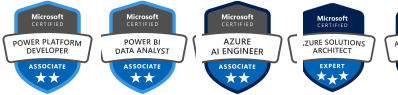
    Microsoft Certification Badges of Code Creators

    Let’s Talk

    We have 100% successful track-record of serving Fortune 500 Companies from 45+ Industries! Connect with us to experience the Power of Innovative Development and Designs

    Request a Quote

    Free No-Obligation Quote

    How Managed Services Onboarding Works

    1

    Environment Review

    During the 1st week, we review your current tenant configuration, licensing, security settings, and existing support arrangements. This produces a findings report and a list of priority fixes.

    2

    Onboarding & Baseline Configuration

    Over the next one to two weeks, we document a configuration baseline covering security policies and monitoring, and establish the helpdesk contact and escalation process with your team.

    3

    Transition Period

    Over the next two to four weeks, both our team and your existing support contact, if there is one, stay available while your team adjusts to the new process.

    4

    Ongoing Management

    From here forward, we run tenant administration, security monitoring, licensing reviews, and helpdesk support against the configuration baseline and escalation matrix established during onboarding.

    5

    Quarterly Business Reviews

    Every quarter, we review licensing usage, security posture, and support-ticket trends with your team, then adjust the service based on what is happening in the environment.

    Our Clients

    AmeriCU Code Creators client logo
    bluemercury Code Creators client logo
    CERIDIAN Code Creators client logo
    The University of CHICAGO Code Creators client logo
    City of Hope. Code Creators client logo
    World Health Organization (WHO) Code Creators client logo
    University of WATERLOO Code Creators client logo
    University of TORONTO Code Creators client logo
    TIN ROOF TACOS Code Creators client logo
    Stoller Code Creators client logo
    SIEMENS Code Creators client logo
    SAFEGUARD Medical Code Creators client logo
    RioCan Code Creators client logo
    Ontario Trillium Foundation Code Creators client logo
    McMaster University Code Creators client logo
    Macys Code Creators client logo
    Little City Code Creators client logo
    KINROSS Code Creators client logo
    Gate Code Creators client logo
    FlexNGate Code Creators client logo
    Fastwyre Broadband Code Creators client logo

    FAQs About Microsoft 365 Managed Services

    General IT support typically reacts to tickets as they come in, without ongoing responsibility for your Microsoft 365 environment specifically. Our managed service includes proactive monitoring, recurring license and security reviews, and tenant administration as standing, ongoing work, backed by a documented configuration baseline and escalation matrix set up during onboarding. The environment gets maintained continuously on that basis.

    Our managed services cover tenant administration, user onboarding and offboarding, security monitoring including MFA and Microsoft Defender, license management, backup and recovery, endpoint management, and helpdesk support, with coverage hours confirmed in your service agreement. Which pieces apply depends on your current setup. Some organizations need the full scope, others already have parts of this covered internally.

    Yes, helpdesk support is part of the standard managed services engagement, covering both admin-level issues and end-user tickets. Response times are defined by issue severity, and the specific coverage hours, whether that’s business hours or extended coverage, get confirmed in your service agreement before onboarding begins. The agreement should also state which issues are escalated beyond standard support and who owns that escalation.

    Migration and reconfiguration work isn’t automatically part of the standard managed services scope. During the environment review, we assess whether cleanup, reconfiguration, or a licensing migration is needed, and scope that as a separate phase or related engagement before ongoing management begins. This keeps the managed-services agreement focused on the ongoing work it is meant to cover.

    License assignments often drift from actual usage as teams change, people end up on a tier higher than they need, or leave without their license being reclaimed. We run recurring license optimization reviews against actual usage, reclaim unused licenses, and track Microsoft’s New Commerce Experience renewal terms, so licensing costs reflect what your team actually needs.

    We manage multi-factor authentication, conditional access policies, Microsoft Defender configuration, and data loss prevention policies as standing practices that get revisited on a recurring schedule. Compliance settings are mapped to your documented security and compliance requirements, and we flag configuration drift before it turns into an incident. The review frequency and the evidence retained for each review are agreed during onboarding.

    Hybrid and remote teams depend more heavily on Teams, SharePoint, and endpoint security working correctly outside a single office network. We manage endpoint compliance through Microsoft Intune, monitor access from outside the network through conditional access, and provide helpdesk support regardless of where someone’s actually working from. We also review enrollment and access policies as the workforce and device mix change.

    Look for a Microsoft 365 managed service provider whose depth is specifically in the Microsoft ecosystem, with defined response-time commitments confirmed in writing and delivery by an in-house team. It’s also worth asking how often license reviews and security monitoring actually happen, and whether that cadence is documented anywhere. Ask what reports you receive and who follows up when a control or review falls behind.

    Get a Clear Picture of Your Microsoft 365 Environment

    Code Creators delivers cloud-managed services for Microsoft 365 organizations across the U.S. and Canada. Our in-house team handles tenant administration, security, licensing, backup, and helpdesk support. Book a consultation to find out what is currently going unmanaged in your environment.

    Microsoft 365 Case Studies

    Explore Related Services