Microsoft Copilot is worth it for most knowledge-worker roles once you account for the real total cost, base license plus the $30/user/month add-on, plus permission cleanup and training, against actual hours saved, not just the headline seat price. In our Copilot deployments at Code Creators, the licenses that deliver strong ROI are almost never the ones bought broadly across an entire org chart, they’re the ones targeted at roles that spend real time on documents, email, and meetings. This guide breaks down the real total cost of ownership, concrete ROI metrics across core business departments, and a clear framework to measure your own software investment accurately.
The True Cost of Microsoft 365 Copilot
To calculate real ROI, you need to first determine your actual all-in cost per user. Comparing headline price tags in isolation leads to inaccurate software budgeting. The full cost stack has four parts: your base Microsoft 365 license, the Copilot add-on itself, data governance and permission cleanup work, and user training.
Understanding Base License Requirements
You can’t buy Microsoft 365 Copilot as a standalone product. It operates as an add-on layer on top of qualifying base subscriptions, such as Microsoft 365 Business Standard, Business Premium, E3, or E5.
- Enterprise seats. The enterprise Copilot add-on costs $30 per user, per month (billed annually). Adding this to a standard M365 E3 plan ($36/user/month) brings your baseline software investment to $66 per user, each month.
- Small and mid-sized business seats. Organizations under 300 seats can access dedicated small-business tiers or promotional bundles (such as Business Premium bundled with Copilot), which lower total entry costs.
Factoring in Implementation and Data Readiness
Beyond monthly software seats, launching AI tools requires technical preparation. Before deploying licenses across your organization, you need to audit your digital workspace permissions.
If your company has over-shared SharePoint sites or loose file access rules, Copilot surfaces those exposed files instantly to logged-in users. Fixing permission hygiene, setting up sensitivity labels in Microsoft Purview, and training staff represent essential initial setup investments that ensure long-term data security. In our own client engagements, this permission cleanup step is consistently the part organizations budget the least time for, even though it’s usually the single largest driver of how long a rollout actually takes.
Measuring ROI: Quantifying Time Saved Across Key Departments
A Copilot subscription is worth its cost when the value of time saved consistently exceeds what you’re paying for it. If an employee earning $50 per hour saves just one hour per week using integrated AI, the license pays for itself immediately.
Time savings and value show up differently by department: executive and management teams gain from meeting recaps and action items, finance and operations from trend analysis and variance logs, sales and marketing from RFP drafts and client summaries, and IT and data security from automated governance work.
1. Executive and Management Teams
Managers spend hours reviewing missed meetings, parsing lengthy email chains, and compiling weekly status reports.
- Teams meeting summaries. Copilot generates instant meeting recaps, organizing key decisions, open questions, and assigned action items without requiring a human note-taker.
- Document summarization. Summarizing 40-page PDFs or Word reports into concise bullet points cuts document review times from hours to minutes.
2. Finance and Operations
Financial controllers and data analysts use Copilot in Excel to analyze trends quickly without building complex manual formulas.
- Data visualization. Users type plain-English prompts to highlight margin trends, identify budget variances, and generate clear charts instantly.
- Reconciliation support. AI assistants draft narrative summaries explaining quarterly financial shifts for executive board decks.
3. Sales and Marketing
Sales representatives spend significant time on administrative task work rather than talking to clients.
- Proposal and RFP drafting. Copilot pulls product specs from internal SharePoint libraries to draft custom proposal outlines in Word.
- Client call preparation. Before dialing a prospect, sales reps use Copilot to scan Outlook threads and CRM notes, generating instant context briefs.
If you’re trying to figure out which of these use cases would actually move the needle for your team specifically, rather than deploying broadly and hoping for adoption, that’s exactly the kind of role-by-role assessment our Microsoft Copilot Consulting Services team runs before a client commits to seat counts.
Evaluating Microsoft 365 Copilot Cost vs. ROI
To evaluate Copilot’s cost against its ROI effectively, your organization needs to track both direct financial metrics and qualitative operational improvements.
Hard ROI metrics are quantifiable: hours saved per employee on routine administrative drafting, reduction in third-party software licenses you can now consolidate, and faster sales proposal turnaround times. Soft ROI metrics are qualitative but still real: reduced employee burnout from repetitive data entry, improved document accuracy and consistent brand tone, and accelerated onboarding for new team members.
Hard ROI Metrics
- Administrative hours recovered. Multiply hours saved per week by fully burdened employee hourly rates.
- SaaS tool consolidation. Replacing standalone AI writing assistants, automated transcription apps, and external research tools with native Microsoft 365 tools lowers separate software overhead.
- Sales velocity. Faster RFP turnarounds let sales teams submit more proposals, directly increasing pipeline velocity.
Soft ROI Metrics
- Higher work quality. Automated first drafts give employees a starting point, shifting their focus from basic drafting to critical editing and strategic analysis.
- Job satisfaction. Removing tedious administrative tasks reduces employee burnout and improves retention.
Common Pitfalls That Undermine Copilot Value
Even powerful AI tools fail to deliver returns if organizations make key deployment mistakes. These are the three we run into most often when we’re brought in after a rollout has underperformed:
- Deploying without role-based targeting. Buying Copilot licenses for employees who perform simple, physical, or highly routine tasks yields poor returns. Focus licenses on knowledge workers, project leads, analysts, and content creators who handle heavy document loads.
- Ignoring permission hygiene. Deploying AI across unstructured, over-shared SharePoint document libraries exposes sensitive salary data or internal strategy documents to unauthorized employees. This is, by a wide margin, the most common issue we find during a post-deployment security review, not a Copilot flaw, but a pre-existing permissions problem Copilot simply makes visible.
- Skipping prompt engineering training. Handing employees an AI tool without teaching them how to write effective prompts results in low adoption. Staff need to learn how to provide clear context, specify desired formats, and iterate on responses.
Maximize Your AI Investment with Code Creators
Determining whether Microsoft Copilot is worth it for your business requires the right licensing strategy, secure data governance, and structured user adoption. Without proper preparation, organizations risk overpaying for unused licenses or exposing sensitive enterprise records.
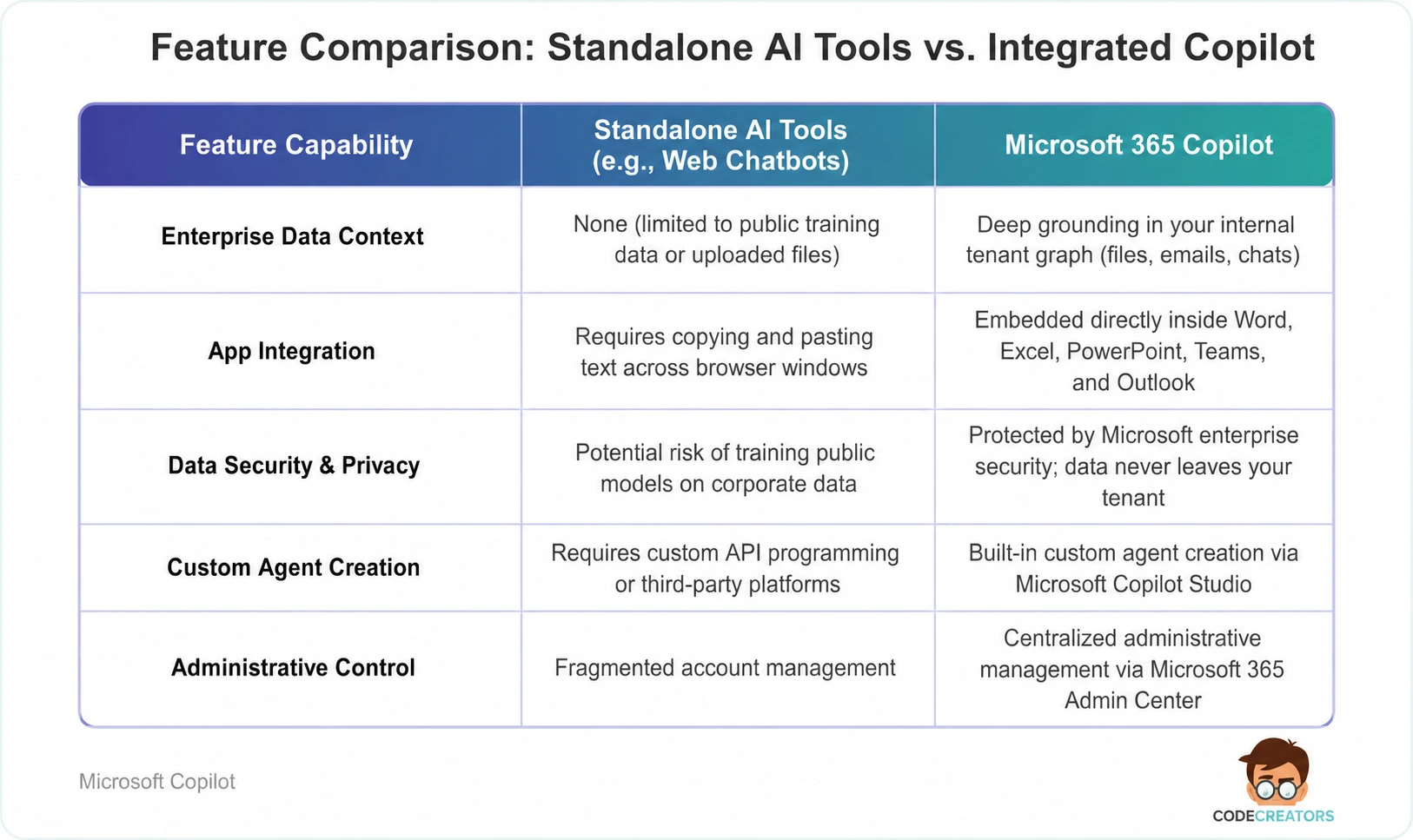
At Code Creators, our certified Microsoft engineers help companies maximize the value of their cloud environment. From auditing SharePoint permissions and configuring Microsoft Purview security guardrails to building custom AI agents in Copilot Studio, we ensure your AI deployment delivers measurable return on investment.
Schedule a Consultation for Microsoft Copilot Consulting Services at Code Creators to get a readiness evaluation that tells you where your organization actually sits before you commit to seat counts.