When Copilot inherits overly broad SharePoint permissions, it indexes and surfaces every file within reach of that permission, including sensitive documents that were accidentally left exposed to the entire organization. Picture an employee asking an AI tool for executive salary details or confidential client lists, and the assistant hands over the exact document within seconds. At Code Creators, we see companies rush to deploy modern AI tools without checking their underlying digital storage first. When you connect smart assistants to your daily workspace apps, the technology doesn’t know what’s meant to be secret, it simply reads what’s available.
Many IT leaders assume advanced assistants come with built-in security intelligence that automatically blocks sensitive data. In reality, Copilot relies entirely on your existing file access rules through Microsoft Graph’s delegated permissions model, it can only see and retrieve what the active user already has permission to view, and it applies no independent judgment about what should stay hidden. If your storage setup has messy or wide-open access controls, your digital assistant will treat restricted files exactly the same way it treats public company memos.
What Happens When Copilot Inherits Overly Broad SharePoint Permissions?
When you give an AI assistant access to your corporate storage libraries, it maps every file, folder, and site page. What happens is that the AI instantly indexes sensitive documents that were accidentally left exposed to the entire organization, regardless of whether anyone intended for that exposure to last.
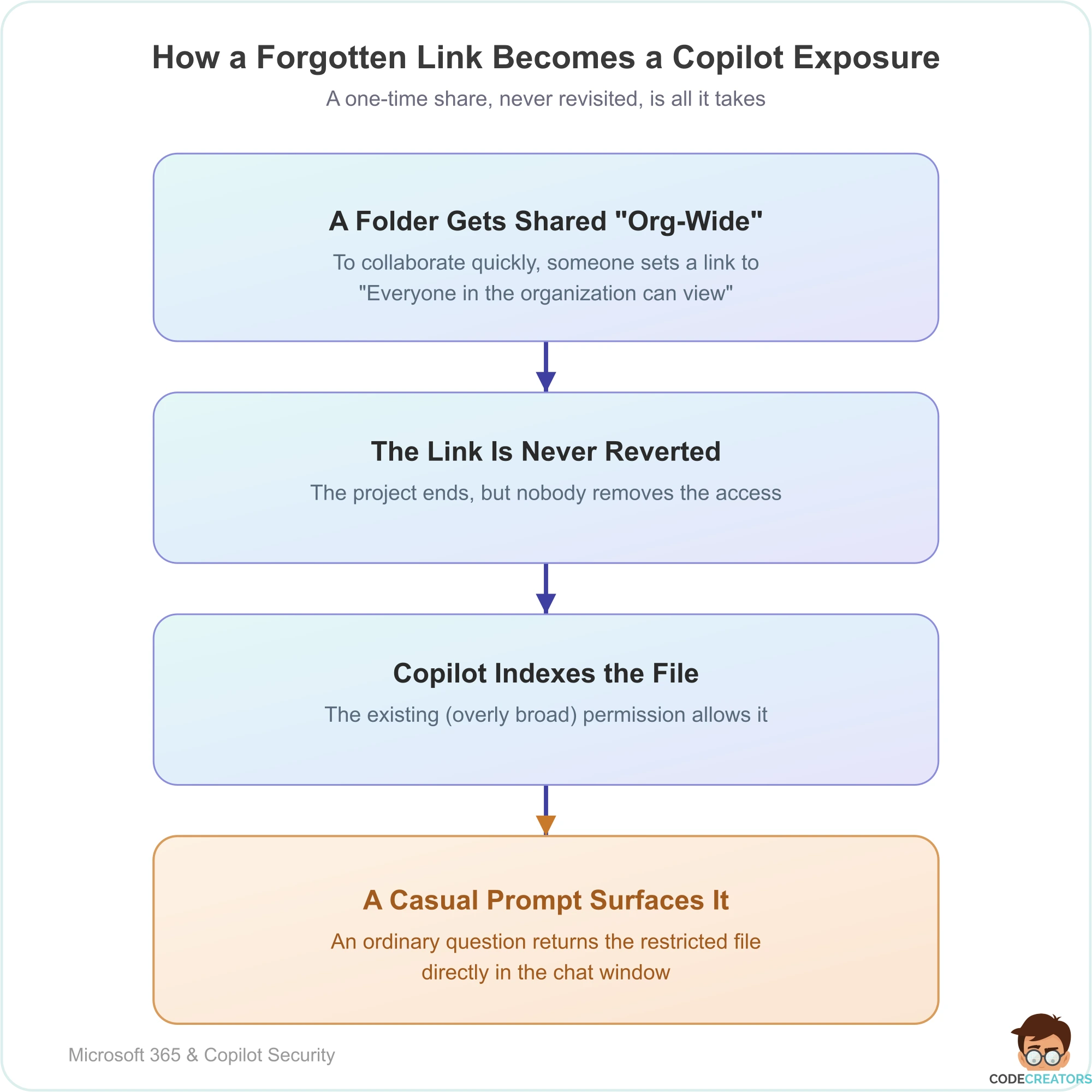
For example, imagine your finance team drafts a sensitive restructuring plan inside a project folder. To share it quickly with one colleague last year, someone toggled the link settings to “Everyone in the organization can view.” Once the project ended, nobody changed the access back. When an ordinary staff member later types a general question into their AI sidebar, the assistant searches the index, finds that hidden plan, and pulls the restricted data right into the chat window. The AI doesn’t bypass security, it simply exploits the overly permissive rules your team already put in place.
If this scenario sounds familiar, it’s worth having someone actually look at your tenant before rolling Copilot out further. Our SharePoint Consulting Services team runs exactly this kind of permissions audit for clients ahead of an AI deployment, so exposure like this gets caught before a pilot user finds it first.
How does external sharing in SharePoint affect copilot use?
External collaboration drives modern business but letting outside partners access your cloud storage creates unique complications. How does external sharing in SharePoint affect copilot use comes down to boundary control and data indexing scope.
When you share specific project folders with external vendors, contractors, or client representatives, those links create pathways into your environment. If an external sharing link remains active indefinitely or gets sent to a broad group outside your direct control, automated search tools can ingest those linked paths. This means internal summaries might inadvertently aggregate data that interacts with external-facing directories, muddying the line between internal corporate knowledge and external partner data.
Why Outdated File Structures Create Hidden Vulnerabilities
Most organizations accumulate years of digital clutter. Old project folders, abandoned department pages, and archived HR documents pile up in cloud storage. Over time, employees change roles, IT administrators cycle through staff, and original file owners leave the company.
When you introduce automated AI search tools to a messy digital landscape, every single piece of forgotten data becomes searchable. If an old folder containing confidential personnel records sits unmonitored with loose security groups attached, the AI will crawl it. Cleaning your storage architecture before launching new automation tools is essential for maintaining strict data governance.
Simple Steps to Secure Your Cloud Storage
Securing your environment doesn’t require complex engineering, but it does demand a methodical audit of your file libraries. None of these steps require custom development or a large budget they require time, a clear owner, and a willingness to actually revoke access that’s been sitting untouched for years. Follow these practical steps to protect your sensitive intellectual property before you expand Copilot access any further:
Audit active sharing links.
Review all existing folder and document links to find any set to broad organization-wide access or external sharing. In our own audits, ordinary “Everyone in the organization” links created for a one-time need and never revisited account for most of the real exposure we find. Microsoft Purview’s access reviews and sharing reports can generate this list at scale rather than checking folders one by one.
Remove stale repositories.
Archive duplicate files, outdated drafts, and documents older than seven years that no longer serve an active business purpose. Old content presents a major risk because files untouched for years often retain overly broad sharing links simply due to lack of oversight. Because no one has had a reason to notice them, these forgotten documents remain fully indexed and exposed. Set a recurring review cadence rather than treating this as a one-time cleanup.
Enforce the principle of least privilege.
Restrict department folders so only current team members can open, edit, or view confidential files. Replace broad organization defaults with job-specific security groups and build automated offboarding into role transitions to revoke access immediately.
Deploy sensitivity labels.
Use Microsoft Purview to automatically tag and protect confidential documents so automated tools exclude them from general search results. Labels persist even if a file’s sharing settings are later misconfigured. Because Copilot respects these labels directly, a properly labeled file stays protected even if someone accidentally over-shares its folder. Start with your highest-risk categories, like payroll and executive communications, rather than labeling your entire tenant on day one.
Partner With Experts for Secure Cloud Deployments
Transitioning to an intelligent digital workspace unlocks incredible daily efficiency. However, it requires a solid foundation of data security and proper file governance. Protecting your company’s proprietary information means balancing innovation with strict administrative control.
Our team can help your organization clean up data silos, audit SharePoint access, and deploy smart workflows safely. Let us guide your secure AI transformation. Schedule a consultation with our Copilot Consulting Services at Code Creators to build a secure, high-performance environment engineered for your scale.