Dynamics 365 Finance costs $210 per user, per month for the standard tier, or $300 per user, per month for Premium, with lighter Operations Activity and Team Member licenses available at $50 and $8 respectively, and if your organization needs both Finance and Supply Chain Management, attach pricing brings the combined cost to $240/user/month instead of $420. In our ERP and Microsoft 365 implementation work at Code Creators, this attach pricing model is one of the most consistently missed savings opportunities we find during a licensing review, a lot of organizations simply don’t know it exists and end up paying full price for a second module they didn’t need to.
This guide breaks down every Dynamics ERP licensing tier, what drives implementation cost, and how the platform compares to legacy Dynamics NAV and AX systems.
Understanding Core Enterprise Resource Planning Concepts
Before examining price tags, your leadership team needs to understand how Microsoft structures its business management applications. Modern enterprises rely on connected systems to unify financial records, inventory tracking, sales pipelines, and HR workflows under a single operational database.
When evaluating Dynamics ERP architectures, Microsoft offers two primary platforms based on organization scale and functional complexity:
- Dynamics 365 Business Central: designed for small to mid-sized organizations requiring streamlined financial tracking, inventory management, and operational reporting in a single package.
- Dynamics 365 Finance and Supply Chain Management: built for mid-market to enterprise-level organizations operating across multiple legal entities, complex manufacturing environments, or international tax jurisdictions.
Choosing the right platform ensures your company funds the exact capabilities it needs without paying for unnecessary operational overhead.
Decoding Microsoft Dynamics 365 ERP Pricing Structure
Evaluating Microsoft Dynamics 365 ERP pricing requires analyzing how Microsoft charges for user access across different operational roles. Microsoft uses a per-user, per-month subscription model billed annually.
In enterprise deployments, user licenses fall into three main functional access tiers:
- Full Users: designed for CFOs, controllers, senior accountants, and financial managers who need complete authority to create financial entries, configure workflows, and run consolidation models.
- Operations Activity Users: built for staff members performing focused transactional tasks, such as creating purchase requisitions, logging vendor invoices, or managing bank reconciliations.
- Team Members: intended for general staff who only need read access to reports, submit expense claims, log timesheets, or approve basic workflow requests.
Structuring your user base across these access tiers prevents your organization from overpaying for light users who don’t require full system permissions.
Analyzing Standard Dynamics 365 Finance Pricing Tiers
Understanding Dynamics 365 Finance pricing starts with baseline monthly software seats. The primary standalone license for Dynamics 365 Finance costs $210 per user, per month.
This standalone subscription gives full users complete access to general ledger accounting, accounts payable, accounts receivable, budgeting, fixed assets, cash management, credit processing, and financial reporting.
For organizations needing advanced AI forecasting, automated financial planning, and enhanced analytics, Microsoft offers Dynamics 365 Finance Premium at $300 per user, per month.
Additionally, lighter user roles reduce recurring subscription commitments:
- Operations Activity License: $50 per user, per month.
- Team Member License: $8 per user, per month.
Assigning $8 Team Member seats to department managers who only approve purchase orders or review monthly budget variance reports yields significant monthly cost savings, this is consistently one of the first optimizations we walk clients through, since it’s an easy fix once someone actually maps roles to license tiers instead of defaulting everyone to full access.
Evaluating Combined Dynamics 365 Finance and Operations Pricing
Enterprise organizations rarely run financial accounting in total isolation from supply chain operations. Manufacturing companies, distributors, and logistics firms frequently need both financial management and inventory execution tools.
Dynamics 365 Finance and Operations pricing reveals a cost-effective “attach” licensing model. Instead of charging full list price for every individual application, Microsoft lets companies assign a primary base application and “attach” secondary applications at a steep discount.
Here’s how attach pricing works in practice:
- Base Application (Dynamics 365 Finance): $210 per user, per month.
- Attached Application (Supply Chain Management): $30 per user, per month.
- Combined Monthly Cost: $240 per user, per month for complete access to both apps.
If your company purchased both modules as independent standalone apps without attach pricing, software fees would reach $420 per user, per month ($210 + $210). Leveraging attach pricing cuts full-user software overhead nearly in half.
If you’re not sure whether your current environment is set up to take advantage of attach pricing, that’s a quick thing for our Office 365 Development team to check as part of a broader licensing review, it’s one of the fastest wins we find.
Comparing Modern Cloud Platform Costs with Legacy Dynamics NAV Pricing
Long-standing businesses often manage financial operations on legacy Microsoft software systems installed years ago. Reviewing historical Dynamics NAV pricing helps your leadership team appreciate how the software model shifted from capital expenditure to operational cloud subscriptions.
Under legacy Dynamics NAV environments, companies purchased perpetual software licenses upfront, installed servers in local data centers, and paid an annual Software Assurance fee, typically in the 16–18% range of license value, to receive basic software updates.
Modern cloud platforms replace heavy upfront server purchases with transparent monthly seat pricing. Transitioning to cloud-native platforms delivers several distinct financial advantages:
- No infrastructure capital outlays: eliminates expensive physical server refreshes, SAN storage arrays, and local backup hardware.
- Automated feature updates: Microsoft delivers automatic cloud feature updates continuously, eliminating costly major upgrade projects every few years.
- Predictable scalability: scale user seat counts up or down as business volumes fluctuate throughout the year.
For small and mid-sized businesses migrating off legacy systems, Microsoft Dynamics 365 Business Central offers Essentials seats at $80 per user, per month and Premium seats at $110 per user, per month.
Upgrading On-Premises Systems: Microsoft Dynamics AX Pricing Context
Large enterprises facing end-of-support timelines on old on-premises systems frequently compare modern cloud quotes against historical Dynamics AX pricing benchmarks. Legacy Dynamics AX 2009 and AX 2012 systems required massive initial investments in database infrastructure, SQL Server licenses, dedicated server rooms, and specialized IT support staff.
Upgrading from on-premises Dynamics AX to cloud-based Dynamics 365 Finance involves refactoring custom X++ code, cleaning historical data tables, and mapping legacy business logic to standard cloud features.
While cloud migration requires dedicated implementation engineering, it permanently removes internal server maintenance costs, improves cybersecurity compliance, and grants remote employees secure access from any device.
Exploring Automated Rules and Dynamics Pricing Software Capabilities
Modern enterprise platforms go far beyond recording accounting journals, they actively automate complex commercial transactions. Leveraging specialized pricing automation tools built directly into the platform lets finance teams enforce strict commercial policies across global sales teams.
Native financial and operational rules automate complex commercial logic:
- Tiered volume discounts: automatically apply negotiated price breaks based on order quantities, customer tiers, or annual contract volumes.
- Multi-currency calculations: revalue foreign currency transactions automatically using daily central bank exchange rates.
- Promotional rebates: calculate trade allowance rebates and accruals automatically during invoice creation without manual spreadsheet tracking.
- Margin guardrails: block sales orders automatically if calculated gross margins drop below pre-approved company thresholds.
Automating these rules directly within your core financial database prevents human pricing errors, protects gross profit margins, and accelerates order-to-cash cycles.
Calculating Total Microsoft ERP Cost Across the Business
When your financial planners project long-term software budgets, software seat licenses represent only one part of the overall equation. Determining your true overall Microsoft ERP cost requires evaluating the full three-year to five-year total cost of ownership.
Total ERP TCO = Software Licenses + Implementation Services + Data Migration + Third-Party Add-Ons + Ongoing Support
- Direct software seats. The annual subscription charges for Full, Operations Activity, and Team Member licenses assigned across your company.
- Implementation consulting services. Professional engineering fees for system architecture design, business process mapping, module configuration, custom workflow building, and end-user training.
- Data cleaning and migration. Extracting historical general ledger transactions, customer master records, vendor ledgers, and open balances from legacy databases, followed by data cleaning and transformation.
- ISV add-ons and integrations. Connecting specialized third-party solutions, such as automated tax engines (e.g., Avalara), bank communication channels, advanced payroll systems, or e-commerce platforms, via cloud APIs.
- Non-production cloud environments. Sandbox, testing, and training environments required to build, test, and validate new software updates safely before pushing changes into live production.
Evaluating all five pillars upfront prevents financial surprises and keeps your transformation initiative on budget.
What Drives the Total Microsoft Dynamics 365 Implementation Cost?
Evaluating potential project budgets requires analyzing the services side of the deployment equation. Determining your actual Microsoft Dynamics 365 implementation cost depends primarily on organizational scale, business process complexity, and customization scope.
The table below outlines typical implementation investment ranges across different business scales:
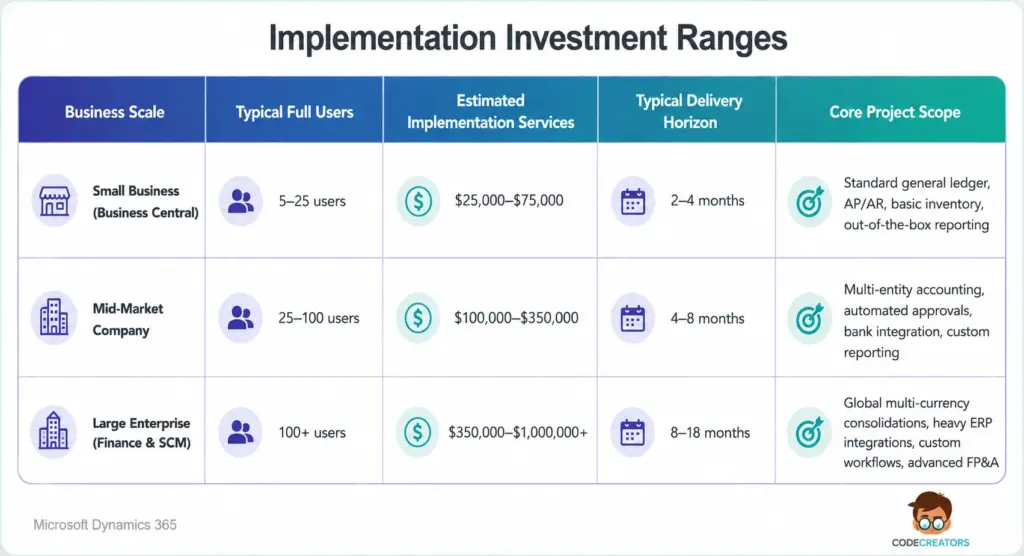
Budgeting for experienced implementation engineering ensures your software setup strictly aligns with industry regulations and internal governance controls.
Maximizing the Strategic Value of Modern Cloud Solutions
Transitioning to modern financial management tools unlocks real-time operational visibility across departments. Combining core financial databases with advanced reporting and workflow automation platforms accelerates monthly closing cycles, improves forecasting accuracy, and streamlines cross-departmental collaboration.
Selecting the right cloud architecture lets companies that rely heavily on Dynamics ERP frameworks scale seamlessly into new markets, launch new product lines, and acquire business entities without overhauling core software infrastructure.
If your company requires expert assistance planning cloud architecture, automating workplace workflows, or building customized reporting tools, our senior engineering team delivers proven technical support. Schedule a Discovery Session for Office 365 Development at Code Creators to design a secure, high-performance digital environment tailored to your long-term growth objectives.