A lead enters the pipeline, but the follow-up happens too late. An opportunity remains open long after the deal has gone cold, while your sales managers still rely on spreadsheets to work out what is moving and what is stuck. When these problems keep happening, the issue may be the CRM itself rather than the effort your team is putting in. Choosing between D365 Sales Professional, Enterprise, and Premium then becomes more than a pricing decision. Professional covers the core sales work, Enterprise adds stronger automation and forecasting, and Premium brings in deeper sales intelligence. The right choice depends on which of those capabilities your team will actually use.
In the Dynamics 365 Sales systems we build and support at Code Creators, that decision comes down to the way your sales process works in practice. Lead volume, follow-up activity, forecasting needs, approval steps, and manual workload all help show whether Professional is enough or whether a more advanced edition would be a better fit.
In this article, you will learn what Dynamics 365 Sales is, how its editions differ, what each plan costs, and which option is more likely to suit your sales process.
What Is Dynamics 365 Sales?
Dynamics 365 Sales is Microsoft’s customer relationship management application for managing the sales process from lead qualification to opportunity development, quoting, ordering, and invoicing.
It gives your sellers and managers one place to manage account information, customer conversations, sales activities, opportunities, pipelines, and performance. Instead of keeping details across spreadsheets, inboxes, and personal notes, your team can work from one shared customer record.
The platform also connects with Microsoft tools such as Outlook, Teams, Excel, Power BI, Power Automate, and Power Apps. This allows your sellers to work with sales data through applications they may already use throughout the day.
In the sales environments we have supported, sellers use current customer information to review account details before meetings, update opportunities, record next steps, and work with colleagues. Your managers can then use that data to review the pipeline and create more reliable sales forecasts.
The exact tools your team receives will depend on which D365 Sales edition you choose.
Dynamics 365 Sales Pricing Comparison
Microsoft currently lists the following US prices for annual billing:
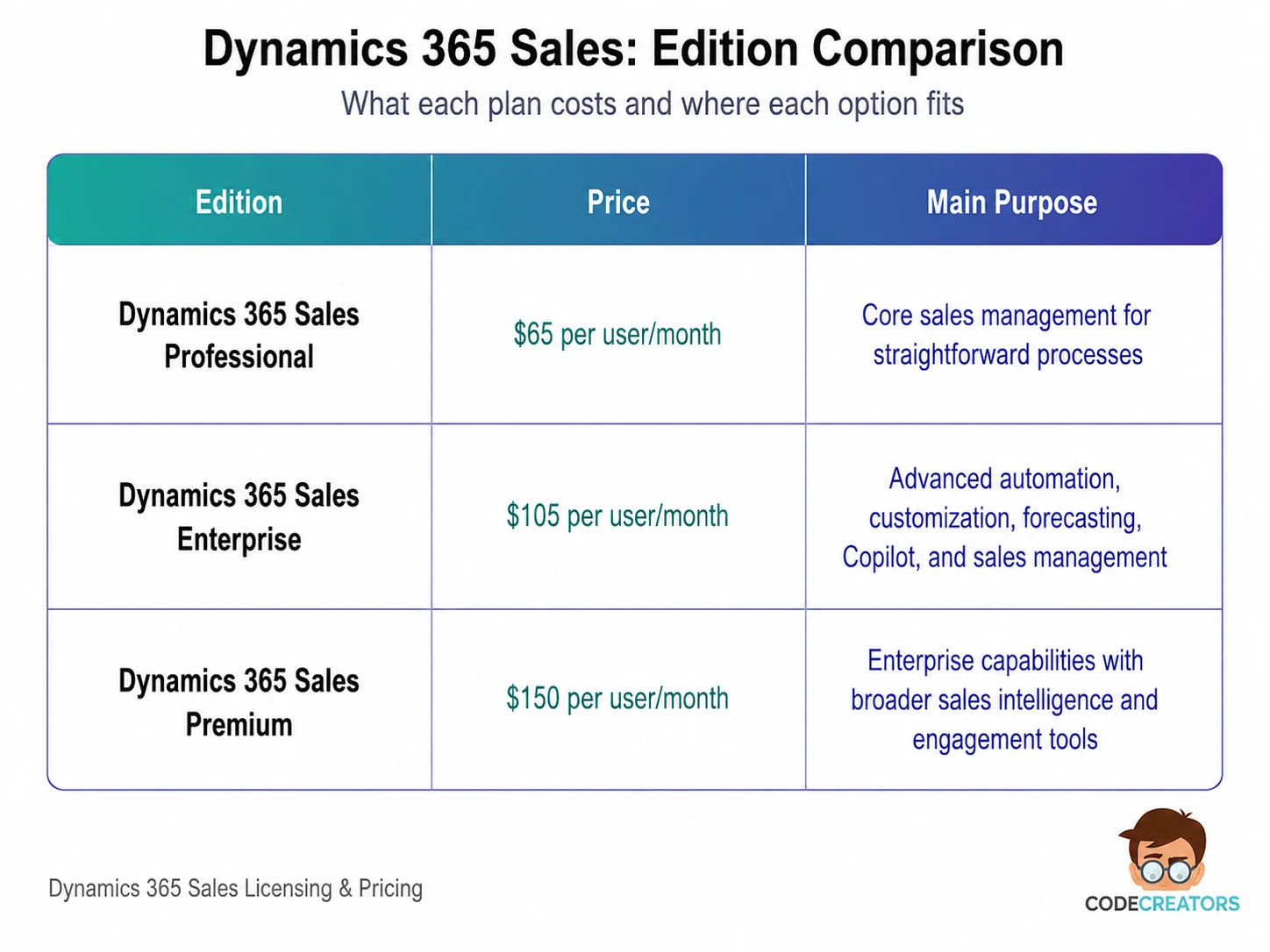
Sales Professional provides the main sales force automation features. Enterprise adds deeper customization, forecasting, AI support, and broader automation. Premium includes Enterprise functionality along with advanced sales intelligence, AI-based recommendations, data enrichment, and 1,000 Copilot Credits per licensed user each month.
These prices offer a useful starting point, but your total 365 Sales cost may also depend on regional pricing, taxes, contract terms, data migration, integrations, storage, configuration, ongoing support, and additional Power Platform licensing. A user with a qualifying Dynamics 365 base license may also be eligible for a lower-priced Sales Enterprise attach license.
Dynamics 365 Sales Professional
Microsoft Dynamics 365 Sales Professional provides the core CRM tools needed to manage a structured sales process. It includes lead, account, contact, and opportunity management, along with products, price lists, quotes, orders, invoices, dashboards, and mobile access.
In the simpler sales setups we have supported, this edition has worked best for teams that need a simple way to manage leads, move opportunities forward, prepare quotes, schedule follow-ups, and review basic sales performance.
Professional also works with Microsoft 365, making it easier for your team to connect sales activities with familiar productivity tools. Its customization and automation options, however, are more limited than those available in Enterprise and Premium.
It also uses the Sales Professional app rather than the broader Sales Hub experience. Microsoft licenses these applications separately, so your users must work in the application covered by their license. Sales Professional and Sales Enterprise can exist within the same tenant, but Microsoft requires their respective applications to run in separate environments.
Who Should Choose Sales Professional?
Dynamics Sales Professional may suit your organization when you:
- Have a simple or moderately structured sales cycle
- Need shared lead and opportunity records
- Use standard dashboards and reporting
- Require basic quote-to-order management
- Do not need advanced forecasting, custom applications, or large-scale sales engagement
This edition can help you control licensing costs, but it may feel restrictive if your sales process includes several approval paths, complex territories, custom workflows, or detailed forecasting requirements.
Dynamics 365 Sales Enterprise Edition
The Dynamics 365 Sales Enterprise Edition is better suited when your sales operation becomes more complex. It includes the main features of Professional and adds advanced sales automation, deeper customization, custom applications, forecasting, goal management, contextual insights, and Copilot capabilities within Dynamics 365 Sales.
It also gives your team broader access to Power Platform tools. You can use these tools to automate repetitive work, configure business processes, create tailored apps, and connect sales data with other systems.
Not every Power Apps or Power Automate use case is automatically covered by the Sales license, though. Some workflows and applications may still require additional licensing, so you need to review the full solution rather than the CRM license alone.
Copilot in Enterprise can help your sellers prepare for meetings, summarize opportunities, support email activity, and work with sales information through natural-language prompts. These features can save time, but their value depends on accurate CRM data and users keeping their records up to date.
Enterprise does not include every Microsoft 365 Copilot or advanced Sales Agent feature. Some capabilities may require Microsoft 365 Copilot or additional Copilot Credits.
The edition also includes selected digital-selling tools with usage limits. Microsoft currently allows 1,500 sales accelerator sequence-connected records per environment each month and predictive scoring for 1,500 lead or opportunity records per environment each month. Conversation intelligence does not have a stated monthly limit, while relationship intelligence remains at the basic level.
Who Should Choose Sales Enterprise?
Microsoft Dynamics 365 Sales Enterprise may be a better fit when your business has:
- Several sales teams, regions, products, or pipelines
- Detailed forecasting and performance-management needs
- Approval rules or automated follow-up processes
- Custom fields, forms, applications, or integrations
- Sellers who need Copilot and limited digital-selling tools
- Plans to expand the CRM as your sales operation grows
Enterprise gives you more room to handle complex processes without moving immediately to Premium. It can therefore suit organizations that need more flexibility than Professional provides but do not require advanced scoring, relationship insights, and broader sales engagement tools.
Dynamics 365 Sales Premium
Dynamics 365 Sales Premium combines the Enterprise edition with broader sales intelligence, engagement, enrichment, and AI-based guidance.
Since Enterprise already covers complex sales management, Premium focuses more on helping teams prioritize leads, choose the next action, and spot opportunities that may be losing momentum.
Microsoft lists the sales accelerator and predictive lead and opportunity scoring in Premium without the monthly record limits applied to Enterprise. The edition also provides advanced relationship insights based on Dynamics 365 and Exchange data.
Each Premium license includes 1,000 Copilot Credits per user every month. These credits can support certain agent-based capabilities. Additional usage may require prepaid or pay-as-you-go Copilot capacity, and some agent scenarios may also need an Azure subscription.
Premium therefore makes the most sense when your team uses sales intelligence as part of its daily work rather than only for occasional reporting.
Who Should Choose Sales Premium?
Premium may be the better choice when your sales team:
- Handles large lead or opportunity volumes
- Uses structured sales sequences for follow-up
- Needs predictive scoring without Enterprise limits
- Wants advanced relationship intelligence
- Relies on AI-based recommendations and enrichment
- Has mature processes and enough clean data to support useful insights
You should not choose Premium simply because it is the highest edition. Without reliable data, clear sales stages, and consistent activity, its advanced features may not deliver enough value to justify the higher price.
Professional vs Enterprise vs Premium
The differences become easier to understand when you compare the editions against your sales requirements.
Professional covers the main CRM tasks required for a straightforward sales process. Enterprise adds the flexibility needed for more complex sales operations. Premium removes key capacity limits and adds advanced scoring, relationship insights, and seller guidance.
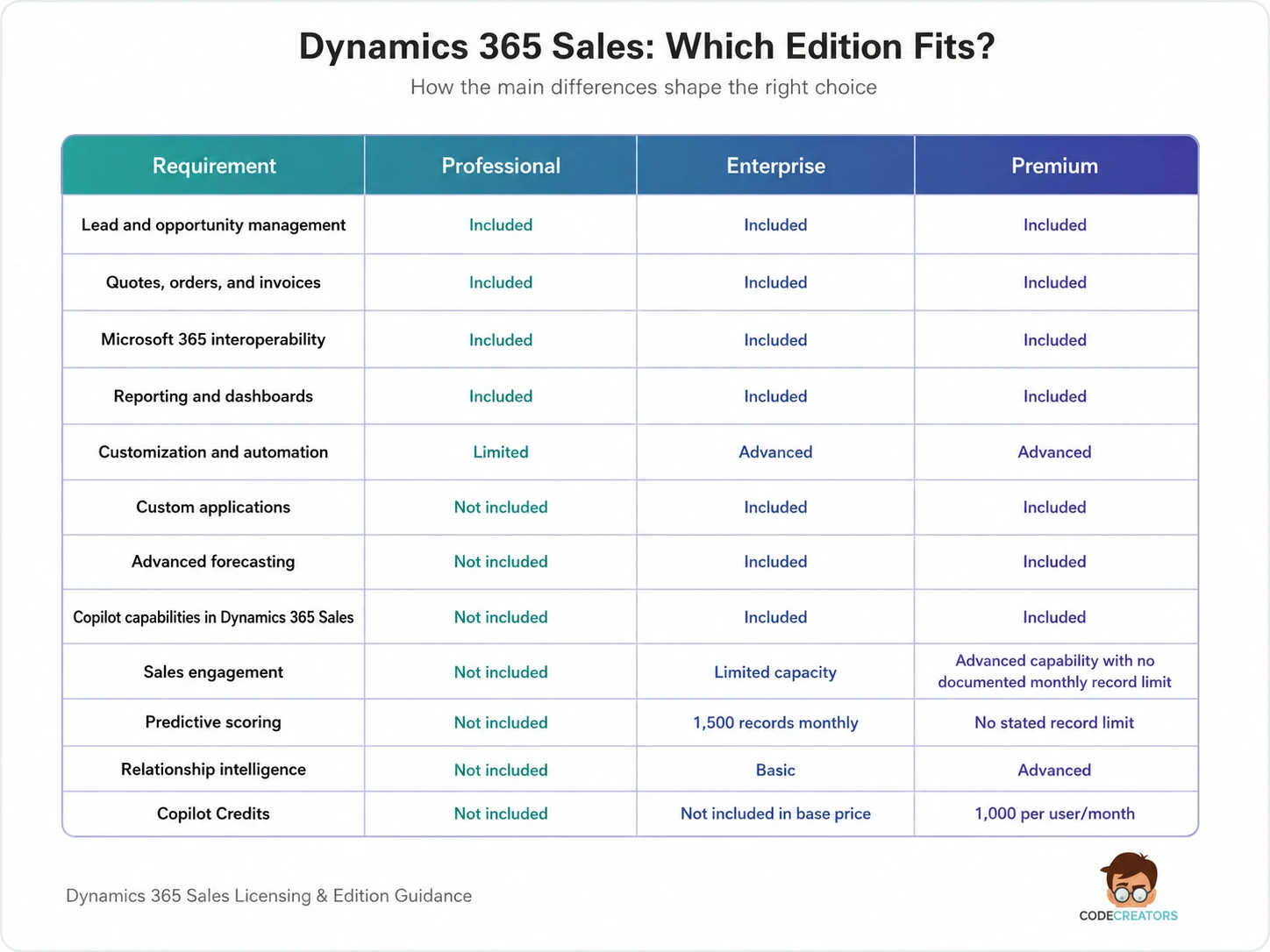
Professional covers the main CRM tasks required for a straightforward sales process. Enterprise adds the flexibility needed for more complex sales operations. Premium removes key capacity limits and adds advanced scoring, relationship insights, and seller guidance.
The most useful question is not which edition has the longest feature list, but which one supports the work your sellers and managers handle every day.
What Affects Dynamics 365 for Sales Pricing?
The license price is only one part of the total investment. Your final Dynamics 365 for Sales pricing can also change based on the number and type of users, implementation scope, data migration, integrations, customization, training, storage, and ongoing support.
Not every employee needs a full Sales license. Your sellers and sales managers may require Professional, Enterprise, or Premium, while users with limited responsibilities may be able to work with a Team Members license.
Team Members does not provide full sales functionality, so each user’s access must match both Microsoft’s licensing rules and the work that person performs.
Your data quality also affects the value of the system. Moving duplicate accounts, incomplete contacts, and outdated opportunities into Dynamics 365 can make reporting, forecasting, and AI results less reliable.
Customization is another cost factor. Adding too many custom processes can increase implementation time and make the system harder to maintain. Customization should focus on the parts of your sales process that the standard setup cannot handle properly.
Before estimating the total cost, review who needs full access, what data must move, which systems need to connect, and how much customization your sales process actually requires.
How to Choose the Right D365 Sales Edition
Start by mapping how a lead moves through your business. Look at who qualifies it, what information your sellers collect, how opportunities progress, where approvals take place, and how your managers forecast revenue.
Missed follow-ups, too many manual handoffs, inconsistent forecasting, and teams working from different versions of customer data are clear signs that the current setup needs attention. If you mainly need shared customer records and basic pipeline management, Premium may offer more than you will use. On the other hand, several pipelines, complex approvals, and high prospect volumes can make Professional feel limited fairly quickly.
Sales Professional suits a straightforward sales process. Enterprise fits teams that need customization, automation, forecasting, and Copilot support. Premium is more appropriate when high-volume selling depends on advanced engagement and sales intelligence.
Future needs also matter. An edition that can support your expected growth may prevent an early redesign, but paying for features without a clear use case will only raise costs.
The best way to choose is to compare each edition with the way your sellers work now, the information your managers need, and the changes your business expects over the next few years.
Find the Right Dynamics 365 Sales Fit with Code Creators
The wrong edition can leave you paying for tools no one uses or missing features your sales team ends up needing a few months later. Before you commit, Code Creators can review the way leads are handled, how opportunities move through the pipeline, what managers need from reporting, and where manual work is slowing the team down.
Looking at those details makes it easier to judge whether Professional will cover the job or whether Enterprise or Premium is worth the added cost. It also shows what the setup will involve, including data migration, workflow automation, Microsoft 365 connections, and user training.
Reviewing the license and implementation together reduces the risk of choosing a system your team quickly outgrows or paying for features that remain unused.
Talk to us about the way your sales team works, and get a Dynamics 365 Sales setup that fits from the start.
Conclusion
Dynamics 365 Sales brings leads, opportunities, customer activity, forecasts, and sales performance into one system. However, the right edition depends on how complex your sales process is and which tools your team will actually use.
With annual billing, Sales Professional costs $65 per user each month and covers the core needs of teams with simple and consistent processes. Sales Enterprise costs $105 and adds advanced automation, customization, forecasting, custom applications, Copilot capabilities within Dynamics 365 Sales, and limited digital-selling capacity. Sales Premium costs $150 and adds advanced relationship intelligence, no documented monthly record limits for key sales-engagement features, AI-based recommendations, data enrichment, and monthly Copilot Credits.
Before purchasing licenses, review how leads move through your team, what sellers still handle manually, what managers need to see, and how much the sales process is likely to change. Once those needs are clear, it becomes easier to compare the editions without choosing by price or feature count alone. Book a consultation with us to discuss your requirements, compare the available options, and choose the edition that supports your team without adding unnecessary cost.