The plan, now called Microsoft 365 Business Basic, gives your team business email, cloud storage, file sharing, and web and mobile Office applications. Online meetings are also available in versions that include Microsoft Teams. However, the license does not include the full desktop versions of those apps. This difference may seem minor during plan selection, but it can directly affect daily work when employees rely on advanced Excel features, Outlook add-ins, offline access, or locally installed applications.
Across the Microsoft 365 projects Code Creators has handled, this issue often appears when one plan is assigned to the entire team despite differences in how each role uses Office. Some employees work comfortably with browser-based applications, while others need the full functionality of desktop Office apps.
In this article, you will learn what Office 365 Business Essentials includes, where its limitations affect daily work, and how it compares with Office 2021 and Office 365 enterprise plans.
What Is Office 365 Business Essentials?
Office 365 Business Essentials is the former name of Microsoft 365 Business Basic. It is a subscription plan for businesses that need professional email, web and mobile Office applications, cloud file storage, document sharing, and workplace communication.
Each licensed user receives access to the web and mobile versions of applications such as Word, Excel, PowerPoint, and Outlook. Your employees can open these applications through a supported browser without installing the full desktop versions on their computers.
This setup works well when most daily tasks happen online. Your team can create documents, update standard spreadsheets, review presentations, and access company files from different locations.
However, 365 Business Essentials does not include licenses for the full desktop versions of Word, Excel, PowerPoint, and Outlook. If some employees need locally installed applications, Microsoft 365 Business Standard, Business Premium, or another plan that includes desktop apps may suit those roles better.
Professional Business Email Through Exchange Online
Business email through Exchange Online is one of the plan’s most important features.
You can create email addresses connected to your company domain, such as name@yourcompany.com, instead of asking employees to use personal accounts. A business email address presents a more professional image and gives administrators centralized control over company communication.
Your employees can access email, calendars, contacts, and meetings through Outlook on the web or supported mobile apps. Shared calendars also make it easier to check availability, arrange meetings, and coordinate schedules across departments.
In our experience, centralized administration makes employee onboarding and offboarding easier to manage. Administrators can create accounts, reset passwords, assign licenses, and remove access without depending on individual users to manage company email.
Web and Mobile Versions of Office Applications
Office 365 Business Essentials includes web and mobile versions of Word, Excel, PowerPoint, Outlook, and other supported applications.
Your team can use Word for business documents, Excel for spreadsheets, PowerPoint for presentations, and Outlook for email and calendars. Because these applications run in a browser, employees can access their work from supported devices without installing Office separately.
The web applications support common business tasks, including creating and editing documents, updating standard spreadsheets, preparing presentations, reviewing files, adding comments, sharing content, and working together on the same document.
However, browser-based apps do not include every feature available in the desktop versions. Complex Excel workbooks, advanced formatting, macros, specialized add-ins, and some offline workflows usually require installed desktop software.
This distinction deserves attention before you assign licenses. Businesses often focus on familiar application names without checking which version employees will actually receive. As a result, a plan can appear suitable at first but still leave certain roles without the tools they use every day.
Cloud File Storage With OneDrive
Each licensed user receives OneDrive storage for business files. Instead of keeping important documents only on a laptop or local drive, your employees can store them in their Microsoft 365 accounts.
OneDrive makes files available across supported devices and allows users to share documents without sending multiple email attachments. Rather than creating several copies of the same file, an employee can share a link to the original and control who can access it.
This helps prevent a common document-management problem: several people editing different versions of the same spreadsheet or presentation. When the team works from one shared file, everyone can see the latest version and avoid combining changes manually.
OneDrive also supports version history for many file types. In our work with Microsoft 365 environments, we have seen this prove valuable when teams need to recover deleted, overwritten, or incorrectly edited content instead of rebuilding a document from scratch.
Team File Sharing With SharePoint Online
OneDrive mainly supports files owned and managed by individual employees. SharePoint Online, by contrast, provides shared spaces where departments, project teams, and the wider organization can manage documents and business information together.
You can use SharePoint to create document libraries, internal team sites, shared resources, and structured locations for company content. Permissions determine who can view, edit, or manage specific files and areas.
In our experience, document control improves when sensitive files remain separate from resources intended for the wider company. Finance documents can stay limited to authorized employees, while policies, templates, and general resources remain available to the broader team.
SharePoint also supports file collaboration across several Microsoft 365 services. For that reason, it is better to plan folder structures, permissions, ownership, and naming standards before moving large amounts of content into the platform.
Online Meetings and Communication Through Microsoft Teams
Depending on the subscription version and region, Microsoft 365 Business Basic may include Microsoft Teams or come as a separate plan without Teams.
Where Teams is included, your employees can use it for chat, online meetings, calls, screen sharing, and channel-based communication. This can reduce lengthy email chains and give project teams one place to hold discussions, share updates, and coordinate work.
Teams also connects closely with SharePoint and OneDrive. Employees can share a document in a chat or channel, open it in an Office web app, and work on it with colleagues without creating separate copies.
To get consistent results from Teams, you still need clear guidelines for creating teams, naming channels, storing files, and deciding when employees should use chat, channels, meetings, or email.
What Office 365 Business Essentials Does Not Include
The plan’s most important limitation is the absence of full desktop Office applications.
Users receive web and mobile versions, but the license does not provide the complete installed versions of Word, Excel, PowerPoint, and Outlook. Access can also become more limited when employees do not have an internet connection, although available functionality varies by application and device.
Office 365 Business Essentials also does not include the same level of security, device management, and compliance functionality available in Microsoft 365 Business Premium or higher enterprise subscriptions.
The plan can cover core productivity needs, but it may not be enough if your business manages company devices, faces strict compliance obligations, requires advanced threat protection, or handles sensitive information under more demanding security policies.
Office 365 vs Office 2021
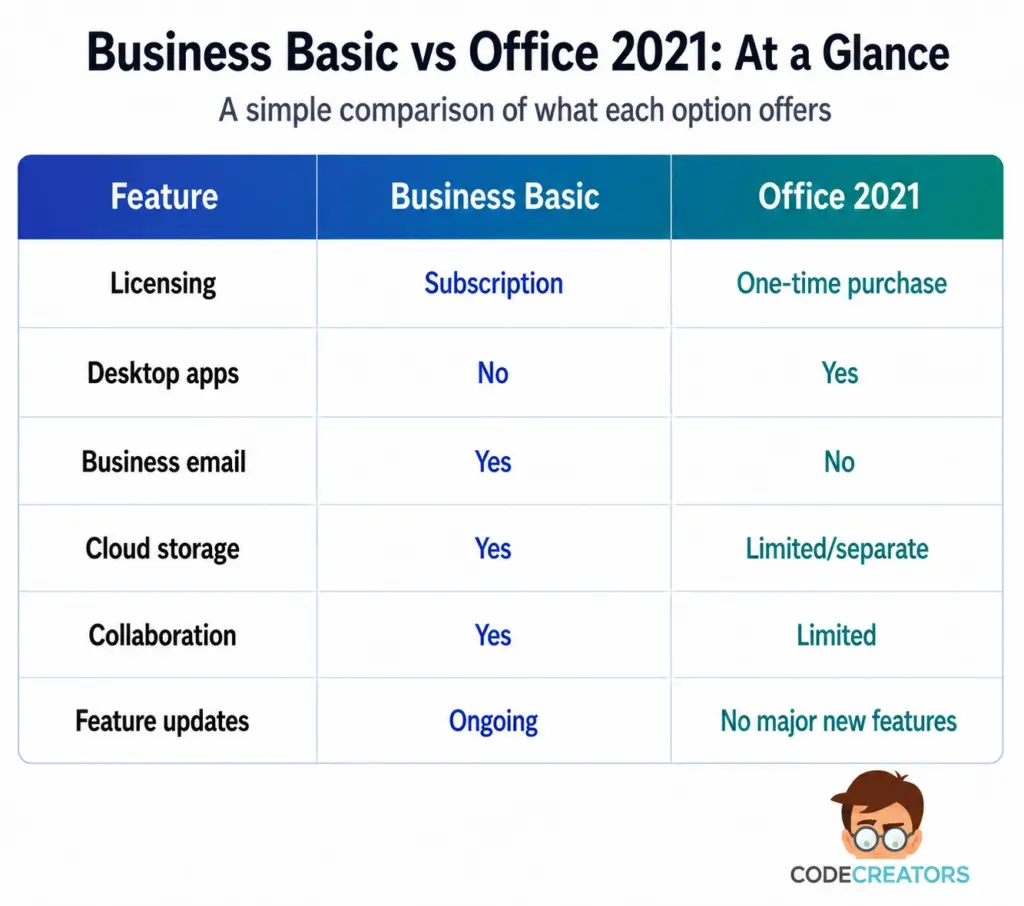
The main difference between Office 365 and Office 2021 lies in their licensing models and included services.
Office 2021 uses a one-time purchase model and licenses desktop applications for a specific device, subject to the terms of the edition purchased. It does not include Microsoft 365 services such as Exchange Online, SharePoint Online, or OneDrive storage as part of the license.
Office 365 Business Essentials follows a per-user subscription model. Rather than providing installable desktop applications, it includes business email, cloud storage, online collaboration, and web and mobile Office apps.
This distinction also explains the broader comparison between Microsoft Office 2021 and Microsoft 365. Office 2021 mainly provides installed applications, while Microsoft 365 combines applications with cloud services, user management, file sharing, and ongoing updates.
Support for Office 2021 will end on October 13, 2026. The applications may continue to run after that date, but Microsoft will no longer provide technical support or security updates.
Your decision should therefore reflect how employees work. Office 2021 may suit someone who only needs locally installed applications on one device, while Microsoft 365 Business Basic is better suited to businesses that need managed email, shared files, online access, and collaboration across multiple users.
Business Essentials vs O365 Enterprise Plans
Microsoft 365 Business plans are designed for organizations with up to 300 users, while enterprise plans address larger and more complex environments.
Office 365 enterprise options include plans such as E1, E3, and E5. Their applications, desktop licensing, compliance controls, security capabilities, analytics features, and communication services differ.
Business Essentials remains a more straightforward option when your company mainly needs email, browser-based applications, cloud storage, and file collaboration. Enterprise plans become more relevant when you need advanced compliance, stronger information protection, broader administrative controls, or features designed for larger environments.
A higher plan is not automatically the better choice. Additional features can increase both licensing costs and administrative complexity. The right plan should reflect your user roles, security requirements, and actual day-to-day needs.
Who Should Use 365 Business Essentials?
Microsoft 365 Business Basic works best for organizations whose employees complete most of their work through browsers and cloud services.
It can suit your business if employees mainly need professional email, shared calendars, cloud storage, file sharing, standard document editing, and online meetings where Teams is included. It also supports remote and distributed teams by allowing users to access company resources from different locations.
The plan becomes less suitable when employees regularly depend on advanced Excel functions, desktop Outlook workflows, specialist Office add-ins, macros, or extensive offline editing.
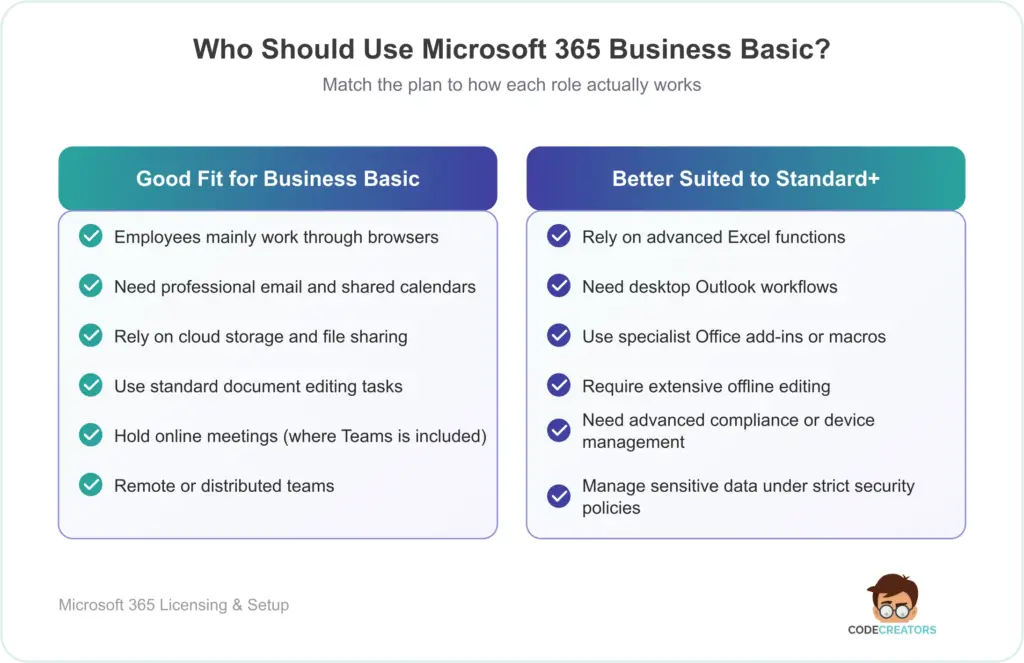
Before purchasing licenses, review how each role uses Office instead of assigning the same plan to everyone automatically. Business Basic suits employees who work mainly through browser-based applications, while roles that depend on desktop Office tools require Business Standard, Business Premium, or a suitable enterprise plan.
Get More From Office 365 With Code Creators
Office 365 Business Essentials gives your team access to email, browser-based Office apps, OneDrive, SharePoint, and Microsoft Teams where included. However, those tools still need the right structure. Without it, files can end up in the wrong locations, permissions become difficult to manage, and employees may use Teams, SharePoint, and email inconsistently.
Through our Office 365 Development Services, Code Creators helps businesses configure these tools around their existing processes. This includes setting up clearer document locations, defining access permissions, connecting collaboration tools, and making it easier for employees to find and use the information they need.
Ready to improve how Office 365 supports your business? Get in touch to create a setup that fits your team’s day-to-day needs.
Conclusion
Office 365 Business Essentials, now known as Microsoft 365 Business Basic, gives your business the core tools needed for email, cloud storage, file sharing, and browser-based document work. Where Teams is included, your employees can also manage meetings and day-to-day communication within the same subscription.
The plan becomes less suitable when your team depends on the desktop versions of Word, Excel, PowerPoint, or Outlook. Advanced spreadsheets, macros, add-ins, offline work, and desktop Outlook processes can quickly reveal the limits of a browser-based license. That is also where Office 2021, Business Standard, or an enterprise plan may become a better fit.
Before you assign one plan across the company, review how each role uses Office in practice. Employees who mainly work online may have everything they need with Business Basic, while desktop-dependent roles will require a different license. Making that distinction early helps you avoid unnecessary upgrades without leaving your team short of the tools they rely on.
Need help setting up Office 365 around the way your team works? Contact us today to discuss a setup that supports your access, collaboration, and document management needs.