The month-end report is due, but the finance team is still comparing QuickBooks figures with inventory spreadsheets, checking purchase records in emails, and correcting numbers before management can use them. QuickBooks is still handling the accounting, but too much of the work now happens outside it.
This is where Code Creators helps businesses identify what is slowing down day-to-day work and where finance, sales, purchasing, and inventory are no longer working from the same information. In many cases, QuickBooks still handles the core accounting tasks. The problem is that the wider business now depends on processes that require more connection than the current setup can provide.
That is why you may start comparing Microsoft Dynamics vs QuickBooks. The decision is not simply about choosing a more advanced platform. It is about understanding whether QuickBooks still fits the way your business operates or whether Microsoft Dynamics 365 Business Central can bring accounting and daily operations into one system.
In this article, you will learn whether Microsoft Dynamics can replace QuickBooks, how Business Central vs QuickBooks compares in daily use, and what you should consider before making the switch.
How Microsoft Dynamics Can Replace QuickBooks
Microsoft Dynamics can replace QuickBooks, and Dynamics 365 Business Central is the Microsoft product that fits this comparison most closely.
Microsoft Dynamics 365 includes applications for finance, sales, customer service, supply chain management, and other business areas. Business Central is designed for small and midsized companies that want to manage accounting and day-to-day operations in one system.
It covers the main financial tasks businesses usually handle in QuickBooks, including:
- General ledger
- Accounts payable
- Accounts receivable
- Bank reconciliation
- Fixed assets
- Cash flow management
- Budgeting
- Financial reporting
Along with these accounting functions, Business Central also supports sales orders, purchase orders, inventory, projects, warehouse activities, and manufacturing.
This broader range of functions is one of the main reasons companies consider moving from QuickBooks. The Microsoft Dynamics 365 vs QuickBooks comparison is not only about replacing one accounting tool with another. It is about deciding whether you need accounting alone or a system that also connects finance with daily operations.
QuickBooks vs Microsoft Dynamics: What Separates Them?
The main difference between QuickBooks and Microsoft Dynamics is the range of business processes each system can handle.
QuickBooks focuses mainly on accounting tasks. It helps businesses send invoices, record expenses, reconcile bank accounts, manage bills, and prepare financial reports. For many small companies, these features are enough.
Business Central handles the same core tasks while also connecting them with purchasing, inventory, sales, projects, and other daily operations.
In our experience, teams often enter or check the same sales information in several places when QuickBooks, inventory records, and operational tools are not fully connected. A sales order may appear in the accounting system, while stock levels, customer details, or related financial entries still require updates elsewhere. Business Central keeps this information together, reducing the need for repeated entries and manual checks.
The difference becomes clearer when comparing the two systems side by side.
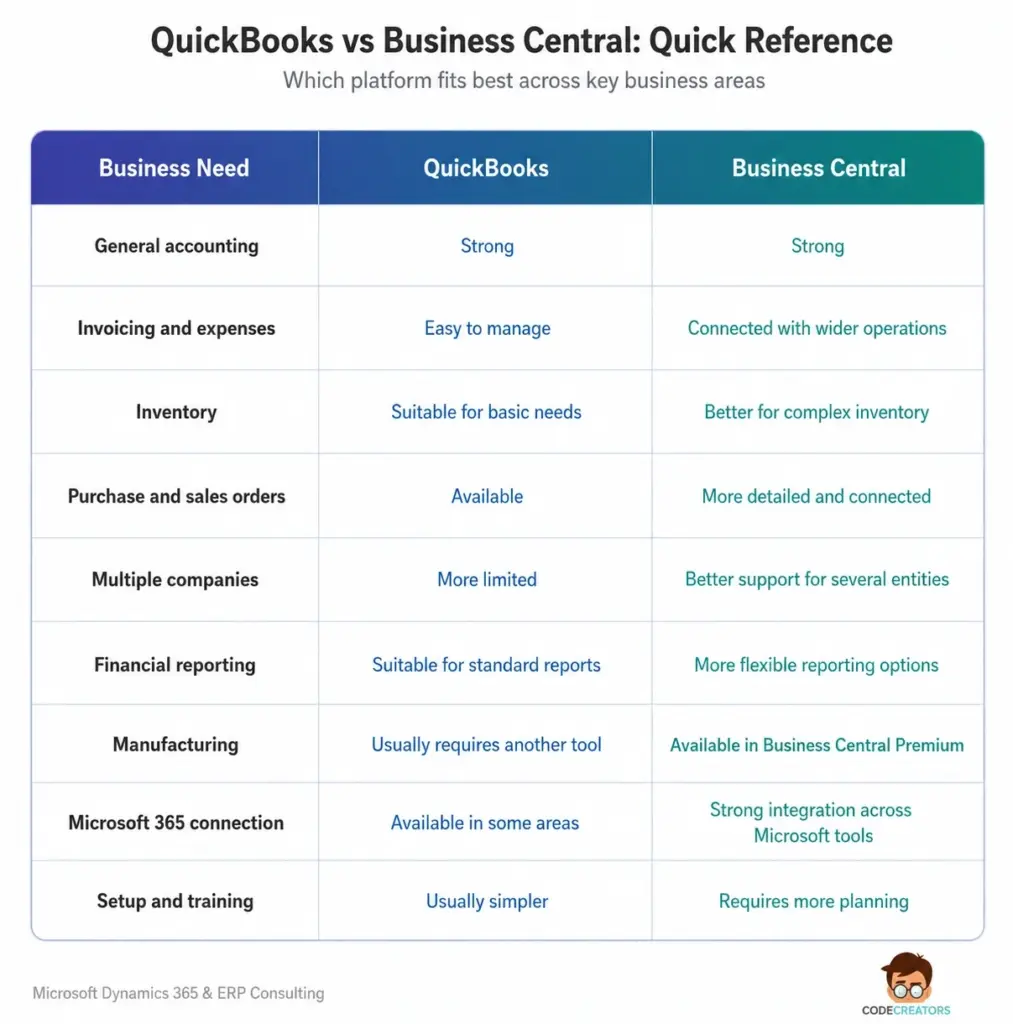
As the comparison shows, the QuickBooks vs Microsoft Dynamics decision depends less on basic accounting features and more on how closely finance needs to work with the rest of the business.
When QuickBooks Still Makes More Sense
Not every company needs to move away from QuickBooks.
A small business with straightforward accounting needs may find that QuickBooks already handles its day-to-day work well. If one finance team can manage invoices, expenses, payments, and reports without major delays or manual workarounds, changing systems may add cost without solving a clear problem.
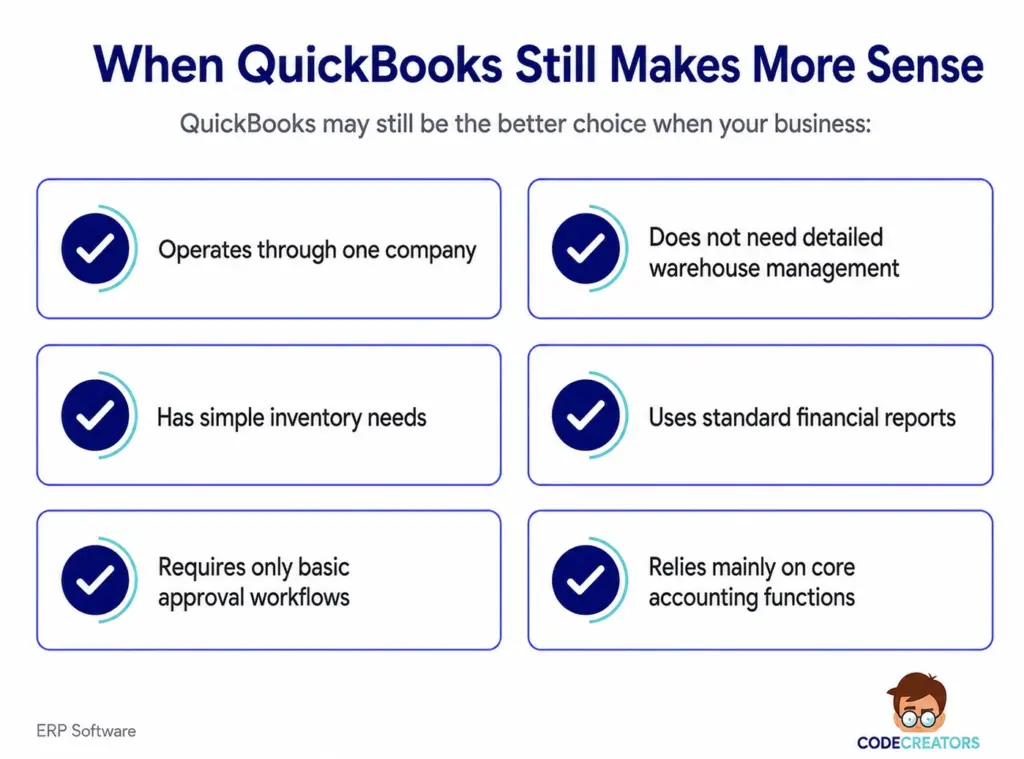
It can also work well for service-based businesses that do not manage large amounts of stock, manufacturing, or complex purchasing.
In these cases, Business Central may offer more than the company currently needs. It usually requires more planning, training, and setup than QuickBooks.
The key question is not whether Business Central has more features. It is whether those features would solve the problems your teams are already facing.
When Business Central Becomes the Better Choice
Business Central becomes the better fit when QuickBooks can no longer support the way the business operates.
The signs often appear in day-to-day work. Reports take longer to prepare, inventory information is difficult to confirm, approvals happen outside the accounting system, and departments cannot easily access the same records.
At that point, the Business Central vs QuickBooks comparison is no longer limited to accounting features. It becomes a question of whether you need one system to manage finance alongside the operations connected to it.
Your Reporting Needs Have Become More Detailed
QuickBooks supports standard financial reports, which may be enough for smaller businesses. As reporting needs grow, however, management may want to review results by department, location, project, product line, or business unit.
Business Central uses dimensions to organize this information without making the chart of accounts unnecessarily complex.
From what we have seen, finance teams often struggle when the figures exist in QuickBooks but must be exported and rearranged before management can use them. Business Central dimensions keep reporting categories linked to the original transactions, making it easier to review results from different parts of the business.
Inventory Is Becoming Harder to Manage
Basic inventory tracking may work well in QuickBooks, but managing stock becomes harder as your company adds more products, warehouses, suppliers, or purchasing rules.
Business Central provides more control over stock levels, item costs, locations, replenishment, assemblies, and warehouse activities. It also links inventory with purchasing and sales, giving employees a clearer view of what is available, what has already been ordered, and what still needs attention.
You Manage More Than One Company
Managing several legal entities becomes difficult when each company keeps separate records and the finance team must combine reports manually.
Business Central allows companies to manage multiple entities within the same environment. It also supports intercompany transactions and financial consolidation, which can reduce the work involved in preparing group-level reports.
The setup still requires careful planning. Charts of accounts, currencies, dimensions, and reporting rules should align where possible; otherwise, consolidation may remain difficult even after the move.
Your Teams Need One Connected System
A move to Business Central may also make sense when sales, purchasing, warehousing, and finance need to work from the same records.
Sales teams can manage quotes and orders, purchasing teams can create purchase orders, warehouse teams can record stock movements, and finance teams can see the financial effect of each transaction. This makes it easier to follow a figure back to the customer order, supplier invoice, item, or project behind it.
What Should You Check Before Replacing QuickBooks?
Start by identifying the problems the new system needs to solve. These may include slow reporting, duplicate data entry, inventory errors, weak approval controls, or limited visibility across multiple companies. Knowing exactly what needs to improve will help keep the project focused and prevent unnecessary features from making the setup more complicated.
Next, review the other tools connected to QuickBooks. Your business may use separate systems for payroll, e-commerce, payments, expenses, customer management, or tax reporting. Some may connect directly with Business Central, while others may require an extension or custom integration.
You should also look at how employees complete their day-to-day work. User roles, approval rules, posting groups, dimensions, and reporting structures need to match the way the business actually operates. Without that planning, teams may continue relying on spreadsheets and manual checks even after the move.
Finally, compare the full cost of keeping QuickBooks with the cost of moving to Business Central. QuickBooks usually involves lower setup and training costs, while Business Central may require software licenses, consulting, configuration, data migration, integrations, testing, and employee training.
The move is worthwhile when Business Central can reduce enough manual work, reporting delays, and disconnected processes to justify the additional cost.
Can You Move QuickBooks Data to Business Central?
Businesses can move important QuickBooks data into Dynamics 365 Business Central using Microsoft’s built-in migration extensions for QuickBooks Online and QuickBooks Desktop.
Depending on the migration method, the data may include:
- Customers
- Vendors
- Inventory items
- Chart of accounts
- Beginning general ledger balances
- On-hand inventory quantities
- Open invoices
- Credit memos
- Customer and vendor payments
Before starting the migration, review and clean the existing records. Duplicate customers, outdated suppliers, unused accounts, and incorrect balances should not move into the new system. General ledger accounts also need the correct account numbers and mappings, while tax accounts may require setup in Business Central before transactions can post correctly.
Once the data has moved, compare the opening balances, customer and vendor balances, bank accounts, inventory quantities, and outstanding documents with the original QuickBooks records. This final check confirms that Business Central begins with complete and accurate information.
Dynamics 365 vs QuickBooks: Which One Should You Choose?
When comparing QuickBooks vs Dynamics 365, QuickBooks is usually the better choice when accounting needs are simple, reports are easy to prepare, and different departments do not need to work from the same system.
Business Central makes more sense when finance needs to stay closely connected with sales, purchasing, inventory, projects, warehouses, or multiple companies.
In the businesses we work with, the need for a new system usually depends more on process complexity than company size. A company managing several warehouses, frequent purchase orders, and detailed inventory records may outgrow QuickBooks sooner than a larger service business with simple billing and no stock to manage.
For that reason, employee count should not drive the decision on its own. You should also consider what your company plans to add next. More locations, products, companies, or reporting requirements may make Business Central the more practical long-term choice.
How Code Creators Helps You Choose the Right System
Choosing between QuickBooks and Business Central requires a clear understanding of what the current system handles well and where it falls short.
At Code Creators, we review how QuickBooks fits into your day-to-day work before recommending any change. This includes looking at where teams still rely on spreadsheets, where the same information is entered more than once, and which tasks are slowing down reporting or creating gaps between departments.
That review makes it easier to decide whether to keep QuickBooks, improve the current setup, or move to Dynamics 365 Business Central. The aim is to choose the system that solves the problems you are facing now without adding complexity you do not need.
To get a clearer recommendation for your business, explore our ERP Software Services to find a system that fits your current needs and future plans.
Conclusion
Microsoft Dynamics 365 Business Central can replace QuickBooks when a business needs more than straightforward accounting. QuickBooks still suits companies with simple reporting, limited inventory needs, and fewer connected processes, while Business Central is better suited to businesses where finance, sales, purchasing, inventory, projects, or multiple companies need to work through the same system.
Your decision should come down to how much work now happens outside QuickBooks. If teams rely on spreadsheets, repeat the same data entry, or spend too much time checking reports, Business Central may provide the structure needed to bring those processes together.
Before making the switch, review the current setup, connected tools, data quality, implementation cost, and the problems the new system needs to solve. This helps avoid replacing QuickBooks with a larger platform that does not address the real issues.
If you need help working through that decision, contact us today to find out whether Business Central is the right replacement for QuickBooks.