Your team may approve a Dynamics 365 Customer Insights budget based on Microsoft’s starting price, then discover that the actual cost is higher once customer profiles, campaign audiences, and messaging volume are taken into account. The base license includes a set amount of capacity, so exceeding the Unified People or Interacted People allowance can increase the monthly bill. This usually happens when the estimate is based only on the number of contacts in your CRM. In the Customer Insights pricing plans we review at Code Creators, that number alone is not enough because Microsoft measures Unified People and Interacted People separately. You need both figures to get a clear idea of what the license will actually cost.
In this article, you will learn how Dynamics 365 Customer Insights pricing works, what the standard and attach licenses include, how Microsoft calculates additional capacity, and which related expenses you should include in your budget.
How Much Does Dynamics 365 Customer Insights Cost?
The standard Dynamics 365 Customer Insights license costs $1,700 per tenant per month, paid annually. This creates a base annual subscription cost of $20,400 before taxes, additional capacity, messaging services, implementation, or support.
Microsoft also offers a discounted Customer Insights Attach license for $1,000 per tenant per month, paid annually. Its base annual cost is $12,000. However, this option is only available to organizations that already own qualifying Dynamics 365 applications.
Both licensing options provide the same starting capacity:
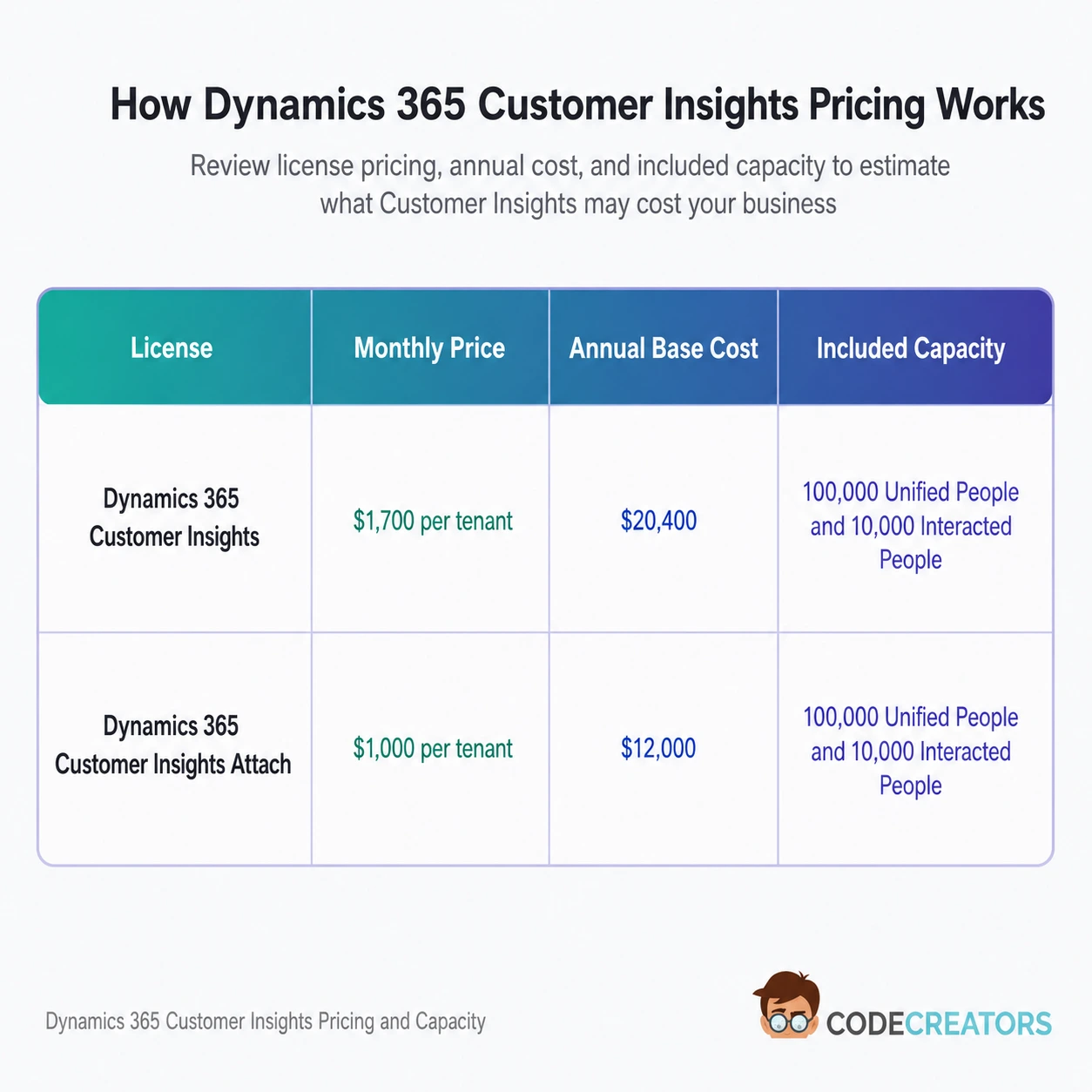
Customer Insights uses capacity-based licensing rather than traditional per-user licensing. Therefore, adding more employees who need access does not increase the subscription price in the same way that adding user licenses would for many other Dynamics 365 applications. Instead, your cost depends mainly on the amount of customer data you unify and the number of people you engage.
Microsoft lists these figures in US dollars. Regional prices, taxes, currency conversions, contractual discounts, and purchasing channels may affect the amount your organization pays.
Who Qualifies for Customer Insights Attach Pricing?
Customer Insights Attach can reduce the base subscription cost by $700 per month, which equals $8,400 per year. However, owning another Microsoft product does not automatically make your organization eligible.
Microsoft requires existing customers to own qualifying Dynamics 365 application licenses before they can purchase Customer Insights at the attach price. The qualifying applications and license combinations depend on Microsoft’s current commercial licensing terms, so eligibility should be checked against the exact products in your tenant before purchase.
The Attach license includes the same Customer Insights capacity as the full-price base license. The lower price reflects your existing Dynamics 365 investment; it does not reduce the included Unified People or Interacted People allowance.
You should ask your Microsoft seller, Cloud Solution Provider, or licensing partner to confirm attach eligibility rather than relying only on the product names visible in the Microsoft 365 admin center.
What Does the Customer Insights Base License Include?
The current Customer Insights license combines entitlements for Customer Insights – Data and Customer Insights – Journeys.
Customer Insights – Data uses the Unified People capacity. Customer Insights – Journeys uses the Interacted People capacity. The base license includes 100,000 Unified People and 10,000 Interacted People at the tenant level.
These allowances are separate. Unused Unified People capacity cannot replace Interacted People capacity, and unused Interacted People capacity cannot cover additional Unified People. Microsoft sells add-on capacity for each meter independently.
This distinction matters because a business may have a large customer database but engage only a small portion of it. Another company may have fewer unified profiles but communicate regularly with most of its audience. Although both companies use Microsoft Dynamics Customer Insights, they may require completely different capacity plans.
How Does Tenant-Level Capacity Work?
Dynamics 365 Customer Insights licenses and capacity allowances apply at the tenant level, not separately to each environment.
If your organization runs Customer Insights across production, sandbox, developer, or trial environments within the same tenant, Microsoft adds the usage from those environments together. You do not receive another 100,000 Unified People or 10,000 Interacted People allowance every time you install the applications in another environment.
In the Customer Insights licensing plans we review, production and sandbox usage is sometimes checked separately, which can make the tenant appear to remain within its allowance. Once usage from both environments is combined, the total may exceed the included 10,000 Interacted People even when each environment remains below that limit on its own.
The same principle applies to Unified People. To calculate total usage, you must consider the customer profiles created across all Customer Insights – Data environments within the tenant.
Organizations operating more than one Microsoft tenant need a Customer Insights license for each tenant where they use the applications. Capacity purchased for one tenant cannot cover consumption in another tenant.
Can You Use Customer Insights in Multiple Environments?
Paid Customer Insights licenses allow the applications to be installed in an unlimited number of production and sandbox Dataverse environments. Microsoft removed application-installation limits for paid licenses by June 30, 2024. Trial installations remain limited separately.
Although paid licenses support multiple production and sandbox installations, test-data planning still matters. Customer records copied into a sandbox may add to your tenant’s Unified People or Interacted People usage when Customer Insights processes or engages them.
What Are Unified People?
Unified People are unique customer profiles produced when Customer Insights – Data combines and matches information from different data sources.
Customer records commonly appear across CRM, ecommerce, loyalty, and customer service systems. After identity matching and unification, Microsoft Dynamics Customer Insights can combine matching records into one unified profile.
Once your unified profile count exceeds the included allowance, you must purchase additional Unified People capacity.
You should estimate this figure using the number of profiles expected after data matching rather than simply adding every row from every source system. Duplicate records across systems may become one profile, while poor data quality or weak matching rules may prevent related records from merging correctly.
How Much Does Additional Unified People Capacity Cost?
Microsoft sells additional Unified People capacity in packs of 100,000. The monthly price per pack decreases at higher capacity levels.
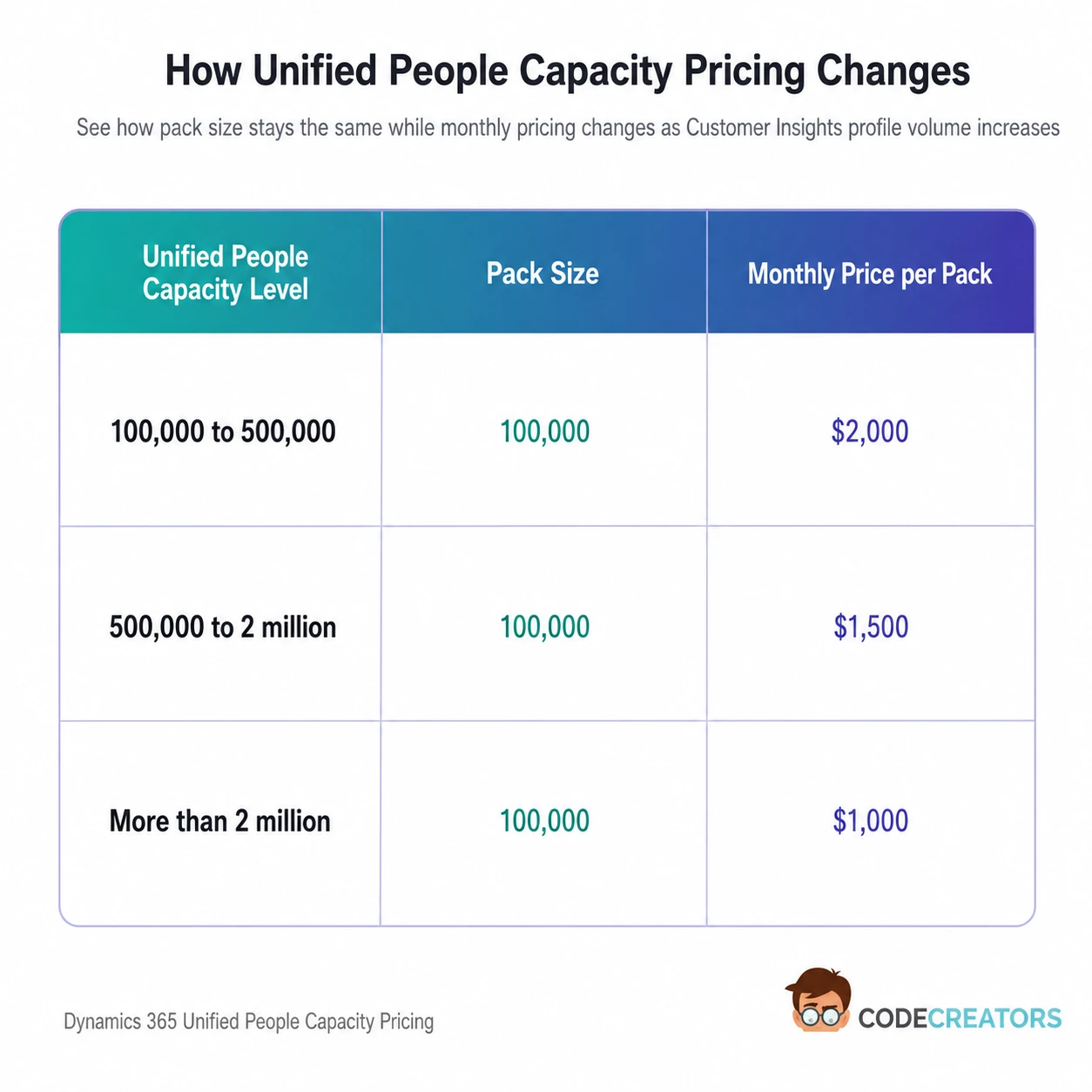
These add-ons require an existing Customer Insights base license and annual payment.
A requirement for 300,000 Unified People includes the first 100,000 in the base license and requires two additional packs of 100,000.
Using the standard license, the calculation would be:
$1,700 base license + $4,000 Unified People capacity = $5,700 per month
The annual subscription cost would reach $68,400, excluding taxes and other project expenses.
This calculation shows why Dynamics 365 Customer Insights pricing can rise quickly for organizations with large customer databases. The difference between 100,000 and 300,000 unified profiles adds more to the monthly cost than the original base license.
What Are Interacted People?
Interacted People are eligible Dataverse entities that your organization engages through outbound interactions orchestrated by Customer Insights – Journeys. These entities can include contacts, leads, accounts, Customer Insights – Data profiles, or supported custom entities.
Microsoft counts each person once, regardless of how many qualifying interactions that entity receives. A record stored in Dataverse does not count toward the Interacted People quota until it receives a qualifying interaction through Customer Insights – Journeys.
Once an entity becomes an Interacted Person, it remains in the count until 12 months have passed without another qualifying interaction. As a result, your total can build across campaigns rather than resetting at the end of each month.
However, an Interacted Person and an interaction are not the same measurement. One person may receive several messages while still counting as one Interacted Person, but each qualifying outbound message contributes separately to your monthly interaction usage.
Microsoft’s licensing guidance identifies qualifying interactions as outbound communications such as emails, SMS messages, push notifications, voice-channel messages, and custom-channel messages sent through Customer Insights – Journeys. Inbound activity, such as a form submission, does not count as a licensing interaction.
Because Interacted People and interactions are measured separately, the number of people you license also affects the monthly interaction allowance available to your tenant.
How Much Does Additional Interacted People Capacity Cost?
Microsoft provides three capacity tiers for additional Interacted People:
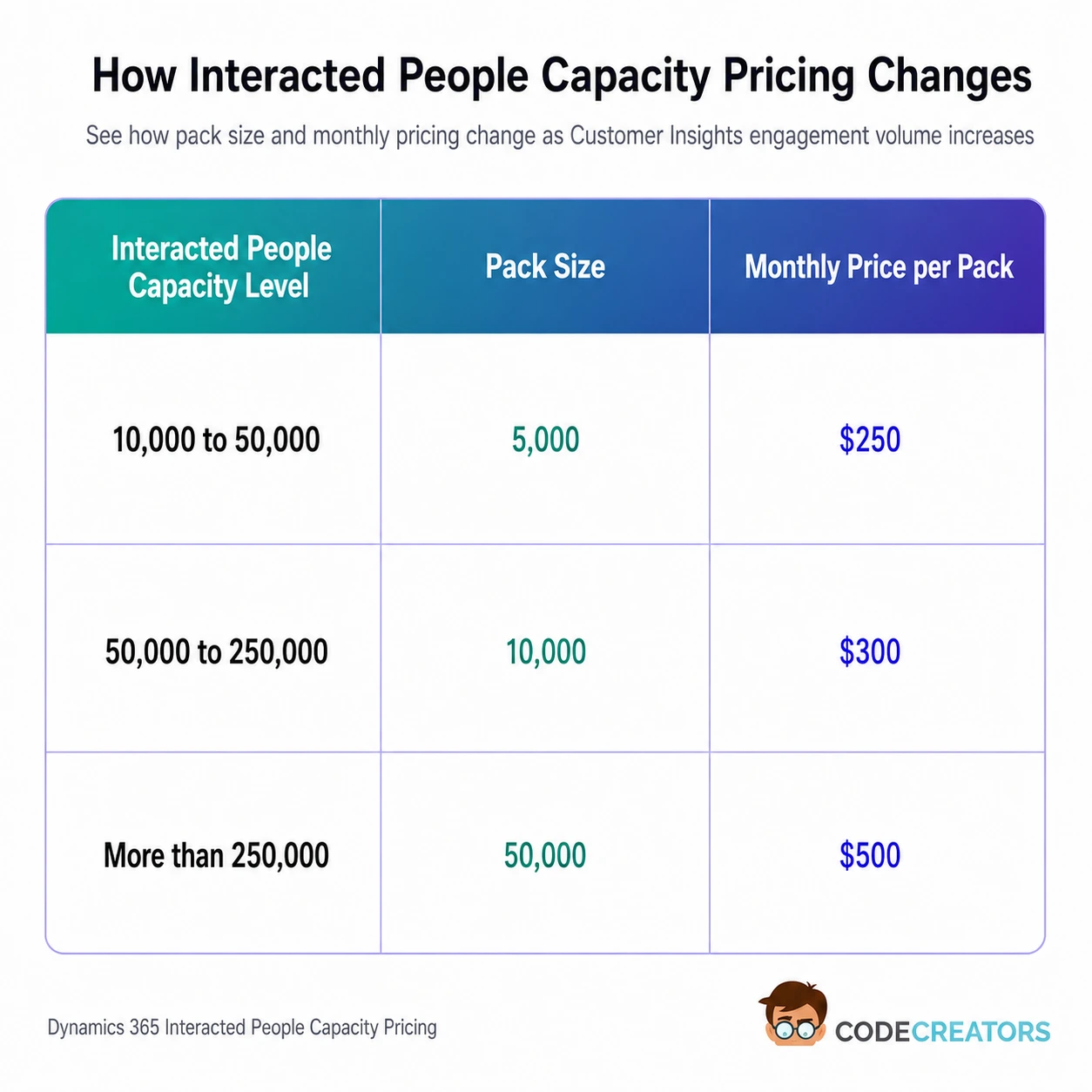
The price applies to each capacity pack, not to the entire tier.
An audience of 30,000 Interacted People leaves another 20,000 to license after the included 10,000-person allowance is applied. Four packs of 5,000 add $1,000 to the monthly cost.
With the standard license, the total would be:
$1,700 base license + $1,000 Interacted People capacity = $2,700 per month
That produces an annual subscription cost of $32,400, before messaging, implementation, and other related expenses.
When estimating this requirement, count the unique people you expect to engage across a rolling 12-month period. Looking only at the audience for one monthly campaign may produce a much lower estimate than your actual capacity usage.
How Does the Monthly Interaction Allowance Affect Pricing?
Your monthly interaction allowance equals 10 times the number of Interacted People you license. The system measures total interactions at the tenant level rather than assigning a fixed allowance to each person.
Licensing 20,000 Interacted People provides an allowance of 200,000 qualifying outbound interactions per month. Those interactions can be spread across the full audience or used for several messages to a smaller group.
The monthly interaction quota resets on the first day of each month, and unused interactions do not roll over. In contrast, the Interacted People count follows the 12-month activity rule.
You should therefore calculate these requirements separately:
- The number of unique entities you expect to engage over 12 months determines your Interacted People requirement.
- The number of outbound messages expected during your busiest month determines whether the 10-times monthly interaction allowance is sufficient.
Microsoft advises customers to purchase enough capacity to cover their highest expected month rather than relying on an average monthly figure.
Are There High-Volume Service Limits?
Purchasing additional capacity increases your licensed allowance, but Customer Insights – Journeys also has service and fair-use limits.
Microsoft currently lists a maximum of 300 million interactions per month, with a maximum of 10 million interactions per day. However, support for monthly volumes above 100 million remains subject to Microsoft’s stated preview conditions.
Microsoft also lists journey and throughput limits, including up to 500,000 interactions per hour for qualifying segment-based journey scenarios. Actual throughput can depend on your licensed capacity, configuration, channels, audience complexity, and Microsoft’s service conditions.
Most small and mid-sized organizations will not approach these limits. However, businesses planning national campaigns, transactional messaging, or very large customer journeys should review them before assuming that buying more capacity alone will support any volume.
How Can You Monitor Customer Insights Capacity?
Customer Insights – Journeys includes a Quota limits area where administrators can review purchased entitlements and current consumption.
The page shows:
- The tenant’s total Interacted People entitlement
- Interacted People usage across environments
- The monthly interaction allowance
- Outbound interactions already sent during the month
Microsoft also displays in-app notifications when an organization approaches or exceeds its paid consumption quota.
Usage is broken down by environment, while the total tenant-level amount includes consumption from other organizations or environments in the same tenant.
Customer Insights – Data requires a different check. Administrators should review the number of customers created in each Data environment and add those figures together to determine total tenant-level Unified People consumption.
Regular monitoring helps you identify unexpected growth before it affects licensing. In the Customer Insights environments we review, consumption can increase after customer data is copied into a sandbox, a new data source is connected, or a campaign audience is expanded, even when the original production estimate remains unchanged.
Can You Increase or Reduce Capacity Later?
Microsoft allows customers to increase Unified People or Interacted People capacity during the subscription term. This gives you a way to respond when your database grows or your engagement volume rises.
However, reducing purchased capacity generally must wait until the agreement anniversary and remains subject to the rules of your licensing program, such as the Enterprise Agreement or Cloud Solution Provider program.
As a result, overestimating capacity can leave your organization paying for unused allowances until the next eligible reduction date. Underestimating can require an additional purchase during the term. A reliable forecast should therefore include expected growth, seasonal campaigns, new data sources, and planned market expansion.
Can You Purchase Only Data or Journeys?
New customers purchase the combined Dynamics 365 Customer Insights license even when they intend to use only Customer Insights – Data or only Customer Insights – Journeys. The current base license provides access to both applications.
However, additional capacity remains separate. A company using only Customer Insights – Data may purchase more Unified People capacity without adding Interacted People capacity. Similarly, an organization focused on customer journeys may add Interacted People without purchasing more Unified People, provided its data usage remains within the included allowance.
Organizations that purchased older standalone Dynamics 365 Marketing or Customer Insights licenses before September 2023 may have different entitlements. The benefits of the newer combined license do not automatically transfer to those older standalone subscriptions.
Microsoft’s transitional rules may also affect how long an existing standalone agreement can continue. Businesses with legacy licenses should review their contract dates and renewal terms instead of applying the current base-license calculations directly.
What Other Costs Should You Include?
The Microsoft subscription does not cover every expense involved in running Customer Insights.
SMS communication requires an account with a supported messaging provider. Phone numbers and message-delivery charges come from the selected provider rather than the Customer Insights base license.
You should also budget for data preparation, integrations, identity-matching rules, consent management, journey configuration, testing, training, and ongoing administration. These are project or operational costs rather than Microsoft Customer Insights license charges.
Additional Dataverse storage, external data services, custom connectors, or other Power Platform products may create further expenses depending on your architecture and existing Microsoft entitlements.
Email and SMS costs may also change with message volume, delivery provider, destination country, dedicated-number requirements, and communication type. These expenses should remain separate from the Unified People and Interacted People license calculation.
How to Calculate Your Expected Cost
Begin by checking whether your organization qualifies for the $1,000 Attach license or requires the $1,700 standard license. Understanding the Customer Insights dynamics behind Unified People, Interacted People, and monthly interactions will help you calculate the rest of the cost correctly.
Next, estimate the number of unique customer profiles Customer Insights – Data will create after matching records across every connected system and environment. Compare that figure with the included 100,000 Unified People capacity.
Then estimate how many unique entities Customer Insights – Journeys will engage across a rolling 12-month period. Compare that figure with the included 10,000 Interacted People.
After that, calculate the number of outbound messages planned for your busiest month. Divide that amount by 10 to estimate the Interacted People entitlement needed to support the monthly interaction volume. Microsoft recommends this approach for high-volume engagement planning.
Finally, add the required capacity packs and include messaging, implementation, storage, integration, and support expenses. Apply the calculation across the entire tenant rather than treating each production or sandbox environment separately.
Get the Right Customer Insights Plan with Code Creators
Your Customer Insights license should match the way your data and campaigns actually run. A business with 80,000 unified profiles and a small active audience has very different needs from one managing several environments and running hundreds of thousands of customer interactions each month. The license price only makes sense once those numbers are separated and calculated properly.
Code Creators can help you map your Unified People, Interacted People, environments, and expected message volume before you buy. We also check whether your existing Dynamics 365 licenses make you eligible for attach pricing, so the recommendation is based on your current setup rather than a rough estimate.
Contact our team to review your Customer Insights requirements and confirm the license and capacity that fit your current setup.
Conclusion
Dynamics 365 Customer Insights starts at $1,700 per tenant per month, while qualifying Dynamics 365 customers can purchase the Attach license for $1,000 per tenant per month. Both options include 100,000 Unified People and 10,000 Interacted People, but the final cost depends on how much customer data you unify, how many people you engage, and how much messaging activity you run each month.
That is why the advertised price should not be treated as the complete budget. Additional capacity, messaging services, storage, integrations, implementation, and ongoing administration can all increase the total cost. Usage across production, sandbox, and other environments within the same tenant must also be included in the calculation.
Before you purchase, confirm whether your organization qualifies for Attach pricing, estimate Unified People and Interacted People separately, and plan around your busiest month rather than your average usage. A clear capacity estimate at this stage can help you avoid unexpected licensing costs later.
If you need help choosing the right Customer Insights license and capacity for your business, our team can review your customer data, audience size, environments, and messaging plans. Request a Customer Insights cost assessment to see what you need, what it may cost, and where you can avoid paying for unused capacity.