
When your support agents have to search through emails, spreadsheets, and separate systems just to understand one customer issue, delays become difficult to avoid. Customers repeat the same details, agents lose valuable context, and managers struggle to see which cases need immediate attention. In the service processes we review at Code Creators, these problems usually become more noticeable as support workloads grow and more teams become involved in case handling. Dynamics 365 Customer Service brings customer records, cases, communication history, knowledge, and service activities into one connected environment, so your team can respond with better context and maintain clearer control over daily support work.
However, not every edition supports the same level of service complexity. In this article, you will learn what Dynamics 365 Customer Service is, how it helps your team manage daily service work, and how Dynamics 365 Customer Service Professional, Enterprise, and Premium differ.
What Is Dynamics 365 Customer Service?
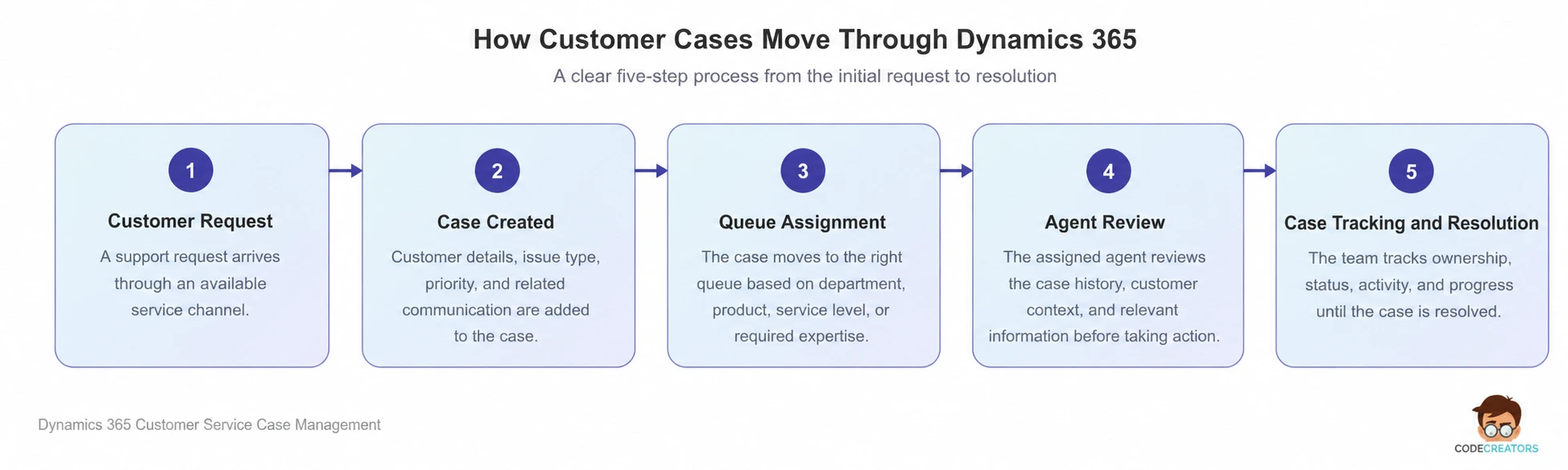
Dynamics 365 Customer Service is Microsoft’s CRM application for organizing customer support, case activity, and service information. For teams evaluating customer service in Dynamics 365, it provides one place to manage cases from initial contact through resolution. Customer records, communication history, knowledge articles, and related service activities remain connected to the same case.
When an agent opens a customer record, they can review previous cases, emails, calls, notes, and other relevant details before responding. This connected view reduces the need to search across separate inboxes, spreadsheets, or internal systems. It also helps the agent continue the conversation with a clearer understanding of the customer’s history.
Case management sits at the center of the application. Each case represents a customer question, complaint, request, or technical issue that requires attention. Your agents can assign the case, update its priority, record activities, add notes, and track its progress until resolution.
At the same time, managers gain a clearer view of open cases, workloads, response times, and unresolved issues. This visibility makes it easier to identify delays before they begin affecting more customers.
Microsoft offers three main editions: Dynamics 365 Customer Service Professional, Dynamics 365 Customer Service Enterprise, and Dynamics 365 Customer Service Premium. Professional provides core service tools for simpler requirements. Enterprise supports more advanced service processes, while Premium combines enterprise customer service capabilities with an integrated contact center.
How Dynamics 365 Customer Service Supports Case Management
A shared inbox can collect customer requests, but it usually becomes harder to manage as case volumes increase. Agents may respond to the same issue twice, overlook an urgent request, or lose important details within a long email thread.
With Microsoft Dynamics CRM Customer Service, your team can replace this fragmented process with structured case records. Each case can include the customer, issue type, priority, owner, status, related communications, and resolution details.
Queues organize this work further. You can separate requests according to department, product, service level, or required expertise. Agents can then focus on the cases relevant to their role, while managers can see how much work each queue contains.
Case visibility often improves as soon as requests follow a consistent structure, even before you add complex automation. You can then see where cases stop moving, which categories create the most work, and where agents need better information.
This structure also strengthens accountability. Instead of relying on individual inboxes, every authorized team member can see who owns a case, what action has already taken place, and what still needs attention.
 Knowledge Management for Consistent Customer Support
Even an experienced agent cannot remember every policy, troubleshooting step, or product detail. When support information remains scattered across folders and old emails, the quality of the answer often depends on who handles the case.
Dynamics 365 Customer Service addresses this issue through knowledge management. This is one reason businesses use Microsoft Dynamics for customer service instead of keeping support knowledge across separate files and inboxes. Your team can create articles for common questions, support procedures, product instructions, and approved resolutions. Agents can search this content while working on a case and use it to give customers a more consistent answer.
Knowledge articles can also follow review and publishing processes. This gives you better control over which information agents use and helps prevent outdated instructions from circulating.
The value becomes clearer when the same issue appears repeatedly. Instead of asking agents to rebuild an answer each time, you can turn an approved resolution into reusable knowledge. Over time, this creates a stronger support resource for both new and experienced team members.
Selected knowledge content can also support customer self-service. When customers find a clear answer without opening a case, your team receives fewer avoidable requests. However, self-service only works when the content remains accurate, searchable, and written around real customer questions.
Service-Level Agreements and Entitlements
During service process reviews, we often find that response commitments differ across contracts, service plans, and customer groups. Tracking these commitments manually increases the risk of missed deadlines.
With Dynamics 365 for customer services, you can use service-level agreements, commonly known as SLAs, to define response and resolution targets. The system can track the time remaining against those targets and alert agents when a case is approaching a deadline.
Entitlements cover a different part of the service relationship. They define the support a customer has purchased or can receive. This may include a specific number of cases, a set number of support hours, or coverage for certain products.
Together, SLAs and entitlements connect contractual expectations with everyday case handling. Agents can confirm what level of support applies, while managers can review whether the team meets its service commitments.
SLAs and entitlements work best when your support rules are clear before configuration begins. The system can track a response target, but your team must first agree on when that target starts, when it pauses, and which cases it covers.
Dynamics 365 Customer Service Professional
Dynamics 365 Customer Service Professional gives your support team the core tools needed to manage cases, customer records, queues, activities, and knowledge in one place. It suits businesses that want a more organized service process without the added complexity of advanced routing or contact center features.
The edition works well when agents follow a clear case process from the initial request through resolution. They can review customer details, record activities, update case information, and use approved knowledge without moving between separate systems.
However, team size should not be the deciding factor. We have seen smaller support teams manage multiple service levels, specialized queues, and detailed assignment rules. In those cases, Professional can become limiting even when only a few agents use the system.
Microsoft currently lists Dynamics 365 Customer Service Professional at $50 per user per month, paid yearly, on its US pricing page. Regional pricing, taxes, and licensing agreements can affect the final cost.
Dynamics 365 Customer Service Enterprise
Dynamics 365 Customer Service Enterprise gives your team more control when cases move between several departments, require specialist skills, or follow different service rules. It extends the core case management features with more advanced routing, workload management, and agent productivity tools.
Unified routing can direct incoming work to the right queue or representative based on the case requirements, agent skills, availability, and current capacity. This reduces manual assignment and helps managers distribute work more consistently across the team.
Enterprise also includes broader AI-assisted capabilities that can help agents summarize cases, find relevant knowledge, and prepare responses. Their value, however, depends on the quality of your customer records and knowledge content.
Before configuring these features, define who owns each type of case, how priorities are set, when an escalation is required, and which skills agents need. Clear rules give Enterprise the structure it needs to route and manage work effectively.
Microsoft currently lists Dynamics 365 Customer Service Enterprise at $105 per user per month, paid yearly, on its US pricing page.
Dynamics 365 Customer Service Premium
If your service operation also manages live voice and digital conversations, Dynamics 365 Customer Service Premium extends the platform beyond standard case management. It combines advanced customer service capabilities with an integrated contact center and CRM service solution.
Your agents can work with contact center interactions and customer service records in a more connected environment. This reduces the gaps that appear when one platform handles conversations and another stores customer history and case information.
Premium is most relevant when representatives regularly handle live interactions, require intelligent work distribution, and need immediate access to existing customer records. Managers also gain a broader view of how cases and real-time conversations affect overall service performance.
However, these additional capabilities only make sense when your operation genuinely needs them. In the service environments we review, teams that rely mainly on email-based case management often have limited need for integrated contact center functionality.
Microsoft currently lists Dynamics 365 Customer Service Premium at $195 per user per month, paid yearly, on its US pricing page.
Dynamics 365 Customer Service Professional vs Enterprise vs Premium
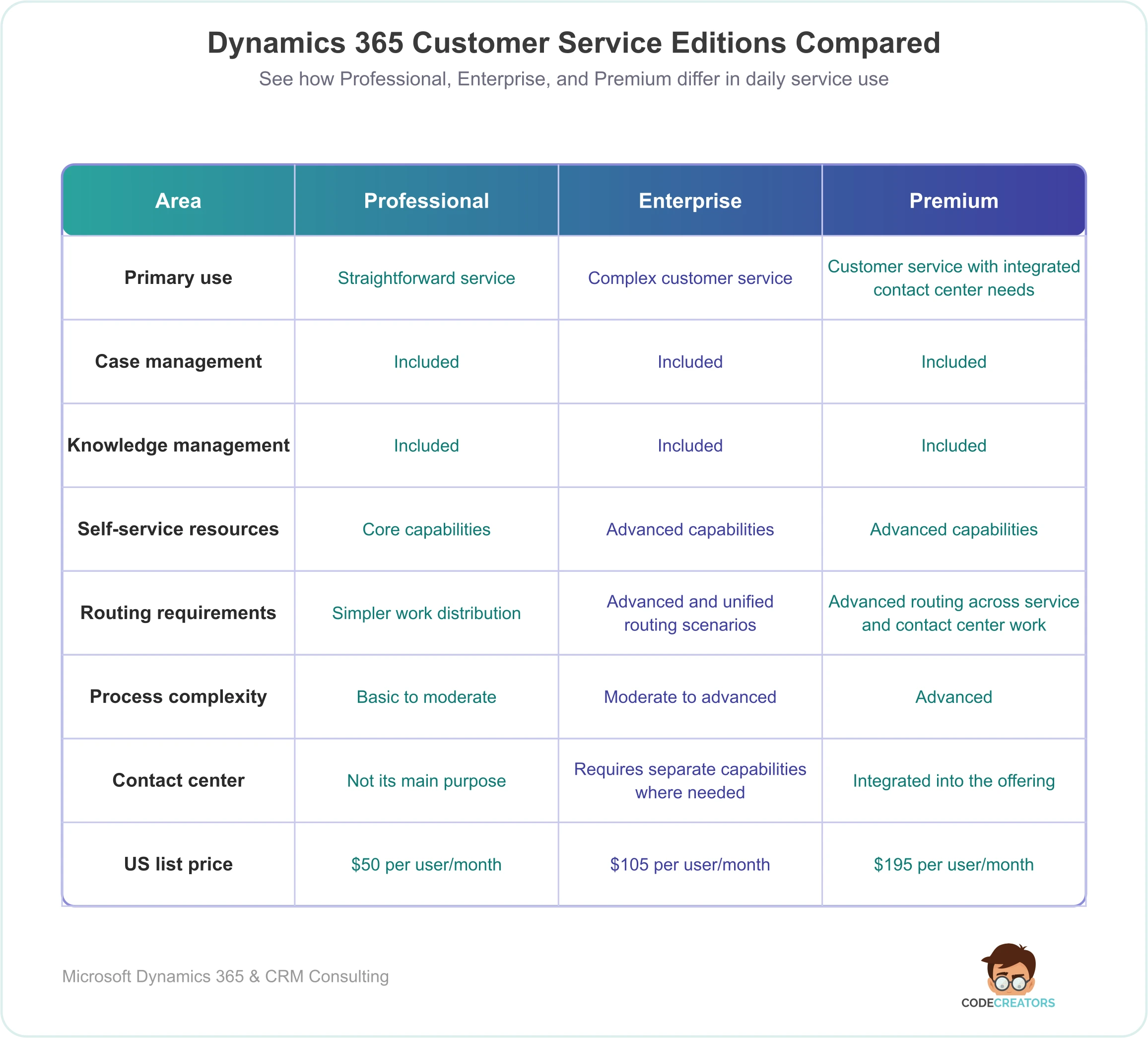
These editions do not simply correspond to small, medium, and large businesses. Each one supports a different level of service complexity, so the right choice depends on how your team actually manages customer work.
Which Edition Fits Your Customer Service Operation?
Start by reviewing how customer work reaches your team and what happens after it arrives.
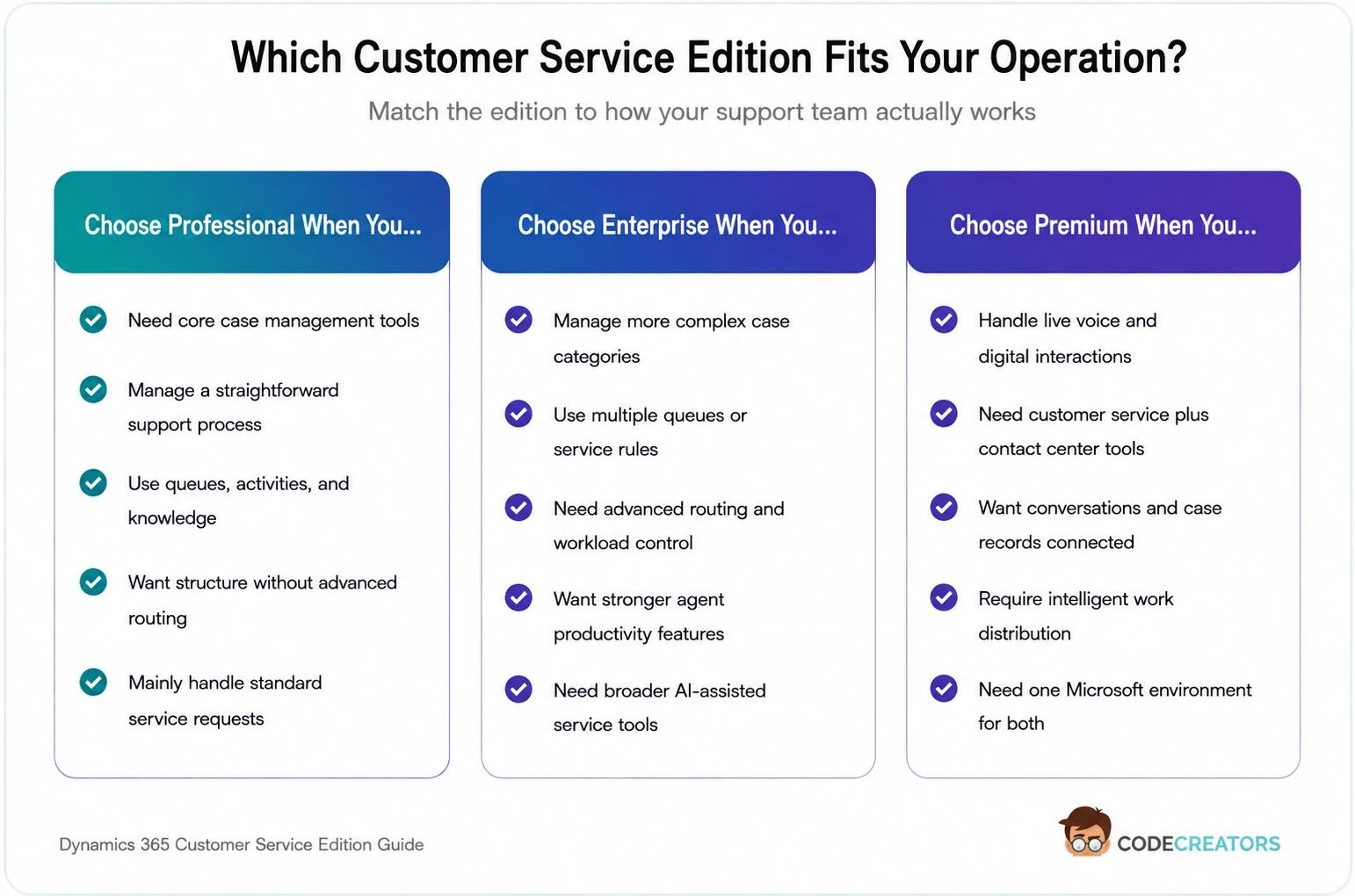
Dynamics 365 Customer Service Professional fits a structured but relatively simple support process. It provides the core tools required to manage cases, customer records, queues, and knowledge without introducing advanced contact center requirements.
Enterprise provides a better fit when your team handles more complex case categories, uses several queues, applies detailed service rules, or needs advanced routing and productivity capabilities.
Premium becomes the stronger choice when customer service and contact center operations need to work together. It supports teams that want agents to manage live interactions and case records within one connected Microsoft environment.
Before selecting an edition, review your case volumes, communication channels, routing rules, service commitments, agent roles, reporting needs, and expected growth. Looking at these requirements together gives you a more reliable licensing decision than choosing only by price or company size.
Choose the Right Dynamics 365 Customer Service Edition with Code Creators
The differences between Professional, Enterprise, and Premium only become useful when you compare them with the way your support team handles cases. The channels you use, the number of queues you manage, your escalation process, and your service targets all affect which edition makes sense.
At Code Creators, we review these areas before recommending an option. This helps separate the features your team genuinely needs from the ones that would add cost without improving daily service work.
This also gives you a clearer view of what needs to be configured after licensing. Case routing, permissions, knowledge, and service-level agreements can then be planned around the process already in place rather than added without a clear reason.
Need a clearer answer before choosing an edition? Connect with our team to discuss your case flow, routing needs, and service priorities.
Conclusion
Dynamics 365 Customer Service gives your support team a structured way to manage customer records, cases, knowledge, queues, service commitments, and agent activity. By keeping this information connected, it reduces the gaps that usually appear when support work remains divided across inboxes and separate systems.
Dynamics 365 Customer Service Professional covers the essential requirements of a straightforward service operation. Enterprise adds the control needed for more complex routing, processes, and agent workloads. Premium extends those capabilities into an integrated contact center for businesses that manage live voice and digital interactions alongside customer cases.
The right edition depends on the work your agents perform each day. When you review your support channels, case complexity, routing requirements, service levels, and contact center needs together, the differences between the editions become easier to assess. This gives you a clearer basis for choosing a setup that supports the team without adding unnecessary cost or limiting future service requirements.
Turn the edition comparison into a confident licensing decision. Get in touch for a focused review of your Dynamics 365 Customer Service requirements.