A company assigns Microsoft 365 E5 licenses to 40 employees, then separately buys 40 standalone Power BI Pro seats for the same people, without realizing E5 already includes Pro access at no extra cost. In our analytics and consulting work at Code Creators, this exact scenario is one of the most frequent billing mistakes we find, and it’s usually hiding in plain sight on a Microsoft invoice nobody has audited in months.
Power BI Pro costs $14 per user, per month on its own. It’s the standard license required for anyone who builds, shares, or views reports in a collaborative team workspace. If your organization already uses Microsoft 365 E5 or Office 365 E5, this license is already included, so the fix is often just removing a duplicate charge rather than changing how your team works.”
This guide breaks down every Power BI plan, explains what each tier actually costs, and helps you identify the most cost-effective licensing path for your team.
Exploring Free vs Paid Power BI Licenses
Understanding your user base starts by separating report creators from report consumers. Microsoft offers several user tiers to match specific operational roles within your company.
The standard Free account allows individual users to connect to data sources, build custom dashboards, and analyze datasets on their local computers. However, free accounts only function within personal workspaces. As soon as an analyst needs to publish a report to a shared team folder or send an interactive dashboard to an executive, free accounts reach their limit.
To share reports across your organization, team members require paid Power BI licenses. Paid options let users publish content to shared cloud environments, subscribe to automated report emails, and embed live visuals directly into applications like Microsoft Teams and SharePoint.
What Is the Baseline Power BI Pro Price?
When your organization steps up to collaborative business intelligence, the Pro tier serves as the standard starting point for daily report creators.
Power BI Pro is priced at a fixed rate of $14 per user, per month, billed annually. Every employee who creates, publishes, or views reports within a shared Pro workspace needs an active seat.
For example, if a team of 5 analysts builds reports for 25 department managers in a standard Pro environment, all 30 employees require individual subscriptions. Calculating your monthly commitment simply requires multiplying your total active user count by $14.
Note for Microsoft 365 users: if your organization assigns Microsoft 365 E5 or Office 365 E5 licenses to staff members, those users already have Pro access at no additional monthly charge. Always audit your active E5 subscriptions before purchasing standalone user seats, we’ve walked into more than one licensing review where a client was double-paying for exactly this.
How Much Does Power BI Cost for Advanced Users?
As datasets grow larger and reporting needs become more sophisticated, basic refresh limits and memory caps can constrain analytical workflows. Advanced analysts often need dedicated compute power, automated paginated reporting, and machine learning tools.
Scaling up to enterprise-grade analytics means deciding whether you upgrade per individual seat or purchase organizational cloud capacity.
The Premium Per User tier offers advanced data model sizes up to 100 GB and up to 48 scheduled data refreshes per day, priced at $24 per user, per month.
However, administrators need to remember that Premium Per User workspaces operate under strict license checks. If an analyst creates a dashboard inside a Premium Per User workspace, every viewer accessing that content must also hold a Premium Per User seat.
Power BI Enterprise License and Fabric Capacity Explained
Large enterprises with hundreds or thousands of report viewers often find per-user pricing inefficient. Paying a monthly fee for casual viewers who only inspect a dashboard once a week inflates software overhead rapidly, this is usually the exact pain point that brings a client to us for a licensing audit in the first place.
To solve this issue, Microsoft provides organizational capacity options through Microsoft Fabric F-SKUs. Under this model, your company purchases dedicated cloud computing power rather than individual viewer seats.
When your organization deploys an F64 capacity or larger, content creators still need Pro seats to build and publish reports, but standard report viewers no longer require paid individual licenses. Unlicensed users can view, filter, and interact with reports stored in designated capacity workspaces for free.
This structure creates clear financial advantages for enterprise environments:
- Fixed compute costs: scale compute resources based on query load rather than employee headcount.
- Unlimited viewers: allow thousands of internal staff members to consume dashboards without buying additional seats.
- Unified data services: combine reporting tools with real-time analytics, data warehousing, and data engineering in a single cloud tenant.
If you’re not sure whether your organization has crossed the point where Fabric capacity beats per-seat licensing, that calculation is exactly what our Power BI Consulting Services team runs for clients before they commit to either path.
Comparing Plan Tiers: Features and Pricing
Choosing the right plan requires matching your operational requirements against user roles, dataset sizes, and refresh frequencies.
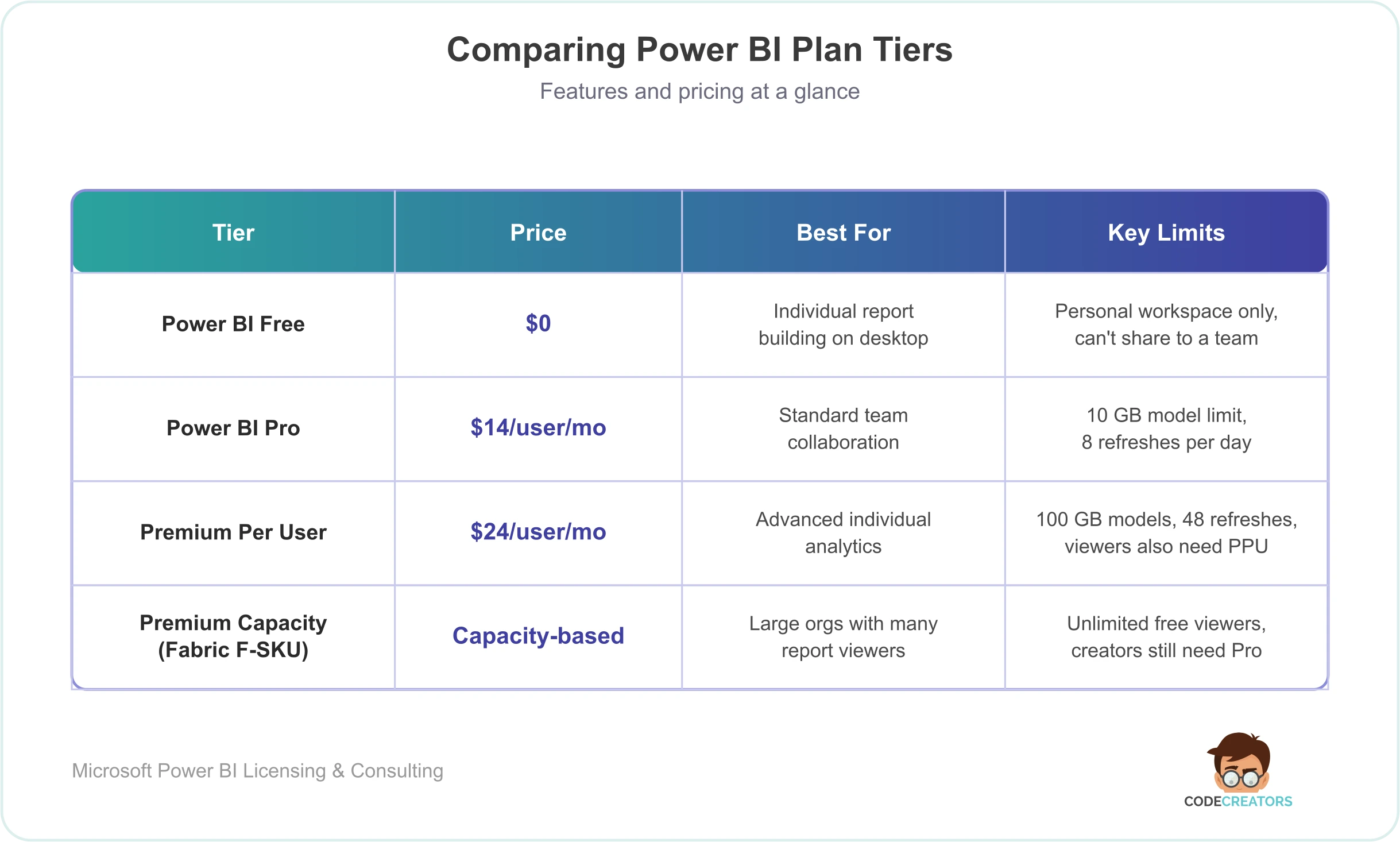 Reviewing these tiers helps your finance team project software expenditures accurately as your organization expands.
International Billing and Regional Pricing
Global organizations operating across multiple regions often manage centralized software procurement across varying international currencies. Microsoft aligns local billing against standardized US dollar exchange rates for Power BI pricing worldwide.
While the standard baseline Pro price stays set at $14 per user, monthly, international invoices reflect localized currency conversions, local tax structures, and enterprise regional agreements. If you’re budgeting across multiple countries, confirm the actual invoiced local-currency rate with your Microsoft partner rather than assuming a flat conversion.
Organizations evaluating their overall BI spend should also track fluctuating Azure consumption rates if they use pay-as-you-go capacity tiers for enterprise analytics.
How Much Is a Power BI License Over Time?
When planning multi-year IT budgets, decision-makers frequently ask how license costs scale across long-term enterprise deployment timelines. Projecting team growth, user roles, and infrastructure expansion over a three-to-five-year horizon changes which tier actually makes sense.
For example, a company with 50 staff members on standard Pro licenses spends $700 per month, totaling $8,400 per year. If that same company grows to 500 staff members and stays strictly on per-user Pro seats, annual software expenditure climbs to $84,000.
At that threshold, transitioning to dedicated Fabric capacity can meaningfully reduce overhead by unlocking free consumption for standard viewers while capping monthly platform fees. Understanding how this scales lets your finance team transition smoothly from seat-based to capacity-based billing at the point where capacity actually becomes cheaper.
Navigating Power BI Support Services and Enterprise Optimization
Deploying data platforms successfully involves far more than buying software subscriptions. Raw data needs proper modeling, ETL pipeline configuration, row-level security setup, and dashboard design to deliver real business value.
Organizations frequently bring in specialized Power BI support to audit existing environments, eliminate redundant licensing fees, and accelerate user adoption. Working with an experienced technical partner helps your team build optimized workspaces, maintain strict data governance, and avoid paying for unused compute capacity.
Reviewing your monthly licensing commitments alongside active workspace utilization metrics is one of the fastest ways to catch licensing waste across departments, in our own audits, it’s rarely one big problem, usually a handful of smaller ones (unused seats, wrong-tier assignments, overlapping E5 coverage) that add up.
Calculating Your True Total Power BI Costs
To build an accurate software budget, you need to look beyond basic per-seat fees. Determining your true Power BI costs requires evaluating three distinct budget components:
- Direct seat licensing. The combined monthly fees for Pro and Premium Per User seats assigned to creators and managers.
- Capacity infrastructure. Azure billing commitments for dedicated Fabric F-SKUs or embedded analytics capacities.
- Implementation and governance. Consulting, training, data architecture, and custom API integrations needed to maintain a secure reporting ecosystem.
Evaluating your total Power BI costs holistically ensures your leadership team funds the necessary backend architecture while eliminating over-provisioned seat accounts. The answer to “how much does Power BI actually cost for us” always comes back to your real user distribution, dataset sizes, and governance strategy.
Optimizing Implementation and Long-Term Success
Modernizing your organization’s reporting framework requires thoughtful workspace architecture, robust security policies, and continuous governance. Aligning license allocations directly with daily user responsibilities keeps your team operationally agile while keeping recurring software fees predictable.
If your enterprise needs expert guidance on data modeling, workspace security audits, or cloud architecture optimization, our team provides tailored technical assistance. Schedule a consultation for our Power BI Consulting Services at Code Creators to build a secure, high-performance digital analytics ecosystem designed for sustainable expansion.