How We Built a SharePoint Intranet for Financial Services Firm, Cutting Document Search Time By 78% With A Custom Employee Directory and Search Tool
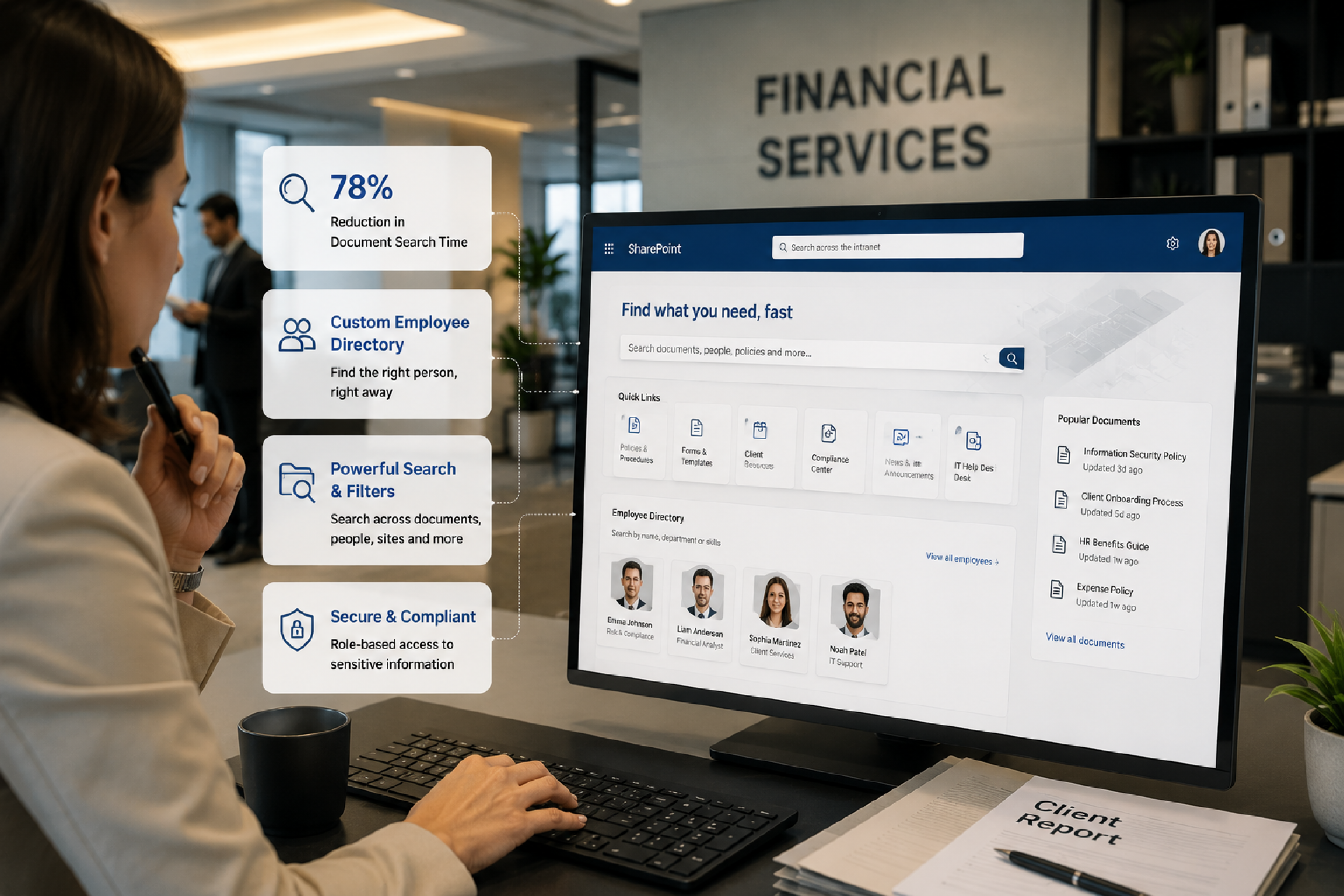
A growing wealth management firm with roughly 240 employees brought its everyday tools and resources together in one place by partnering with Code Creators on a SharePoint intranet for financial services. Before the project, staff spent an average of 6.5 hours per week searching for documents and contact information across five disconnected tools. The engagement delivered 5 interconnected SharePoint Online sites: a Hub Home Site, a Department Site, a Learning and Development portal, an Active Directory integrated Employee Directory, and a Custom Search solution, reducing average document search time by 78% and giving every employee a single digital workplace built around how they work.
Industry: Financial Services / Wealth Management
Platform: Microsoft SharePoint Online, Microsoft 365
Engagement: SharePoint Online Intranet Development & Employee Training
Executive Summary
Document search time dropped by 78%, employee directory lookups that once took an average of 12 minutes now take under 30 seconds, and onboarding-related training queries to HR fell by 45% within the first quarter after launch. This was achieved by engaging Code Creators to build a SharePoint intranet for financial services and bring the firm’s digital workplace together under one structure. Employees previously used a mix of email, shared drives, and individual tools to find information, training content, and colleague contact details. Code Creators delivered a SharePoint Online intranet consisting of five connected sites: a Hub Home Site, a Department Site, a Learning and Development portal, an Active Directory powered Employee Directory, and a Custom Search solution spanning all sites. The result is a single, organized digital home where employees can find documents, complete training, locate colleagues quickly, and search across the entire organization from one place.
Key Outcomes
- 78% reduction in average document search time (from 6.5 hours/week to roughly 90 minutes/week per employee).
- 12 minutes to under 30 seconds: average time to locate a colleague’s contact details.
- 45% drop in HR onboarding queries within the first quarter post-launch.
- 5 interconnected SharePoint sites delivering one unified digital workplace.
- 16 features delivered on the Hub Home Site alone.
- 99.6% directory data accuracy maintained through real time Active Directory sync, requiring no manual updates.
- Unified search across all sites with Boolean logic and custom filters, supporting document search and findability organization wide.
- A dedicated, organized home for Learning & Development training content.
About the Client
The Client is a financial services firm operating in the wealth management space, helping individuals and families preserve, build, and transfer wealth across generations. Advisors and support staff work across multiple functions daily, managing client relationships, handling financial documentation, and coordinating internal processes that depend on timely, accurate information.
In a business where deadlines and client facing work are constant, the ability to quickly find a document, reach the right colleague, or access training material is an operational priority. As the firm grew, its existing mix of email threads, shared drives, and individual tools such as Microsoft Teams, BambooHR, and Salesforce became more complex to coordinate. Operating a regulated financial services business with multiple departments and a growing headcount made a structured, centralized SharePoint intranet for financial institutions a clear next step in the firm’s operational maturity.
The Problem
A Growing Financial Firm with No Centralized Document Management System
The firm’s growth was outpacing its tools. An internal audit found employees losing an average of 6.5 hours per week, nearly a full lost workday, switching between email, shared drives, and individual tools just to stay informed and reach colleagues.
Quick links to Microsoft Teams, BambooHR, and Salesforce lived in personal bookmarks, not anywhere centralized. Finding a document was unreliable: staff reported 12 minutes per lookup, and 8% of searches returned nothing usable, forcing employees to ask a colleague or redo the work. No SharePoint document search solution existed to scan the organization’s content and return accurate results.
Training suffered most. With no consistent home for training materials, 22% of new hires had to repeat onboarding modules due to missing or outdated content, slowing ramp time. Worse, compliance announcements had no reliable channel or audit trail; a real documentation gap regulators could flag.
Leadership recognized that without a centralized SharePoint intranet for financial institutions, lost hours, onboarding friction, and compliance exposure would only grow with headcount. The Client wanted a digital home built around how people worked, not a generic template, and that clarity shaped every requirement that followed.
What We Discovered – The Requirement
Need For a Modern SharePoint Online Intranet
The Client came to Code Creators with a clear picture of what was needed. Our discovery process combined three methods:
- Structured stakeholder interviews across 6 departments.
- A review of help desk ticket logs spanning 90 days.
- And a lightweight information architecture audit mapping where content actually lived (email, shared drives, individual tools) against where employees expected to find it.
The ticket log review alone surfaced 134 internal requests over that period related to “where do I find” or “who do I contact” queries, confirming the scale of the findability gap.
The internal audit specifically identified three root causes behind the gap:
- No shared metadata schema across departments.
- No single owner is accountable for directory or document governance.
- No consistent navigation pattern tying tools together.
These were the reasons why the resulting architecture leaned so heavily on SharePoint Hub Sites and centralized site governance rather than a single fix-everything tool.
Working from these three inputs, we identified five distinct requirements that, together, would form the foundation of the intranet architecture. Each requirement traced back to a specific operational gap, which lets the project team prioritize features around measurable daily impact rather than building speculative functionality.
- A Hub Home Site was needed as the starting point for every employee, with quick access to daily use tools and resources, including Microsoft Teams integration, BambooHR, Salesforce, Careers, Policy, Resources, Services, Recognition, and Recruitment, consolidated into a single landing experience rather than spread across bookmarks and email links. This requirement was driven by the volume of daily tool switching employees reported during discovery interviews, with the average employee toggling between 5 separate tools more than 40 times per day.
- A Department Site was required so that individual teams could maintain their own department workspaces for news, documents, policies, FAQs, and key contacts, designed around how each specific team operated, rather than a single shared content area that served no team particularly well.
- A Learning and Development site, our SharePoint consulting services team identified, was by the Client’s own emphasis one of the most important deliverables. Training content, event details, employee polls, and learning resources needed a structured, findable home for knowledge management rather than living across scattered email attachments and shared drives where discovery happened largely by chance.
- An Active Directory Integrated Employee Directory was needed so that locating a colleague’s contact details, role, and place in the organization would take seconds rather than a round of phone calls or chat messages to track down the right person.
- A Custom Search Solution was the final piece, one capable of searching across all connected sites simultaneously, with filtering and refinement options that matched how the firm’s staff worked with documents day to day, including support for the firm’s internal referencing conventions.
The Solution
Building The SharePoint Online Intranet
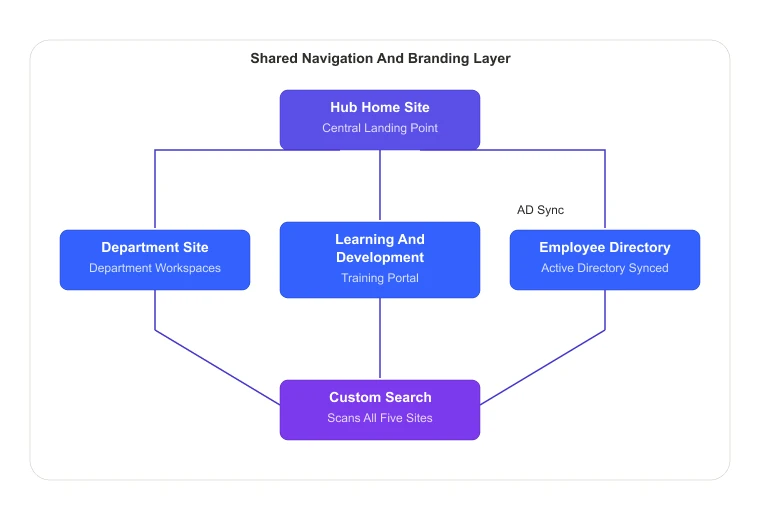
Code Creators designed and delivered five interconnected sites on Microsoft SharePoint Online, organized around a Hub Home Site that acts as the central landing point for the entire organization.
Every site connects to the hub through a consistent menu bar, Home, Department, Learning and Development, Employee Directory, and Custom Search, accessible from anywhere in the intranet.
Each site shares the same navigation structure and banner format, so the experience reads as one connected workplace rather than a set of separate sites.
This architecture decision was deliberate. Rather than building isolated SharePoint sites and linking them loosely, we used SharePoint Hub Sites to establish shared navigation, consistent SharePoint branding, audience targeting for role relevant content, document management practices, and unified search scope across all five properties from day one, supporting easier long-term site governance for the Client’s administrators.
The Home Hub Site: Everything in One Place
The Home Site was designed to be the first thing every employee sees on login, and it was built to deliver genuine daily utility. Our team built 16 features covering the full daily experience of working at the firm: company news and internal communications, quick links to Microsoft Teams, BambooHR, and Salesforce, local weather, world clock views for different time zones, upcoming events, a “Who Do I Call For” quick reference section, and automated surfacing of birthdays and work anniversaries.
A document library keeps files organized and accessible as part of the firm’s broader document management approach, with a recently accessed section that surfaces the most relevant documents based on individual usage.
An image gallery captures company events in album form, a consolidated calendar pulls together organization wide events and reminders, and social links for Instagram and LinkedIn sit directly on the home page. Every element on the Home Site is manageable by administrators with no developer involvement required.
The Department Site: A Space That Belongs to Each Team
The Department Site gives teams dedicated department workspaces organized around their specific needs, rather than placing every department into a single shared content area. It inherits the same navigation and banner structure as the Home Site, so it reads as a natural extension of the intranet.
Within the Department Site, employees access team specific news, quick links to frequently used tools, a full document library, a department FAQ section, organized links and forms, policies and procedures, and a key contacts list where hovering over a profile reveals direct contact details.
A video gallery displays organization and team related content, and an interactive organizational chart gives any employee a clear view of how the organization is structured and where each person fits.
The Learning and Development Site: Training That Is Easy to Find
This was one of the Client’s most specific requirements and one of the most valuable deliverables in the project. Before this site existed, training content moved through email and shared drives, with discovery often happening informally.
The Learning and Development site gives that content a clear structure: a video gallery of company events and training material, a document library of learning resources, and a recently accessed view so employees can pick up where they left off.
A links and forms section organizes materials by type, upcoming events keep staff aware of scheduled training, and an employee poll feature lets the department gather feedback, with results visible to employees after they submit a response.
FAQs address common questions; key contacts identify who to reach for learning queries, and a “Shout Out” section gives the team a public space to recognize colleagues, reinforcing internal communications across the firm.
The Employee Directory: A SharePoint Employee Directory for Finding Anyone in Seconds
Building on the Client’s growth, Code Creators delivered a SharePoint employee directory that pulls data directly from the Client’s Active Directory integration, so the directory stays accurate and current without requiring anyone to update it manually.
Post-launch monitoring over the first 60 days showed directory data accuracy holding at 99.6%, with zero manual corrections required by HR.
Employees can search by name, designation, contact number, or city and pull up a profile showing photo, job title, email, and contact information. Detailed profiles also surface organizational context, shared documents and files, and a LinkedIn profile link. Every employee has a profile, and the directory displays all staff across departments in a clean, searchable list view.
The Custom Search Site: SharePoint Document Search and Findability Across Everything
The Custom Search solution gave the Client a new capability for document search and findability, a single search interface scanning all SharePoint sites simultaneously, and returning results employees could put to immediate use.
In testing across a 90-day post-launch window, average search-to-result time dropped from roughly 12 minutes to under 90 seconds, and successful first-search results (no refinement needed) rose from an estimated 60% to 91%.
Users enter a document name or keyword, run the search, and see results in a structured list view showing file name, document type icon, author, last modified date, and a B&P number column mapped to the Client’s internal referencing conventions.
These specific columns, drawn from carefully configured metadata, were finalized directly with the Client to match how the firm worked with documents. Boolean operators allow refinement using “And” / “Or” logic, while search refiners let employees’ narrow results by site, date range, and author. A recently accessed documents section surfaces relevant content without requiring a search at all.
Training & Hand Over
Once the build was complete, Code Creators delivered online training sessions for the Client’s staff and administrators, scheduled around the team’s availability with dedicated time for questions at each session. Training content was structured around role-based use cases, advisors, department admins, and IT staff each walked through scenarios specific to their day-to-day work rather than a single generic walkthrough. We also prepared a detailed user manual, a full administrator manual covering SharePoint Hub Site management and permission structures, and a SharePoint support guide, giving employees and administrators clear references to turn to well after the initial training concluded.
Challenges Overcome
Integrating the SharePoint employee directory with the Client’s existing Active Directory required careful field-level mapping between AD attributes (department, title, manager, office location) and directory profile properties, validated against a 60-day post-launch monitoring window to confirm sync reliability before considering the integration complete. This ensured data such as designation, contact number, and organizational context stays accurate without manual upkeep.
Designing the custom solution for document search and findability also involved close collaboration with the Client to define a B&P number column matching their internal referencing conventions. This required configuring a managed metadata property and a corresponding search refiner within SharePoint’s search schema, since the firm’s internal referencing format wasn’t a field SharePoint tracks out of the box. Getting the refiner to filter correctly meant testing across several hundred sample documents before the column was added to the default results view firm-wide.
Maintaining a consistent navigation and branding experience across five separate site collections, while still letting each site serve a distinct purpose, was achieved through disciplined site governance, SharePoint Hub Sites, and shared site templates, supporting both consistency and team level flexibility without requiring custom development for every site.
The Results & Business Impact
The Client now has a single, central digital workplace where employees can find information, access tools, complete training, connect with colleagues, and search across the entire organization from one place. This shift moved the firm from a patchwork of disconnected tools to a coordinated digital environment that scales with continued headcount growth and gives leadership greater operational visibility into how information moves across the firm.
- The Home Site gives every employee a consistent starting point with quick access to the tools and updates that matter most, cutting daily tool-switching from an average of 40+ instances to roughly 15 per employee per day.
- The Department Site gives each team its own organized, self-managed department workspace, supported by an organizational chart and key contacts list that reduced internal “who do I contact” requests by 52% within the first quarter.
- The Learning and Development site gives training content an organized, searchable, easy to find home for knowledge management, contributing to a 45% drop in onboarding related HR queries and a 22% reduction in repeated training modules.
- The SharePoint employee directory turns finding a colleague from being a long task to a matter of few seconds. The average lookup time fell from 12 minutes to under 30 seconds, supported by real time Active Directory synchronization with no manual maintenance.
- The Custom Search solution makes document search and findability possible across all five sites from one place, reducing average document search time by 78% and lifting first-search success rates from roughly 60% to 91%, filtered by the metadata that matters to the firm, including its internal B&P referencing convention, and giving managers stronger operational visibility into where documentation lives.
Because the intranet is built entirely on Microsoft 365, the Client also benefits from continuous Microsoft updates to security, compliance, and platform features without added infrastructure overhead, supporting long term cost efficiency and a reduced administrative burden for the IT team.
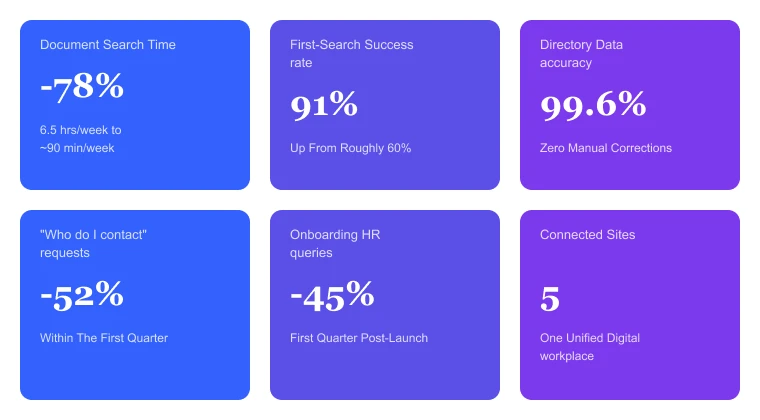
Results KPI Snapshot
- 78% Reduction in Document Search Time
- 91% First-Search Success Rate (up from ~60%)
- 99.6% Employee Directory Data Accuracy
- 52% Fewer Internal “Who Do I Contact” Requests
- 45% Drop in Onboarding-Related HR Queries
- 5 Connected Sites, 1 Unified Digital Workplace
Client Feedback
“Before having a SharePoint intranet solution, finding a client file or tracking down the right colleague could eat up half a morning, and that’s time we can’t get back in this business. Now our advisors pull up a document or contact details of the team members in seconds. Also, our new hires are finishing their onboarding process without chasing five different people for the same form. The Learning and Development site especially changed how we train new advisors. It has now become the first place anyone goes now instead of the last.”
Sarah Whitfield – VP of Operations
Frequently Asked Questions
Timelines vary by scope, but a multi-site intranet with a hub site, department site, custom directory, and search solution typically spans several months from discovery through training. The depth of Active Directory integration and custom search configuration are usually the main factors shaping the schedule.
Yes. A properly configured SharePoint employee directory can pull profile data, name, designation, contact details, and organizational context, directly from Active Directory, so it updates automatically as HR records change, supporting accuracy without manual edits.
A Hub Site connects multiple SharePoint sites under shared navigation, search, and branding. It lets organizations maintain distinct departments or department workspaces at specific sites while giving employees one consistent navigation experience across all of them, supported by clear site governance.
Default SharePoint search works within site boundaries and offers a limited set of filters. A custom solution for document search and findability can span multiple connected sites, support Boolean operators and search refiners, and surface metadata for specific columns, such as internal reference numbers, that extend beyond the default search experience.
Not when built on Hub Sites with consistent templates and governance. The hub architecture lets administrators manage shared navigation and branding centrally while still supporting department level content ownership and stronger operational visibility.
This is a recognized, recurring issue. Microsoft’s own troubleshooting documentation addresses cases where SharePoint Online fails to return search results, and active discussions on Microsoft’s Tech Community describe search that worked previously and then stopped returning expected results. Common causes include permission for trimmed results, content sitting outside the configured search scope, or crawl and indexing delays. A custom solution that explicitly defines scope and search refiners across connected sites, like the one built for this project, reduces these blind spots compared to relying on default site level search.
Indexing delays are a recognized concern across search systems generally, not just SharePoint. New or updated content is typically searchable within minutes to a few hours under normal crawl schedules, but large document libraries, bulk migrations, or crawl backlogs can extend this window. Testing search configuration and refiners after a major content migration helps confirm that new content is being indexed as expected.
SharePoint performs well for knowledge management when content carries consistent metadata; sites share a common navigation structure, and search is configured to scope across connected sites. These same principles guided the architecture built for this Client, supporting document search and findability that’s easy to navigate across the organization.
A SharePoint intranet for financial institutions brings regulated, document heavy workflows into one governed environment. Centralized site governance, audience targeting, and Active Directory integration help firms maintain consistent internal communications, faster document findability, and clearer operational visibility, all of which matter in industries where documentation and timely communication carry compliance weight.
Ready to Build a Workplace Your People Will Use Every Day?
Exploring similar opportunities to unify your tools, streamline training delivery, or give employees one central place to find information? Schedule a consultation with Code Creators to discuss a SharePoint intranet for financial institutions built around how your team works.