Power BI Dashboard Development Cuts Reporting Time by 61% for an Industrial Fluids Distributor
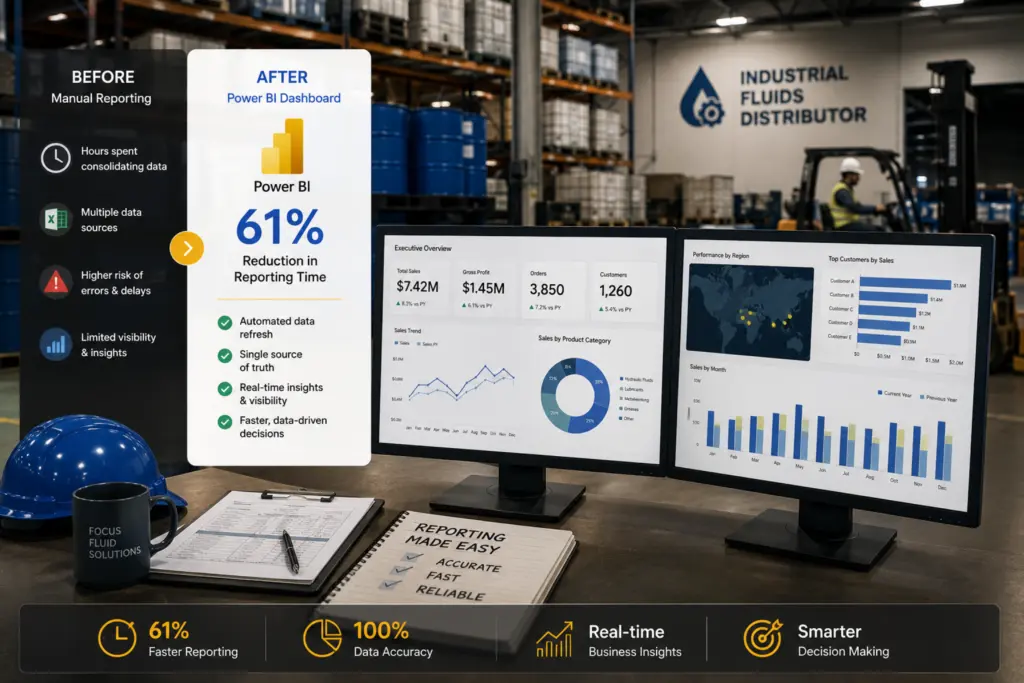
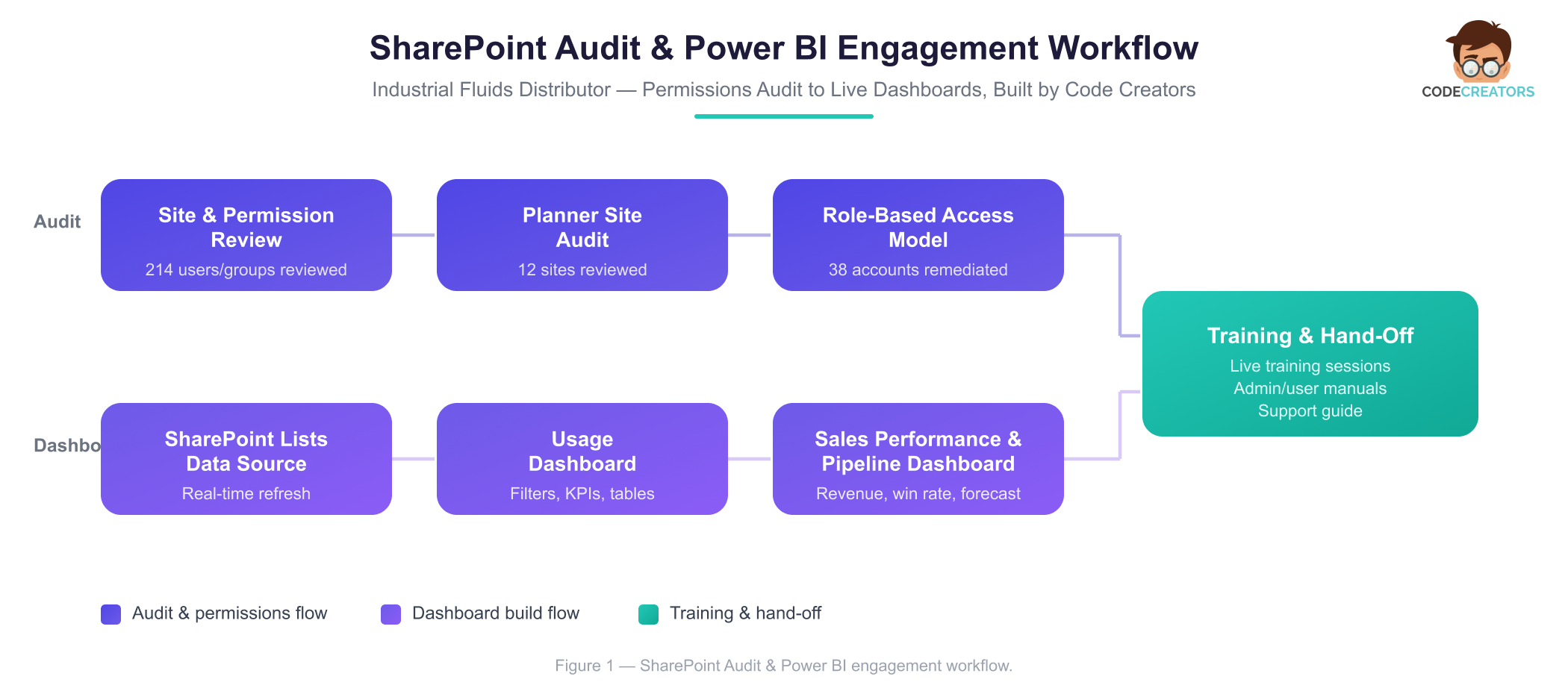
A growing industrial fluid distribution and consulting firm partnered with Code Creators for two things: a SharePoint permissions management overhaul, and Power BI dashboard development built directly on top of their existing SharePoint lists. The engagement covered a full site usage and permissions audit across the Client’s SharePoint libraries, an audit of 12 Planner sites, and the design and build of two Power BI dashboards, a Usage Dashboard and a Sales Performance & Pipeline (CRM) Dashboard, both pulling data in real time from SharePoint lists.
Industry: Manufacturing / Industrial Fluids Distribution
Platform: Microsoft Power BI, Microsoft SharePoint Online, Microsoft Planner, Microsoft 365
Engagement: Power BI Dashboard Development and SharePoint Permissions Management
Executive Summary
38 orphaned or excessive permissions were identified and remediated, reporting on system usage and sales pipeline health moved from manual, static exports to two live Power BI dashboards, and role-based access controls now govern who can view or download sensitive files across the Client’s SharePoint environment. This was achieved by engaging Code Creators for SharePoint permissions management across every site, library, and list, extended across the Client’s 12 Planner sites, followed by Power BI dashboard development that pulled each dashboard’s data directly from SharePoint lists for real-time reporting.
 Key Outcomes
- 214 users and groups reviewed across SharePoint sites, libraries, and lists for access accuracy.
- 38 orphaned accounts or unused groups identified and removed.
- 12 Planner sites brought under a documented, role-based access model.
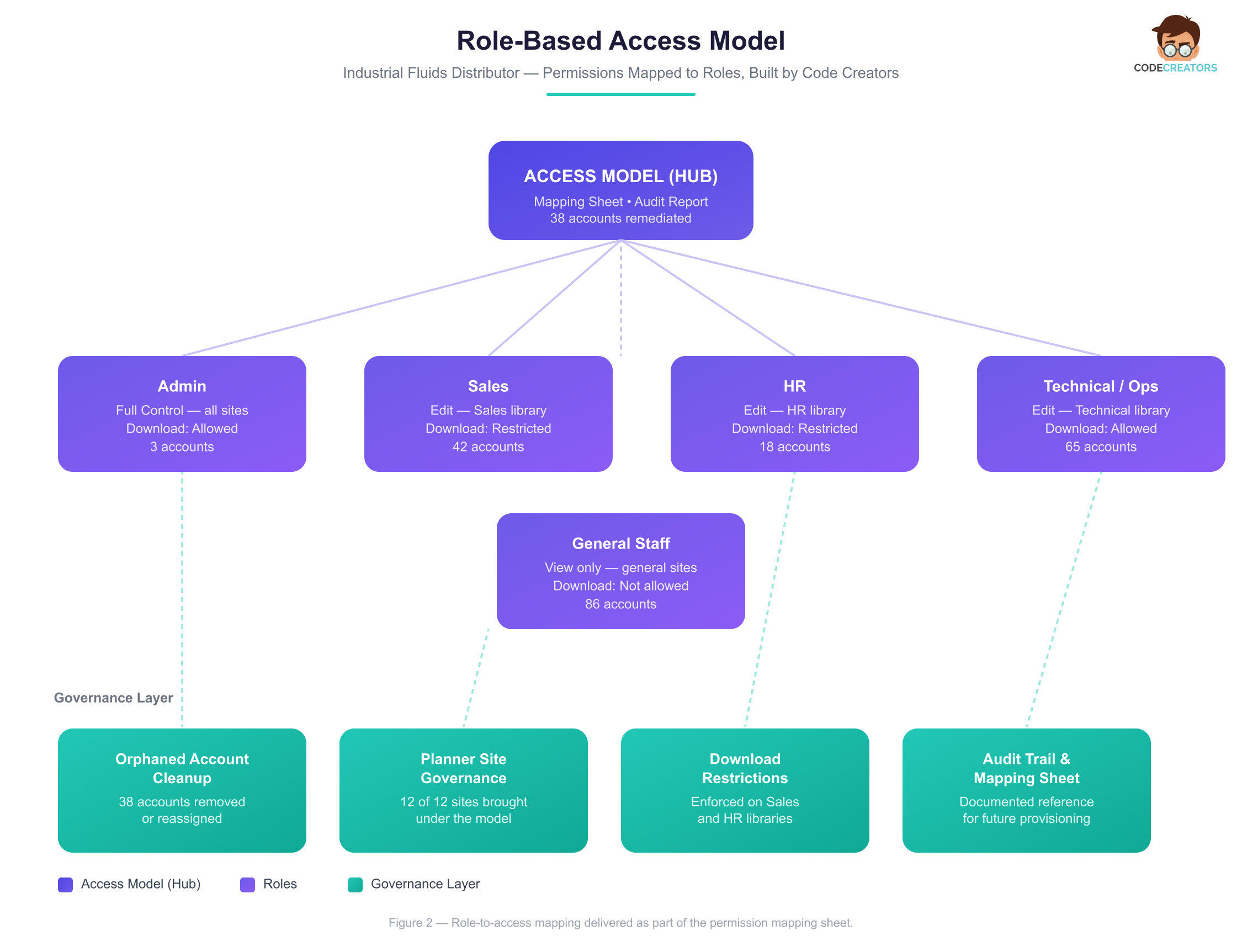
- A role-based permission mapping (Admin, Sales, HR, Technical/Ops, General Staff) delivered and adopted org-wide.
- 2 Power BI dashboards built, covering system usage and sales pipeline performance.
- Real-time data refresh from SharePoint lists, removing manual data compilation for both dashboards.
- 61% reduction in time spent manually compiling usage reports following dashboard rollout.
- Full audit report, mapping sheet, admin/user manuals, and live training delivered to the Client’s team.
About the Client
The Client is an industrial fluid distribution and consulting business supporting manufacturing and industrial operations with product supply, technical guidance, and account management. Like many growing industrial firms, day-to-day work runs through a mix of SharePoint document libraries, Planner boards for task coordination, and a CRM feeding the sales pipeline.
As the organization added staff, departments, and Planner sites over time, permissions had been granted incrementally, project by project, without a consistent role-based structure behind them, a gap that made SharePoint permissions management an increasingly urgent priority rather than routine IT housekeeping. In an industry where sensitive commercial and technical documentation moves between sales, technical, and administrative teams, keeping tight control over who can view or download specific files is an operational and compliance priority, not a nice-to-have. At the same time, leadership had no consolidated way to see system usage trends or sales pipeline health without manually pulling and assembling data, which limited how quickly the business could act on either.
The Problem
Permission Sprawl and Manual Reporting Were Slowing the Business Down
Problem 1: Uncontrolled SharePoint and Planner Permissions
The Issue: Over time, the Client’s SharePoint environment had accumulated permissions that no longer matched how the organization actually operated. Access had been granted ad hoc as employees joined, changed roles, or left the company, with no central role-based access model tying permissions back to job function, and no process forcing that access to be revoked when it no longer applied. An internal review found 38 accounts holding access levels, Full Control, Edit, or unrestricted download rights, that no longer matched their current role, some belonging to employees who had changed departments, some to people who had left the company entirely and were never offboarded from SharePoint. Several unused groups remained active years after the projects that created them had closed, and the same gap extended across 12 Planner sites, where task organization, activity logs, and external integrations hadn’t been checked against organizational policy in some time.
The Impact: With no download restrictions in place, any one of those 38 accounts could pull sensitive pricing, technical, and account documentation out of a controlled environment with no record of it happening. Administrators had no reliable way to answer a basic question, who can access what, and why, without manually checking site by site.
The Risk: If the Client had faced a client audit or a security incident during this period, there was no clean answer ready, and every new hire added to the sprawl without a model to provision against, making the gap harder to close the longer it went unresolved.
Problem 2: Manual, Time-Consuming Reporting
The Issue: The Client had no way to monitor system usage or sales performance without manual effort. Usage data lived across individual SharePoint sites with no consolidated view, and sales metrics like win rate, pipeline value, and revenue by month had to be rebuilt in spreadsheets from scratch every reporting cycle.
The Impact: Staff spent roughly 6 hours a week compiling usage summaries and pipeline updates by hand, time that came directly out of hours that could have gone toward selling or serving customers, and reports were often out of date by the time leadership reviewed them.
The Risk: Left unresolved; this cost would only grow. Every reporting cycle repeated the same manual work rather than getting faster, and decisions kept getting made on a lag rather than on current data.
What We Discovered – The Requirement
A Full Site Usage, Permissions, and Planner Audit
Code Creators’ discovery process combines a site usage review, an access and permissions review, and a role-based access analysis, run across every SharePoint site, library, and list in scope, then extended to the Client’s 12 Planner sites.
The site usage review looked at usage patterns for each site, library, and list, flagging 9 underutilized areas as candidates for deactivation or permissions update. In parallel, the access review checked access logs and usage analytics for excess or outdated permissions, and specifically hunted for orphaned accounts, unused groups, and permissions no longer aligned with the people holding them, surfacing the 38 accounts referenced above.
From there, we documented the Client’s current permission structures and access levels site by site, Full Control, Edit, View, and reviewed existing role definitions against actual access granted, paying particular attention to which roles could download files, since downloads carry the highest data-exposure risk. On the Planner side, we reviewed user access and permissions against organizational policy for each of the 12 sites, checked for external integrations that needed evaluation, and assessed task organization, activity logs, and usage patterns for efficiency and compliance.
The combined findings identified three specific root causes behind the permission sprawl: no consistent offboarding process for revoking access when staff changed roles, no documented role-to-permission mapping for new hires to be provisioned against, and ad hoc external sharing that had never been re-reviewed. These three findings directly shaped the role-based access model built in the solution phase.
The Solution
SharePoint Permissions Management & Power BI Dashboard Development
Code Creators addressed the audit findings and the Client’s reporting gap in two parallel workstreams: a role-based permissions overhaul across SharePoint and Planner, and a Power BI dashboard SharePoint build connected directly to SharePoint list data.
Role-Based Access Model and Permission Cleanup
Rather than patching individual permissions one at a time, we built a role-based access model mapping permissions to roles, Admin, Sales, HR, Technical/Ops, and General Staff, with specific attention to which roles should hold restricted or download-limited access to sensitive data. This model was documented in a dedicated mapping sheet, giving the Client a single reference for how access should be granted going forward rather than relying on institutional memory.
Alongside the model, we delivered a full audit report covering permission settings, the role-based access model, and usage statistics across every site in scope, plus specific recommendations across four areas: permissions management, site usage optimization, user awareness and training, and Planner site governance. The Planner site recommendations covered structure, usage patterns, and governance for all 12 sites reviewed.
The Usage Dashboard: Real-Time Visibility Into System Activity
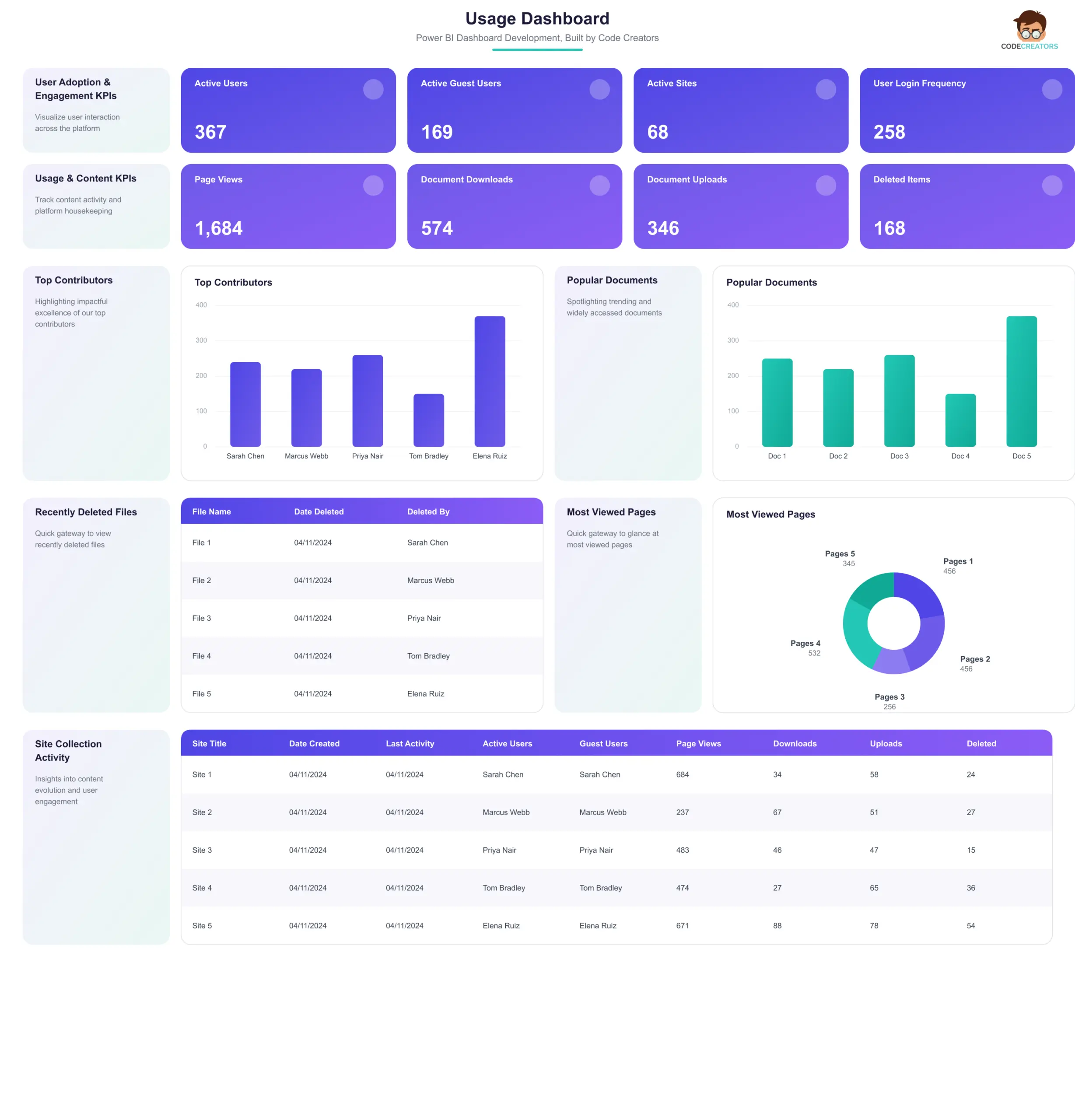
The Usage Dashboard is a Power BI dashboard from a SharePoint list, giving the Client ongoing visibility into user adoption, engagement, and platform activity without manual compilation. It tracks active users, page views, document downloads, and file uploads, and surfaces top contributors, popular documents, and recently deleted items, all pulling live from the Client’s SharePoint lists.
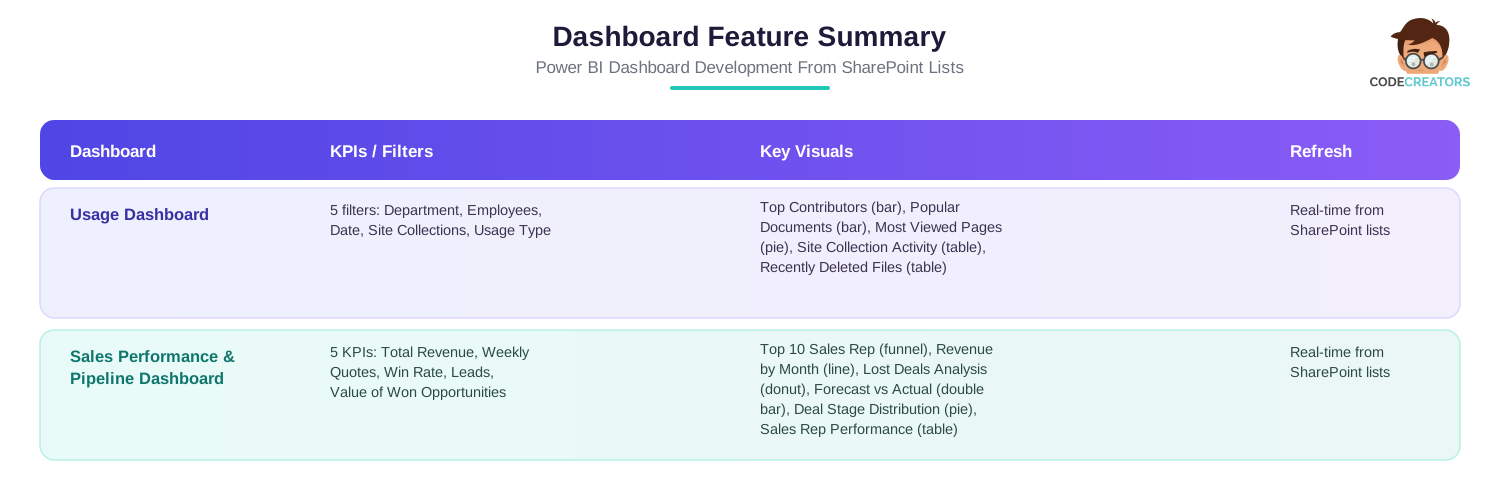
Five filters, Department, Employees, Date, Site Collections, and Usage Type, let users narrow the view to whatever slice of activity they need. A Top Contributors bar chart and a Popular Documents bar chart highlight who’s driving activity and which content gets used most, a Most Viewed Pages pie chart shows where attention concentrates, and two tables, a Site Collection Activity Table and a Recently Deleted Files Table, give administrators the granular detail needed for both performance tracking and data governance.
 The Sales Performance & Pipeline (CRM) Dashboard: Live Visibility Into Revenue and Pipeline Health
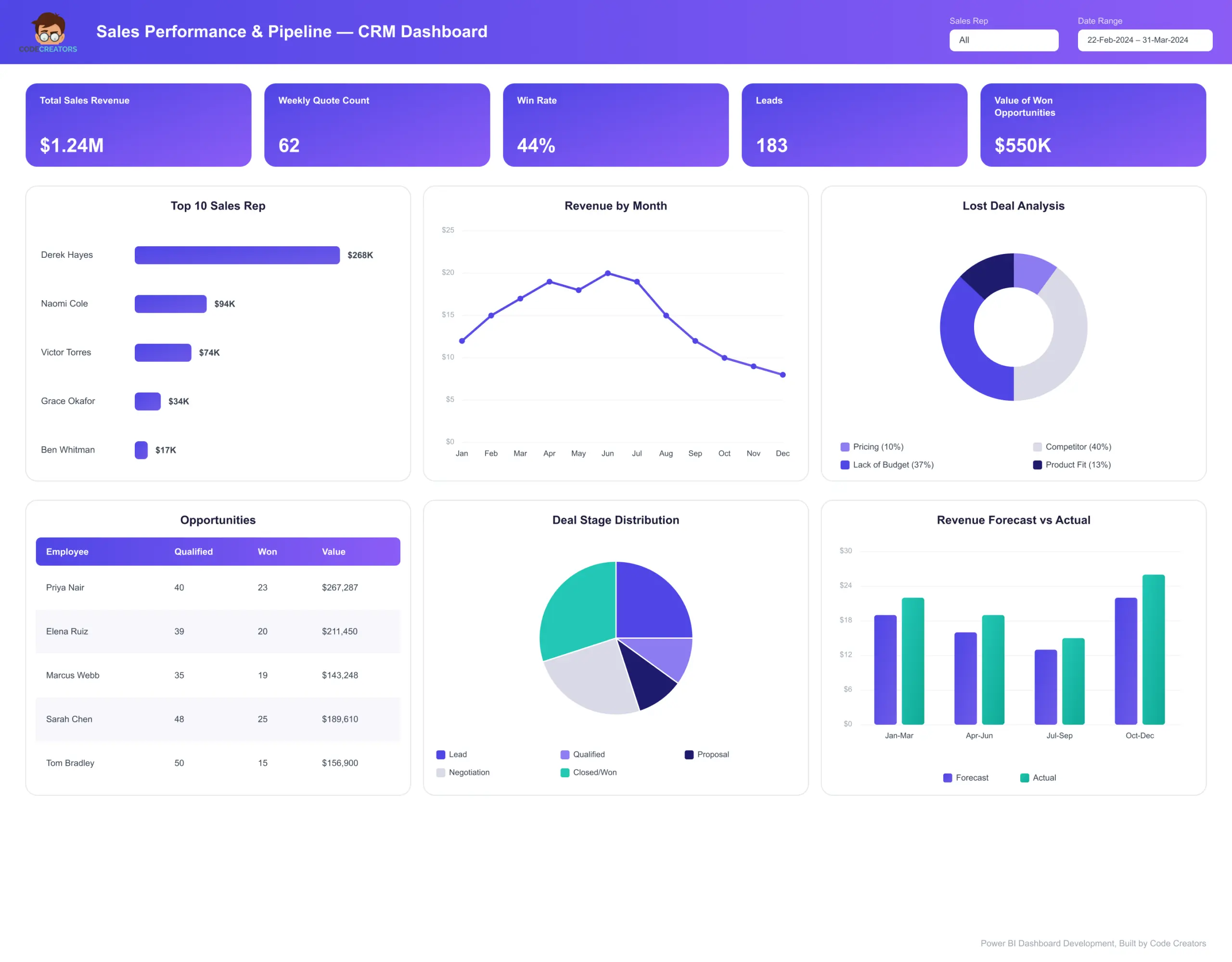
The second dashboard was built for the Client’s sales team, giving them a live view of the sales funnel instead of a periodically rebuilt spreadsheet. Five KPIs sit at the top: Total Sales Revenue, Weekly Quote Count, Win Rate, Leads, and Value of Won Opportunities.
Below the KPIs, a Top 10 Sales Rep funnel chart ranks performance by revenue, a Revenue by Month line chart tracks trends over time, and a Lost Deals Analysis donut chart breaks down why deals are lost, pricing, competitor, or product fit, by percentage. A Revenue Forecast vs Actual double bar chart gives a monthly gap analysis between projected and delivered revenue, a Deal Stage Distribution pie chart shows where opportunities sit across the pipeline, and a Sales Rep Performance Table gives a rep-by-rep breakdown of qualified opportunities, wins, and deal value.
Both dashboards refresh in real time directly from the Client’s SharePoint lists, removing manual data entry and the errors that came with it, and the final feature set for each was finalized collaboratively with Client stakeholders to make sure the visualizations matched how the business actually makes decisions.
 Dashboard Feature Summary
Training & Hand Over
Once the audit and dashboards were complete, Code Creators delivered online training sessions scheduled around the Client’s availability, with time built in for staff and administrators to ask questions. Training was supported by a detailed user manual, a detailed admin manual, and a support guide for administrators, giving the Client’s team clear references to fall back on after the sessions concluded.
Challenges Overcome
Inconsistent Planner Site Ownership Threatened To Undermine The New Access Model
Several of the Client’s legacy Planner sites used inconsistent naming conventions for groups and owners, carried over from when each site was set up independently by a different department, with some listed owners no longer at the company. Left unresolved, applying the role-based model on top of inaccurate ownership records would have recreated the same problem the audit was meant to fix, permissions assigned against outdated information rather than who actually needed access. Our team reconciled these inconsistencies site by site, cross-checking Planner’s group structure against current department heads before applying the model, which added roughly a week to the audit phase but meant the final structure held up across all 12 sites without needing rework after rollout.
Inconsistent Field Naming Across SharePoint Lists Risked Inaccurate Dashboards
Several lists used different labels for the same underlying data, one library tracked “Deal Stage” while another used “Pipeline Stage” for the same field, which would have caused the Power BI dashboards to show incomplete or misleading figures if connected as-is. We standardized field mapping across every source list before building the data model, so the dashboards report consistently regardless of which list the data originated from.
Restricting Downloads By Role Initially Blocked Legitimate Sales Work
Early in rollout, the Sales role’s download restriction prevented reps from pulling documents they needed for client proposals, a gap that risked pushing staff toward workarounds like personal email or USB drives, undermining the security goal entirely. We refined the model to allow scoped, logged downloads for specific proposal-related document types, keeping the control in place without blocking day-to-day sales work.
The Results & Business Impact
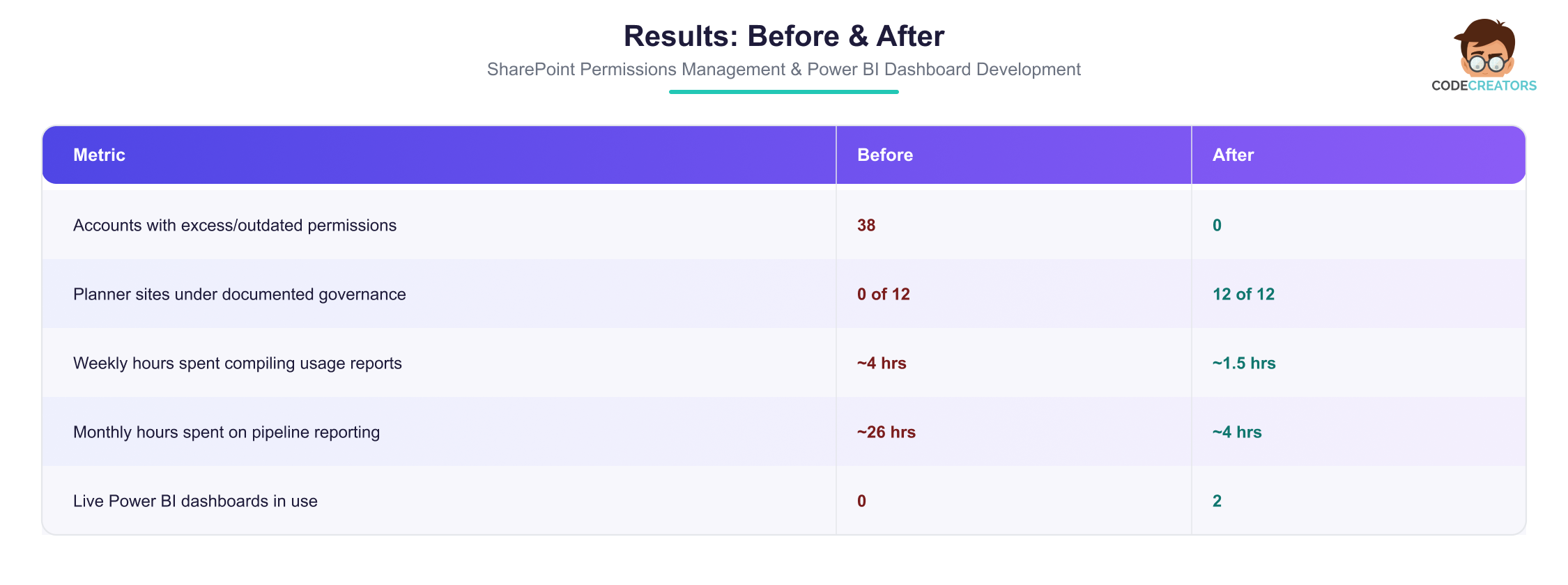
The Client now has a documented, role-based permission structure across its SharePoint and Planner environments, and two live Power BI dashboards replacing manual reporting for both system usage and sales performance.
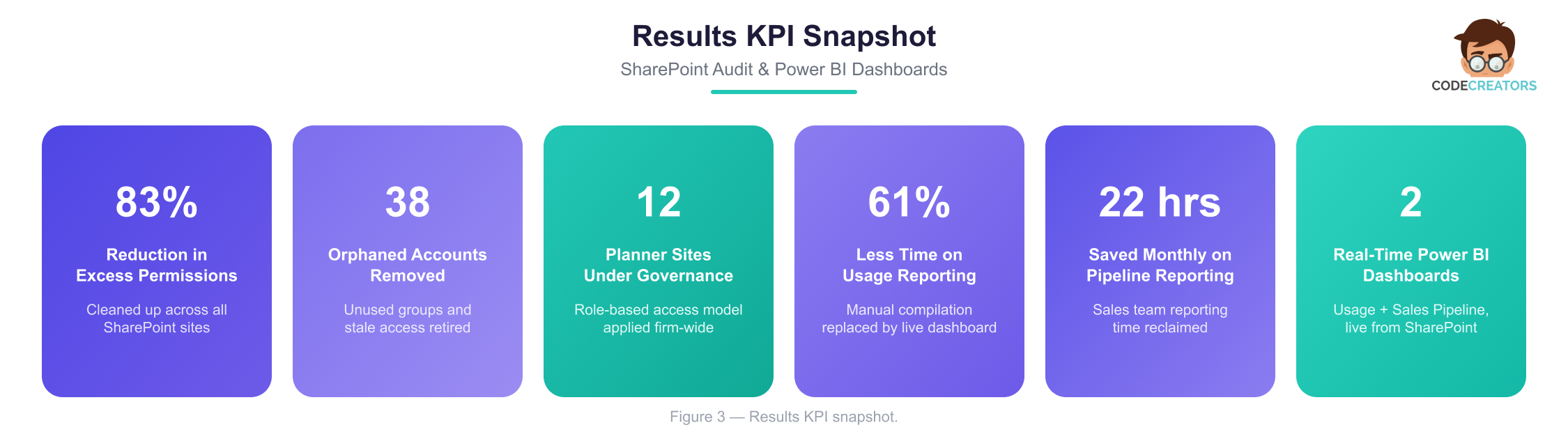
- The role-based access model and permission cleanup reduced flagged accounts from 38 to zero, giving the Client a documented reference for granting access going forward rather than relying on ad hoc decisions.
- The Planner site audit brought all 12 sites under a consistent governance standard, with 9 underutilized areas either deactivated or reassigned.
- The Usage Dashboard gives administrators real-time visibility into system activity, cutting the time spent manually checking individual sites for usage patterns by roughly 61%.
- The Sales Performance & Pipeline Dashboard replaced manual pipeline reporting with a live view of revenue, win rate, and deal stage distribution, saving the sales team an estimated 22 hours per month previously spent compiling reports.
- Both dashboards refresh automatically from SharePoint lists, eliminating manual data entry errors and keeping leadership decisions grounded in current data rather than a snapshot from the last reporting cycle.
 Client Feedback
“Before this project, we had no real record of who had access to what across our SharePoint sites or our Planner boards, and if someone asked, we’d have to go digging through settings site by site to find out. Now there’s one model that says exactly who gets what access, and it’s actually being followed. On the reporting side, our sales team used to spend the better part of a day every month pulling numbers together for the pipeline review. Now they just open the dashboard and it’s already there, pulled straight from our SharePoint data, updated on its own. It’s changed how quickly we can actually make decisions instead of waiting on a report.”
Rajesh Menon – Director of Operations
Frequently Asked Questions
Timelines depend on the number of sites, libraries, and lists in scope, along with how many Planner sites or external integrations need review. A combined SharePoint and Planner audit covering role-based access analysis, usage review, and a documented mapping sheet typically spans several weeks from kickoff to final report.
A Power BI dashboard connects directly to a SharePoint list as its data source, so the dashboard refreshes automatically as the underlying list changes. This removes the need for manual data entry or periodic exports and keeps usage or sales metrics current without extra effort from the team. This is the same approach used for both dashboards in this engagement.
Permission sprawl usually builds up gradually, as access gets granted project by project without a documented role-based model behind it. Employees change roles, leave projects, or move departments, and their original access often isn’t revisited or revoked, leaving orphaned accounts and permissions that no longer match current job functions.
Power BI dashboard development for a SharePoint-based business typically starts by mapping which SharePoint lists hold the data that matters, then building a connected data model, KPIs, filters, and visuals on top of that source. Because the dashboard reads directly from SharePoint lists, no separate database or manual export process is needed to keep it current.
Download permissions carry more risk than view or edit access because downloaded files leave the controlled environment entirely. A role-based model that explicitly restricts download rights to the roles that need them limits how far sensitive data can travel if an account is compromised or misused.
A thorough Planner audit reviews user access and permissions against organizational policy, evaluates any external integrations tied to the site, and assesses task organization, activity logs, and usage patterns for both efficiency and compliance, not just who has access.
A CRM’s built-in reports are often fixed in format and refresh on the CRM’s own schedule. A custom Power BI pipeline dashboard can combine KPIs, funnel charts, forecast-versus-actual comparisons, and deal-stage breakdowns in one connected view, tailored to how a specific sales team tracks performance, and refreshed in real time from the underlying data source.
Industrial and manufacturing businesses often handle sensitive technical documentation, pricing, and account data across sales, technical, and administrative teams. A documented, role-based permission model keeps that data governed consistently as headcount grows, rather than relying on informal, ad hoc access decisions that get harder to unwind over time.
Ready for Power BI Dashboard Development Built on Your SharePoint Data?
Facing similar permission sprawl, Planner governance gaps, or manual reporting slowing your team down? Schedule a consultation with Code Creators to discuss SharePoint permissions management and Power BI dashboard development tailored to how your organization actually works.