Microsoft 365 Copilot costs $30 per user, per month on top of a qualifying Microsoft 365 base license, while ChatGPT Enterprise runs roughly $45–$75/user/month (around $60 typical) with a 150-seat minimum but evaluating Microsoft 365 Copilot cost vs. ROI requires looking well past those headline numbers. At Code Creators, we help organizations evaluate, configure, and secure Microsoft enterprise environments.
In this guide, we break down the total financial commitment and operational value of native Microsoft AI versus standalone tools, giving you a clear path to evaluate your software investments.
Comparing Microsoft 365 Copilot Pricing and Standalone AI Options
To build an accurate budget, you need to first understand how software vendors charge for enterprise artificial intelligence. Licensing models vary significantly depending on whether you choose deeply integrated tools or independent web applications.
Understanding Microsoft 365 Copilot Pricing
Microsoft structures its enterprise AI assistant as an add-on subscription tied to an underlying Microsoft 365 base license.
- Enterprise add-on tier: Microsoft 365 Copilot pricing sits at $30 per user/month (billed annually) for organizations using Microsoft 365 E3, E5, Business Standard, or Business Premium plans.
- Base suite requirement: Because Copilot requires a qualifying base plan, your total seat cost equals your base subscription plus $30. For instance, pairing a Microsoft 365 E3 license ($36/user/month) with Copilot brings your total monthly outlay per seat to $66.
- Small business promotions: Microsoft offers scaled plans for smaller teams (under 300 users) starting between $18 and $21 per user/month, making entry costs lower for mid-market teams.
Comparing Embedded AI vs Standalone AI Tools
When evaluating embedded AI vs. standalone AI tools, the main operational difference centers on data context. Embedded AI operates directly inside Microsoft Word, Excel, PowerPoint, Outlook, and Teams. It accesses your live tenant data, including internal emails, SharePoint documents, and chat records, through Microsoft Graph security controls.
Standalone AI tools run outside your core productivity software. Employees access them via a separate web browser window or standalone application. To perform work tasks, users must manually copy data, paste text, upload corporate files, or build custom API integrations.
Evaluating Copilot vs ChatGPT Enterprise Cost
Many procurement departments directly compare Microsoft’s ecosystem against independent AI platforms like OpenAI’s ChatGPT Enterprise.
- ChatGPT Enterprise pricing: OpenAI doesn’t publish a list price for Enterprise, it’s quote-only. 2026 procurement reports converge on roughly $45–$75 per user/month, with $60 as a typical figure.
- Seat commitments: OpenAI enforces a reported 150-seat minimum with a mandatory annual contract and no month-to-month option. At the typical $60/user rate, that sets a floor near $108,000 per year.
- Cost difference: Comparing Copilot vs. ChatGPT Enterprise cost line by line, Microsoft 365 Copilot’s $30/user add-on is meaningfully lower than ChatGPT Enterprise’s typical $60/seat rate. However, ChatGPT Enterprise includes underlying infrastructure in its fee, whereas Copilot requires an active Microsoft 365 subscription on top of its own price.
If you’re weighing this decision for your own organization and want a real cost comparison based on your actual seat count and base licensing, that’s exactly the kind of analysis our Office 365 Development team runs before a client commits to either platform.
Calculating the Total Cost of Ownership Microsoft Copilot Requires
Focusing strictly on license stickers causes budget surprises. Establishing a true total cost of ownership for Microsoft Copilot requires accounting for supporting infrastructure, administration, and setup expenses.
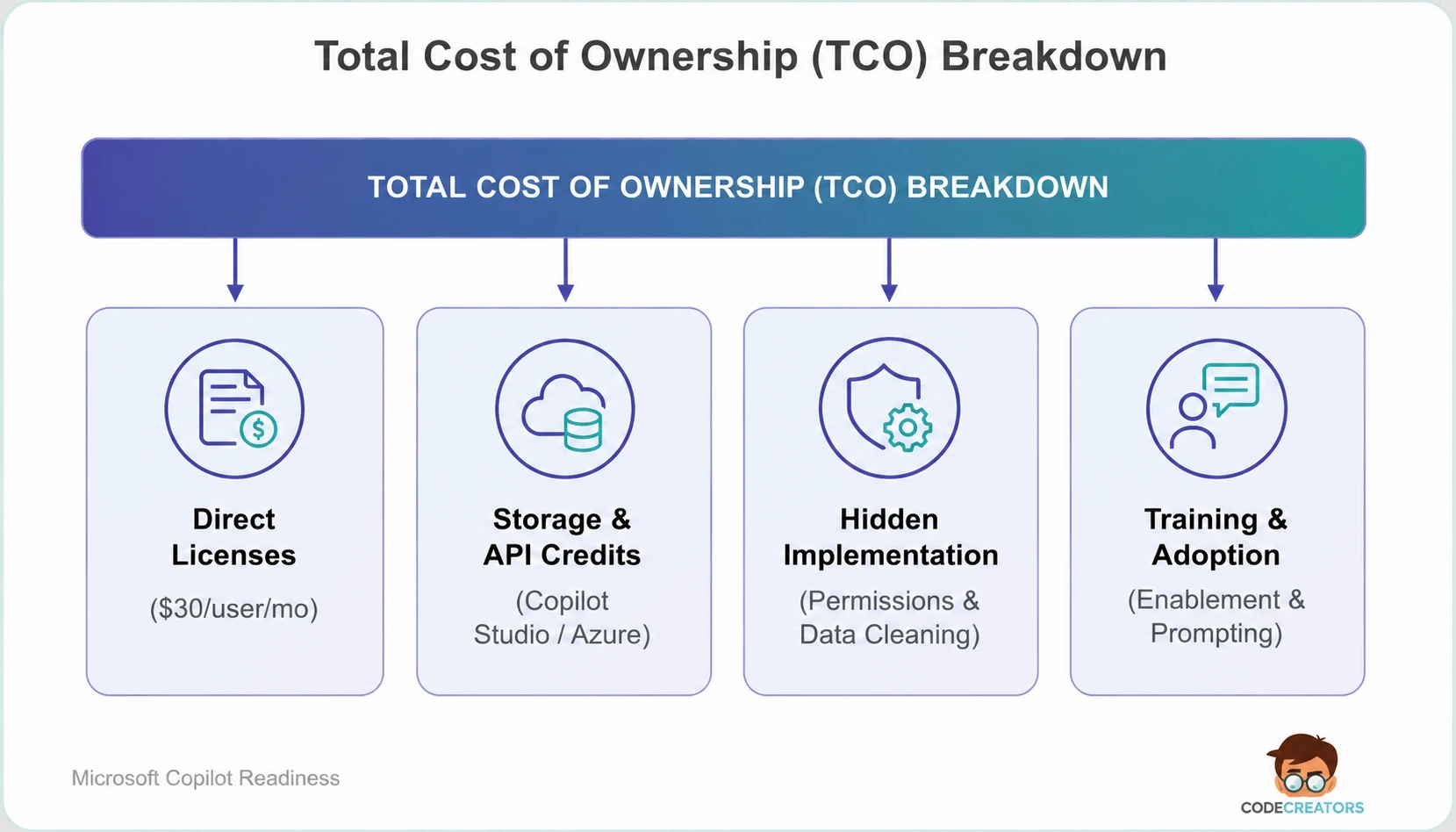
Direct vs Indirect Costs
Direct costs represent your monthly SaaS bills paid to Microsoft or third-party providers. Indirect costs include the labor hours your internal IT, security, and operations teams spend setting up, managing, and securing the system.
Identifying the Hidden Costs of Copilot Implementation
Deploying AI safely introduces behind-the-scenes expenses that many buyers overlook. Managing the hidden costs of Copilot implementation includes three critical components:
- Permission auditing and data cleaning. Copilot respects user access rights. If your internal SharePoint document libraries feature over-shared permissions, Copilot can reveal sensitive corporate files to non-authorized staff during chat queries. Fixing permission hierarchies and applying data loss prevention (DLP) labels requires dedicated IT time. In our own client rollouts, this cleanup step consistently takes longer than the licensing decision itself.
- Copilot Studio and custom extensions. Building autonomous workflows or connecting external databases to Copilot requires capacity in Microsoft Copilot Studio, priced through Copilot Credits. A prepaid capacity pack costs $200/month for 25,000 credits, or you can pay as you go at $0.01 per credit. Credit consumption varies significantly by feature, a simple scripted response can cost far less than a complex reasoning-based interaction, so estimate usage carefully before committing to a pack size.
- User enablement and training. Buying software licenses without teaching staff how to write effective prompts results in low usage. Allocating resources for internal workshops and training programs is essential for driving actual tool usage.
Measuring Enterprise AI Productivity Gains Across Workflows
Calculating financial returns requires measuring enterprise AI productivity gains in specific, day-to-day business actions rather than using abstract estimates.
Time Savings in Core Daily Operations
Knowledge workers waste hours each week on repetitive administrative tasks. Native AI tools target these routine tasks directly inside active work applications:
- Email and meeting management. Summarizing missed Teams meetings, catching up on lengthy email threads in Outlook, and drafting client replies saves knowledge workers an estimated 2 to 4 hours per week.
- Document and report creation. Generating initial draft proposals in Word from existing SharePoint project files reduces initial drafting times by 50%.
- Data analysis in Excel. Writing complex formulas, analyzing sales trends, and generating visual charts using natural language prompts cuts spreadsheet processing time significantly.
Reducing Context-Switching Costs
When employees use standalone web-based AI tools, they spend substantial time toggling between applications. An employee has to copy customer notes from Outlook, paste them into an external AI chat window, check for missing details, copy the summary response, and paste it back into an internal document.
Embedded AI removes this manual friction. Employees trigger AI assistance directly within the document or presentation they’re editing. Eliminating constant app switching keeps workers focused and protects corporate data from accidental exposure in public web forms.
Step-by-Step Microsoft 365 Copilot ROI Calculation
Determining your organization’s financial return requires comparing saved employee hours against total software expenditures. Evaluating Microsoft 365 Copilot cost vs. ROI becomes straightforward when you use a standardized mathematical model.
The Basic ROI Formula:
ROI (%) = ((Financial Value of Time Saved − Total AI Spend) / Total AI Spend) × 100
Practical Worked Example (100 Enterprise Users)
Consider a mid-market company deploying 100 Copilot licenses to full-time knowledge workers:
- License expense: 100 users × $30/month × 12 months = $36,000 per year.
- Implementation & setup: permission cleanup, governance, and training = $14,000 (one-time).
- Total Year 1 spend: $50,000.
Now calculate the value of recovered working hours:
- Average employee hourly cost: $50 per hour (including salary, benefits, and overhead).
- Average time saved: 2 hours per user, per week (100 hours per year per user).
- Total annual hours saved: 100 users × 100 hours = 10,000 hours saved.
- Gross financial value of time saved: 10,000 hours × $50/hour = $500,000.
Applying the ROI formula: ($500,000 − $50,000) / $50,000 × 100 = 900% ROI.
Even if users save only 30 minutes per week instead of 2 hours, the annual time value generated ($125,000) easily surpasses the initial $50,000 investment, yielding a positive financial return.
Running a Microsoft Copilot Readiness Assessment
Before purchasing software licenses for your entire workforce, conduct a structured Microsoft Copilot readiness assessment to ensure your technical environment and staff are fully prepared.
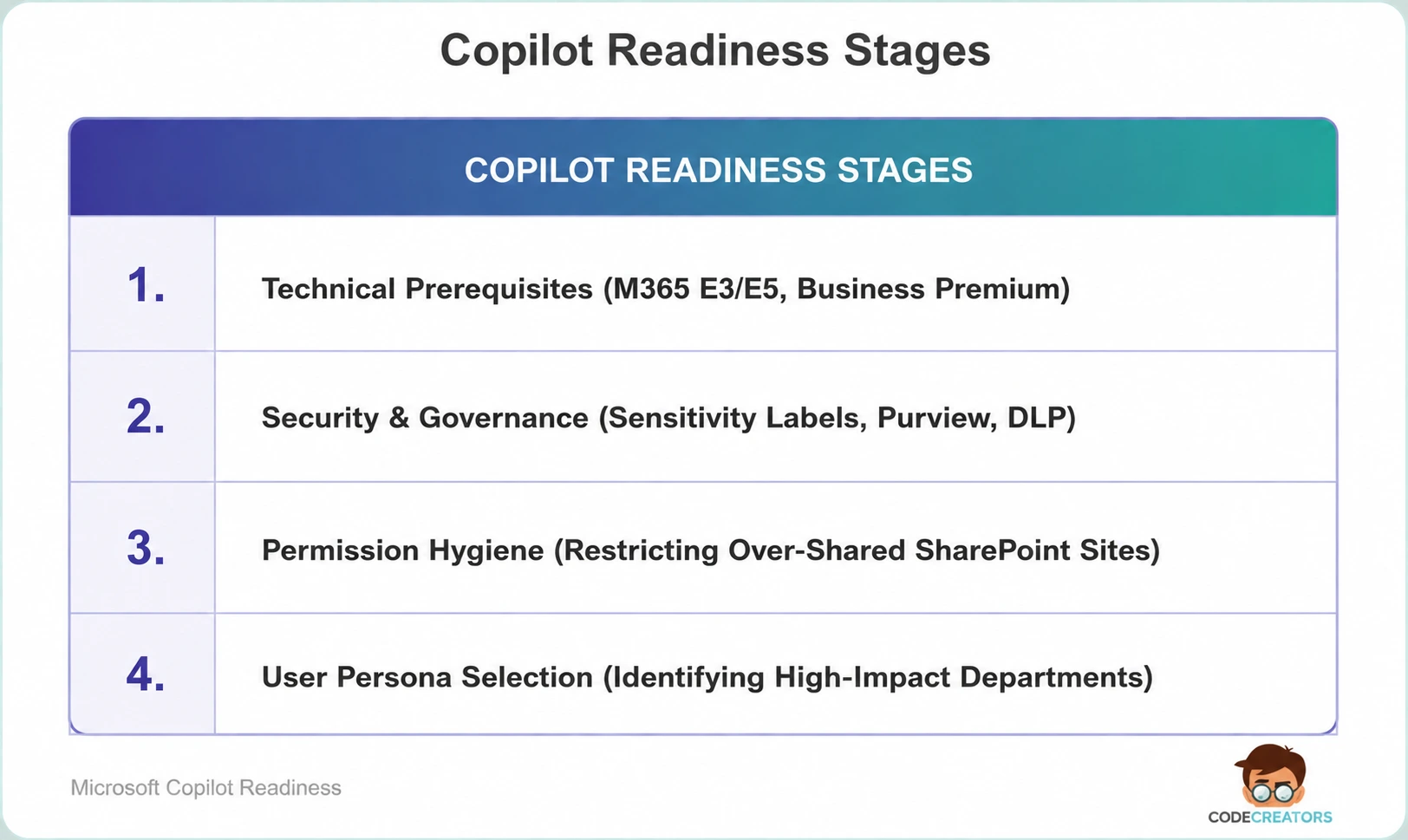
Essential readiness checklist:
- Verify base licensing. Ensure target users hold active licenses for Microsoft 365 E3, E5, Business Standard, or Business Premium.
- Clean up data permissions. Run access audits using Microsoft Purview to identify public SharePoint sites that contain confidential HR, financial, or legal files.
- Select high-impact user groups. Start deployment with roles that handle heavy text and data workloads, such as sales teams, marketing managers, IT help desk leads, and executive assistants.
- Define usage metrics. Track key performance indicators like weekly active usage, meeting recap generation counts, and self-reported hours saved.
Maximizing Your Microsoft AI Investment with Code Creators
Selecting, securing, and rolling out artificial intelligence platforms across an organization requires careful planning. Without proper security controls and adoption strategies, license costs can accumulate without delivering measurable operational value.
The expert engineers at Code Creators assist businesses through every stage of digital transformation. From performing readiness assessments and auditing SharePoint permissions to custom Power Platform integrations and end-user enablement, we help your organization achieve maximum productivity from its Microsoft cloud ecosystem.
Schedule a Consultation for Copilot Consulting Services at Code Creators to discuss your Microsoft 365 Copilot deployment roadmap and calculate the exact return on investment for your enterprise.