SharePoint costs start around $6 per user, per month as part of Microsoft 365 Business Basic, scaling up to $57/user/month for Microsoft 365 E5, but the license fee is only one line item in your real budget. In our SharePoint implementation work at Code Creators, the number we see clients underestimate almost every time isn’t the license cost, it’s storage overages and migration effort once real project data starts landing in the tenant.
This guide breaks down every line item: how Microsoft structures its subscriptions, where hidden expenses hide, and how to build a realistic implementation budget.
Understanding SharePoint Licensing Models
Microsoft delivers SharePoint through two primary deployment methods: SharePoint Online (cloud-hosted via SaaS) and SharePoint Server (hosted on-premises or on private cloud infrastructure). Most modern organizations choose SharePoint Online because it eliminates local server hardware upkeep, though each model features completely different pricing mechanics.
SharePoint Online (Per-User Subscriptions)
SharePoint Online uses a Software-as-a-Service model. You pay a recurring monthly fee for every user who needs access to your intranet, document repositories, or team sites.
Historically, Microsoft sold standalone SharePoint Online plans at $5/user/month (Plan 1) and $10/user/month (Plan 2). This is important to know if you’re budgeting today: Microsoft is retiring both standalone plans. No new sales are permitted after May 2026, existing agreements stop renewing after January 2027, and the plans fully retire by December 2029. If you’re planning a new deployment, you’ll be buying SharePoint bundled inside a Microsoft 365 suite rather than as a standalone product, which is the direction Microsoft has been pushing for a while, but it’s now effectively mandatory for new customers.
Microsoft 365 Business Bundles
Most companies rarely purchase standalone SharePoint licenses even historically. Instead, they buy broader Microsoft 365 suites that include SharePoint alongside Microsoft Teams, Exchange email, and Office applications. As of mid-2026, current list pricing is:
- Microsoft 365 Business Basic: $6.00 per user/month. Includes web-only versions of Word and Excel, Teams, Exchange email, and full SharePoint access.
- Microsoft 365 Business Standard: $12.50 per user/month. Includes everything in Basic plus full desktop installs of Office apps for up to 5 devices per user.
- Microsoft 365 Business Premium: $22.00 per user/month. Combines Business Standard with enterprise security tools, including Microsoft Intune device management and Entra ID Conditional Access.
Microsoft has flagged further price increases for some of these tiers effective July 1, 2026, so confirm current rates with your Microsoft partner before finalizing a budget rather than treating these as locked-in.
Enterprise Suites (For 300+ Users)
Organizations requiring larger seat scale or high-level regulatory compliance typically use Enterprise plans:
- Microsoft 365 E3: $36.00 per user/month. Delivers full enterprise security, data loss prevention (DLP), and advanced analytics capabilities.
- Microsoft 365 E5: $57.00 per user/month. Represents Microsoft’s top tier, bundling voice phone systems, advanced threat protection, and Power BI Pro licenses.
SharePoint Server (On-Premises Infrastructure)
If your organization operates under strict data residency laws, you may choose SharePoint Server 2019 or SharePoint Server Subscription Edition (SE). This approach doesn’t use a simple per-user cloud rate, and pricing varies enough by server count, CAL mix, and existing infrastructure that a real number requires a custom quote rather than a flat rate. Instead, you’ll need to budget for:
- Server licenses: a base software license for every running server instance.
- Client Access Licenses (CALs): standard CALs for basic intranet access, plus additional add-on CALs for enterprise search and workflows.
- Infrastructure & ops: ongoing costs for hardware provisioning, server backup systems, network cooling, electrical power, and specialized IT management personnel.
If your organization is weighing on-premises SharePoint for compliance reasons, that’s exactly the kind of scoping conversation worth having with our SharePoint Consulting Services team before you commit to server hardware, the total cost swings widely based on your existing infrastructure.
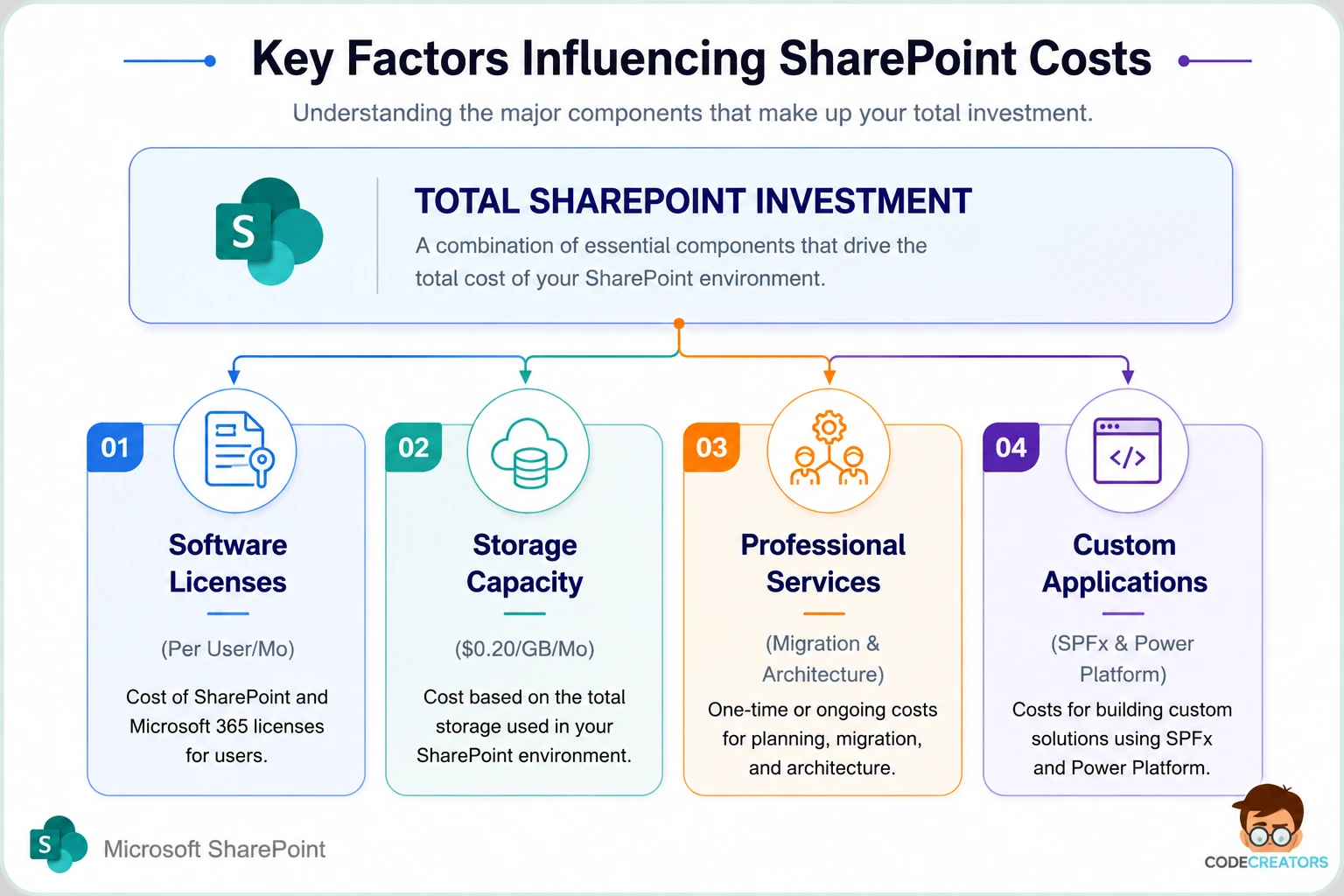
Key Factors Influencing SharePoint Costs
Looking strictly at license tags will skew your budget estimates. Real-world SharePoint investments depend heavily on five functional implementation pillars.
Storage Overages
Microsoft grants your tenant a base SharePoint storage pool: 1 TB per organization, plus 10 GB for every licensed user. If a 100-user company generates substantial media files, CAD drawings, or historical project archives, they’ll quickly consume their default 2 TB limit. Microsoft charges $0.20 per GB per month for extra cloud storage above your pool limit.
- 1 extra terabyte (TB): costs $200 per month, adding $2,400 per year directly to your subscription bill.
This is one of the most common surprises we see in client budgets, a tenant that looked comfortably within its storage pool at go-live can outgrow it within a year once departments start uploading video, CAD files, or full project archives. To minimize these recurring fees, enterprise teams often use Microsoft 365 Archive (priced around $0.05/GB/month) or move legacy files to cold storage.
Architecture Design and Governance
A fresh SharePoint environment requires careful structural design. Setting up site hierarchies, hub sites, metadata columns, permission inheritance models, and content types demands expert information architecture. Without deliberate planning, document repositories quickly turn into unsearchable data dumping grounds, this is consistently the difference we see between intranets that get adopted and ones that quietly die within six months.
Data Migration Complexity
Moving historical company documents from local network file shares (like N: or Z: drives), Google Drive, or legacy on-premises SharePoint servers into SharePoint Online is a significant cost driver. Data migration costs depend on:
- Total volume of unorganized data.
- Data cleansing, deduplication, and file re-naming requirements.
- Metadata tagging and retention label applications.
- Specialized migration software tool licensing (e.g., ShareGate or AvePoint).
If your organization is sitting on years of unorganized file shares and isn’t sure what a realistic migration budget looks like, our SharePoint Consulting Services team can scope that before you commit to a timeline, migration complexity is consistently the single hardest implementation cost to estimate without actually looking at the source data first.
Customization and Automation
Out-of-the-box SharePoint intranet sites look functional, but most enterprises need custom branding, dedicated web parts, automated approval routing, and integrations with line-of-business applications. Building custom business apps using the SharePoint Framework (SPFx), Power Apps, and Power Automate requires skilled development effort that adds to the initial implementation budget.
User Adoption and Ongoing Support
Software adoption succeeds only when staff members actually use the platform. Training end users, authoring internal site-owner guidelines, and maintaining governance policies require dedicated resources. Most mid-market and enterprise teams partner with external Microsoft experts for administration, permission troubleshooting, and continuous site updates.
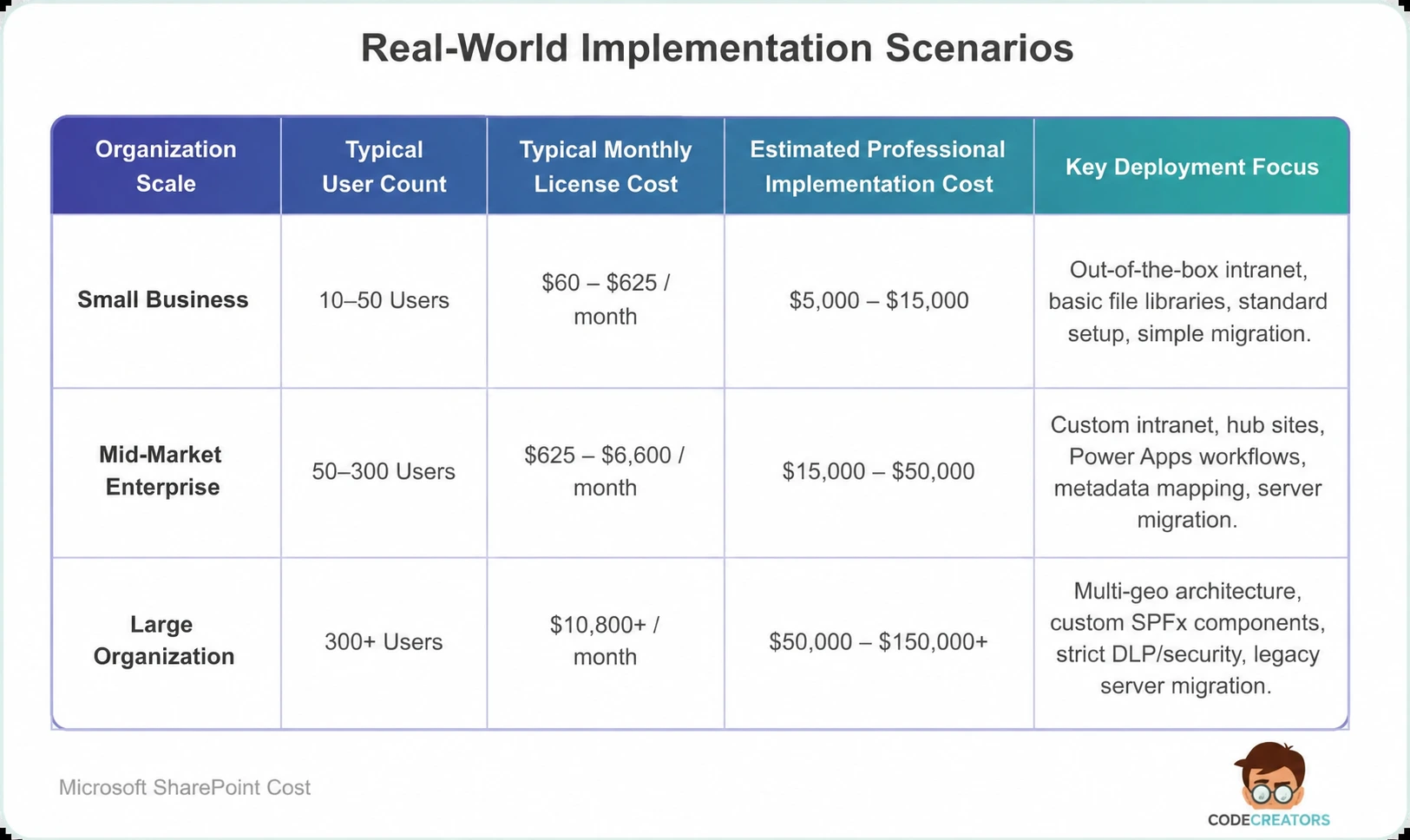
Real-World Implementation Scenarios
To help you forecast your total financial outlay, the breakdown below illustrates what small, medium, and large organizations typically invest when deploying SharePoint Online alongside professional consulting support.
 How to Optimize Your Cloud Storage and Licensing Expenses
You can prevent budget bloat by following strategic cost-management steps:
- Conduct regular license audits. Remove licenses from inactive employees immediately. Assign read-only or low-cost licenses to deskless team members who only view internal announcements.
- Archive stale data. Move inactive project files and historical archives out of active SharePoint document libraries. Using cold cloud storage tiers or Microsoft 365 Archive reduces your long-term storage bill significantly.
- Establish enforced governance. Set strict document retention policies, site creation limits, and version history thresholds. Unrestricted version histories can multiply single-file storage consumption by dozens of times.
- Leverage standard out-of-the-box features first. Build your initial intranet using native Microsoft 365 web parts before paying for custom SPFx code development.
Optimize Your SharePoint Investment with Code Creators
Navigating cloud license tiers, structuring secure intranet architectures, and migrating corporate data without business disruption requires experienced technical guidance.
At Code Creators, our certified Microsoft SharePoint specialists help enterprise teams design scalable intranets, automate complex business workflows, and optimize cloud license allocations. Whether you need an initial architectural review, custom Power Platform development, or a complete cloud migration strategy, our team delivers transparent planning tailored to your operational budget.
Schedule a Consultation with our SharePoint Consulting Services at Code Creators to get a detailed SharePoint implementation quote and turn your document management vision into a high-performing digital workplace.