Sales managers often end up chasing representatives for pipeline updates because entering and updating information in the CRM takes too many steps. Opportunities remain in the wrong stage, meeting notes stay in Outlook, and forecasts are built from records that no longer reflect what is actually happening. When that becomes routine, leadership loses confidence in the reports coming from the system. In many cases, the problem starts with a mismatch between the CRM and the way your business already operates. Salesforce gives sales teams a dedicated CRM environment and access to a broad application ecosystem, but it may add more integration work when most of your systems already come from Microsoft. Dynamics 365 connects more closely with Outlook, Teams, Power BI, and other Microsoft tools, although teams moving from Salesforce may need time to get used to a different way of working.
That difference also explains why the decision rarely rests with one department. Sales usually looks at ease of use, IT focuses on security and control, while leadership pays closer attention to reporting accuracy, licensing, and long-term costs. The challenge is finding the platform that meets those priorities without creating more work elsewhere.
From our work with CRM and Microsoft business applications at Code Creators, we have seen that the right choice becomes clearer when both platforms are compared against the systems, skills, and sales processes already in place.
In this article, we will compare Microsoft Dynamics 365 vs Salesforce across usability, integrations, customization, AI, reporting, and implementation so you can determine which CRM is right for your organization.
Dynamics 365 vs Salesforce: Key Differences
Microsoft Dynamics 365 Sales and Salesforce Sales Cloud both help teams manage leads, accounts, contacts, opportunities, forecasts, activities, and customer records. What separates them is how each platform works with the tools and systems already used across your business.
Dynamics 365 connects closely with Microsoft 365, Outlook, Teams, Power BI, Power Apps, Power Automate, Azure, and other Dynamics applications. Salesforce keeps CRM work inside its own environment while giving you access to a broad range of sales, service, marketing, analytics, and industry products.
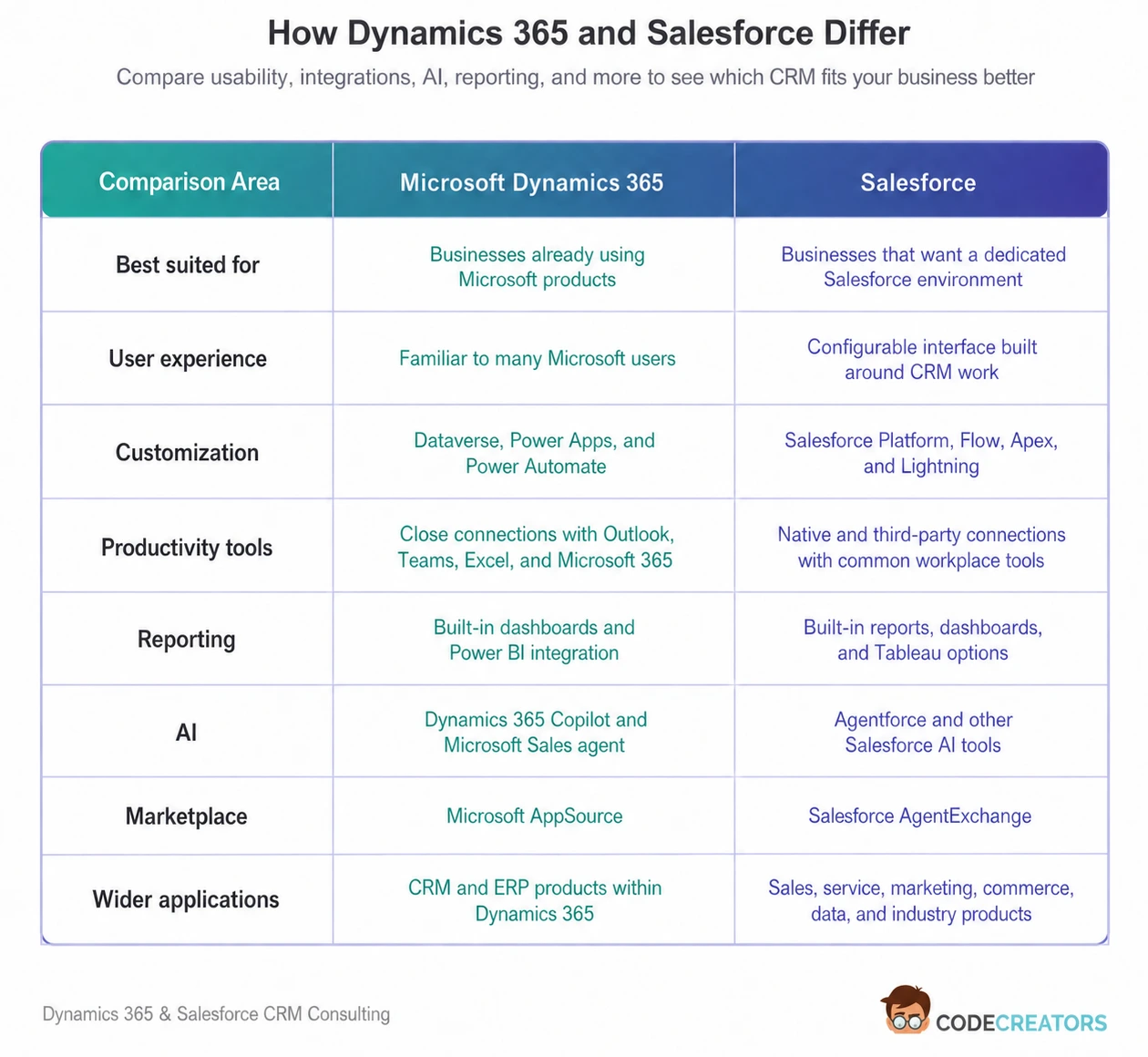
The comparison below shows how the two platforms differ in usability, integrations, customization, reporting, AI, and the wider tools available around each CRM.
Is Dynamics 365 or Salesforce Easier to Use?
Ease of use often depends on what your employees already know.
Dynamics 365 may require less adjustment for teams that spend much of their day in Outlook, Excel, Teams, and other Microsoft applications. Its forms, views, commands, and menus follow patterns that many Microsoft users will recognize. Supported Microsoft 365 integrations also allow employees to handle some CRM work without treating Dynamics 365 as a completely separate system.
That familiarity does not guarantee a simple experience, though. Dynamics 365 can become crowded when a business adds too many fields, dashboards, applications, and process stages. Your sales representatives should not have to work through information that only managers or administrators need.
Salesforce offers a more self-contained CRM experience through its Lightning interface. Users can manage leads, contacts, accounts, opportunities, tasks, and dashboards in one place. You can also adjust pages and navigation for different roles.
New users still need to learn Salesforce terminology and understand how its records connect. However, teams that want one dedicated system for sales may find its structure easier to follow.
In practice, Dynamics 365 often feels more natural inside a Microsoft-based workplace, while Salesforce may feel more straightforward when you want the CRM to stand at the center of your sales technology.
How Do Salesforce and Dynamics 365 Integrations Compare?
In the Salesforce vs Dynamics comparison, the integration decision usually comes down to two questions: which systems do you already use, and how much information needs to move between them?
Dynamics 365 has a clear advantage if your company relies heavily on Microsoft products. Sales teams can work with customer emails in Outlook, use supported Teams chat, calling, and meeting features, automate routine actions through Power Automate, and study sales data in Power BI.
Microsoft has discontinued the older feature that linked Dynamics 365 records directly to Teams channels. Other Teams integrations remain available, but you should check the exact collaboration functions your team plans to use instead of relying on older product descriptions.
Dynamics 365 also connects with Microsoft applications for customer service, field service, finance, supply chain management, and project operations. If you use several of these products, sales information can sit closer to the financial and operational data connected with the same customer.
Salesforce takes a broader marketplace-led approach. It supports APIs, native connectors, AgentExchange, and MuleSoft integration products. AgentExchange, previously known as AppExchange, includes Salesforce and Slack apps, partner solutions, AI agents, and industry-specific tools.
This gives Salesforce an advantage when your business needs a wide choice of specialist CRM extensions. Dynamics 365 usually makes more sense when direct connections with Microsoft products will reduce the need for additional integration work.
Which CRM Offers More Customization Options?
Both systems allow you to change how the CRM stores information, guides users, and handles routine work. The difference lies in the tools used to make those changes.
Dynamics 365 runs on Microsoft Dataverse. Companies can create custom tables, fields, forms, views, dashboards, security roles, business rules, and process flows. You can also use Power Apps to build related business applications and Power Automate to create approvals, alerts, data updates, and workflows between systems.
In practice, businesses often extend the same environment beyond sales to support customer onboarding, inspection forms, partner requests, and internal approvals. This can be useful when the CRM needs to support work outside the sales department.
Salesforce offers similar flexibility through custom objects, fields, page layouts, validation rules, permission sets, and Salesforce Flow. More advanced requirements may involve Apex code, Lightning Web Components, or Salesforce APIs.
Salesforce also has a large community of trained administrators, developers, architects, and implementation partners. However, access to more customization options does not always lead to a better CRM. Too many custom fields, rules, and automations can make either platform difficult to maintain.
Before building anything, you should remove unnecessary steps from the sales process. Recreating a slow or outdated process inside a new CRM only makes the same problem more expensive.
Dynamics 365 Copilot vs Salesforce Agentforce
Microsoft and Salesforce both use AI to support sales work, but their tools are structured differently.
Copilot in Dynamics 365 Sales can summarize leads and opportunities, show recent changes, help sellers prepare for meetings, provide account details, and answer questions about CRM records. These capabilities work within the Dynamics 365 Sales application.
Microsoft Sales agent is a separate product experience. It brings CRM information and sales insights into Outlook and Teams and can connect with either Dynamics 365 Sales or Salesforce Sales Cloud. You should therefore not confuse it with the Copilot features built directly into Dynamics 365.
Salesforce provides Agentforce for creating AI agents that can support employees, communicate with prospects, update information, carry out actions, and automate selected sales tasks. What an agent can do depends on the Salesforce product, edition, setup, permissions, and pricing plan you choose.
Agentforce also does not have one standard pricing structure. Salesforce offers usage-based options, including Flex Credits and Conversations, alongside per-user licensing for some products. If you plan to use AI at scale, those costs should be calculated separately from the main Sales Cloud license.
AI can make routine work faster, but it cannot repair poor CRM data. Duplicate contacts, incomplete opportunities, unclear ownership, and inconsistent sales stages will weaken the output you receive from both Copilot and Agentforce.
Which CRM Has Better Reporting?
Both platforms provide reports and dashboards, although they suit different reporting environments.
Dynamics 365 includes charts, views, forecasts, dashboards, and sales reports. Its connection with Power BI becomes especially useful when you need to study sales information alongside finance, service, operations, or data from outside the CRM.
We have also seen reporting become more useful when pipeline value is reviewed alongside invoices, customer profitability, service history, product performance, and regional results. This makes Dynamics 365 a practical choice if your business already uses Power BI for company-wide reporting.
Salesforce includes reports and dashboards for opportunities, forecasts, sales activities, conversion rates, pipeline stages, and team results. Users can group, filter, and summarize CRM records without moving to a separate reporting tool.
For more advanced analysis, you can add products such as Data Cloud and separately licensed Tableau tools. The available features and total cost depend on the editions selected.
Salesforce may offer a more complete reporting experience within the CRM itself. Dynamics 365 may be the better option when your sales reports need to include data from Microsoft applications or ERP systems.
Is Salesforce or Dynamics 365 Easier to Implement?
A basic version of either CRM can be launched relatively quickly when your sales process is clear and the existing data is clean.
Salesforce can suit a standard sales setup with defined opportunity stages, user roles, permissions, and reports. The work grows more demanding when your project includes custom objects, several integrations, complex automation, industry products, or detailed security requirements.
Dynamics 365 also supports a phased rollout. However, a Microsoft-based implementation may require decisions about Dataverse environments, Microsoft 365 identities, Power Platform governance, Power BI, Azure connections, and existing Dynamics applications.
For that reason, implementation difficulty depends more on your project than the brand. Before configuring either CRM, the business should agree on sales stages, required customer information, reporting needs, permissions, approval steps, integrations, and record ownership.
Without that groundwork, even a well-known CRM can turn into an expensive system that employees rarely keep updated.
When Does Microsoft Dynamics 365 Make More Sense?
Dynamics 365 is usually the stronger option when Outlook, Teams, Excel, Power BI, Azure, or other Microsoft products already play an important role in your business.
It is also well suited to companies that want sales to connect with customer service, finance, field service, supply chain, or project operations. Power Apps and Power Automate add further value when your teams need to build related applications or automate work around CRM records.
When Is Salesforce the Better Choice?
Salesforce may be a better match when you want the CRM to remain the main platform for sales and customer-facing work.
It is also worth considering when your business needs Salesforce-specific products, a large choice of industry solutions, extensive custom development, or access to a broad network of Salesforce partners and specialists.
Is Dynamics 365 the Same as Salesforce?
No. Microsoft Dynamics 365 and Salesforce are competing CRM platforms created by different companies.
Both help you manage leads, customer records, opportunities, forecasts, sales activities, automation, service interactions, and reports. However, they use different technologies and connect with different product families.
Dynamics 365 works closely with Microsoft 365, Power Platform, Azure, Power BI, and Microsoft ERP applications. Salesforce connects Sales Cloud with products such as Service Cloud, Data Cloud, Agentforce, Tableau, Slack, and AgentExchange. It is also one of the best-known Dynamics 365 competitors and one of the main Microsoft Dynamics 365 competitors in the CRM market.
Salesforce is therefore one of the leading Microsoft Dynamics CRM competitors, but it is not the same product and does not follow the same licensing, development, integration, AI, or reporting model.
How Code Creators Helps You Make the Right CRM Choice
Choosing between Dynamics 365 and Salesforce becomes easier when you stop comparing them as standalone products and look at where each one will sit inside your business.
Code Creators compares both platforms against the systems you already use, the reports your teams depend on, and the amount of integration and customization each option will require. That helps you see whether Dynamics 365 will work more smoothly with your Microsoft setup or Salesforce will give you more control over how the CRM is built and managed.
Still comparing Dynamics 365 and Salesforce? Talk to us about your current setup we’ll help you identify which platform fits your sales process and existing systems.
Conclusion
Dynamics 365 and Salesforce both handle the main CRM tasks, but they work best in different setups. Dynamics 365 usually feels more natural when Outlook, Teams, Power BI, Azure, and other Microsoft tools are already part of your business. Salesforce is often the better choice when you want sales to run inside a dedicated CRM and need more Salesforce-specific customization, industry tools, and partner solutions.
The amount of work after launch also matters. Dynamics 365 can reduce some of the extra connections needed in a Microsoft environment, while Salesforce gives you more room to shape the CRM around detailed sales processes. The total cost can rise quickly once storage, AI, reporting, support, integrations, and admin are added.
Before deciding, follow one real opportunity from the first inquiry to the final forecast. Check where the information is entered, who updates it, which teams use it, and how it reaches reporting, service, or finance. The better option is the one that keeps that process easier to follow without adding extra systems, duplicate updates, or unnecessary admin work.
Ready to move forward? Book a consultation to discuss your CRM requirements and get a clear recommendation before you invest in either platform.