How a Copilot Governance Framework Turned Unused Licenses into 92% Weekly Adoption for a Biotech Company

The client partnered with Code Creators on a phased, governance-first rollout of Microsoft 365 Copilot, enabling AI-assisted productivity across Research, Clinical, Regulatory, Finance, and Leadership teams while staying aligned with the organization’s existing data sensitivity framework and access controls.
Executive Summary
The client, a clinical-stage biotechnology company, had already procured Microsoft 365 Copilot licenses and defined a data sensitivity framework (a Red/Yellow/Green classification model), but hadn’t yet turned that foundation into a controlled, working rollout. Code Creators was engaged to build a Copilot governance framework around that foundation: validating Copilot readiness, configuring and activating Copilot across core Microsoft 365 applications, and enabling persona-based use cases across Research, Clinical, Regulatory, Finance, and Leadership functions, followed by a train-the-trainer program to support scalable, ongoing adoption. Within 30 days of the pilot going live, 65 pilot users across Research, Clinical, Regulatory, Finance, and Leadership were selected for the phased rollout, and 92% of them were actively using Copilot weekly. The readiness assessment identified and remediated 34 over-permissioned SharePoint locations before a single user gained Copilot access, with zero governance incidents recorded through the end of Phase 1.
Project Snapshot
- Industry: Clinical-stage biotechnology (regulated life sciences)
- Company size: ~420 employees
- Main challenge: Copilot licenses procured but not yet deployed in a controlled, compliant, business-aligned way
Key Metrics
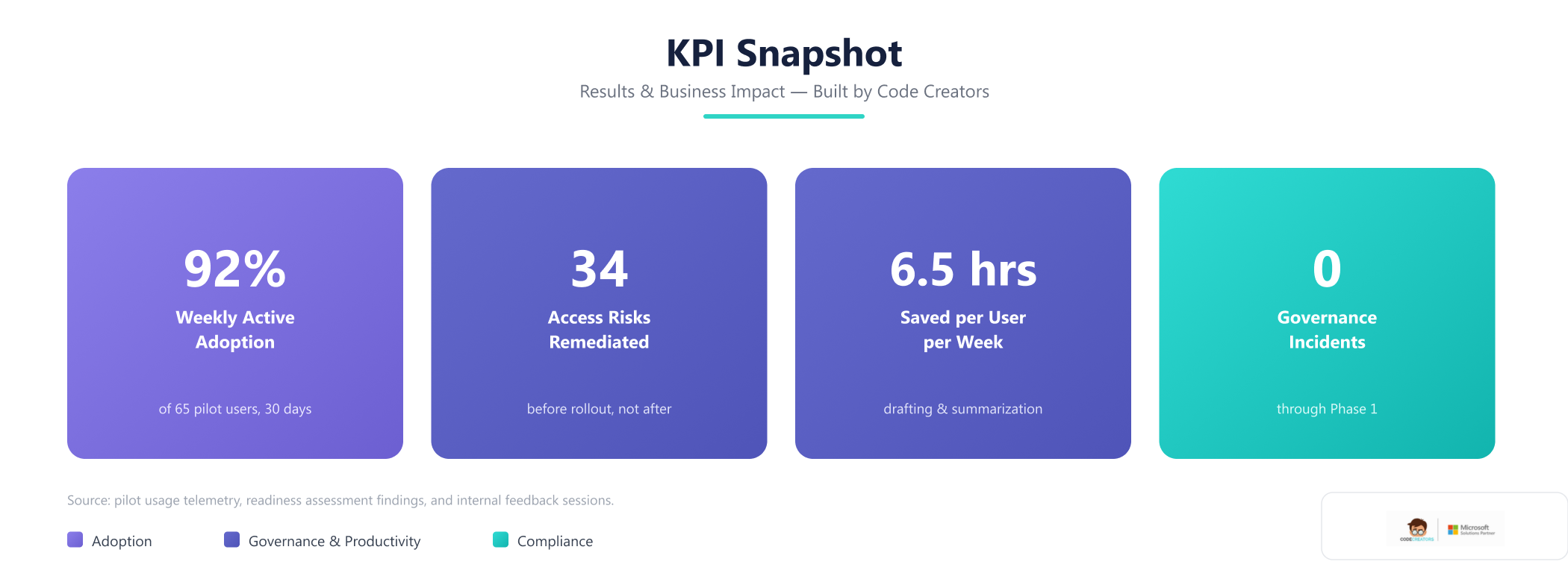
- 92% weekly active adoption among pilot users within 30 days
- 34 over-permissioned access points identified and remediated pre-rollout
- 6.5 hours per week saved per user on document drafting and summarization
- 0 governance incidents during the phased rollout
About the Client
The client is a clinical-stage biotechnology organization operating in a highly regulated landscape, with functional teams spanning Research, Clinical, Regulatory, Finance, and Leadership. Like many organizations in regulated industries, the company had already done meaningful groundwork before bringing in outside help: it had procured Microsoft 365 Copilot licenses and defined a data sensitivity framework, a Red/Yellow/Green classification model, to guide how Copilot should and shouldn’t be used against different categories of content.
The company operates within a mature Microsoft 365 ecosystem, including SharePoint, Teams, OneDrive, Outlook, and the core Office applications, which serves as the primary platform Copilot would need to integrate with.
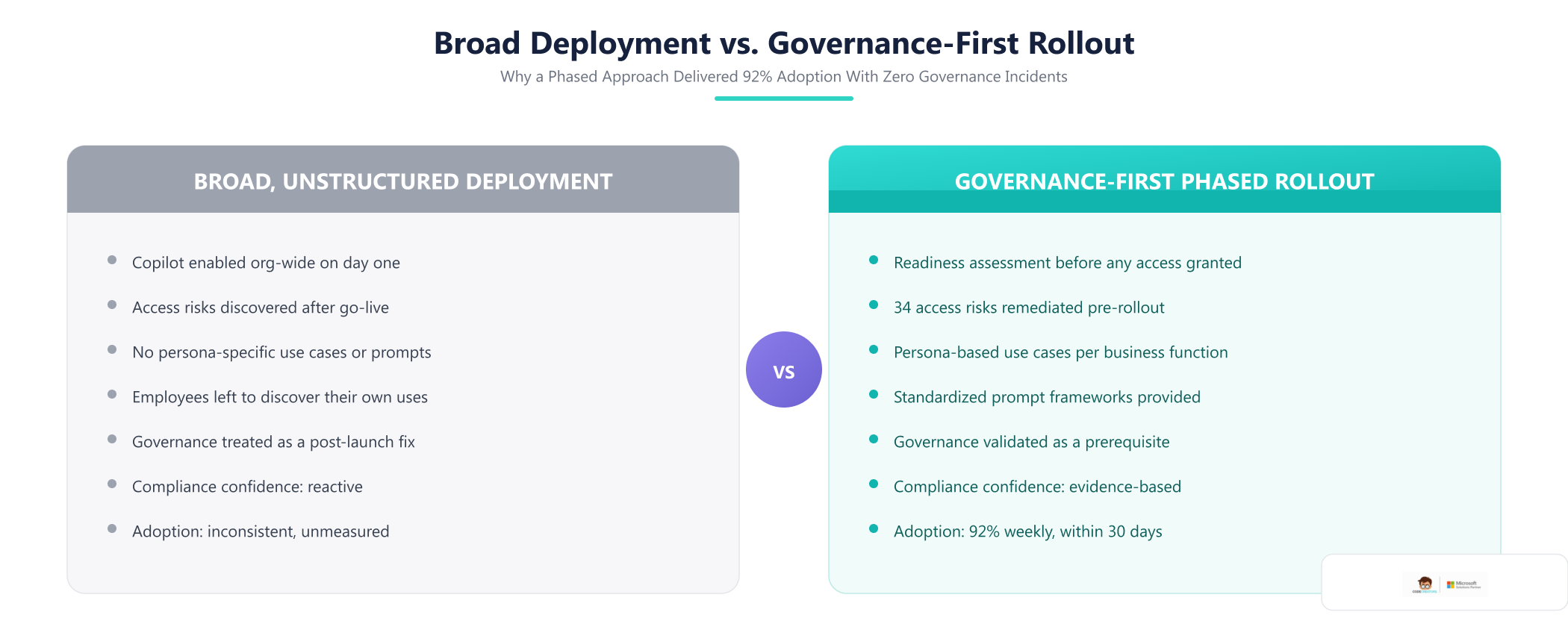
The project mattered because the company was deliberately prioritizing a controlled, phased rollout over broad, unstructured deployment, a meaningful distinction in a regulated environment, where the risk of an AI tool surfacing over-permissioned or sensitive content isn’t hypothetical. That meant the engagement needed to validate the environment itself: licensing, access structures, and content readiness, before any user got hands-on with Copilot, rather than enabling first and troubleshooting governance gaps after the fact.
The Problem
Before this engagement, the client had the foundational pieces of a Copilot rollout in place: licenses procured, a data sensitivity framework defined, but no structured path from those building blocks to a working, adopted tool. That gap matters more in a regulated biotech environment than it would elsewhere: enabling an AI assistant across SharePoint, Teams, OneDrive, and Outlook without first validating access controls risks exposing over-permissioned or sensitive content precisely because Copilot is good at surfacing whatever it can technically reach.
The organization had genuine urgency and interest in adopting Copilot. The real risk was moving too fast in the wrong direction: a broad, unstructured Copilot deployment could technically “work” while quietly violating the access boundaries the data sensitivity framework was designed to enforce. At the same time, moving too cautiously meant leaving real productivity value on the table: persona-based use cases across Research, Clinical, Regulatory, Finance, and Leadership that could meaningfully speed up work like research summarization, regulatory documentation, and financial reporting.
Left unaddressed, this created a real dilemma: without a validated readiness assessment, the organization couldn’t confidently say whether its existing permissions, content structure, and licensing were actually compatible with safe Copilot usage, and without structured, business-aligned use cases, any rollout risked becoming exactly the kind of “theoretical training” the organization was explicitly trying to avoid, where employees technically have access to a powerful tool but no concrete, repeatable way to use it.
What We Discovered
Before enabling Copilot for a single user, Code Creators ran a structured Copilot Readiness Assessment across the client’s Microsoft 365 environment, treating environment validation as a required first step before rollout began.
The assessment covered:
- Environment inventory and discovery across Teams, SharePoint, OneDrive, and Outlook, to understand what content and structures Copilot would actually be interacting with.
- Data distribution and content-type analysis, mapping where different categories of content lived and how they related to Copilot usage patterns.
- A permissions and access review, specifically to validate alignment with Copilot’s access boundaries: since Copilot inherits whatever access a user already has, any pre-existing over-permissioning becomes an AI-surfaced risk the moment Copilot goes live.
- Risk identification for over-permissioned content, inconsistent access controls, or sensitive data exposure, flagged before rollout rather than discovered after.
- Content readiness evaluation, including document quality, structure, and usability for AI interaction, since Copilot’s output quality depends heavily on the quality of what it’s drawing from.
- Identification of complex components: custom workflows, integrations, legacy structures, that could affect how Copilot behaves in practice.
- Licensing and eligibility validation, confirming assigned licenses were actually compatible with Copilot capabilities and that user roles met activation prerequisites.
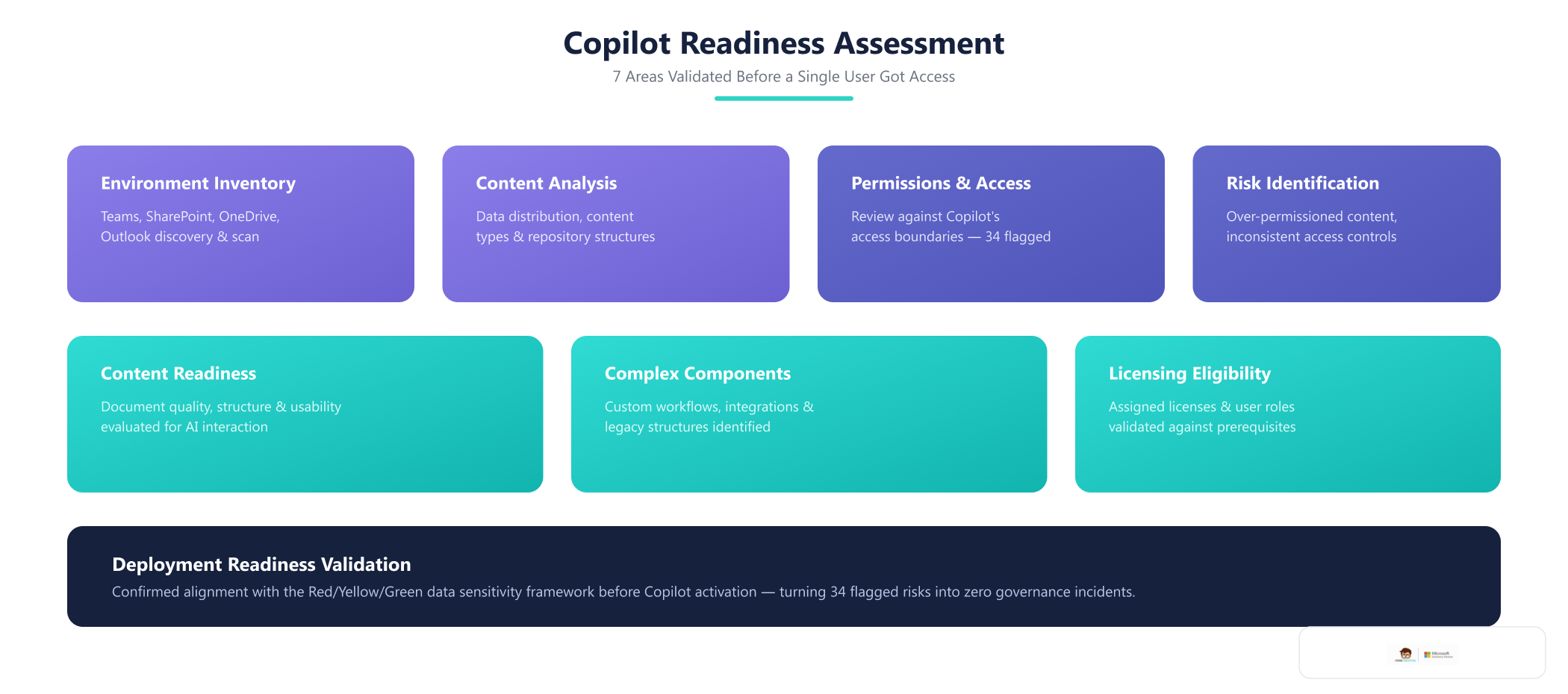 From there, a Deployment Readiness Validation step specifically checked alignment with the client’s Red/Yellow/Green data sensitivity framework and confirmed the access structures and governance boundaries required before Copilot could be safely activated, establishing baseline conditions for enablement without disrupting existing operations. This process drew on Code Creators’ broader Copilot readiness assessment methodology, adapted to the client’s specific data sensitivity model rather than applied as a generic checklist.
This assessment-first approach mattered because it meant the eventual rollout scope was defined by validated readiness, not assumption. Business-aligned use cases were identified in parallel, through structured stakeholder sessions with Research, Clinical, Regulatory, Finance, and Leadership, so that by the time Copilot was actually configured, the organization knew both that the environment was ready and which specific, high-value workflows Copilot would support first.
The Solution
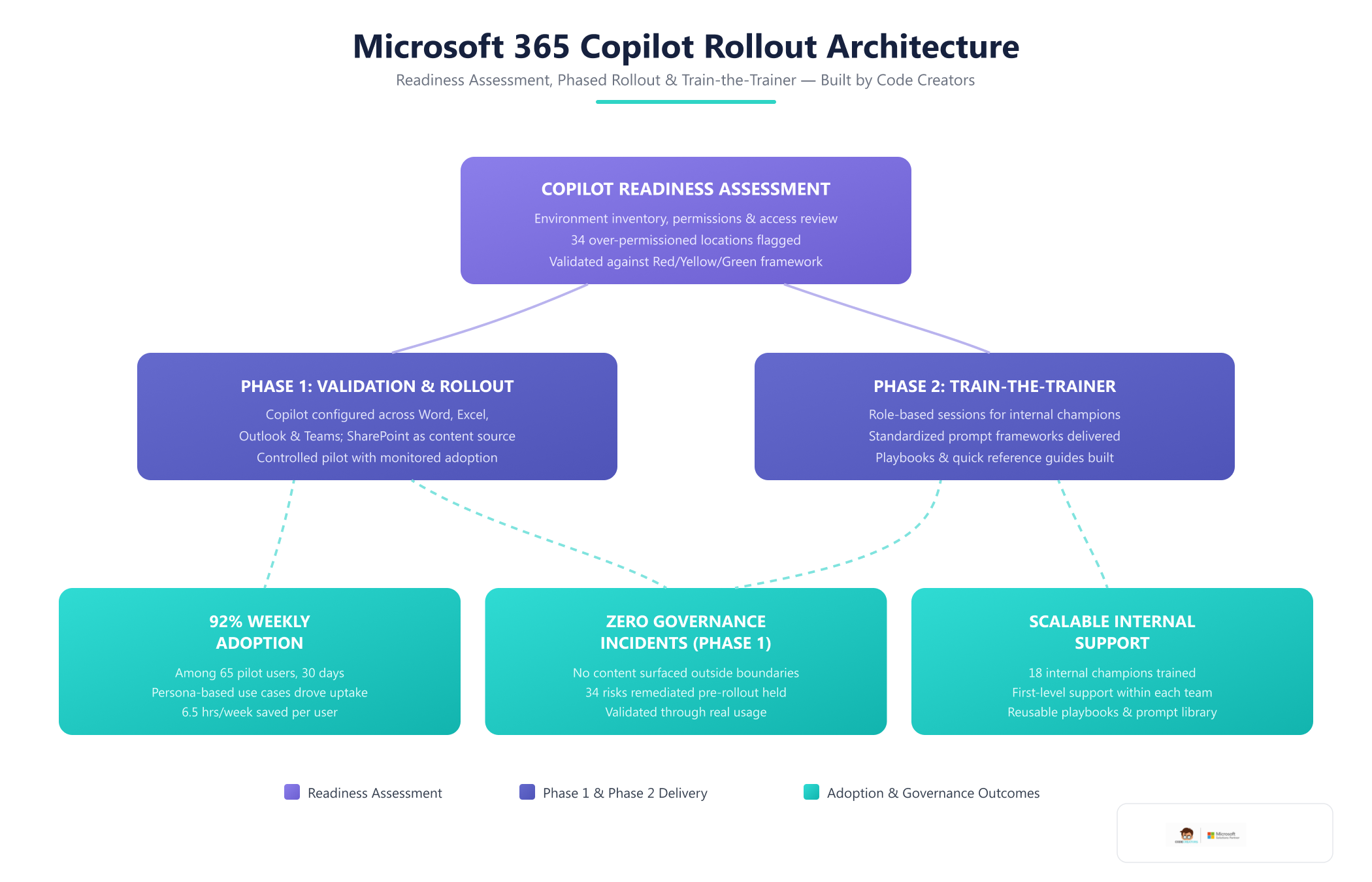
Based on the readiness findings, Code Creators structured the Copilot enablement engagement into two phases: a validation-and-rollout phase, followed by a train-the-trainer enablement phase.
Phase 1: Copilot Validation, Implementation & Rollout
Code Creators configured and activated Microsoft 365 Copilot across Word, Excel, Outlook, and Teams for defined user groups, with SharePoint serving as the governed content source Copilot draws from based on each user’s existing permissions rather than a separate app requiring its own activation. Access strictly adhered to the client’s existing permissions and data boundaries rather than introducing new access rules. Out-of-the-box Copilot and agent capabilities were mapped to real operational scenarios (document drafting, summarization, reporting, collaboration), and the team developed standardized prompt frameworks tailored to specific business functions: turning “Copilot is available” into “here’s exactly how Research uses Copilot for literature summarization” or “here’s the structured prompt pattern for regulatory documentation.”
The rollout itself was controlled and monitored: pilot users and prioritized departments got access first, with usage patterns, engagement levels, and system interactions tracked from day one. Both qualitative and quantitative feedback on usability and output quality were captured, surfacing common challenges and improvement opportunities early rather than after a full-scale rollout.
Phase 2: Train-the-Trainer Enablement & Adoption Support
Rather than running one-off Copilot end user training sessions for the whole company, Code Creators built internal capability: identifying key users and internal champions across business functions, then delivering role-based training tracks (Research, Clinical, Regulatory, Finance, Leadership) through 2 to 3 structured sessions. This included scenario-based walkthroughs using real business use cases, a standardized library of business-aligned prompt frameworks, and guidance on validating Copilot outputs for governance-aligned usage.
Enablement materials, including a Copilot User Playbook, an OOTB Agent Usage Guide, a Prompt Framework Library, and Quick Reference Guides, were built to outlast the engagement itself, giving internal champions the tools to provide first-level support within their own teams going forward.
Copilot Use Cases Identified
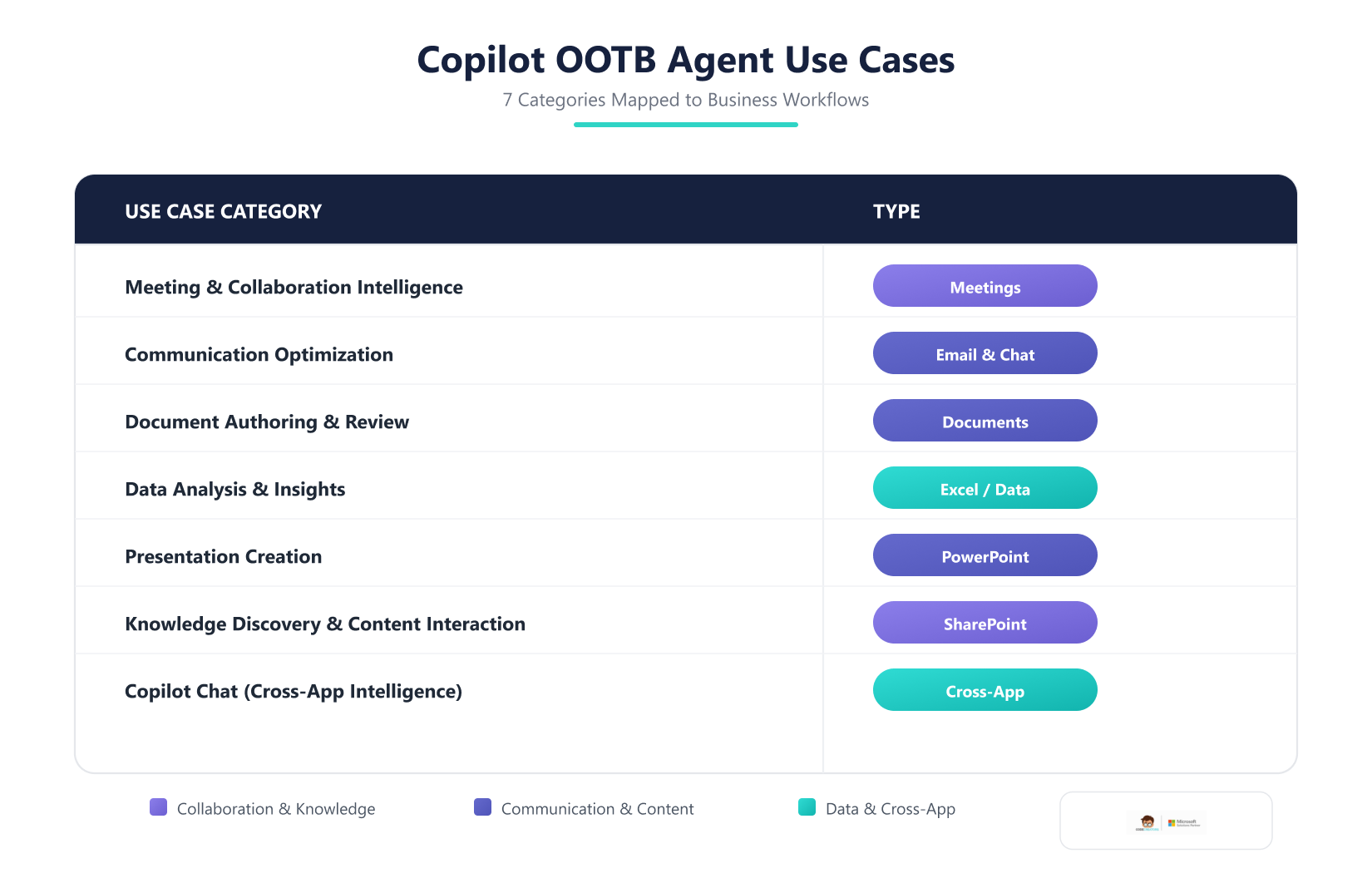
The use case library built during the engagement spans seven categories: meeting and collaboration intelligence, communication optimization, document authoring and review, data analysis and insights, presentation creation, knowledge discovery across SharePoint content, and cross-app Copilot Chat. Each category was mapped to specific client workflows rather than left generic, so a Research user and a Finance user opened Copilot to two different, function-specific starting points.
Governance & Best Practices
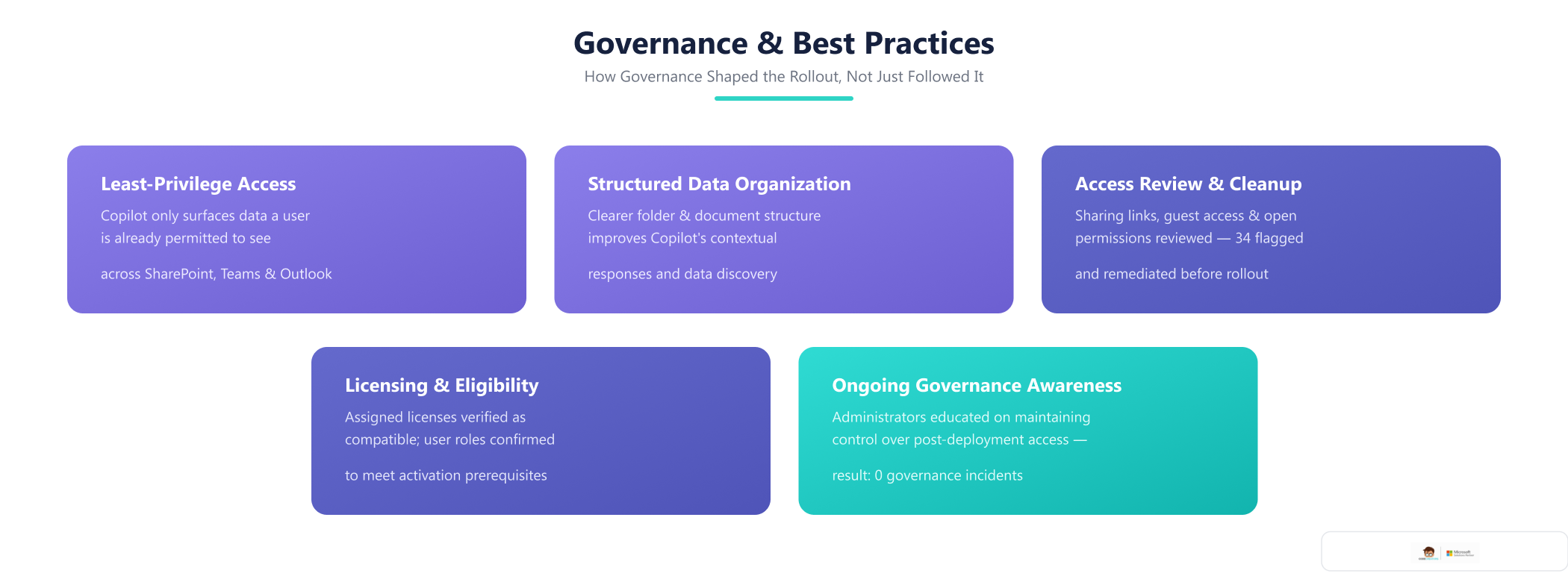
Governance shaped the rollout itself rather than following it. This is the core of Copilot data governance in practice: Code Creators anchored the approach to the client’s existing Copilot data classification model (the Red/Yellow/Green framework) and five practices: least-privilege access, structured data organization, a full access review and cleanup, licensing and eligibility validation, and ongoing governance awareness for administrators managing what Copilot can reach post-deployment.
Challenges Overcome
Challenge 1
The readiness assessment’s access review surfaced a concrete example of the exact risk the client was worried about: 11 of the 34 flagged locations were SharePoint folders tied to a discontinued CRO partnership that still had active guest access nearly two years after the partnership ended. Removing that access wasn’t a same-day technical fix. It required sign-off from the client’s Legal team to confirm the guest accounts weren’t tied to any lingering contractual obligations, which added nine business days to the remediation timeline the team hadn’t originally scoped. Code Creators worked with the client’s IT and Legal teams to batch the remaining 23 access changes into a single approval cycle, so that delay didn’t repeat itself for every subsequent fix.
Challenge 2
A second challenge came from balancing the client’s stated goal of avoiding “unstructured deployment” against pressure from Leadership to show value quickly, since the Copilot licenses had already been sitting unused for several months before the engagement began. Rather than open the pilot to all five functions at once, Code Creators sequenced access by risk profile: Finance and Leadership, whose primary use cases touched lower-sensitivity content, went live in week one, while Research, Clinical, and Regulatory, whose workflows touched Red-classified content most often, followed in week two once their specific access reviews came back clean. That staggered sequencing let the team show early adoption numbers to Leadership within the first week without getting ahead of the access validation work for the higher-risk functions.
Challenge 3
The persona-based use cases defined during stakeholder sessions mostly held up in practice, with one notable exception: the Regulatory team’s actual usage skewed more heavily toward summarizing external regulatory guidance documents than the original use case library anticipated, which had focused on internal documentation drafting. Code Creators added a dedicated prompt framework for external document summarization midway through Phase 1 rather than waiting for Phase 2, since it was clearly where Regulatory was already finding the most value.
Lessons Learned
The clearest takeaway from this engagement: a documented data sensitivity framework doesn’t remediate itself. Having the Red/Yellow/Green model defined going in gave the team a clear standard to check access against, but every flagged issue still needed a human decision, and in a biotech’s case that often meant Legal sign-off, not just an IT ticket closed same-day. Teams planning a similar rollout should budget real calendar time for that approval loop rather than assuming access remediation is instant once a risk is identified. The second lesson: sequencing pilot access by risk profile, rather than by department convenience, let the team deliver visible early wins to Leadership without compromising the review timeline for the more sensitive functions, a trade-off worth making deliberately rather than defaulting to “everyone starts together.”
Results & Business Impact
The readiness-first, phased approach delivered measurable results across adoption, governance, and productivity, starting with a 30-day Phase 1 pilot and continuing through Phase 2 enablement.
- 92% weekly active adoption among the 65 pilot users within 30 days of go-live, well above typical enterprise software adoption curves, attributable to persona-based use cases landing on real workflows rather than generic Copilot access.
- 34 over-permissioned SharePoint locations identified and remediated during the readiness assessment, before any pilot user received Copilot access, meaning those risks never became AI-surfaced exposure in the first place.
- 6.5 hours per week saved per user, concentrated in document drafting, summarization, and meeting follow-ups. This figure comes from self-reported time savings that pilot users logged during structured feedback sessions, not from automated usage tracking, so treat it as a directional estimate rather than a precise measurement.
- Zero governance incidents recorded through Phase 1: no instances of Copilot surfacing content outside a user’s appropriate access boundaries, validating that the readiness assessment’s remediation work held up under real usage.
- 18 internal champions trained across Research, Clinical, Regulatory, Finance, and Leadership during Phase 2, each equipped with the Copilot User Playbook, prompt framework library, and quick reference guides to provide first-level support within their own teams.
Beyond the numbers, the phased approach changed how the organization talked about AI adoption internally. Early governance concerns, the kind that can stall a Copilot rollout indefinitely in a regulated environment, were addressed with evidence rather than reassurance, since the readiness assessment gave Compliance and IT leadership a documented basis for confidence established before rollout and sustained throughout it.
Results KPI Snapshot
- 92% Weekly Active Adoption (Pilot Users)
- 34 Access Risks Remediated Pre-Rollout
- 6.5 Hours/Week Saved per User
- 0 Governance Incidents Through Phase 1

Client Testimonial
“As a biotech, we couldn’t afford to treat this as ‘just turn Copilot on and see what happens.’ What we needed was proof that we could adopt it without creating a compliance problem for ourselves. The readiness assessment gave us exactly that: we knew our access controls were sound before a single person started using it, not after. Now our research and regulatory teams are saving real hours every week, and I can say with confidence that we know what Copilot can see and why. That kind of clarity is worth more to us than speed.”
VP of Regulatory Affairs
Frequently Asked Questions
Start with a readiness assessment that validates licensing, access controls, and alignment with any existing data sensitivity framework before enabling Copilot for any user. Because Copilot inherits a user’s existing permissions rather than introducing new access rules, pre-existing gaps, such as over-permissioned folders, inconsistent sharing settings, or stale guest access, become AI-surfaced risks the moment it goes live. A phased pilot with monitored adoption, rather than an organization-wide launch, gives teams room to catch and fix issues before they scale.
A structured review of an organization’s Microsoft 365 environment, covering content inventory across Teams, SharePoint, OneDrive, and Outlook, permissions and access controls, content quality and structure, licensing eligibility, and any complex components like legacy integrations, run before Copilot is configured. The goal is to confirm the environment is actually ready for safe, effective use, rather than assuming that procured licenses alone mean the organization is ready to activate.
It builds internal, scalable capability rather than one-time knowledge. A smaller group of trained internal champions, equipped with playbooks, prompt frameworks, and hands-on session experience, can provide first-level support and guidance within their own teams going forward, rather than every future question routing back to an external consulting team. This also tends to produce more contextually relevant guidance, since champions understand their department’s actual workflows.
Broad deployment enables the tool for everyone at once with generic guidance, leaving employees to discover their own use cases with little structure. A persona-based rollout instead identifies specific, high-value use cases for each business function, for example regulatory documentation for a Regulatory team or research summarization for Research, and builds structured, reusable prompt frameworks around those workflows specifically, so adoption is guided rather than left to chance.
Copilot operates within a user’s existing permissions; it doesn’t grant new access on its own. But if permissions were already misconfigured before Copilot arrived, such as over-permissioned folders, stale guest access, or broad sharing links nobody remembers granting, Copilot can make that existing exposure far easier to find, simply because it’s good at surfacing relevant content quickly. That’s precisely why an access review before rollout matters more for AI tools than it might for a typical software rollout.
A data sensitivity framework, such as a Red/Yellow/Green classification model, categorizes content by sensitivity and appropriate usage. For an AI tool like Copilot, this gives an organization a concrete standard to validate usage against, rather than relying on ad hoc judgment calls about what Copilot should or shouldn’t summarize, draft, or surface for a team. This classification model is a core input to the broader Copilot governance framework: it’s what the readiness assessment validates against, and what ongoing access reviews continue to check post-deployment.
In this engagement, pilot users reached 92% weekly active adoption within 30 days of go-live, reflecting business-aligned use cases and standardized prompt frameworks rather than generic access left for employees to figure out on their own. Timelines vary based on how much readiness assessment work is already done before rollout starts, how many function-specific use cases need to be defined and tested, and how large the initial pilot group is. A narrower pilot with a few clear, well-scoped use cases generally shows measurable value faster than a broad rollout where adoption depends on employees discovering their own reasons to use the tool.
Yes. The core method here, running a readiness assessment before enabling Copilot, then building persona-based use cases and governance controls around a documented data sensitivity or classification model, applies to any regulated environment with strict access and compliance requirements. Government document automation projects face a similar risk profile to biotech: content that’s over-permissioned or improperly classified can become an AI-surfaced exposure the moment a tool like Copilot is switched on, so the same assessment-first sequencing applies regardless of sector.
Is Governance the Reason Your Copilot Rollout Hasn’t Started?
Have Copilot licenses sitting unused, or a rollout that’s stalled on governance questions? A readiness assessment can turn those open questions into a documented, defensible answer before a single user gets access. That’s the difference between hoping your access controls hold up and knowing they do, especially in a regulated environment where “we’ll fix it later” isn’t a real option. Schedule a consultation to talk through a phased, compliant path to real Copilot adoption.