SharePoint hub sites connect related sites into a flexible network by adding a shared navigation layer, unified branding, aggregated search, and centralized news, without forcing content into a rigid, nested folder structure. At Code Creators, the mistake we see most often isn’t technical misconfiguration, it’s governance: someone registers a hub for every department, every project, every small team, and within a year the intranet is just as confusing as the file-share sprawl it replaced. This guide covers how to design, configure, and manage a hub architecture that stays organized as your organization grows, not just when it first launches.
Architectural Comparison: SharePoint Hub Site vs. Team Site
Understanding the distinction between site containers and aggregating hubs is the foundation of modern intranet design.
Team and communication sites are isolated content containers, holding project work, department documentation, and their own custom permissions. A SharePoint hub sits above them as an organizational layer, connecting multiple sites under centralized navigation, aggregated search, and universal theme styling, without containing content itself.
Clarifying the Core Differences
When planning your intranet layout, it helps to be clear on each site type’s role:
- Team sites. Purpose-built for collaboration among smaller groups or project teams. They store active working files, connect directly to Microsoft Teams channels, and restrict access to designated team members.
- Communication sites. Designed for broadcasting information to wide audiences across the organization, such as HR policy portals or company news sites.
- Hub sites. An organizational layer rather than a physical content container. A hub ties distinct communication sites and team sites together under a single umbrella, applying common branding, top-level navigation, and cross-site search.
Phase 1: Designing an Enterprise SharePoint Hub Site Architecture
Designing a flat, adaptable intranet structure means abandoning outdated nested subsite hierarchies in favor of a modern hub architecture.
The Modern Flat Topology Model
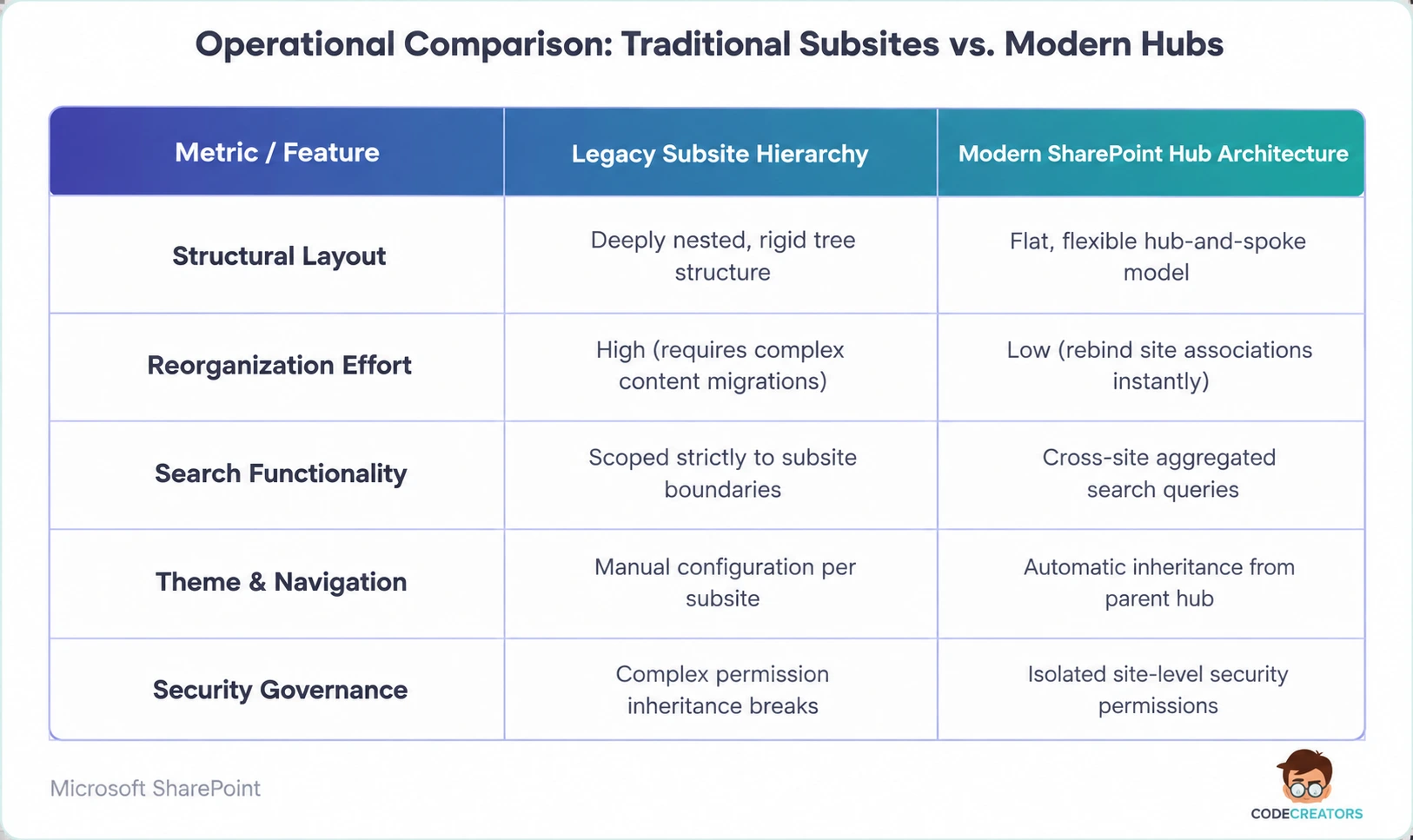
In classic SharePoint, IT teams created complex subsites nested deep beneath a root site collection. Moving a subsite to a new department meant painful content migrations and broke existing hyperlinks.
Modern SharePoint uses a flat topology instead, where every site exists as an independent site collection. You connect these standalone sites using a hub and spoke design: the hub acts as the parent landing portal for a specific business domain, such as Human Resources, Global Sales, or Operations, while spokes are the standalone team sites or communication sites, such as Payroll, Employee Benefits, or Recruiting, associated directly with that parent hub.
If your company restructures, administrators simply change the hub association without breaking site permissions or migrating content. We’ve moved entire departments between hubs in an afternoon this way, on tenants where the same move under the old nested-subsite model would have taken weeks of careful migration planning.
Phase 2: Configuration and Association Workflows
Associating individual site collections with a central parent portal takes only a few clicks inside the SharePoint Admin Center or a simple PowerShell command.
Executing Hub Site Association
Connecting a child site to a parent hub relies on the hub site association feature:
- Open the SharePoint Admin Center and select Active sites.
- Select the target communication or team site you want to convert, click Hub, and choose Register as hub site.
- Select any child site, navigate to Site Information from the gear icon, and select your newly registered parent portal under Hub site association.
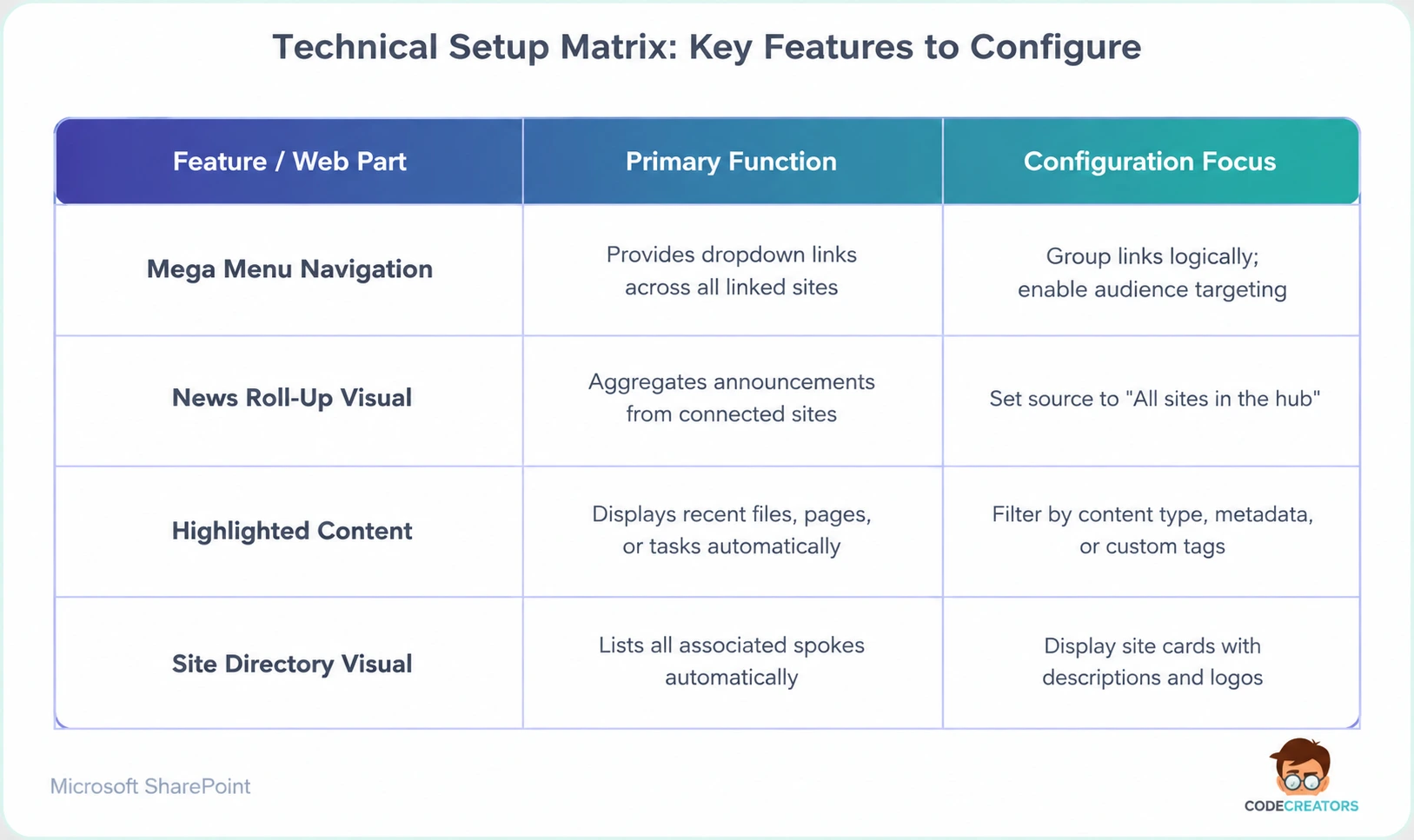
Once connected, the child site automatically inherits the top navigation menu, color schemes, and logo assets defined at the hub level.
One detail worth planning around: association changes can take up to 2-4 hours to fully propagate across the tenant, so don’t assume a failed test immediately after registering a hub means something’s broken. If you’re planning a hub rollout across multiple departments and want a second opinion on the association sequence before you commit, our SharePoint Managed Services & Support team at Code Creators can help you sequence that rollout so departments aren’t left without navigation mid-transition.
Enterprise SharePoint Hub Site Examples
Organizations build tailored intranet environments by grouping related workspaces into functional hub networks. Practical examples include:
- Human Resources Hub. Links separate communication sites for Employee Benefits, Global Onboarding, Corporate Travel, and Payroll Services.
- IT Support Hub. Connects individual portals for Software Requests, System Status Dashboards, Hardware Ordering, and Cybersecurity Guidelines.
- Global Sales Hub. Combines regional team sites, such as North America Sales, EMEA Operations, and APAC Field Teams, into a single global portal.
Audience Targeting and Security Permissions
How do security permissions and audience targeting work across an associated hub network?
Associating sites with a parent hub doesn’t automatically merge or override underlying site permissions. Each associated site keeps its own unique security boundaries, Microsoft 365 Groups, and access controls.
When users run search queries or view roll-up web parts, such as Highlighted Content or News, on the parent hub portal, SharePoint uses security trimming. This ensures employees only see news posts, files, and navigation links they have explicit permission to view. Administrators can also enable audience targeting on the shared hub menu to tailor specific navigation links to designated Microsoft Entra ID groups.
Phase 3: SharePoint Hub Site Best Practices for Enterprise Governance
To maintain a clean, organized intranet over time, a few operational guidelines matter more than any individual configuration choice.
1. Limit the Total Number of Hub Sites
Don’t register every department site as an independent hub. Limit your registered parent hubs to major organizational domains, such as HR, IT, Finance, and Operations, to prevent visual confusion and keep top-level navigation manageable. Microsoft technically allows up to 2,000 hub sites per tenant, but hitting anywhere close to that number is a sign your hub strategy has broken down, not a target to aim for. Most organizations, even large ones, genuinely need somewhere between 8 and 15 hubs mapped to real business units or geographies, not one per team.
2. Implement Dynamic Audience Targeting
Enable audience targeting across global navigation menus and news roll-up web parts. This prevents information overload by tailoring content displays based on user roles, office locations, or department groups.
3. Establish Clear Hub Ownership
Assign dedicated hub owners responsible for maintaining shared navigation links, approving site association requests, and keeping cross-site visual themes aligned with brand guidelines. We’ve walked into more than one tenant where hub ownership was informal or forgotten entirely, and the result was months of stale navigation links nobody felt authorized to fix.
4. Leverage Associated Hub Relationships
For large global enterprises, hub-to-hub associations let a parent hub connect to child hubs, each with their own associated sites, enabling cross-hub search and navigation across multiple division portals. Microsoft currently supports one level of this nesting (parent hub to child hub), not deeper hierarchies. If you find yourself wanting a third level, that’s usually a signal to rely on metadata and search refinement instead of adding more hub layers.
Build a Modern Enterprise Intranet With Code Creators
Architecting scalable intranet topologies, configuring governance models, and executing seamless content migrations require deep platform knowledge. Without structured planning, intranet rollouts risk site sprawl, broken navigation, and poor employee adoption.
At Code Creators, our certified Microsoft intranet architects help organizations design, deploy, and govern modern digital workplaces, and we’ve cleaned up enough over-hubbed tenants to know exactly what that governance failure looks like before it happens. From configuring custom communication portals to building complete enterprise intranets, we help your business turn disconnected portals into a unified digital workspace.
Schedule a Consultation for SharePoint Managed services & support at Code Creators to design a hub architecture sized for your organization, not one you’ll need to untangle in a year.