Sales Commission Automation: Weekly Processing Drops From 15 Hours to 2 for 130 Design Consultants

Executive Summary
Weekly commission processing at a US flooring retailer fell from about 15 hours to 2 hours of Accounting review after Code Creators delivered sales commission automation for its 130 commission-based design consultants.
The solution moves 5 to 6 manual NetSuite exports and a large Excel workbook into Azure SQL, where the existing commission rules run automatically each week across 16 markets and 600 to 800 sales orders. Accounting starts each run, reviews results and exceptions, and issues statements through a Power Apps commission management app orchestrated by Power Automate, while Power BI provides commission tracking across periods. The commission methodology stayed exactly as before, and every weekly run is now stored in one searchable history.
Project Snapshot
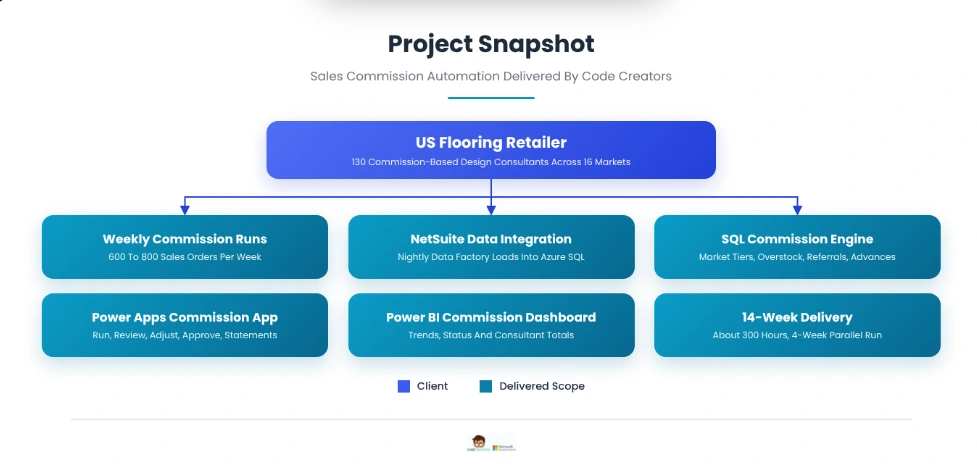
Code Creators delivered sales commission automation for 130 design consultants in 14 weeks, connecting NetSuite to an Azure SQL commission engine reviewed through Power Apps and Power BI.
About the Client
The client is a US flooring retailer that sells and installs flooring through in-home consultations across 16 markets. A call center books appointments, and about 130 design consultants visit customers, measure spaces, and close sales.
The design consultants work as independent contractors paid entirely on commission, and commissions are paid every week. The business handles 600 to 800 sales orders a week, about 3,000 a month, and each order can include several products with different prices by market.
That raises the stakes for Accounting. With no base salary, every consultant depends on each weekly payment, so a late run or a wrong rate reaches 130 people’s income within days and quickly erodes trust in the commission plan.
NetSuite is the company’s ERP and the system of record for sales orders, invoices, and product pricing. Salesforce manages leads and appointments and passes them to NetSuite, and an existing Azure SQL environment already receives NetSuite data for other reporting. When the company had 12 to 20 salespeople, a spreadsheet was enough to calculate commissions. At 130, it had become a weekly bottleneck for Accounting.
The Problem: A Weekly Commission Run Built on Exports and Spreadsheets
Every week, Accounting ran 5 to 6 NetSuite saved searches, exported the results as CSV files, and pasted them into a commission workbook. The workbook held the full commission logic: lookups by product and market, commission tiers, overstock rules, referral rates, advances, and manual extras. A single run took 10 to 20 hours of Accounting time.
The process created 5 recurring problems:
- Manual data preparation. Each run depended on the right exports being pasted into the right worksheets in the right order, following a written instructions tab.
- Business rules buried in formulas. Market-specific commission tiers, overstock double commission, and higher rates for self-generated referrals lived in worksheet formulas and color-coded columns that only a few people fully understood.
- Hard-to-maintain reference data. Prices by product and market, the list of excluded sellers, and market factors were edited directly in the workbook, with no record of who changed what.
- Slow answers to commission questions. When a consultant questioned a payment, Accounting had to trace one order across several worksheets to explain it.
- Fragmented history. The historical commission register had grown so large that it was split across multiple files, making it hard to see what any consultant had been paid over time.
The company engaged Code Creators’ Power Automate consulting team to automate the weekly run without changing how commissions are calculated, and to keep Accounting in control of every payment.
What We Discovered
Code Creators spent 2 weeks with Accounting walking through a live commission run, worksheet by worksheet, and documented every input, formula, and manual check before designing anything.
The Workbook Was the Rulebook
The commission workbook was far more than a report. Green columns held raw NetSuite data, and every other column applied a business rule. The team turned each worksheet into a written rule specification covering the Lines, Headers, PAR pricing, DC Listing, Overstock, Var, Paid Invoice, Advances, and Commission Summary tabs, and Accounting signed it off.
Price Depends on Product and Market
The same product can carry a different standard price, or PAR value, in each of the 16 markets. Commission calculations therefore use a lookup key that combines location and part number, along with unit-of-measure conversions for products sold in different units.
Commission Tiers Are Blended at the Order Level
Each line’s factor is its selling price divided by its PAR value. Line factors are blended across the order, and the blended factor sets the commission tier: the closer an order sells to PAR, the higher the rate. PAR is a benchmark set above typical net selling prices, so factors below 1 are normal, and in the client’s example a blended factor of 0.37 falls in the 7% tier. Tiers differ by market, and at least one market already used its own tier table, so tiers had to be configurable per market.
Commission Is Payable When the Customer Pays
Commission is calculated on invoiced orders but becomes payable only when the customer’s invoice is paid in full. The paid-invoice search told the workbook which invoices were paid during the week, so an order invoiced this week but paid next month earns its commission in the week its payment posts.
Several Rules Are Exceptions to the Main Calculation
Discovery confirmed 5 special cases that the automated run had to handle:
- Overstock items earn double commission to clear slow-moving inventory.
- Self-generated appointments and referrals earn a higher rate because they carry no call-center lead cost.
- Excluded sellers, such as shortage order entries, never receive commission.
- Advances, with 5 to 8 open at any time, are deducted from the next commission payment.
- Manual extras, such as a one-off bonus approved by Sales, are added as controlled adjustments with a reason.
Weekly guarantees for new consultants involve prorating and exceptions, so Accounting chose to keep them as manual extras for this project.
Accounting Needed to Trust the Numbers First
Accounting wanted to keep its review step and compare automated results against the workbook before relying on them. That shaped 2 decisions: every run produces a reviewable batch before anything is final, and the first 4 weekly runs would run in parallel with the existing workbook.
The Solution: Sales Commission Automation on Azure SQL and Power Platform
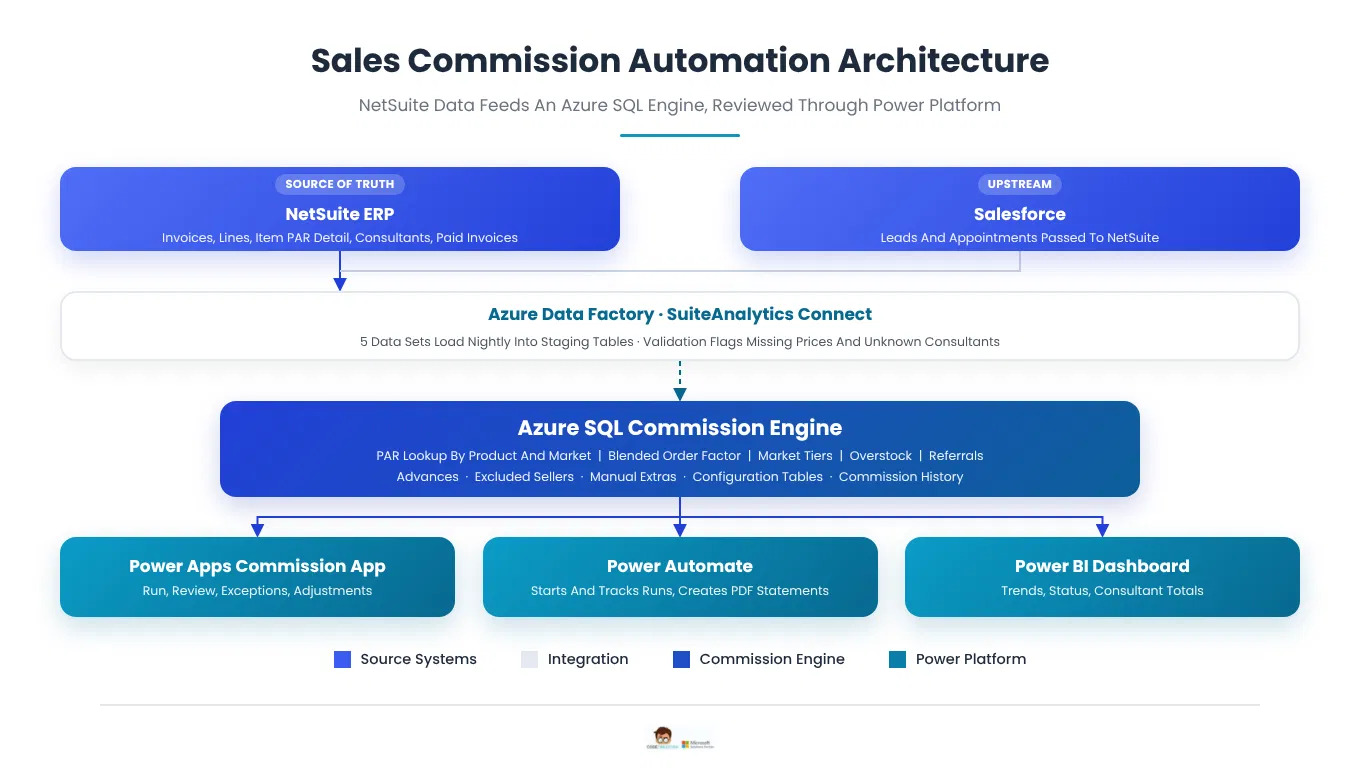
Code Creators delivered sales commission automation in 3 layers: data and calculation in Azure SQL, a Power Apps commission management app and Power Automate flows that both connect to Azure SQL, and a Power BI commission dashboard. Azure SQL was chosen over Dataverse or a packaged commission tool because NetSuite data already landed there, the blended PAR-factor rules suit set-based SQL, and the existing methodology could be kept exactly without per-seat fees for 130 consultants. NetSuite remains the source of truth for orders, invoices, and prices.
NetSuite Data Integration
The client’s existing Azure Data Factory pipeline reads NetSuite through SuiteAnalytics Connect, NetSuite’s ODBC data service, using a self-hosted integration runtime. Code Creators rebuilt the 5 saved searches behind the weekly exports as SuiteAnalytics Connect queries: invoice headers, invoice lines, item PAR detail by location, the design consultant listing, and paid invoices. The pipeline loads changes into staging tables every night at 2 a.m., where SQL validation checks flag missing prices, unknown consultants, and orders without matching invoice lines.
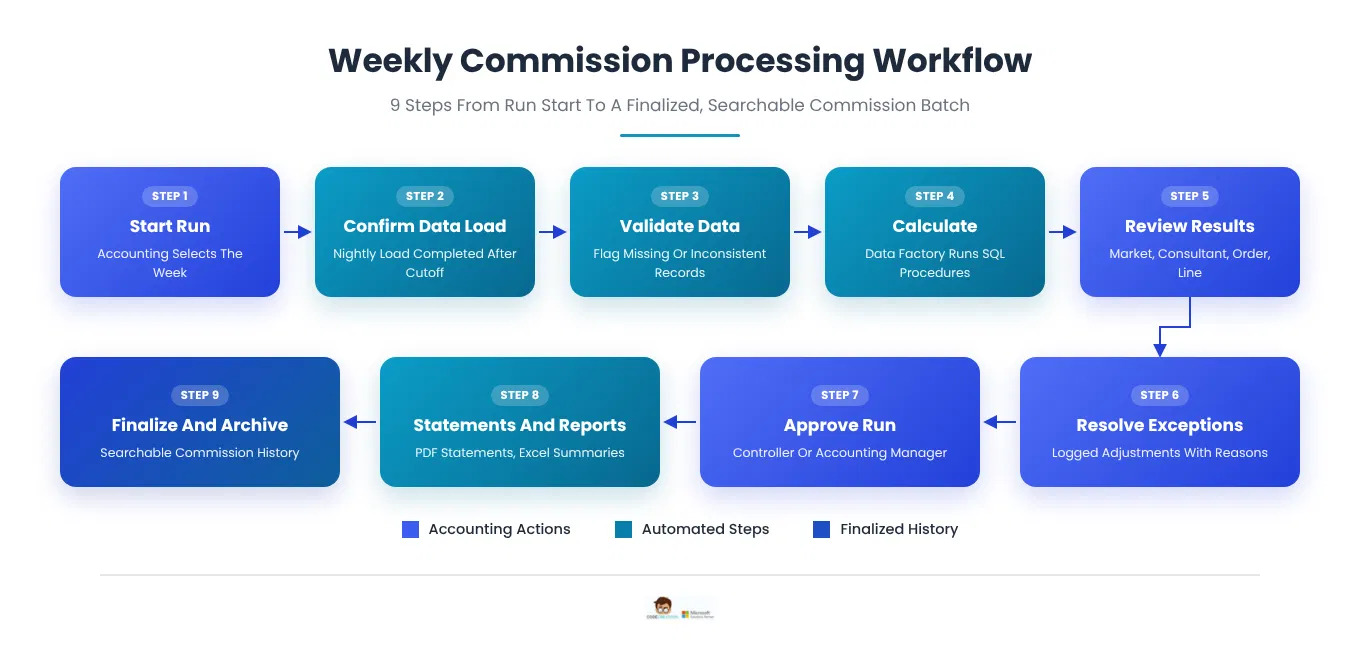
A run uses previously synchronized data rather than a fresh extract. The weekly cutoff is Sunday at 11:59 p.m., so Monday’s 2 a.m. load is the final load for that week. Payments posted after the cutoff qualify in the following week’s run, which also replaced the occasional sixth export, a second paid-invoice pull for late payments. Before processing starts, the flow confirms that load succeeded. If it failed, Data Factory alerts IT, the app marks the data as out of date, and the run stays blocked until IT reruns the pipeline.
Sales Commission Calculation in Azure SQL
The signed-off rule specification was rebuilt as SQL stored procedures that:
- Match each invoice line to its PAR value using the product and market lookup key, with unit-of-measure conversion.
- Calculate the selling-price-to-PAR factor for each line and blend it at the order level.
- Apply the commission tier for the order’s market.
- Apply overstock double commission and the higher referral rate where a transaction qualifies.
- Remove excluded sellers, deduct open advances, and add approved manual extras.
- Write the results to a weekly commission batch with full line-level detail.
PAR prices come from NetSuite and are not edited in the app. When Sales approves a temporary price for a market, a Commission Administrator records a PAR override with a reason and start and end dates, and the override takes precedence over the NetSuite value only within those dates. Tiers, overstock items, and excluded sellers use the same effective dates, and every run stores the PAR value, its source, and the rate used on each line, so earlier runs stay reproducible after prices change.
The calculation takes about 15 minutes, well beyond the 110-second limit on SQL connector actions, so no single flow action waits for it. The flow starts a Data Factory pipeline that runs the stored procedures in sequence, checks the pipeline status every minute, and marks the batch ready for review when the pipeline completes.
Power Apps Commission Management App
The Power Apps commission management aczxpp, a canvas app built by our Power Apps development team and connected to Azure SQL, gives Accounting one place to run and review commissions:
- Start a run: select the week, and processing begins once the data load is confirmed.
- Review results: totals by consultant and market, with drill-down to each line’s PAR value, factor, rate, and amount.
- Handle exceptions: a queue of flagged items such as unusually high commissions, overstock, referrals, advances, and data issues.
- Record adjustments: manual extras need an amount and a reason, and each change is logged with the user and time.
- Finalize and issue statements: after approval, Power Automate saves a PDF statement for each consultant to a restricted SharePoint library, and Accounting emails each one to its consultant after a final check. Summaries download as Excel.
- Search history: any consultant’s past commissions, including 3 years of history migrated from the workbook’s register files.
 Roles and Data Protection
3 Microsoft Entra ID groups separate duties: 2 Commission Administrators maintain tiers, overstock lists, excluded sellers, and PAR overrides; Accounting processors start runs and record adjustments; and only the Controller or Accounting Manager can approve and finalize a batch, never one they adjusted. The app connects with each user’s Entra ID identity, database roles mapped to those groups limit what each person can read or change, and Azure SQL encrypts pay data at rest with Transparent Data Encryption and logs access with auditing. Because this Power Apps Azure SQL design uses the premium SQL Server connector, app users need Power Apps premium licenses.
Commission Tracking in Power BI
A Power BI commission dashboard imports data from a reporting view in Azure SQL. It refreshes daily at 7 a.m., and a flow starts an extra refresh whenever a batch is finalized. It shows total commission, records processed, average commission, and pending and completed records: pending covers lines in batches still under review or finalized but not yet marked paid, and completed covers lines Accounting has marked paid. Charts show monthly trends, commission by consultant, status distribution, and period comparisons, filtered by date range, consultant, period, and status. About 8 users in Accounting, Finance, and Sales leadership view it with Power BI Pro licenses; consultants do not have access.
Challenges Overcome
Moving From Excel to a SQL Database Without Changing the Rules
The commission logic lived in formulas spread across more than 10 worksheets. Each rule was written up, signed off by Accounting, rebuilt in SQL, and tested against past weeks with known results before the first live run.
Getting Pricing Right in Every Market
PAR values vary by product and market, and products are sold in different units of measure. The product-and-market lookup key and unit conversions were tested across all 16 markets so every line found the correct standard price.
Making Business Rules Easy to Change
Tiers, overstock lists, and excluded sellers change during the year. Moving them into configuration tables managed through the app lets Accounting update a rate or add a market in minutes, with every change logged.
Keeping Accounting in Control
Automation could not remove Accounting’s review. Every run stops at a reviewable batch, exceptions are flagged for a decision, and nothing is final until an authorized user approves it.
Proving the Numbers Before Switching Over
The first 4 weekly runs ran in parallel with the workbook. Differences in week 1 traced back to 3 rule interpretations, which were corrected, and by week 4 every consultant’s total matched to the cent.
Delivery Phases, Training, and Acceptance
The project took about 300 hours over 14 weeks, followed by 1 month of post-launch support.
- Phase 1, weeks 1 and 2, discover and document: live run walkthrough, rule specification, and data mapping from NetSuite saved searches.
- Phase 2, weeks 3 to 7, build data and calculation: Data Factory loads through SuiteAnalytics Connect, staging and validation, SQL commission procedures, configuration tables, and migration of 3 years of commission history from the workbook’s register files, reconciled to each year’s paid totals.
- Phase 3, weeks 8 to 10, build the app and dashboard: Power Apps commission management app, Power Automate flows for runs and statements, and the Power BI dashboard.
- Phase 4, weeks 11 to 14, parallel run, train, and launch: 4 weekly runs alongside the workbook, user acceptance testing, training, and go-live.
Training and Documentation
- Train-the-trainer sessions for 2 Accounting super users, using real weekly runs
- Hands-on sessions for the wider Accounting team on running, reviewing, adjusting, and finalizing commissions
- User guides, an administrator guide for configuration tables and access, and process documentation for the weekly cycle
- For ongoing changes, such as new markets or commission plans, organizations can extend their team through Code Creators’ Power Apps maintenance services.
Acceptance Criteria
- Data: each run loads the required NetSuite data for the selected week and flags records with missing or inconsistent values.
- Calculation: automated results match the approved rule specification and the parallel-run workbook totals.
- Review: Accounting can drill from market totals to individual line items and see the factor, rate, and amount behind each commission.
- Adjustments: manual extras require a reason and are logged with the user and time.
- Outputs: PDF statements and Excel summaries generate for every consultant in a finalized run.
- History: authorized users can search past runs by consultant and period.
Results and Impact: A Weekly Commission Run Accounting Can Trust
Code Creators and Accounting measured results over the 12 weeks after go-live and compared them with the 12 weeks before the project began. By the end of that period, sales commission automation had replaced the workbook for every weekly run, and Accounting’s role had shifted from building commissions to reviewing them.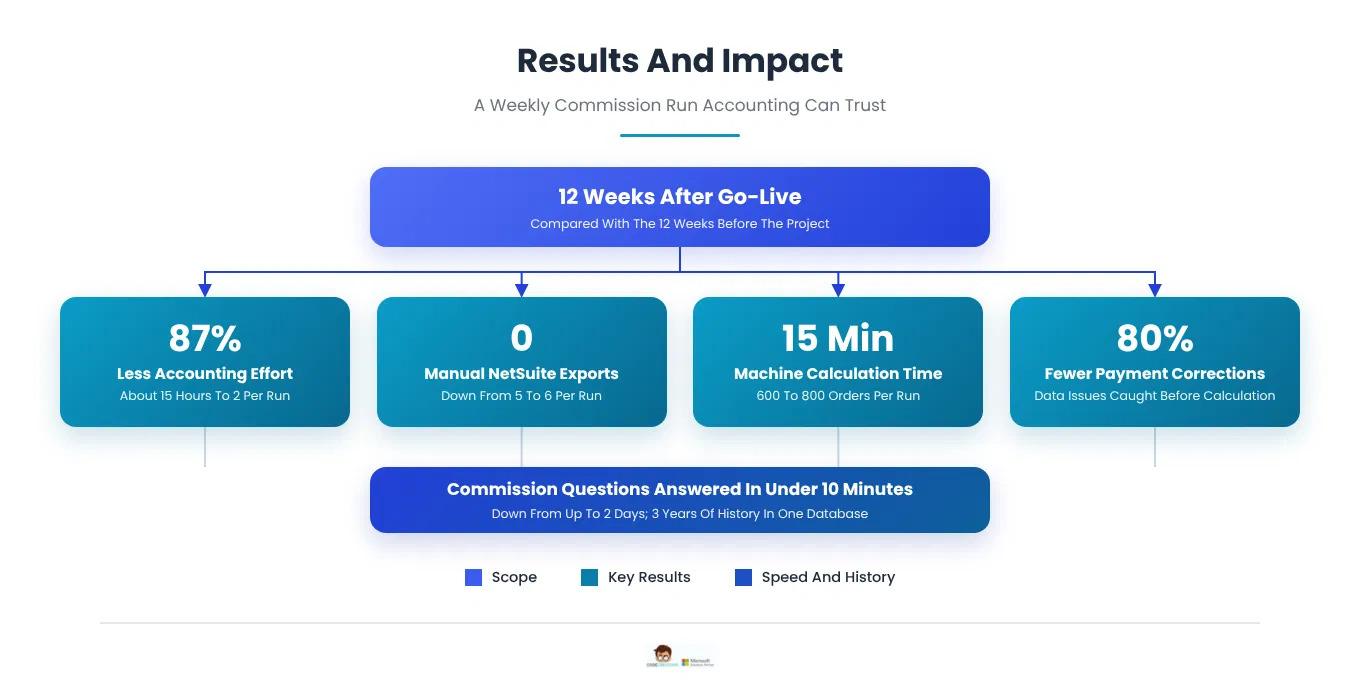
- Accounting Effort: Accounting time per weekly run fell from 10 to 20 hours, about 15 on average, to about 2 hours of review, an 87% reduction. Measured from Accounting’s weekly time logs for the 12 weeks before the project and the 12 weeks after go-live.
- Machine Calculation Time: separate from Accounting’s effort, the automated calculation for 600 to 800 orders runs in about 15 minutes. Measured from Data Factory pipeline run history.
- Manual Exports: the 5 to 6 NetSuite exports per run dropped to 0.
- Commission Questions: answering a consultant’s payment question fell from up to 2 days of tracing worksheets to under 10 minutes of drilling into the run. Measured from Accounting’s inquiry log, 52 questions before and 41 after.
- Corrections: payment corrections after a run fell by 80%, from 30 to 6, because data issues are flagged before calculation. Measured from Accounting’s corrections log over the same 2 periods.
- History: 3 years of commission history, migrated during the build, now sit in one searchable database instead of several Excel files.
What changed for each group
- Accounting: a guided weekly run with flagged exceptions, logged adjustments, and statements generated automatically.
- Design consultants: consistent PDF statements every week and faster answers to payment questions.
- Sales leadership: commission tracking by consultant and period in Power BI.
- Finance and IT: commission rules documented, tested, and maintained in one governed system.
What the Client Says
“Our commission run used to take most of 2 days every week, and it depended on a workbook only a couple of us really understood. Now we start the run, review what the system flags, and approve it, usually in a couple of hours. The rules are exactly what we used before, which mattered to our consultants, and the parallel run gave us proof before we switched over. When a consultant asks about a payment, we can show them the order and the line behind it in minutes. Code Creators took the time to understand every exception in our process before they built anything.”
Accounting Manager, US Flooring Retailer
Frequently Asked Questions
Sales commission automation replaces spreadsheet-based commission calculations with a system that pulls sales data from the source system, applies commission rules automatically, and produces results, statements, and reports on a schedule, with commission tracking over time. It is most valuable when a business has many commission-based sellers, frequent pay cycles, or rules that vary by product, market, or deal type. A well-designed solution keeps a review step so finance can approve each run before payment. For the flooring retailer in this case, Accounting’s weekly effort for 130 design consultants fell from about 15 hours to 2.
Yes. NetSuite data can reach a database such as Azure SQL through saved searches, SuiteTalk web services, or SuiteAnalytics Connect, and commission rules then run as stored procedures or scheduled jobs. The key steps are mapping each NetSuite field the rules depend on, setting a clear weekly cutoff, and validating the data before calculation, so missing prices or unknown sellers are caught early. Here, Azure Data Factory loads 5 NetSuite data sets into Azure SQL every night, and the sales commission calculation replaced 5 to 6 manual exports a week.
Excel works for a handful of sellers, but large workbooks become slow, fragile, and hard to audit as volume and rules grow. A move from Excel to a SQL database stores transactions, reference data, and history in structured tables, runs the same logic every time, and supports logged changes and controlled access. Reports, apps, and dashboards can then read from one trusted source. The retailer’s Azure SQL database now processes 600 to 800 weekly orders in about 15 minutes and holds 3 years of migrated commission history in one place.
Power Apps reads and writes Azure SQL tables through the SQL Server connector, a premium connector that requires Power Apps premium licenses. Power Automate Azure SQL actions run an operation when a flow reaches them, such as executing a stored procedure or getting rows, while triggers start a flow when a supported change occurs, such as a new or modified row. Connector actions time out after 110 seconds, so long processes are usually handed to a separate job. Here, Azure Data Factory runs the 15-minute commission calculation while a flow checks its status.
Special commission rules are usually handled as separate, configurable steps in the calculation. A product list or flag identifies items that earn a bonus rate, a transaction attribute identifies referrals or self-generated deals, and an advances table records amounts to deduct from future payments. Keeping these values in configuration tables lets business users update them without changing code. At the flooring retailer, overstock items earn double commission, self-generated referrals earn a higher rate, open advances are deducted automatically, and manual extras require a logged reason.
The most reliable approach is a parallel run: calculate several real pay periods in both the old process and the new system, compare results seller by seller, and trace every difference to its cause. A written rule specification signed off by finance gives both sides an agreed standard to test against. Many teams also keep a manual review step in the first months after launch. This case used 4 parallel weekly runs: 3 rule interpretations were corrected after week 1, and every consultant’s total matched to the cent by week 4.
Turn Your Commission Spreadsheet Into a Governed Weekly Run
Code Creators builds sales commission automation that keeps your existing rules, connects to your ERP, and gives finance a clear review step before every payment. Explore our Power Automate services to plan an automated commission process for your team.