How a Power Apps Ticketing System Cut Manual Reporting Time by 68% for a Multi-Location Anesthesia Practice.

Executive Summary
Manual reporting time dropped 68%, and urgent surgical event notifications that once took up to 45 minutes to reach the right team now go out in under 90 seconds – a 97% improvement. A multi-location anesthesia physician group needed a faster way to log surgical events from the floor and manage internal HR, benefits, and payroll tickets, without relying on email chains and manual spreadsheet compilation. Code Creators, a Microsoft Solutions Partner, designed and built a SharePoint hub site alongside a purpose-built Power Apps ticketing system and a mobile-friendly Surgical Event App – both backed by a Power Automate workflow for instant and scheduled notifications. The engagement is a practical example of Power Apps for healthcare: purpose-built mobile apps layered on top of Microsoft 365 tools the practice already had.
Industry: Healthcare / Physician Specialty Group
Company size: 120 staff across 5 surgical locations
Main challenge: No structured system for logging urgent surgical events or tracking internal tickets.
Result KPIs
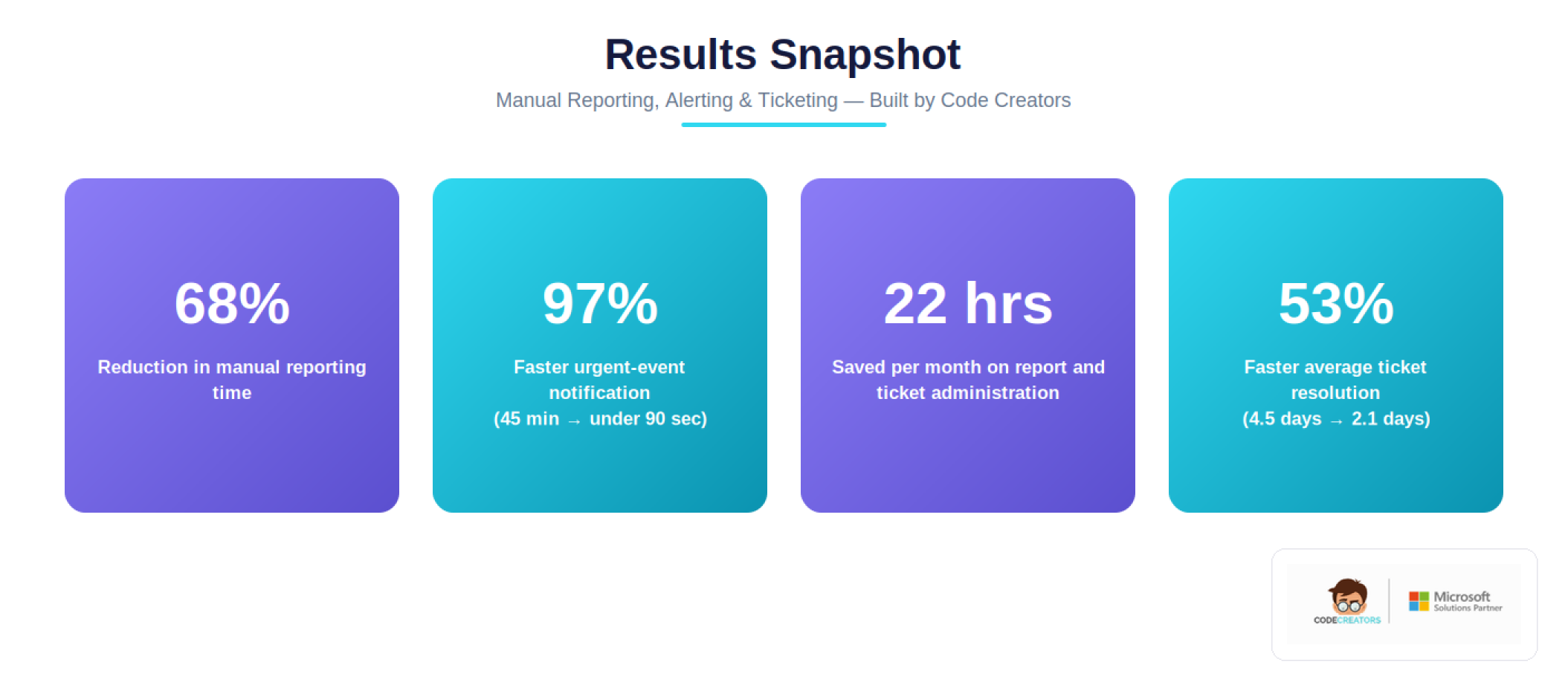
- 68% reduction in manual reporting time
- 97% faster urgent-event notification (45 min → under 90 sec)
- 22 hours saved monthly on report and ticket administration
- 53% faster average ticket resolution time (HR, Benefits, Payroll)
 About the Client
The client is a physician specialty group providing anesthesia services across multiple surgical locations. Groups like this operate in a high-throughput clinical environment where anesthesiologists and support staff move between operating rooms throughout the day, often with only a smartphone or tablet on hand to document what happened during a case.
That operational reality creates a specific technical challenge: any system meant to capture surgical event data has to work reliably on mobile devices, route urgent information instantly to the right people, and still produce clean, structured data that administrators can analyze month over month and year over year. On the administrative side, the practice also needed a standard way to route internal requests, HR questions, benefits issues, and payroll discrepancies, that didn’t depend on emails getting forwarded to the right person.
Because the practice spans several surgical locations, urgent notifications needed to be routed differently depending on where an event occurred, which was a requirement that shaped the entire notification architecture of the solution.
The Problem
The Issue
Surgical event reporting had no dedicated digital workflow. Notable and priority events that need immediate attention from the right stakeholders were being communicated informally, through phone calls and hallway conversations rather than a structured system. Urgent notifications were taking as long as 45 minutes to reach the right recipients. On the operations side, internal tickets covering HR, benefits, and payroll issues lacked any single system of record; requests moved through email with no consistent routing to the correct task assignee.
The Impact
Because urgent surgical events depended on someone noticing and manually escalating them, response time varied case by case instead of being consistent. Monthly and year-over-year analysis of surgical event trends was difficult because the underlying data lived in scattered notes and emails rather than a structured format. Staff estimated roughly 15 hours a month went into manually compiling surgical event summaries and chasing ticket status by email. On the ticketing side, requests had no visible status (open, in progress, closed) and no confirmation loop back to the person who raised the issue, which meant staff regularly had to follow up just to find out whether anything was happening.
The Risk
If left unresolved, the risk wasn’t just inefficiency. For surgical event tracking specifically, delayed visibility into urgent events carries direct clinical and compliance weight, since notable and priority events need to reach the right recipients immediately, not at the end of a shift. On the administrative side, an ongoing lack of a closed-loop ticketing process would likely keep producing dropped requests and duplicated follow-up as the practice, and its ticket volume continued to grow across locations.
Taken together, these gaps meant two different teams were both operating on incomplete information in their own way – clinical staff relying on whoever happened to notice an urgent case, and administrative staff relying on habit and hallway conversations rather than any shared system of record.
What We Discovered / The Requirements
The diagnosis phase focused on how information actually moves through a multi-site surgical practice, not just what the client asked for on paper. A few things shaped the technical approach:
Mobile Reality First
Anesthesiologists and staff logging surgical events are doing so from operating rooms and recovery areas, typically on a phone or tablet, often between cases. A desktop-oriented form, or one asking for extensive text entry, wasn’t going to get used consistently. This pointed toward a Power Apps canvas app optimized specifically for rapid, low-friction mobile entry – short dropdowns for repeatable fields (Surgery Location, Notable Events, Priority Events), with a single long-text field reserved for free-form notes.
Location-Aware Routing, Not a Single Distribution List
Because the practice operates across multiple surgical locations, a single “notify everyone” email approach would either flood staff with irrelevant alerts or bury the ones that mattered. The solution needed conditional routing built through Power Automate workflow design, urgent notifications tied to the Surgery Location selected on the form, sent to the predefined recipient group for that specific site.
Two Distinct Urgency Triggers, One Workflow
Requirements called for urgent alerts to fire under two separate conditions – a Priority Event marked “Urgent,” or any Notable Event flagged as urgent in its own right – which meant the Power Automate flow needed branching logic rather than a single simple condition check.
Structured Data for Trend Analysis
Rather than free-text logging, the Surgical Event list needed defined metadata columns so the practice could run monthly, yearly, and year-over-year comparisons later – a requirement that shaped the SharePoint list schema from the start, and that also drove the decision to auto-generate a weekly summary Excel export via Power Automate rather than requiring manual compilation.
Separate but Parallel Workflow for Tickets
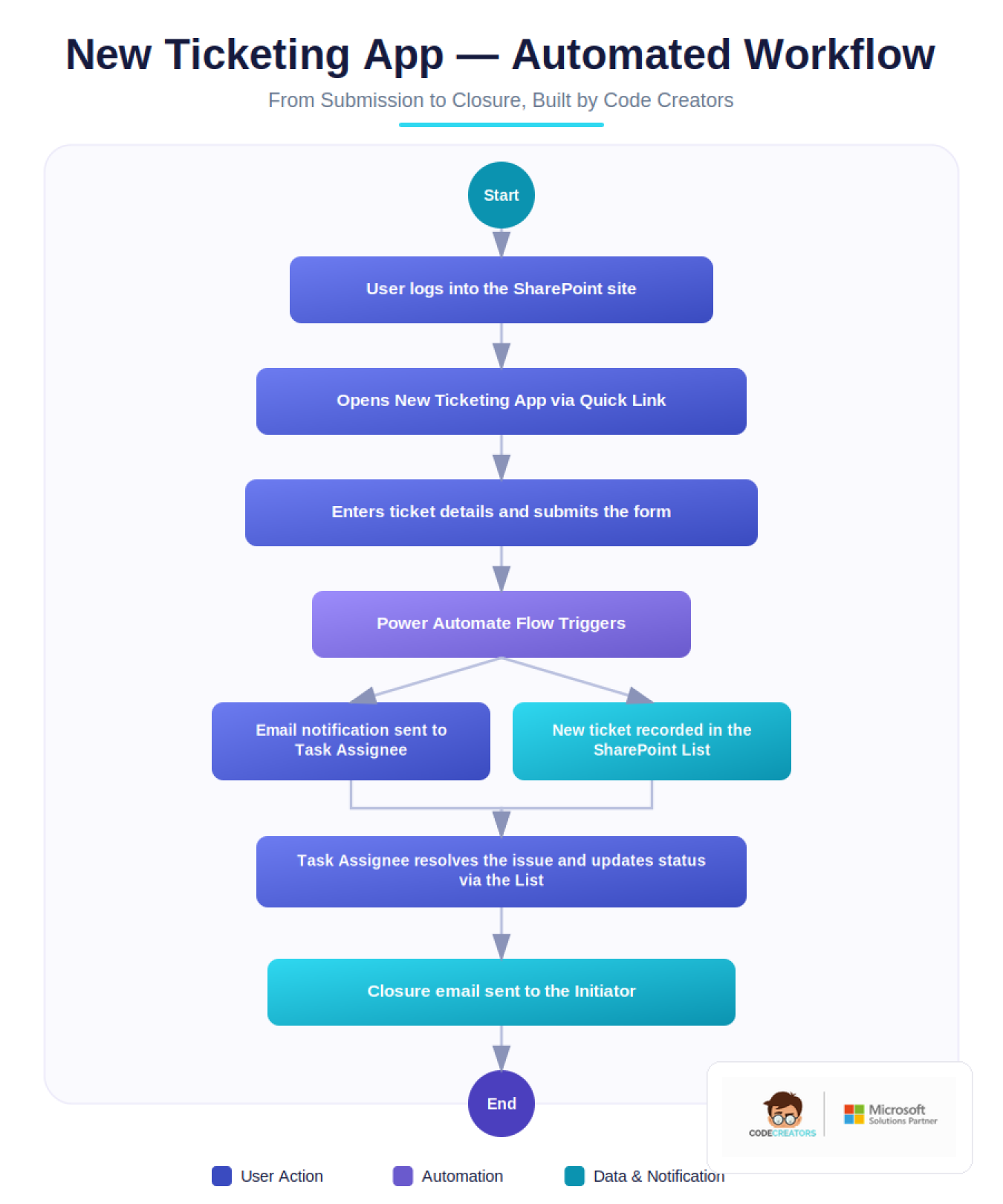
The New Ticketing App required its own intake-to-resolution loop: submission triggers a notification to a Task Assignee, status changes (open → in progress → closed) are managed directly in the SharePoint list, and closure triggers a confirmation notification back to the original requester – closing the loop that was missing before.
 The Solution
Objective
Give staff a fast way to capture surgical event data from anywhere, route urgent information to the right site-specific recipients automatically, and give administrative teams a structured, auditable Power Apps ticketing system – all inside the Microsoft 365 environment the practice already uses.
Technology Stack
SharePoint hub site architecture, Power Apps (canvas apps for Surgical Event and Ticketing forms), a Power Automate workflow layer (conditional and scheduled flows), and SharePoint Lists as the structured data backend for both apps.
Strategy And Roadmap
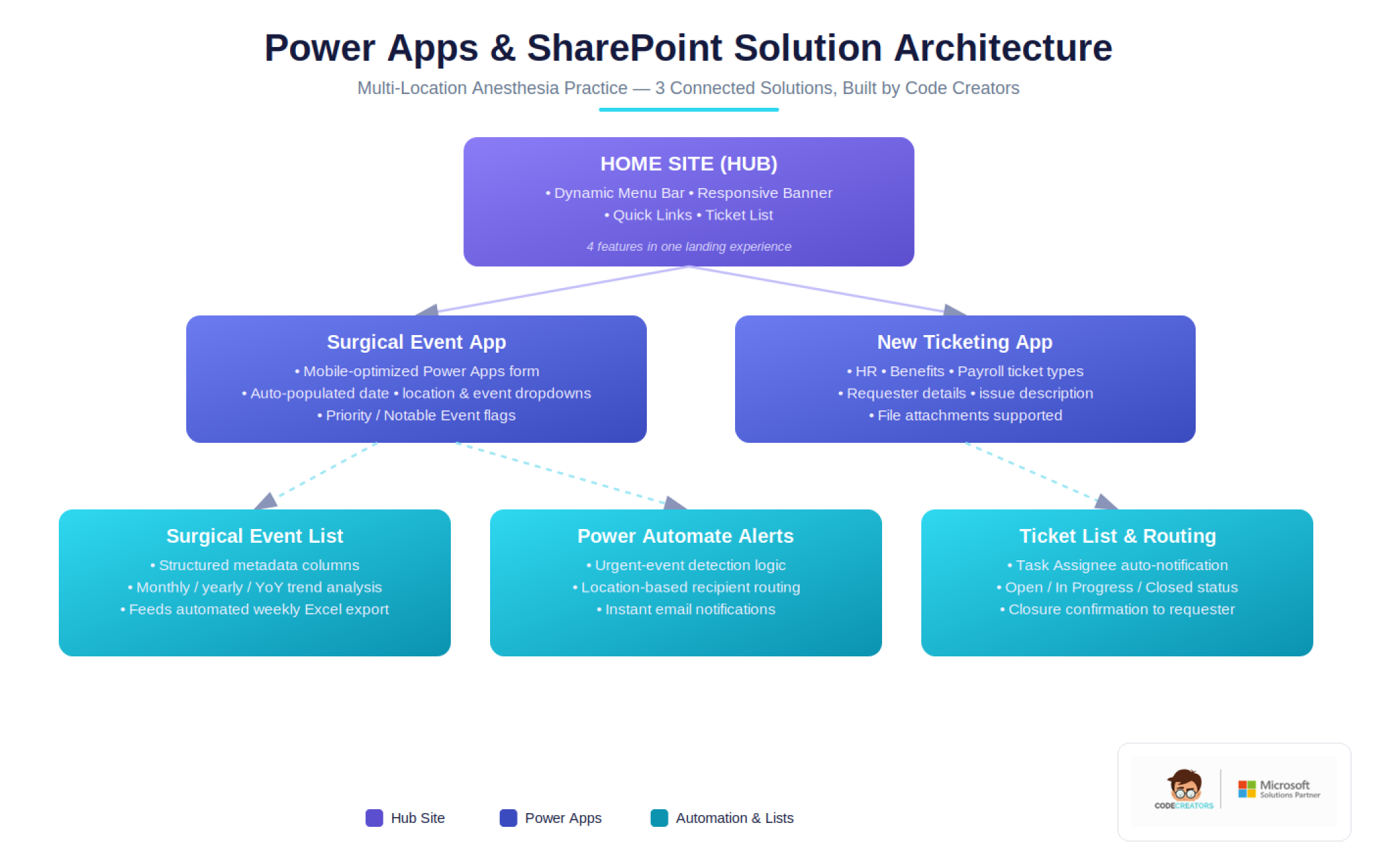
- Home Site (Hub Site). A central SharePoint hub site with a dynamic, admin-editable menu bar, a responsive banner, and a Quick Links section that can be updated and user-targeted without developer involvement – giving both apps a single, discoverable entry point for staff.
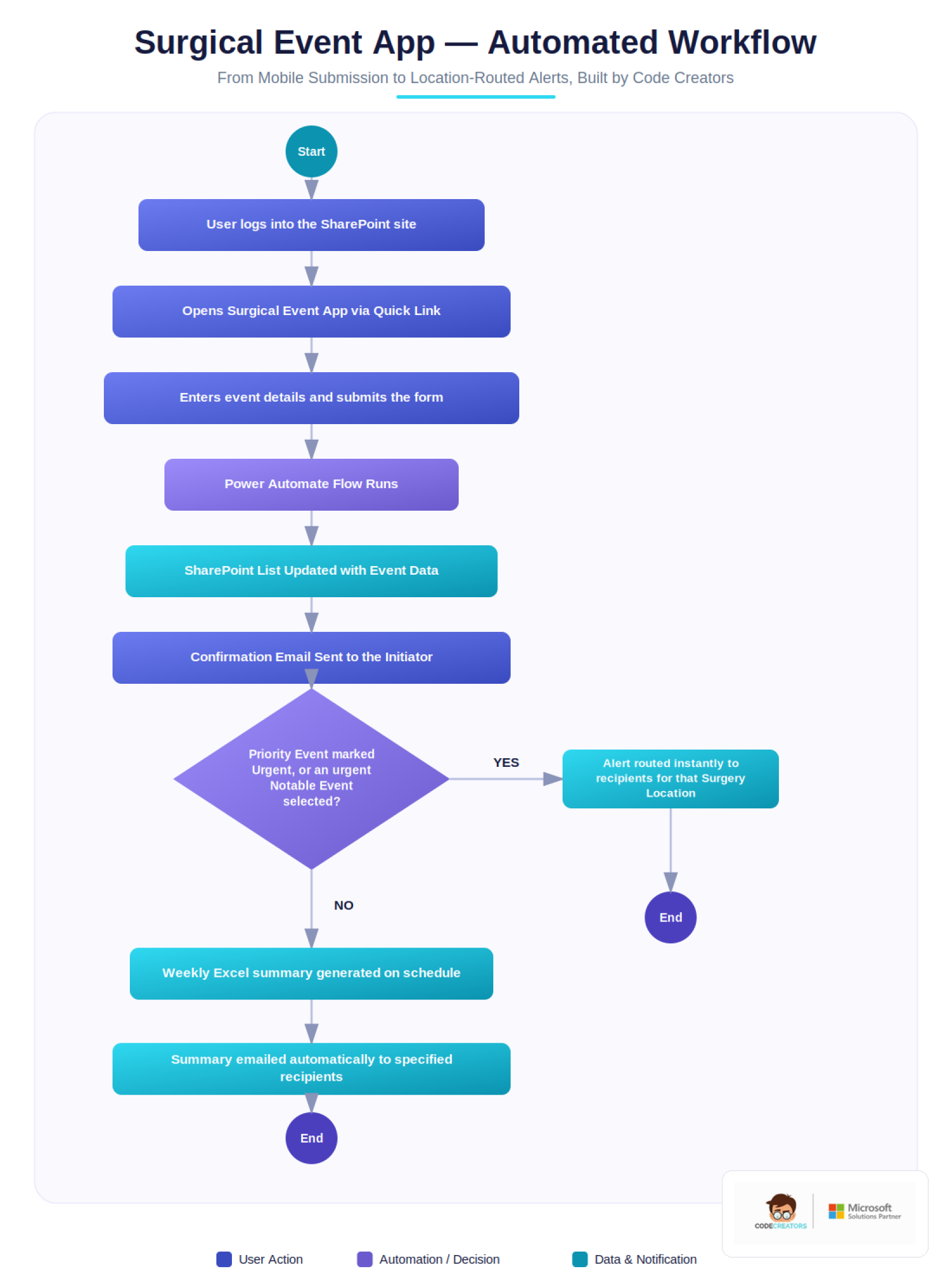
- Surgical Event App. A mobile-optimized Power Apps form with auto-populated date fields, dropdown-driven location and event-type selection, and a long-text notes field. Submissions write directly to a structured SharePoint list designed for downstream reporting.
- Conditional notification logic. Power Automate flows evaluate each submission for urgency (via Priority Event or Notable Event flags) and route alerts to the recipient group tied to the selected Surgery Location – rather than a single generic distribution list.
- Automated weekly reporting. A scheduled Power Automate flow compiles all Surgical Event submissions from the prior week into an Excel summary and emails it automatically to designated recipients, removing the need for manual data pulls.
- New Ticketing App. A second Power Apps form – effectively a self-contained Power Apps ticketing system – supporting HR, Benefits, and Payroll ticket types with subtypes, requester details, and file attachments, feeding a SharePoint-based Ticket List that Task Assignees manage directly – with automated notifications on both submission and closure.
 The two-app structure was a deliberate choice: surgical event logging and internal ticketing have different urgency profiles, different stakeholders, and different reporting cadences, so keeping them as separate apps sharing a common hub site kept each workflow simple rather than forcing both into one generalized form.
Challenges Overcome
Balancing Urgency Detection with Alert Fatigue
Because two separate fields – Priority Event and Notable Event – could each independently trigger an urgent notification, the flow logic had to treat them as an “either/or” condition rather than requiring both, so that a genuinely urgent case couldn’t slip through simply because only one flag was set.
Designing for Location-Specific Routing Without Hardcoding
Rather than hardcoding recipient lists inside the flow itself, notification groups are tied to the Surgery Location value selected on the form, which keeps the routing logic maintainable as the practice site list or staffing changes.
Keeping Metadata Flexible During Rollout
The client and Code Creators agreed the SharePoint lists would launch with generic metadata fields, to be refined jointly with the client before final release – an approach that avoids over-engineering the schema before real usage patterns are understood, while still giving the practice a working system from day one. Any changes beyond that baseline scope are handled through a formal change management process, so that time and cost implications are agreed upon before work begins.
Results & Business Impact
Manual reporting time dropped 68%, urgent surgical event alerts now reach location-specific recipients in under 90 seconds instead of up to 45 minutes, and the practice’s admin team has gotten back an estimated 22 hours a month that used to go into manually compiling weekly summaries and following up on ticket status. That figure runs higher than the practice’s original 15-hour estimate from before rollout, since the initial estimate only accounted for reporting time – the measured total also captures the ticket-chasing time that used to happen alongside it.
Within the first three months of rollout, the Surgical Event App logged 340 submissions across all five locations, with 100% of entries captured in structured, reportable fields – compared to effectively 0% before, when event details lived in scattered notes and emails. Of those, 28 were flagged as urgent, and every one triggered a location-routed notification automatically, with no missed or delayed alerts recorded during the rollout period.
On the administrative side, the New Ticketing App processed 96 HR, Benefits, and Payroll tickets in the same window, cutting average resolution time from roughly 4.5 days to 2.1 days which is a 53% improvement with a visible status on every ticket instead of relying on email follow-up.
Results KPI Snapshot
- 68% reduction in manual reporting time
- 97% faster urgent-event notification (45 min → under 90 sec)
- 22 hours saved monthly on report and ticket administration
- 53% faster average ticket resolution (4.5 days → 2.1 days)
- 340 surgical events and 96 tickets processed in the first 3 months
- 100% of surgical events now captured in structured, analyzable data
Client Testimonial
“Before this, an urgent surgical event could sit in someone’s inbox for 30 to 40 minutes before the right person even saw it, and nobody liked that gap. Now the moment something’s flagged, it goes straight to the team at that location – no one has to remember to escalate it. What’s changed the most for us day to day is the reporting. Compiling the weekly surgical summary used to eat up the better part of a day for someone on my team; now it just lands in our inbox. Tickets are the same story – HR, benefits, payroll requests all sit in one place with a status anyone can check, instead of getting buried in someone’s email. It’s not flashy, but it’s given us back real time every week.”
Jordan Ellis, Director of Clinical Operations
Frequently Asked Questions
Delays typically happen when event logging depends on informal communication, phone calls, hallway conversations, or emails sent after a shift ends, rather than a structured system that captures and routes information the moment an event occurs. Without location–aware alerting, urgent cases can also get lost among lower–priority updates.
Timelines depend on the number of apps, the complexity of notification logic, and how much metadata refinement is needed with the client, but a scoped solution covering a SharePoint hub site plus a Power Apps ticketing system with automated flows is typically planned and delivered within a defined SOW timeline agreed upon before development starts.
A Power Automate workflow lets urgent–event logic run consistently every time, regardless of who’s on shift or whether someone remembers to escalate manually. Conditional flows can evaluate multiple urgency signals and route to different recipient groups based on submitted data, which manual processes can’t guarantee at scale.
Metadata is typically launched with a generic, functional structure and refined jointly with the client as real usage patterns emerge, rather than trying to finalize every field before go–live. This keeps the system usable from day one while leaving room for adjustment.
A hub site gives a practice one consistent entry point, shared navigation, branding, and quick links, while still allowing individual apps and lists underneath to be managed independently, which scales better as more tools get added over time.
In practice it usually means small, purpose–built mobile apps, not one large system trying to do everything, layered on top of Microsoft 365 tools a healthcare practice already has. A Surgical Event App and a Power Apps ticketing system running side by side on a shared SharePoint hub site, each backed by its own Power Automate workflow, is a typical example.
Often, it’s because urgency isn’t detected automatically – someone must notice a flagged event and manually decide to escalate it. Automating that detection through form logic and workflow rules removes the dependency on someone remembering to act.
A structured ticket list with defined statuses (open, in progress, closed) and automatic notifications on both submission and closure gives both the requester and the assignee visibility into where a request stands, without needing to follow up manually.
Yes, Power Apps canvas apps can be designed specifically for phone and tablet use, with dropdown–driven fields and minimal typing, which matters in clinical environments where staff are moving between rooms and don’t have time for lengthy desktop forms.
Ready for a Power Apps Ticketing System You Can Actually Rely On?
If your team is still logging surgical events informally, or ticket requests keep falling through the cracks between HR, Benefits, and Payroll, you don’t have to choose between speed and structure. A short discovery conversation tells you exactly what a Power Apps and SharePoint hub site solution would look like for your environment before you commit to a build timeline. Schedule a Power Apps Readiness Consultation.