Power Automate Purchase Order Approval in Action: 75% Faster for an Environmental Remediation Company
Executive Summary
RAM Environmental Group, a mid-sized British Columbia environmental remediation and emergency response firm with roughly 130 field and office staff, was running client intake, incident activation, daily work orders, and procurement almost entirely through email, phone calls, and disconnected spreadsheets – a setup that routinely added two to three days before signed client authorization came back, and up to six hours of manual setup before a crew reached site. Code Creators, a Microsoft Solutions Partner, replaced those manual hand-offs with a Modern SharePoint intranet and four connected Power Apps and Power Automate solutions – including a dedicated Power Automate purchase order approval workflow – integrating Adobe Sign for legally binding digital signatures. Within the first quarter after go-live, Client Authorization turnaround dropped to under four hours, job activation fell from two hours to twelve minutes, and Purchase Order approvals moved from up to five business days to about one – with 94 percent of staff actively using the new environment within 30 days.
About the Client
RAM Environmental Group operates across British Columbia as an environmental remediation and emergency response provider, dispatching field crews to hazardous material incidents, contamination sites, and disaster-recovery projects for insurers, municipalities, and commercial clients. The company runs roughly 130 field and office employees across two operating divisions – Environmental and Remediation – each with its own daily reporting requirements and BC-specific first aid and safety compliance obligations that have to be documented on every activation.
Market conditions add pressure that most back-office software isn’t built for: response windows are tied to insurance and municipal contracts, with seasonal spikes during storm and spill season. The operational complexity is real – every incoming call can turn into a job that needs client authorization, a dedicated project workspace, a field crew, and procurement, often within the same day. What made the environment unique was the mix of internal staff and external stakeholders: insurers and municipal contacts needed to review and sign authorization documents without ever holding a Microsoft 365 account, and every job needed its own access-controlled project site stood up quickly enough to keep pace with dispatch.
The Problem
Before engaging Code Creators for SharePoint consulting services, RAM Environmental Group ran its client intake, dispatch, and procurement process almost entirely on email threads, faxed signatures, and static spreadsheets stored across shared network drives.
Client Authorization forms mailed or faxed for signature typically took two to three business days to come back signed, delaying the start of billable field work by the same margin. Activation Reports were relayed by phone from dispatch to operations, who then manually built a project folder structure and added each team member to a Microsoft Teams site one at a time – a process that averaged just under two hours per job, and on days with multiple simultaneous incidents could push total admin time past six hours before a single crew was on site.
Daily Work Order data covering labor hours, vehicle usage, and equipment was tracked in per-crew spreadsheets that had to be manually reconciled against Accounting’s records every month, a process the accounting team estimated at roughly 20 hours per month. Purchase Order requests moved through unstructured email chains with no centralized status tracking, occasionally delaying procurement of materials for active job sites by four to five business days. Left unresolved, these manual workflows risked slower incident response relative to competitors, inconsistent documentation for insurance and regulatory purposes, and a growing administrative burden as project volume increased.
What We Discovered
Code Creators began with a two-week discovery phase combining stakeholder workshops with Incident Managers, the Operations Head, and the accounting team, alongside a technical audit of RAM’s existing SharePoint tenant, network file shares, and manual approval routes. Using SharePoint admin center reporting and a review of RAM’s shared drives, we mapped every hand-off point in the client authorization, activation, dispatch, and procurement processes to identify exactly where time was being lost.
The audit surfaced four root causes. First, there was no structured intake form for client authorization – every incident report used slightly different wording and formatting, which made the Terms and Conditions document RAM sent for signature inconsistent and slow to prepare. Second, activation and Teams-site provisioning were entirely manual, with no template-driven folder structure, so operations staff rebuilt the same folder hierarchy by hand for every job. Third, daily work order data had no single source of truth: labor hours, vehicle assignments, and equipment usage were captured in separate spreadsheets per crew, which is precisely why month-end reconciliation took so long. Fourth, RAM’s existing tenant had no hub-site architecture or governance model, so there was no consistent place for company-wide announcements, quick links, or a searchable document library.
This diagnosis pointed to a solution built on Power Apps development services for a structured Power Apps client authorization form, Power Automate for approval routing and Teams provisioning, and a Hub Site–based SharePoint architecture for governance and navigation – rather than a series of point fixes layered onto the existing spreadsheets and email chains. Because RAM’s external clients needed to review and sign documents without holding a Microsoft 365 license, Adobe Sign was selected over native SharePoint e-signature options specifically for its guest-signer support through the Power Automate connector.
The Solution
The objective was to build a governed, template-driven SharePoint intranet for field services: one hub for company-wide navigation and documents, alongside four connected Power Apps and Power Automate solutions covering client authorization, activation, daily work orders, and purchase orders.
Strategy
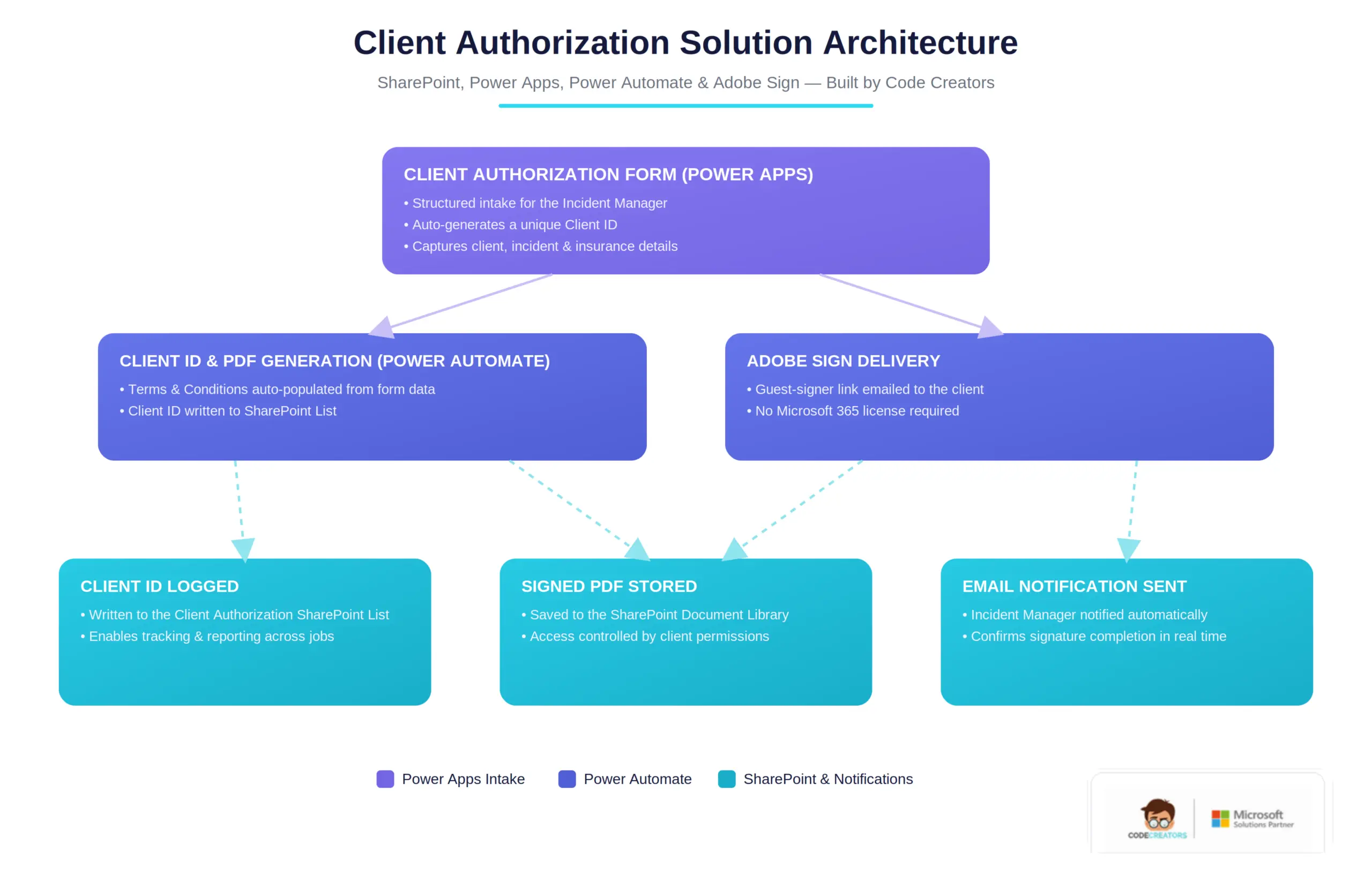
Rather than digitizing each spreadsheet independently, Code Creators standardized on a single Hub Site architecture with a reusable Team Site template that provisions automatically per client engagement, so every new job inherits consistent branding, permissions, and a document library from day one. Power Automate workflow automation carries data between the intake forms, SharePoint Lists, Microsoft Teams provisioning, and the Adobe Sign connector, so a single form submission can trigger Client ID generation, Teams site creation, and document storage without manual intervention.
Power Automate Purchase Order Approval Workflow
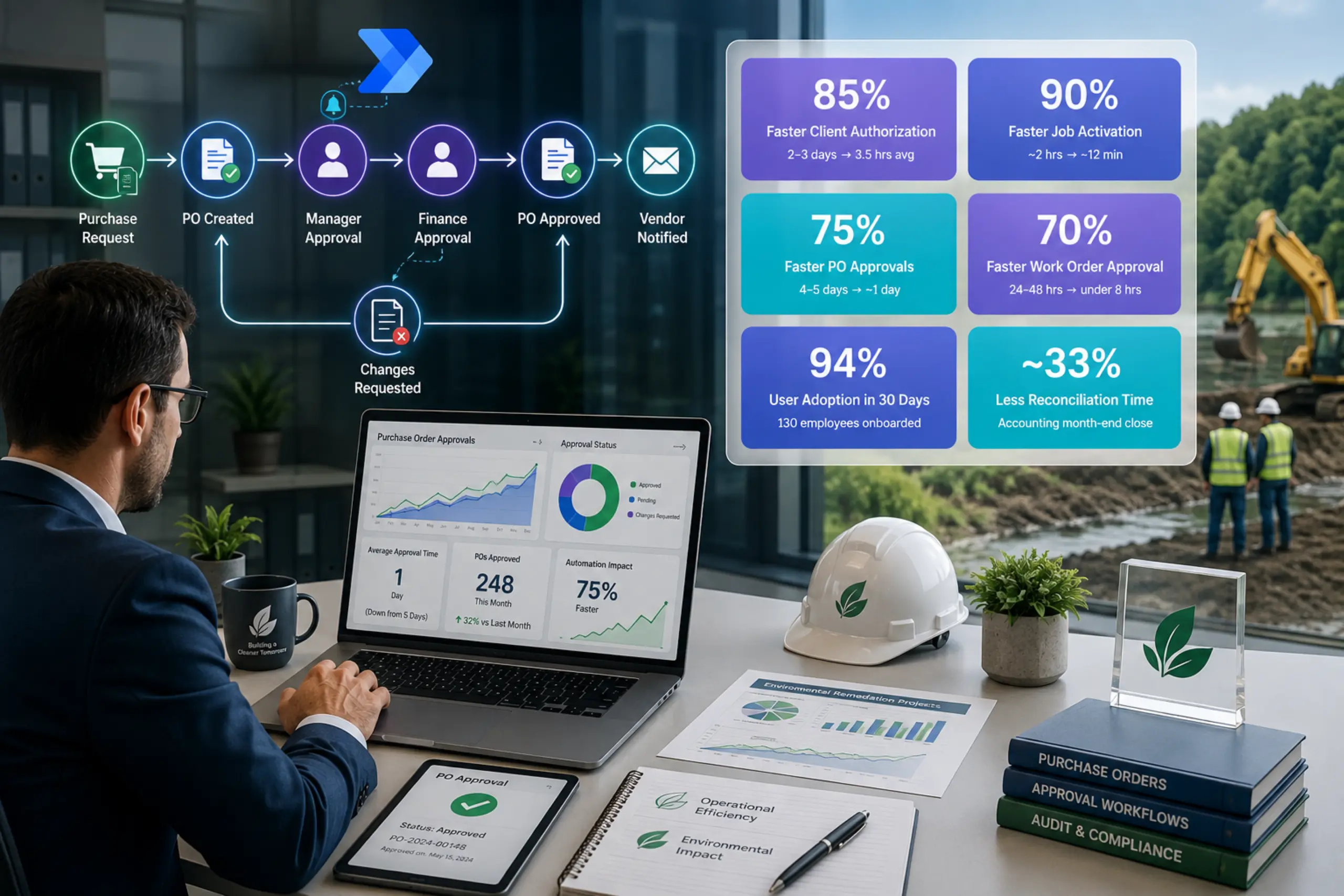
Purchase Order Request was the fourth Power Apps solution, and its Power Automate purchase order approval workflow got specific attention since accounting had flagged it as the most opaque of the four manual processes. An Incident Manager submits a PO request through Power Apps; a Power Automate approval workflow routes it to the designated approver, who can approve or reject directly from the notification email; once approved, the request’s status updates automatically in the SharePoint List, and Power Automate pushes a notification to the requester, procurement, and finance so nobody has to check the list manually to know where a request stands.
Home Site & Quick Links
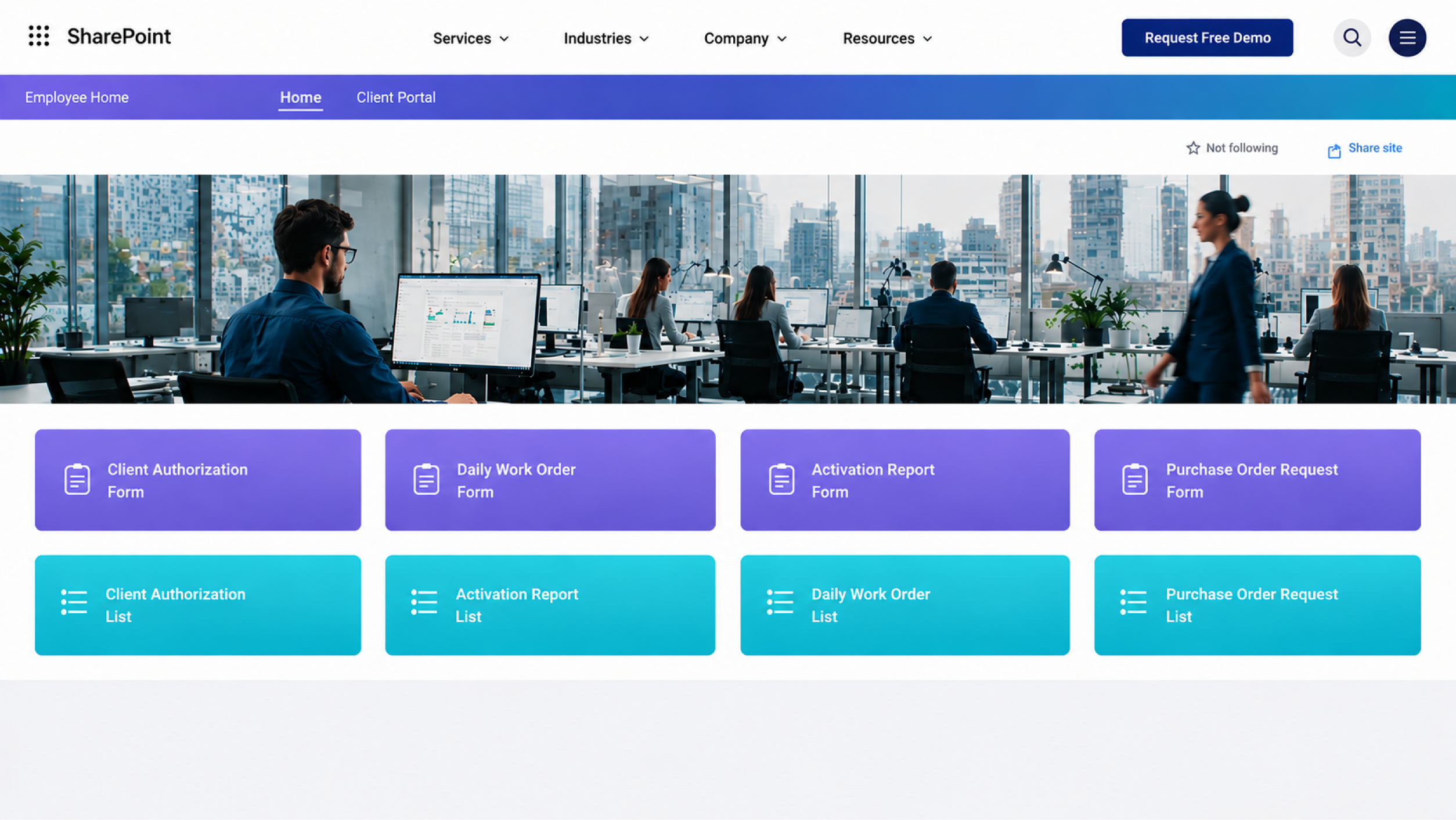
The Home Site hub gives every employee a single landing page: company-wide navigation, a branded banner, and one-click quick links into all four Power Apps solutions – forms on top, their corresponding SharePoint Lists underneath. The mockup below recreates the actual design delivered for this project, shown here with client name and logo removed.
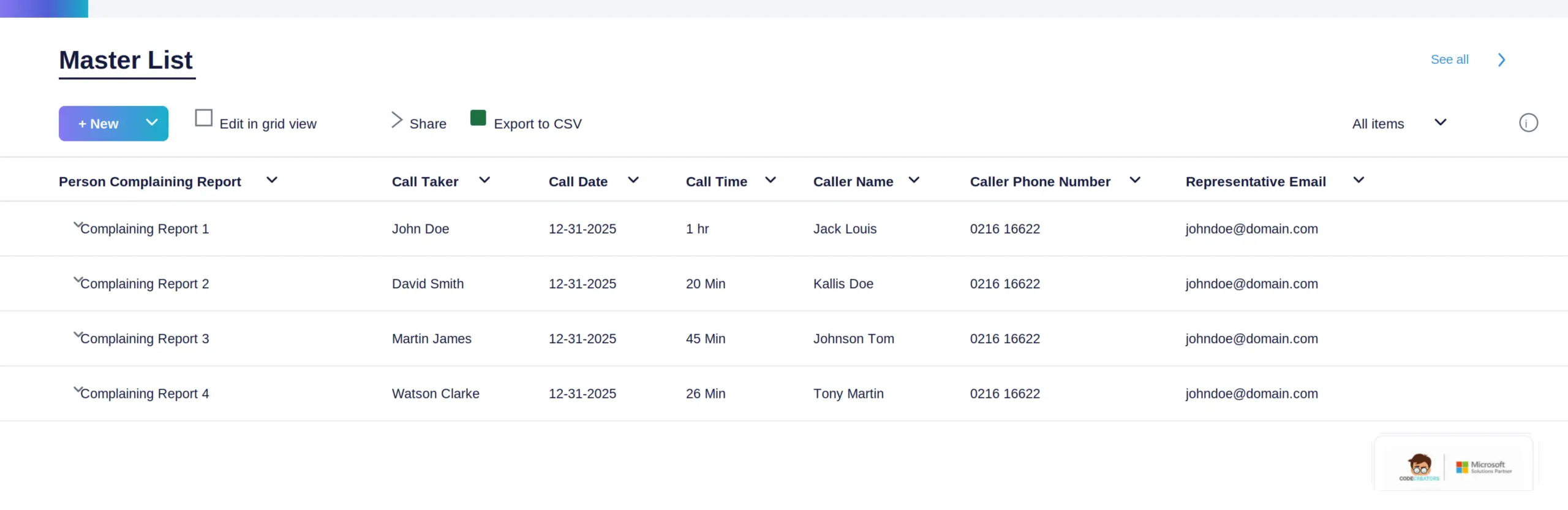
Each solution’s underlying data lands in a governed SharePoint List. The Master List mockup below shows the same list-view pattern used across all four solutions – structured columns, in-line filtering, and an Export to CSV option for accounting and reporting.
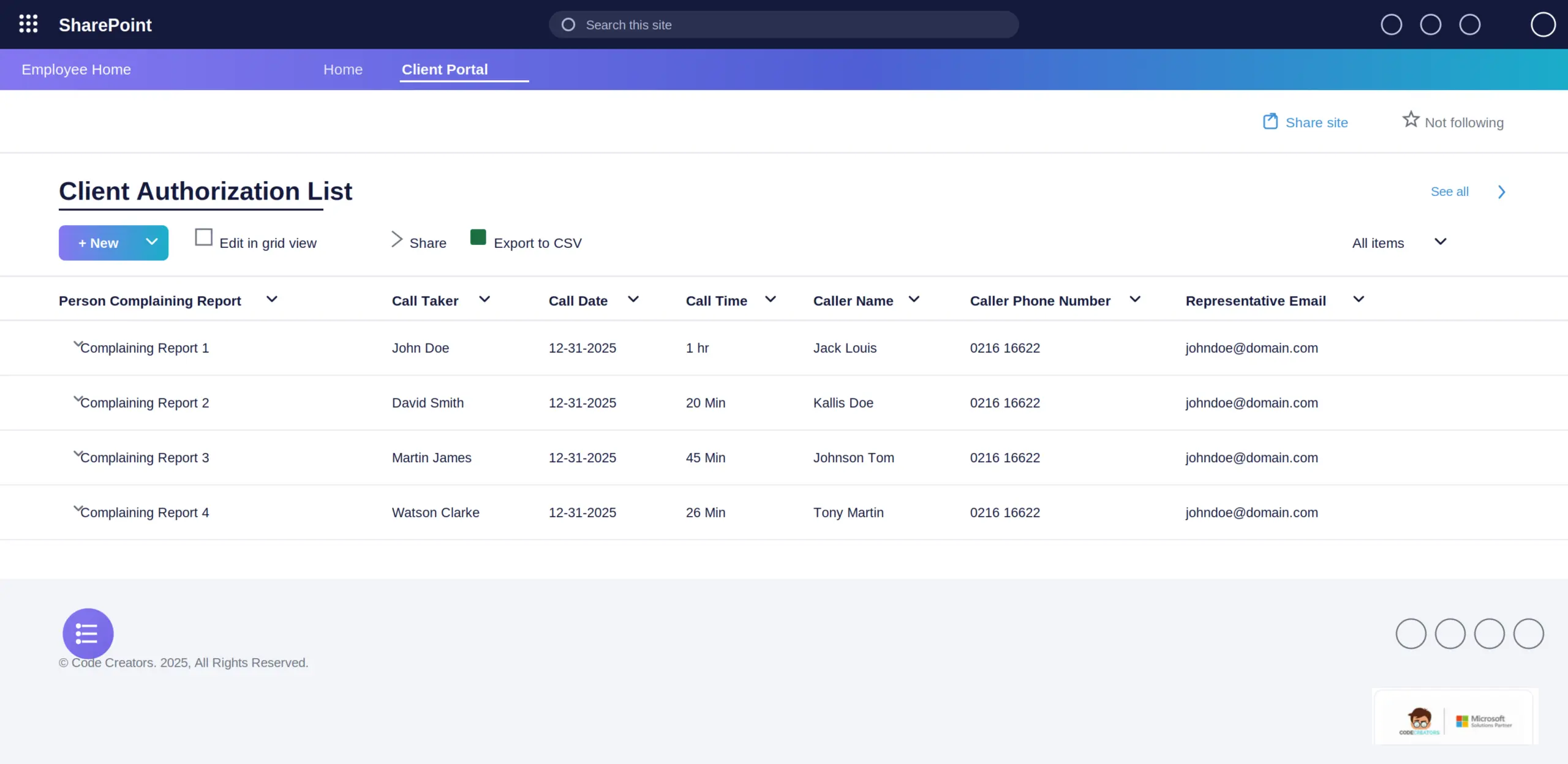
 Taking Client Authorization as a concrete example: submissions land in their own dedicated SharePoint List, shown below with the same toolbar and column pattern, plus a footer carrying no client branding.
 And the intake side: the Client Authorization Power Apps form itself, spanning four sections – Client Authorization, Client Information, Insurance Information, and Incident Details – with Cancel and Submit actions at the end.
Roadmap
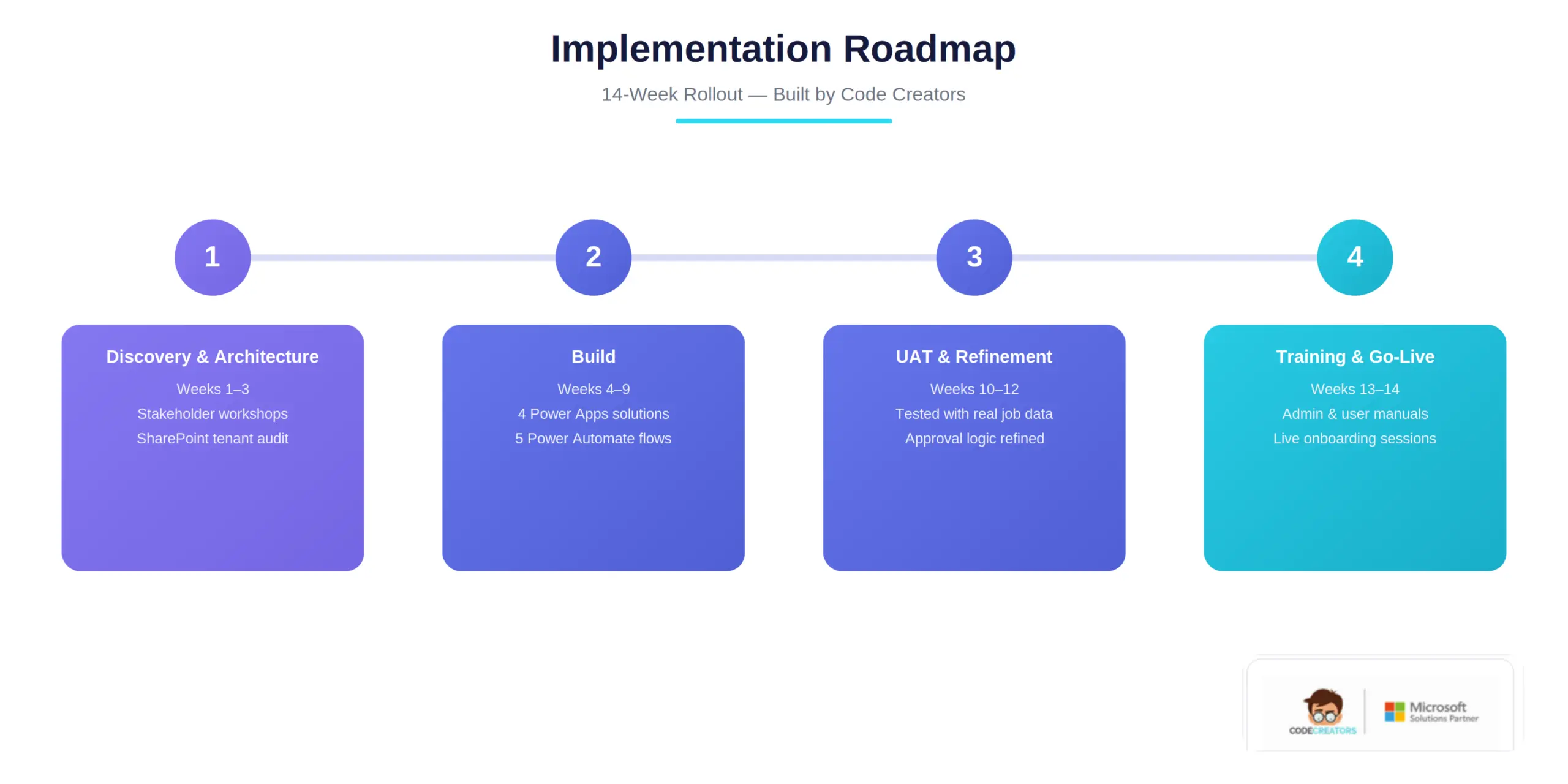
The fourteen-week rollout moved through Discovery & Architecture, Build, User Acceptance Testing, and Training & Go-Live. Each Power Apps solution was built and tested against real historical job data from RAM before go-live, with the Client Authorization and Activation Report workflows prioritized first since they sat earliest in the job lifecycle and had the largest measured delays.
Challenges Overcome
Two implementation challenges required custom handling. RAM’s two operating divisions used different Daily Work Order data structures, since Remediation crews needed to log heavy-duty equipment and trainer usage that the Environmental division never touched. Rather than force both teams onto one rigid form, dynamic, dispatch-type-driven fields were built into the single Power Apps form so each division sees only the fields relevant to its work, while both feed the same underlying SharePoint List for consistent reporting.
The client-facing Adobe Sign SharePoint integration also needed to work for signers who had never used Microsoft 365, in several cases signing from a mobile device in the field. The guest-signer flow was tested against RAM’s actual insurer and municipal contact list during UAT, and the Power Automate flow’s retry logic was adjusted after a small percentage of signature requests were found to be timing out on slower rural mobile connections. Finally, because Activation Reports could now trigger a Teams site and folder structure automatically, RAM’s Operations Head raised a governance concern about accidental over-provisioning – resolved by adding an internal approval step before any Teams site is created or an external client is onboarded to the portal.
Results & Business Impact
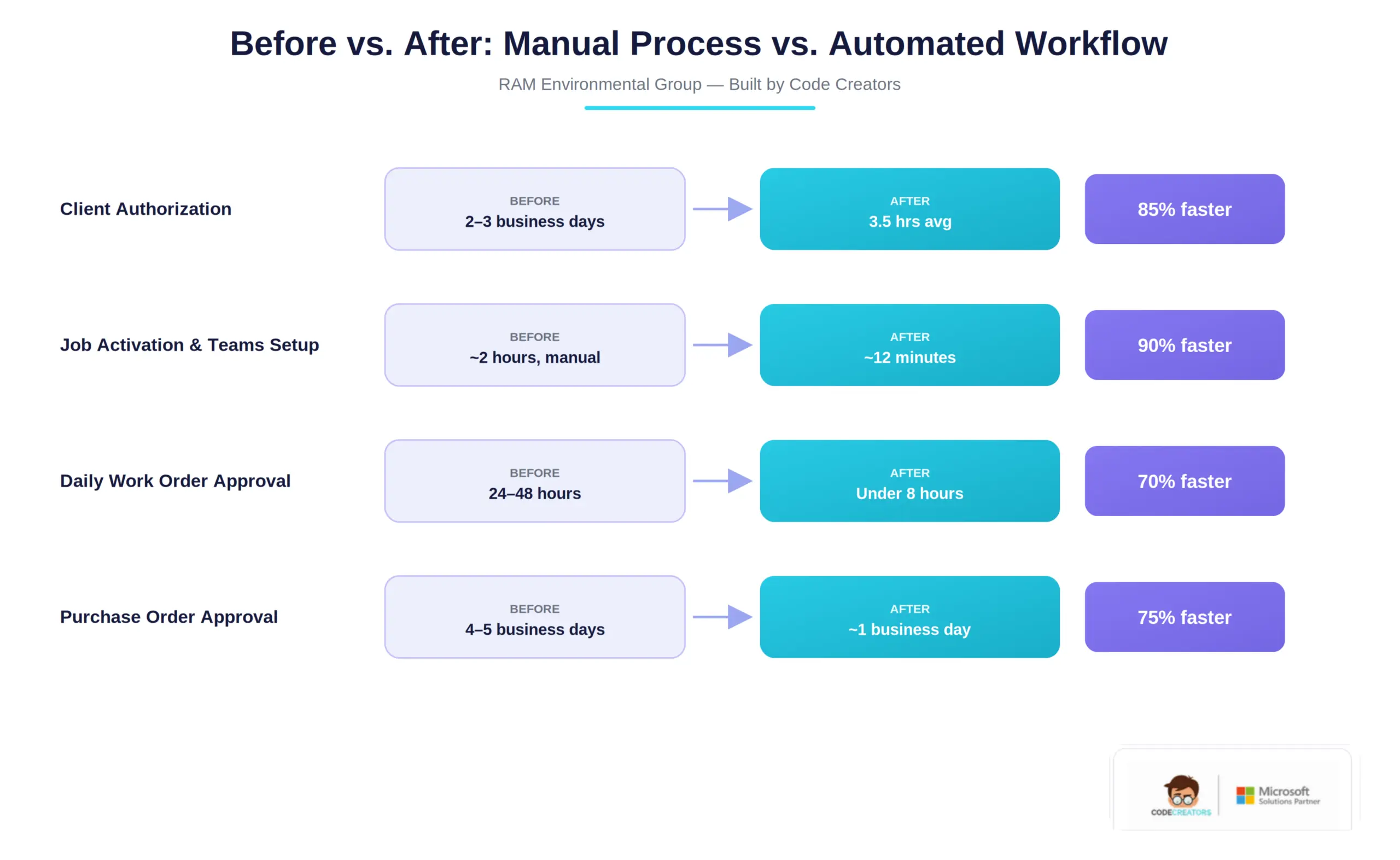
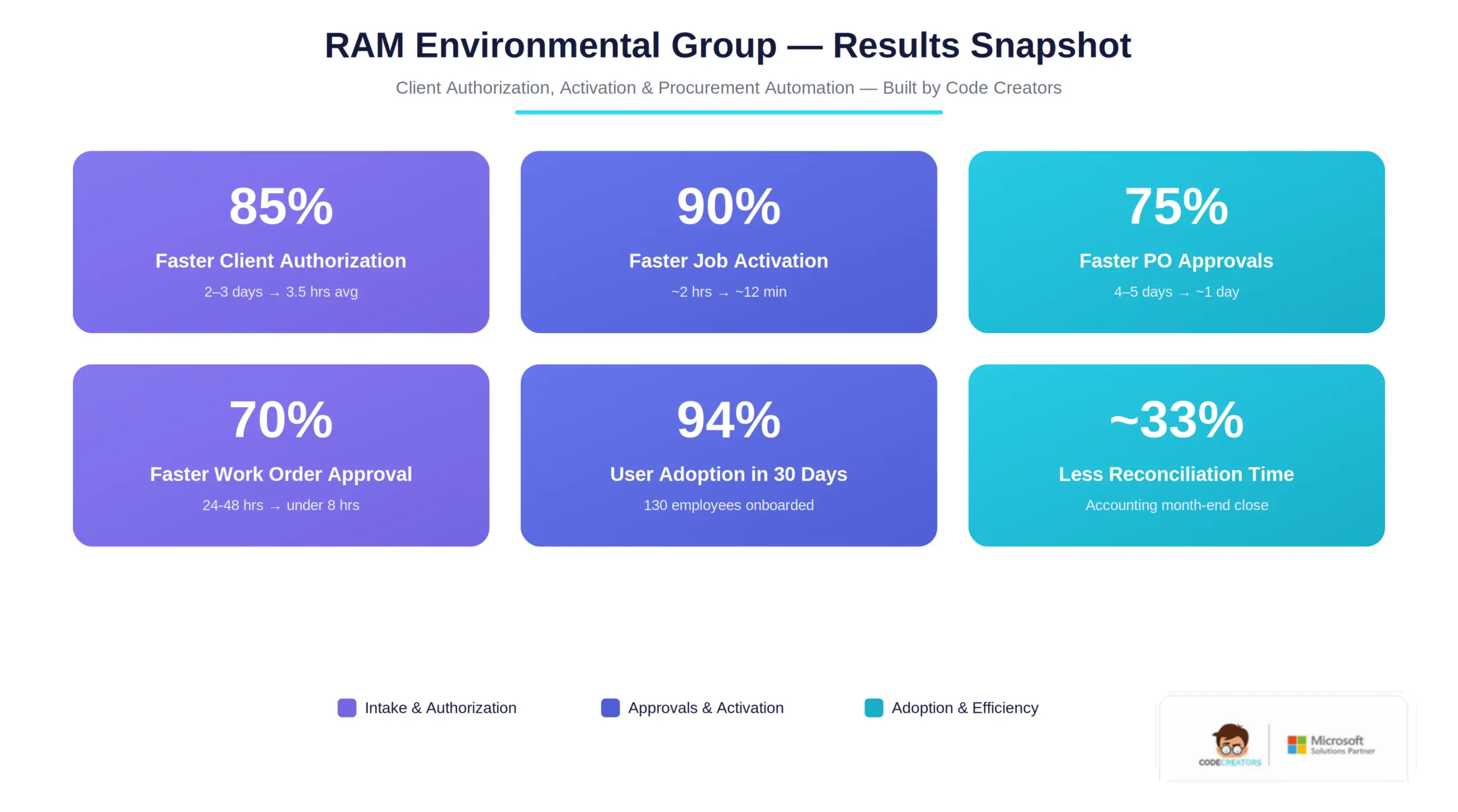
Within the first full quarter after go-live, every automated workflow showed a measurable improvement. Client Authorization turnaround dropped to same-day, averaging 3.5 hours from form submission to signed document. Teams site provisioning automation cut job activation setup from roughly two hours of manual work to about twelve minutes. Daily Work Order approvals, previously taking 24 to 48 hours to clear accounting review, now clear in under eight hours on average. The new Power Automate purchase order approval workflow cut Purchase Order approvals from four to five business days to about one business day.
94% percent of RAM’s 130 employees were actively using the new intranet and Power Apps solutions within 30 days of go-live, without a formal change-management campaign beyond the training sessions included in the engagement. RAM’s Accounting team reported that consolidating Daily Work Order data into a single governed SharePoint List cut month-end labor and equipment reconciliation time by roughly a third.
Beyond the automated processes themselves, RAM’s leadership pointed to a less quantifiable but operationally significant result: because Client Authorization and Activation now complete in hours rather than days, field crews consistently arrive on site with signed authorization and an active Teams workspace already in place, shortening the gap between an incoming call and billable field work.
Client Testimonial
Previously, an incoming call could mean 2 or 3 days before the authorization of paperwork was actually signed, and another chunk of a day getting a project site set up for the crew. Now our Incident Managers submit one form, and by the time the truck is on the road, the client’s authorization is already routed for signature, and the project site is waiting for them. The bigger change has been for accounting, reconciling labor and equipment used to eat a week every month, and that’s shrunk considerably now that it’s all in one list instead of six different spreadsheets.
Operations Director, RAM Environmental Group
Frequently Asked Questions
A Power Automate purchase order approval workflow removes the manual routing that slows PO requests down: instead of an email sitting in an approver’s inbox, the flow triggers automatically on submission, routes the request to the correct approver, and lets them approve or reject directly from the notification. Status updates write back to a SharePoint List in real time, so requesters, procurement, and finance all see the same current status without asking around.
Most delays trace back to manual, paper– or email-based authorization: incident details are captured inconsistently, Terms and Conditions documents are assembled by hand, and signatures are collected by mail or fax. Each hand-off adds a day or more, which is why structured intake forms paired with e-signature routing typically cut authorization turnaround from days to hours.
For a project of this scope – a Hub Site intranet plus four Power Apps solutions and an Adobe Sign integration – a fourteen-week timeline covering discovery, build, user acceptance testing, and training is typical for a mid-market organization. Simpler, single-workflow projects can move faster; multi-division rollouts with custom approval logic may take longer.
Yes. Adobe Sign’s guest-signer flow, triggered through the Power Automate connector, lets external recipients such as insurers or municipal contacts review and digitally sign documents from an emailed link without ever holding a Microsoft 365 license or SharePoint account.
A Power Automate flow, triggered on form approval, calls the Teams provisioning APIs to create a dedicated team, a project-specific channel, and a predefined folder structure based on a selected template – then applies permissions and adds internal team members automatically, removing the need to build each project site by hand.
Why are field service and remediation companies moving away from spreadsheets for daily work orders?
Per-crew spreadsheets create multiple versions of the truth: labor hours, equipment, and vehicle data end up scattered across files that have to be manually reconciled for billing and compliance. Centralizing that data in a single governed SharePoint List, fed by one Power Apps form, removes the reconciliation step and improves audit readiness.
Costs vary with scope, but according to our guide on SharePoint licensing costs, mid-market implementations combining SharePoint Online with Power Platform automation typically run $15,000 to $50,000 in professional services, on top of Microsoft 365 licensing starting around $12.50 per user, per month for Business Standard. A multi-app project like this one, spanning four Power Apps solutions and an Adobe Sign integration, generally sits toward the middle of that range.
Ready to Fix Similar Bottlenecks?
Facing similar client authorization, dispatch, or procurement delays in your own field operations? Schedule a consultation with our team to map out a practical SharePoint and Power Platform automation roadmap for your environment.