Microsoft SharePoint for Nonprofits: How a SharePoint Knowledge Base Fixed Document Search for a Health Sector Organization
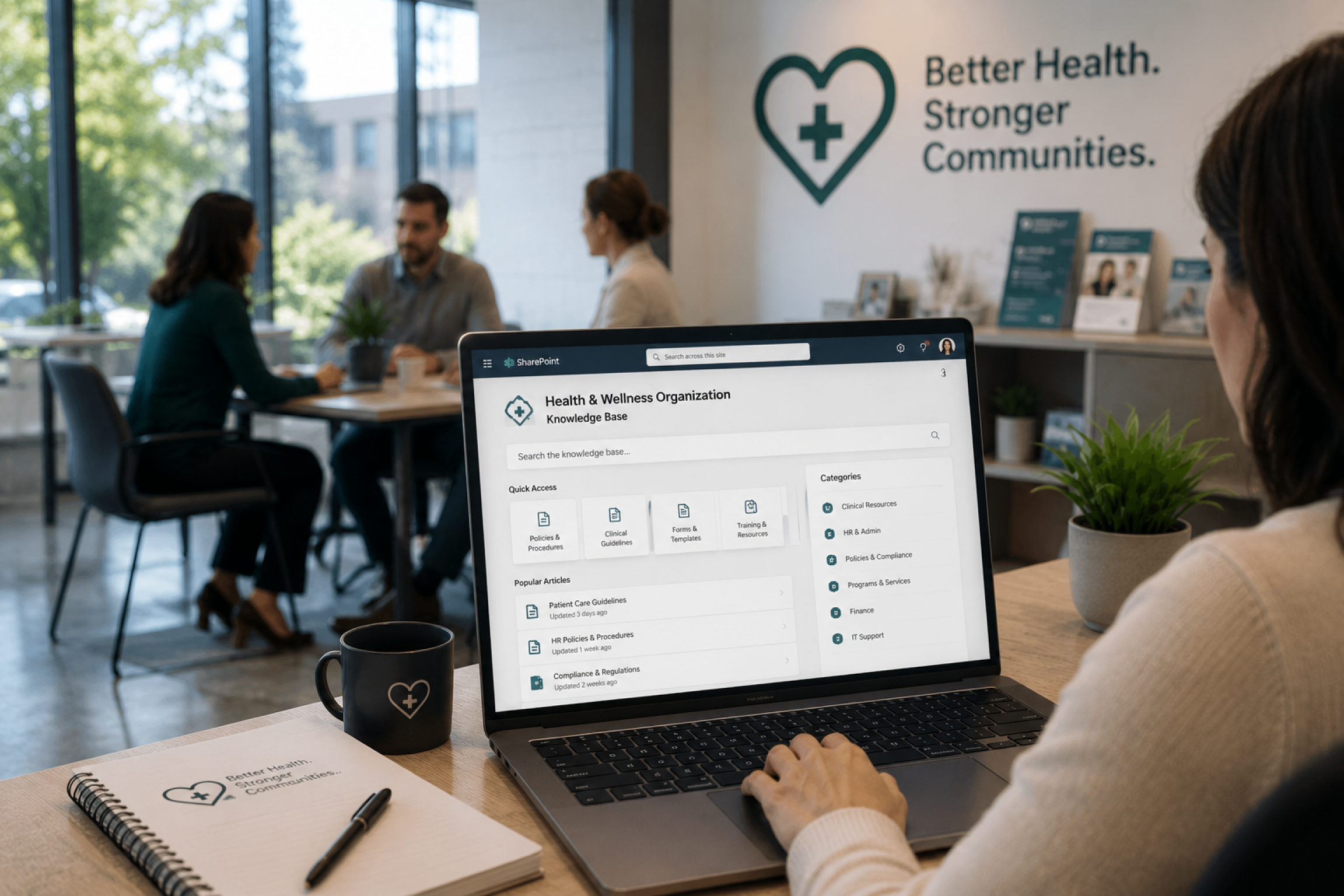
This case study shows how Microsoft SharePoint for nonprofits can be configured to solve one of the most common complaints in the sector: SharePoint document library search not working as expected. Code Creators – a Microsoft Solutions Partner, audited the entire digital workplace first, then delivered a SharePoint intranet for the nonprofit organization, complete with department workspaces, an Active Directory integrated employee directory, and a purpose-built knowledge base that turned scattered folders into content every employee could find through search in seconds. Within 3 months of launch, average document search time dropped from roughly 10 minutes to under 1 minute, and the organization eliminated an estimated 12 hours of staff time spent weekly on manual document lookups.
Executive Summary
Document search time dropped by 90%, from an average of 10 minutes to under a minute, and the organization recovered an estimated 12 hours of staff time per week. An outdated, unstructured SharePoint Online environment became a connected digital workplace after Code Creators audited and rebuilt the SharePoint intranet for a Canadian health sector nonprofit organization. For nonprofits running Microsoft SharePoint, this is a familiar pattern, and the fix is rarely a wholesale platform switch, but a properly governed SharePoint knowledge base. Documents lived in folders with little to no metadata, search rarely returned useful results, and there was no employee directory or dedicated space for HR or IT. Code Creators began with a full audit of the existing environment, then built a modern Hub Home Site, dedicated HR and IT department sites, an Active Directory integrated employee directory, and a dedicated Knowledge Base site collection with full text search and category based refiners. The result is a connected digital workplace where employees can now find the right document in seconds instead of relying on a phone call or a long manual search.
Key Results:
- 90% reduction in average document search time, from 10 minutes to under a minute
- Approximately 12 hours of staff time recovered weekly across departments
- Comprehensive audit completed before any development began, removing rework and guesswork
- Modern Hub Home Site connecting every employee to company news, events, and recognition tools
- Active Directory integrated Employee Directory with searchable, always current profiles
- Dedicated Knowledge Base with full text search, refiners, and a categorized document repository
- Full training program with user manual, administrator manual, and support guide delivered post launch
About the Client
The client is a Canadian nonprofit organization responsible for overseeing and managing health products on a national scale. Their work depends heavily on detailed documentation, including policies, procedures, and product related records that employees need to reference accurately and quickly throughout the day.
As the organization grew, the volume of internal documentation grew with it, but the systems meant to organize that information did not keep pace. Employees across departments increasingly relied on outdated folders, inconsistent naming conventions, and personal knowledge of “where things were kept” rather than any searchable system. In a regulated, health focused environment, this created a genuine operational risk: information that should have been easy to verify was instead buried, and teams were spending hours each week simply trying to locate it.
This made the project matter beyond convenience. For an organization handling health related documentation, having a reliable, governed, and searchable system is not a nice to have. It directly affects how confidently and quickly staff can do their jobs.
The Problem: A Familiar SharePoint Document Library Search
Although the client had been using Microsoft SharePoint Online for years, the environment had expanded without any consistent structure behind it. Site collections were created on an as needed basis with no clear naming or governance pattern; document libraries relied on folders instead of metadata, and the native SharePoint search function rarely surfaced the right file on the first attempt.
There was no dedicated space for HR or IT to manage their own content. There was no employee directory, so finding a colleague’s role, contact information, or reporting line meant asking around or digging through old emails. Active and archived sites sat side by side with no clear separation, making it difficult for staff to know whether the page they landed on even reflected current information.
The business impact of this was significant. Employees were regularly spending time each week searching for documents that should have taken seconds to locate. This slowed down everyday tasks, reduced operational visibility across departments, increased reliance on a small number of people who “knew where things were,” and created risk in a sector where accurate, current documentation matters. Left unresolved, the gap between the organization’s growing documentation needs and its aging governance structure would only have widened, increasing both the time cost and the compliance exposure tied to outdated or duplicate content. Without a connected digital workplace, the organization was effectively running on institutional memory rather than a system anyone could rely on.
What We Discovered
Most intranet projects move straight into design. Our approach starts differently: before any development work begins, our team runs a full audit and assessment of the client’s existing environment as part of our SharePoint intranet consulting services. For this engagement, the audit covered every active site, every archived site, and everything in between. Our team:
- Documented the existing site structures, library hierarchies, and folder organization across the environment.
- Assessed how documents were being stored and whether any metadata was being applied at the library or item level.
- Identified which content was still relevant and worth migrating forward, and which had been superseded or could be retired.
- Surfaced governance gaps and access issues that had accumulated over time without anyone actively managing them.
Where existing content was worth preserving, our team planned a structured SharePoint migration , mapping legacy folders and libraries to the new metadata driven structure so historical documents could move forward without recreating the same disorganization in the new environment.
The audit was carried out using a structured SharePoint maturity assessment, scoring the environment across information architecture, governance, metadata usage, search configuration, and user adoption, which gave the team a clear baseline for prioritizing what to fix first rather than relying on a purely subjective review.
The findings were compiled into a comprehensive assessment report and walked through with the client’s stakeholders. Root causes that emerged from this review included a reliance on folder-based storage instead of metadata driven libraries, no consistent site provisioning process, no clear ownership of HR or IT content, and a search experience that had never been properly indexed or configured to surface the organization’s documentation in a useful way. This is a pattern we see often: SharePoint can struggle to index certain content types and embedded objects, which quietly creates blind spots where information exists but stays effectively hidden from the people who need it.
This diagnosis phase fed directly into our broader SharePoint development services, shaping a migration and build plan that addressed the root causes identified during the audit rather than simply rebuilding the same structure with a new look. Since the team understood the real structure of the environment, including what could be retired and what needed to be preserved, Phase II moved forward with a clear plan instead of assumptions, which meant no unexpected issues and no rework once development began.
| Site | Type of Site |
| Home Site | Hub Site |
| HR Site | Site Collection |
| IT Site | Site Collection |
| Employee Directory | Site Collection |
| Knowledge Base Solution | Site Collection |
Before settling on a separate site collection for the Knowledge Base, our team also evaluated building it as a subsite under the Home Hub. A subsite would have been faster to provision and would have inherited the Hub’s navigation automatically. However, it would also have inherited the Hub’s permission structure and storage allocation, limiting how independently the Knowledge Base could be branded, governed, or scaled as the organization’s documentation needs grew. Given how central findability was to this project, a standalone site collection was the better long-term fit, even with the added setup time.
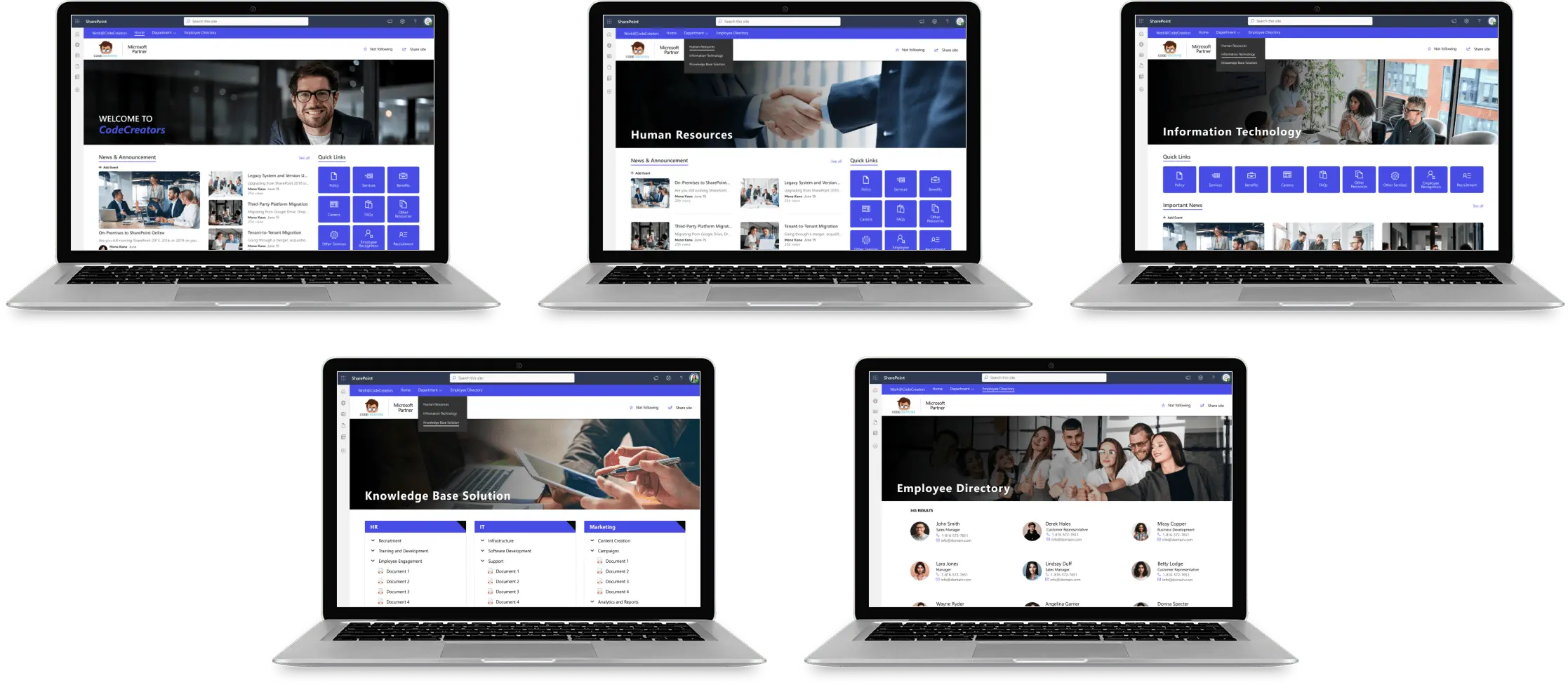
The Home Site was provisioned as a Hub Site specifically so it could connect the HR, IT, Employee Directory, and Knowledge Base site collections under one shared navigation and search experience, rather than leaving them as disconnected, independently managed sites the way the original environment had been structured.
The Solution
With the audit findings agreed upon, Code Creators moved into design and development with a structured plan built around three priorities: a connected Hub Home Site, dedicated department sites for HR and IT, and a standalone Knowledge Base built for fast, accurate search.
Hub Home Site: The centerpiece of the new intranet is a Hub Home Site that acts as the main landing page for every employee. From this single page, staff can access company news and announcements, a dynamic menu bar, quick links, upcoming events, a world clock, weather updates for different regions, a shared calendar, birthdays and work anniversaries, a discussion board, a “Who Do I Call For” directory of key contacts, a shoutout section for nominating and recognizing colleagues, an image gallery, the organization’s core values, and a Tip of the Day feature that administrators can update on their own without developer support.
HR Site: A dedicated HR site brings together internal job postings, company policies and procedures, a referral program, a new hire section, an HR document library, a discussion forum, a video gallery, and a clickable organization chart showing reporting lines and employee details, giving the people team a managed space of their own.
IT Site: The IT site was built around self-service, with a FAQ library, a suggestion box for employee feedback, a key contacts section, an IT resources area, and a document library where a “Recently Accessed” view surfaces frequently used files across the environment for faster retrieval.
Employee Directory: Our team built an Active Directory integrated employee directory, presented as a searchable list view across every department, so employee records sync automatically and stay accurate without manual maintenance. Staff can search by name, designation, contact number, or city and pull up a full profile showing photo, designation, email, and contact information at a glance, with a deeper profile view showing organization context, documents shared with that person, and their LinkedIn profile.
Knowledge Base: The Knowledge Base was deliberately built as its own SharePoint site collection, separately branded so it feels purpose built rather than bolted on, with layout and branding the organization could tailor to its own needs. The landing page leads with a full text search bar that searches across every document in the hub, with a categorized document repository underneath built as a custom web part. Documents are organized into department specific categories, such as HR and IT, with subcategories beneath them, all mapped back to a single centralized backend document library, so administrators manage one structured library instead of a dozen disconnected folders.
When a search is run, users land on a dedicated Search Results page showing results in a grid view with a PDF preview, file name, document type icon, author name, and a short description. From there, results can be refined by category, subcategory, author, phase, title, or document type, turning what used to require a phone call into a search that takes seconds.
This combination of SharePoint Hub Sites, Active Directory integration, and a dedicated Knowledge Base site collection addressed the root causes identified during the audit: inconsistent governance, folder-based storage, and a search experience that had never been properly configured.
Challenges Overcome
The biggest challenge was balancing structure with adoption. An overly rigid taxonomy risked confusing employees who were used to folder-based browsing, while too little structure would have recreated the same findability problems the project set out to fix.
To resolve this, our team mapped the new category and subcategory structure directly against how departments actually described their own documents during the audit phase, rather than imposing a generic taxonomy. This meant the categorization felt familiar to employees from day one rather than requiring them to relearn how their own department’s knowledge was organized.
Every web part built into the intranet, from the menu bar to the document library to the categorized repository, was tied to a defined acceptance criterion agreed with the client in advance, so both teams had a shared, specific definition of “done” rather than a subjective one.
Centralizing everything into one backend document library, while keeping the category browsing experience simple on the front end, also meant administrators could manage content in one place without employees needing to understand the underlying structure at all.
Results and Business Impact
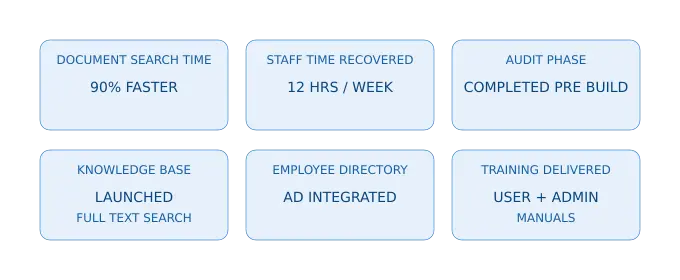
Document search time dropped by 90% within 3 months of launch, and the client now has a connected, modern digital workplace built on Microsoft SharePoint Online, with governance gaps addressed and document management organized and consistent across departments.
Results Snapshot:
- 90% faster document search, down from an average of 10 minutes to under a minute
- 12 hours of staff time recovered weekly across departments
- Full environment audit completed before development, removing rework and unexpected issues during build
- Centralized, searchable SharePoint Knowledge Base replacing the slow, unreliable SharePoint document library search the client struggled with before.
- Always accurate, Active Directory integrated employee directory replacing manual lookups
- Dedicated HR and IT Sites giving each department a managed home for their own content
- Full text search with category, subcategory, author, phase, title, and document type refiners
- Comprehensive training, user manual, administrator manual, and support guide delivered to the client team
Most importantly, information that was previously buried in folders and difficult to locate is now searchable and accessible by every employee within seconds, regardless of their department or role.
Client Testimonial
We have worked with vendors before who came in with a solution already in mind. Code Creators was different. They actually wanted to understand how we operate before suggesting anything. What they built reflects that, and our team noticed it immediately. Honestly, we were not expecting the audit phase to make such a difference, but it did. By the time they started building, they already knew our environment better than we did. The intranet they delivered felt familiar from day one.
Client Leadership
Frequently Asked Questions
This usually happens when documents are stored in folders without metadata, when duplicate files exist across active and archived sites, and when content has never been properly indexed. Over time, the search index has less structured information to work with, so even content that technically exists in the environment becomes difficult to surface. This is exactly what was happening in the client’s environment before the audit.
SharePoint’s search index crawls content periodically rather than in real time, so a newly added document can take some time to appear in results. If a document still doesn’t appear after a reasonable wait, the more common cause is a missing or misconfigured search setting at the library or list level rather than indexing delay alone.
A Hub Site connects multiple related SharePoint sites under one shared navigation and search experience, so users can move between department sites and find content across all of them without needing to know which specific site a document lives on. For a nonprofit with distributed teams and multiple departments, this unified navigation and cross site search reduces the friction of jumping between disconnected sites.
SharePoint can struggle to index certain content types, including content inside embedded objects and some PDF formats, which creates blind spots where information exists but stays effectively hidden from search. A dedicated knowledge base site collection with a properly indexed, centralized document library and a purpose-built search experience addresses this directly, rather than relying on SharePoint’s default search behavior across a sprawling environment.
An audit identifies what content is still relevant, what governance gaps exist, and how the current structure is actually being used before any new pages are built. Skipping this step often leads to migrating outdated or duplicate content into the new environment, which recreates the same findability problems the project was meant to solve.
Since, records sync directly from Active Directory, the directory stays accurate without anyone needing to manually update employee information after changes in role, department, or contact details. This removes one ongoing maintenance task and reduces the risk of staff working from outdated information.
Yes. An audit phase identifies which existing content should be retained, archived, or retired, allowing relevant historical documents to be migrated into the new structure rather than discarded.
Grouping documents into department specific categories and subcategories, backed by a single centralized document library and supported by full text search with refiners such as category, author, and document type, allows employees to either browse or search directly to the document they need.
Are You Facing a Similar SharePoint Challenge?
If your organization’s SharePoint environment has grown without structure, search no longer returns useful results. As a Microsoft Solutions Partner with hands-on experience delivering Microsoft SharePoint for nonprofits, we help organizations fix broken document library search, build a real knowledge base, and restore operational visibility. Schedule a consultation to discuss a practical solution for your environment.