You’ve invested in SharePoint, launched your intranet, and adoption is still not where it should be. This is a common pattern. In many SharePoint intranet projects, the issue isn’t the platform itself, but how the homepage is designed and how it influences the overall user experience.
Your homepage is the central and most frequently visited touchpoint in your digital workplace, creating a strong starting point for a smooth and engaging user experience. It directly impacts intranet adoption success, user satisfaction, employee engagement, and supports organizational change at scale while ensuring long-term scalability.
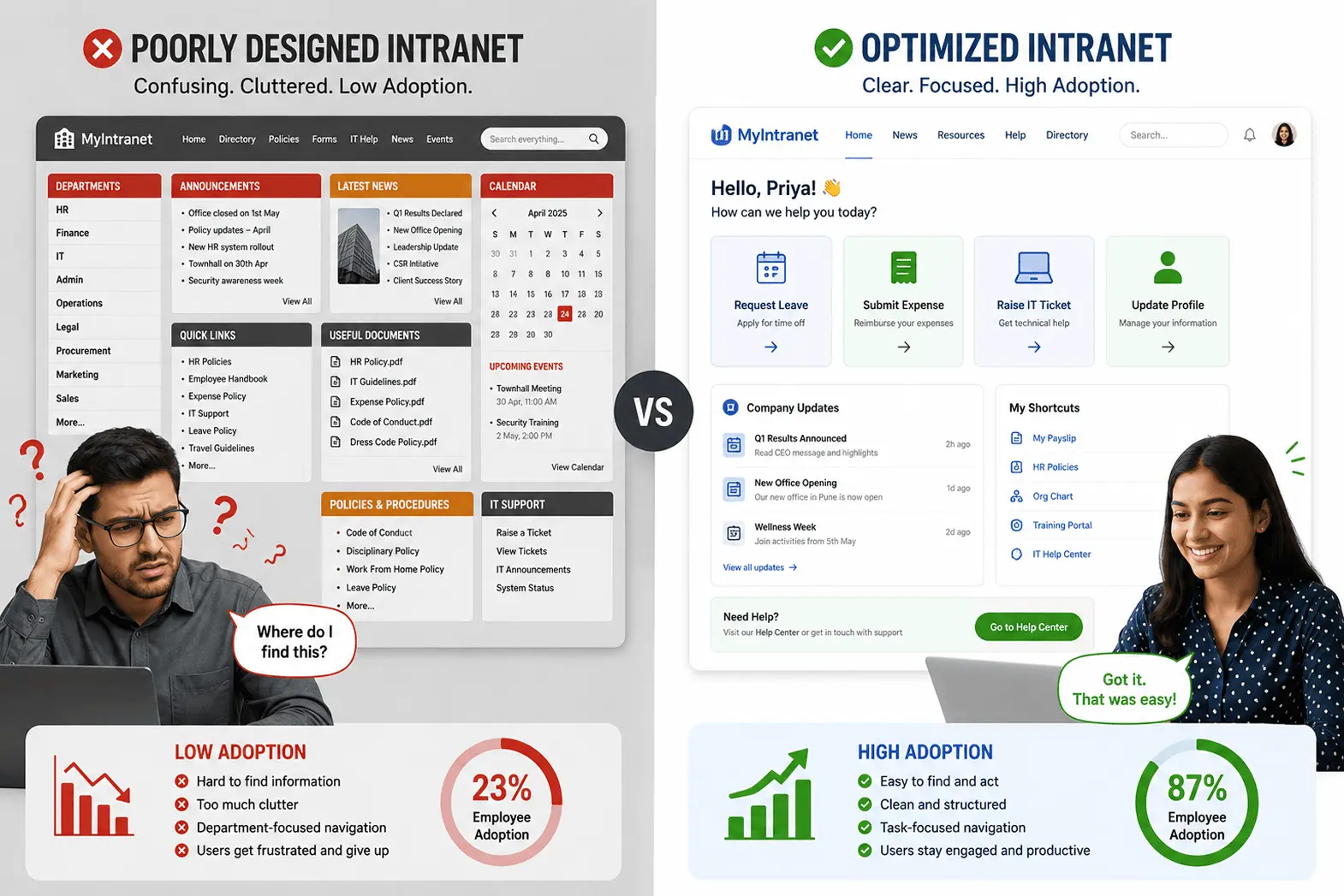
In this article, we’ll break down five essential intranet homepage components and show how each one acts as a practical adoption driver, improving usability, engagement, and workplace efficiency.
Why Homepage Design Matters
Homepage design is more than layout; it’s a key part of your intranet strategy and a major driver of adoption, as it shapes the first impression of the entire experience.
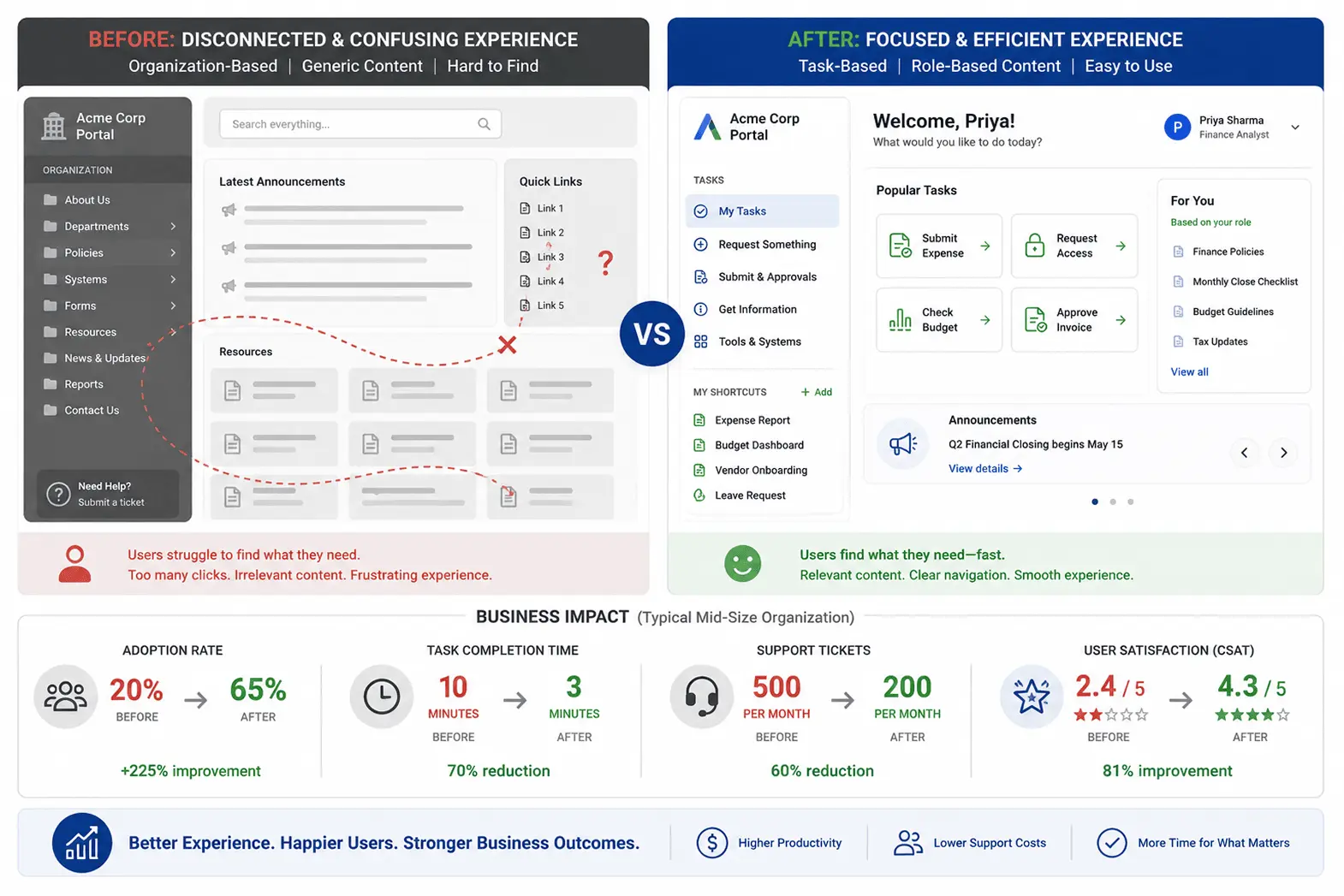
Poor design creates adoption barriers, reduces user satisfaction, and misaligns the homepage with real organizational needs and business requirements, which directly affects organizational efficiency and overall adoption success. It can also impact business outcomes like support tickets and ROI.
A well-designed homepage improves usability, engagement, and productivity, creating a smooth entry point to the digital workplace.
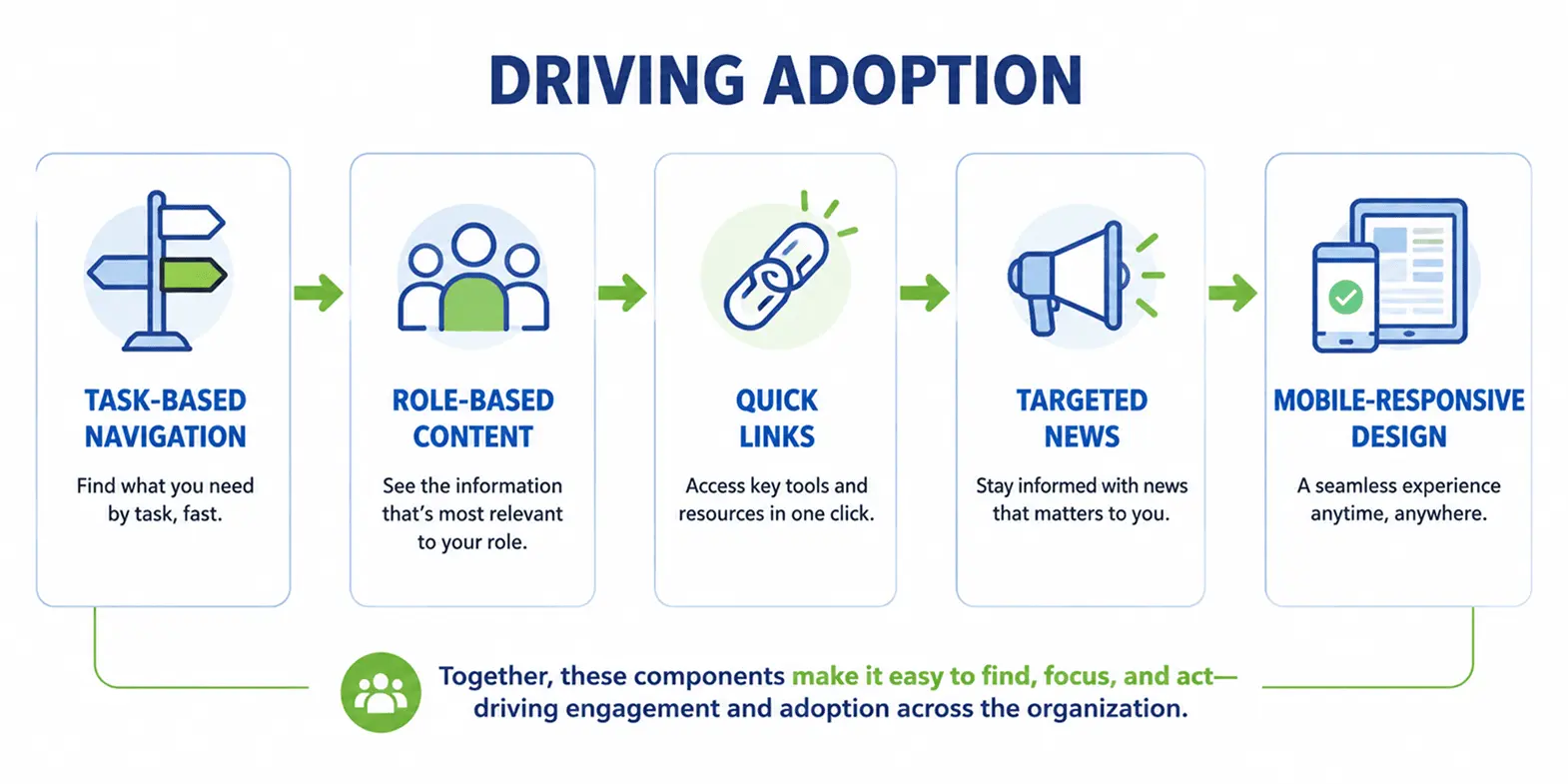
Here are five key components that shape an effective and user-friendly intranet homepage.
Component #1: Task-Based Navigation
In most intranet redesigns we see, organizations still default to structure-based navigation instead of designing around employee workflows, which directly impacts adoption.
In many growing organizations, task-based navigation helps employees quickly complete actions like submitting expenses or booking resources without needing to understand internal structures.
Real tasks include: “Book a meeting room,” “Submit expenses,” “Find policies,” and “Request time off.”
Solution: Design navigation around what employees need to accomplish, not how the organization is structured. This improves adoption success by aligning the homepage with real organizational needs and user workflows. It increases user satisfaction, reduces adoption barriers, and supports better organizational efficiency by improving how employees complete tasks.
Example: Instead of “Finance Department,” use “Manage Expenses & Reimbursements.”
Benefit: Employees complete tasks faster, experience less friction, and engage more consistently with the intranet, which also reduces support tickets and improves overall productivity.
Note: This approach delivers outstanding results when it’s guided by strong user research and well-planned information architecture before SharePoint configuration.
Component #2: Role-Based Content Filtering
Teams often show the same homepage content to everyone, which reduces relevance and creates noise.
Solution: Use role-based content filtering so employees see only relevant information based on role, department, location, or job function, creating a more focused and user-friendly experience.
Examples:
- Managers see HR policies and team management tools
- Sales teams see CRM links and performance targets
- Frontline employees see shift schedules and training resources
In SharePoint, this can be implemented using audience targeting and personalization web parts, allowing dynamic content delivery based on user profiles.
Adoption impact: Adoption success improves significantly as role-based personalization increases user satisfaction, enhances productivity impact, and contributes to stronger intranet ROI over time. It also supports adoption metrics by improving engagement rates and business outcomes across different teams.
Benefit: Higher engagement, faster task completion, and reduced support tickets, as employees spend less time searching and more time focusing on their actual work.
Component #3: Quick Links to Frequently Used Tools
Employees often know what they need but can’t find it quickly, so they rely on search or colleagues, which reduces homepage usage over time.
In fast-moving work environments, quick links allow employees to access frequently used tools like HR forms and internal systems in just one click, improving daily efficiency.
Solution: Highlight the top 8-12 most frequently used resources as clear quick links on the homepage, making everyday tasks faster and easier to access.
What belongs here: Includes key resources like expense reporting, time tracking, policies, HR forms, equipment requests, learning tools, and the employee directory.
Design approach: Use short, clear labels with simple icons (2-3 words) to make information easier to scan and improve overall user experience by reducing cognitive load.
Adoption metrics: Quick links should ideally account for 40-50% of homepage traffic, highlighting how effectively they help users quickly reach the most relevant and frequently used resources.
Maintenance: Review and update quarterly using usage analytics to keep links aligned with real employee needs and evolving workflows, ensuring the experience stays relevant and effective over time.
Component #4: Targeted News & Announcements
Corporate announcements often get buried in long feeds, so employees ignore them.
Solution: Curate news based on relevance, recency, and audience to make communication more meaningful and targeted.
What works: Role-filtered news, location-specific updates, trending internal topics, and employee spotlights that reflect what people actually care about.
Design principle: Focus on what employees need most, keeping content relevant, practical, and aligned with their daily work.
Example: Remote employees see company-wide updates and remote work resources, while office-based employees see facility updates and local announcements, creating a more relevant and tailored experience for each group.
Adoption impact: Employees perceive the intranet as relevant and useful, which encourages regular return visits and stronger engagement.
Maintenance: Keep content fresh with 2-3 updates per week to maintain visibility and keep employees consistently engaged.
Component #5: Mobile-Responsive & Accessible Design
Many teams still design intranets for desktop and treat mobile as secondary. This leads to poor mobile usability, slower interactions, and reduced engagement on the homepage.
For teams that work on the go, a mobile-friendly homepage makes it easy to access tools, updates, and resources from anywhere.
Reality: Around 30-40% of intranet traffic now comes from mobile devices, especially from frontline and remote employees.
Solution: Adopt a mobile-first approach and test on real devices to deliver a seamless, intuitive, and highly reliable experience across all screen sizes.
Key mobile considerations include touch-friendly buttons, readable text without zooming, fast load times, and simplified navigation that supports quick actions.
Accessibility: Follow accessible design principles and WCAG standards to create an inclusive experience that works smoothly with keyboard navigation, screen readers, and clear color contrast. This ensures the intranet is usable for all employees, regardless of ability or device.
Adoption impact: When mobile and frontline users can easily access the homepage, overall adoption improves significantly as more employees are included in the digital workplace experience.
Note: Accessibility is important. It supports inclusive, user-centric design and ensures compliance with legal requirements while creating a better experience for everyone.
Information Architecture: The Foundation
In many real-world implementations, organizations create complex navigation structures that don’t match how employees actually search for information, which leads to confusion and lower adoption.
Definition: Information architecture is how content is thoughtfully structured and organized, making it easy for users to quickly find what they need in the intranet.
Why it matters: A strong homepage delivers the best results when it is supported by solid design methodology and a well-structured technical architecture, ensuring long-term stability and effectiveness. Proper information architecture ensures alignment with business requirements, supports organizational change, and enables scalability across teams and regions.
It also strengthens change management efforts by making the technical implementation more predictable and scalable.
How it works: Methods like card sorting, tree testing, and user interviews help create a structure that aligns closely with real user behavior, making navigation more intuitive and user-friendly.
Example: Deciding where “Company Policies” belongs is based on user research, not assumptions.
Connection to adoption: When users find information in just a few clicks, it improves usability and increases overall adoption.
Critical: It should always be defined and validated before SharePoint configuration begins.
Adoption Metrics That Matter
Many organizations struggle with adoption planning because they don’t track adoption metrics properly or address adoption barriers early. Without clear data on user engagement, user satisfaction, and adoption success, it becomes difficult to measure intranet ROI or business outcomes.
To build a high-performing SharePoint intranet homepage design, tracking the right adoption metrics helps ensure continuous improvement and better user engagement over time. In real-world implementations, these metrics clearly highlight where users engage and where improvements are needed.
Key metrics to monitor include: Active user rate (percentage of employees using the homepage weekly), homepage traffic (share of total intranet visits), time on homepage (ideal: 1–2 minutes), click-through rate on quick links (15–25%), task completion rate, search success rate, mobile traffic (30–40%), and return visitor rate on a weekly basis.
Why they matter: Active user rate reflects overall adoption success, click-through rate on quick links shows content relevance, task completion rate indicates real business value, and return visits measure engagement stickiness.
Benchmarks to aim for: 60-70% active user rate, 40-50% homepage traffic share, 15-25% quick link CTR, and 30–40% mobile traffic.
How to measure: Use SharePoint analytics, Google Analytics (if configured), third-party reporting tools, and regular quarterly user surveys to capture both quantitative and qualitative insights.
Common Mistakes That Kill Adoption
Mistake #1: Org-Chart Navigation
Users think in tasks, not departments.
Fix: Shift to task-based navigation using a structured change management approach and user training strategy that improves adoption success and reduces adoption barriers.
Impact: Faster access and better adoption.
Mistake #2: One-Size-Fits-All Content
Same content for everyone reduces relevance.
Fix: Use role-based filtering.
Impact: Higher engagement and relevance.
Mistake #3: Cluttered Homepage
Too much content creates confusion.
Fix: Keep the layout simple and well-structured for a clear and easy user experience.
Impact: Easier navigation and better UX.
Mistake #4: Desktop-Only Design
Mobile users are often ignored.
Fix: Adopt a mobile-first design to ensure a smooth, consistent experience across all devices.
Impact: Better access and usability.
Mistake #5: Outdated Content
Old information reduces trust.
Fix: Keep content fresh with regular updates to maintain relevance and accuracy.
Impact: Keeps users engaged.
Mistake #6: Poor Search Functionality
Users struggle to find information.
Fix: Improve search optimization and indexing to enable faster, more accurate content discovery.
Impact: Faster information discovery.
Without proper implementation approach and phased rollout, even good designs fail to achieve adoption success or organizational efficiency.
The Design Process: 5 Phases
A strong SharePoint intranet homepage design is built on a clear design framework, structured methodology, and strong platform knowledge that ensures long-term stability. Moreover, it aligns well with business needs and ensures a strong organizational fit. This complete design process helps ensure the final solution is practical, user-focused, and aligned with how employees actually work.
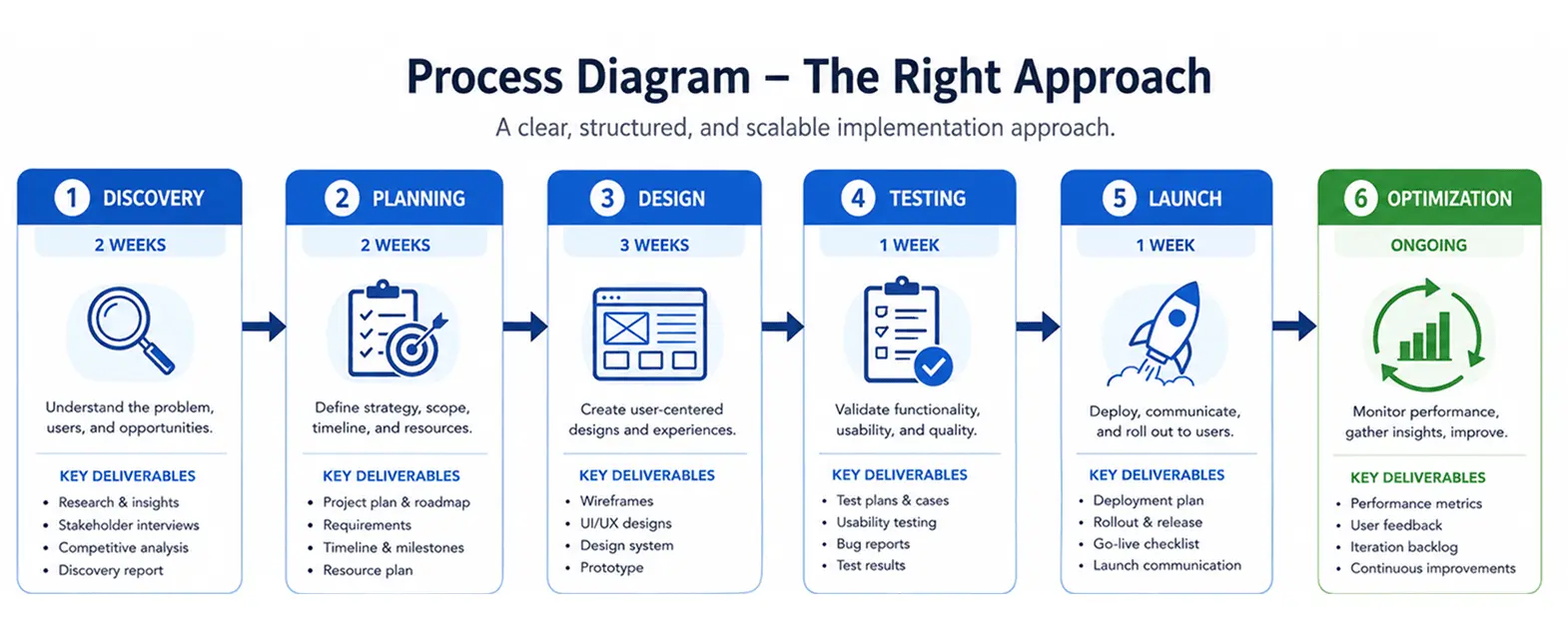
Phase 1: Discovery & User Research – Understand employee needs through interviews and surveys to create well-defined personas that truly reflect user goals and support more effective, user-focused design decisions.
Phase 2: Information Architecture & Wireframing – Create a clear navigation structure and wireframes to support a smooth, intuitive flow that helps users find what they need quickly.
Phase 3: Visual Design & Branding – Apply branding in a way that enhances the experience while keeping usability and accessibility clear and easy for everyone.
Phase 4: Technical Implementation & SharePoint Configuration – This phase ensures the design framework is properly translated into a working system that supports adoption success and long-term organizational efficiency.
Phase 5: Testing & Launch – Test with real users and roll out in phases, followed by ongoing post-launch optimization to refine performance and adoption outcomes.
In real projects, these outcomes are consistently delivered through a strong, well-structured design approach that seamlessly aligns user behavior, information architecture, and SharePoint configuration. This is where experienced implementation teams make a measurable difference.
Key Takeaways
A strong SharePoint intranet homepage works best when it is simple, relevant, and easy to use. It brings the right information to employees at the right time.
- Task-based navigation for quick access
- Role-based content for better relevance
- Quick links for common actions
- Targeted news for timely updates
- Mobile-friendly design for easy access
But implementing these components requires more than good intentions; it requires a strategic approach.
The Right Approach: A Professional SharePoint Intranet Design Process
A successful intranet works best when it follows a clear, structured process:
Discovery → Planning → Design → Testing → Launch → Optimization.
This approach ensures every decision is based on real user needs and supports strong stakeholder communication, structured execution, and continuous post-launch optimization.
A custom SharePoint design approach goes beyond templates by focusing on user research, validated information architecture, and continuous improvement, helping organizations build intranets that employees actually use and rely on daily.
While DIY setups can cover the basics, a professional approach helps create a more refined and scalable intranet experience that supports real business goals.
At Code Creators, we focus specifically on custom SharePoint intranet homepage design that is built around real user behavior with strong platform knowledge and a proven design framework, not generic templates. Our approach combines user research, information architecture, and iterative testing to make sure the design actually works in day-to-day usage.
Across projects, this approach has helped organizations consistently improve engagement and reach strong adoption levels, often in the 60-70% range when implementation is done properly.
Frequently Asked Questions
Q: How long does it take to design and launch a SharePoint homepage?
It usually takes 6-12 weeks depending on scope, user research, and customization level. Complex projects take longer when information architecture, stakeholder reviews, testing, and phased rollout are included, but these steps improve adoption success and reduce rework. Clear business requirements and structured planning play a key role in avoiding delays and ensuring smoother delivery.
Q: Can we redesign our existing homepage without starting from scratch?
Yes, most organizations improve results through incremental redesign instead of a full rebuild. This approach focuses on improving navigation, content structure, and usability step by step while reducing disruption to daily operations. A phased rollout with user feedback ensures better change management and helps maintain user satisfaction throughout the process.
Q: How do we get employees to actually use the new homepage?
Employee adoption improves when barriers like unclear navigation, irrelevant content, and low awareness are addressed early. A structured change management approach with communication, user training, and reinforcement ensures smoother rollout. Quick wins such as role-based content and simplified navigation help build early momentum, while adoption metrics like engagement and task completion guide ongoing improvements. At Code Creators, we apply this structured approach to help organizations drive consistent adoption strategy and long-term engagement.
Q: What’s the difference between custom SharePoint intranet and out-of-the-box solutions?
The real difference in custom vs. out-of-box is Out-of-the-box solutions are faster to deploy but limited in flexibility, while custom intranets are built around specific business requirements and workflows. Custom solutions improve organizational fit, user satisfaction, and long-term efficiency by aligning with real employee needs. Although they require more planning, they typically deliver higher ROI due to better adoption and reduced operational friction.
Q: How do we measure if our homepage design is working?
Performance is measured using adoption metrics like active users, engagement rate, task completion, and homepage traffic. It’s also important to analyze adoption barriers through user feedback and behavior tracking to identify friction points. Continuous review and optimization ensure the homepage stays aligned with business outcomes and user needs over time.
Q: Should we hire a designer or use templates?
Templates are useful for basic setups but often lack alignment with business requirements and user workflows. A professional designer brings design methodology, information architecture, and technical implementation expertise that improves adoption success. This leads to better usability, higher engagement, and stronger long-term ROI, especially in enterprise environments where scalability matters.
Conclusion
Homepage design plays a critical role in adoption success, user satisfaction, and long-term organizational efficiency. When supported by a structured change management approach, clear design methodology, and strong adoption planning, it leads to better business outcomes and improved intranet ROI.
When done well, employees can find information faster, complete tasks with less friction, and collaborate more effectively. This improves engagement, employee experience, user satisfaction, and overall SharePoint adoption, while also strengthening productivity impact and long-term intranet ROI.
These five components work together as a system that shapes how employees interact with the digital workplace. In practice, many organizations still struggle to turn these principles into a working SharePoint experience due to gaps in information architecture, user validation, and execution.
If you’re moving beyond basic setups, a structured implementation approach can significantly improve adoption and engagement. Code Creators design SharePoint intranet homepages based on real user behavior and validated information architecture. This reduces implementation risk, improves usability, and consistently drives stronger adoption outcomes.