Moving your engineering firm to the cloud is a smart business move. Most firms already have Microsoft 365, so using SharePoint for your engineering document management seems like a no-brainer. However, the biggest question on every partner’s mind is: “What is the actual SharePoint migration cost engineering firms should expect?”The truth is that migrating SharePoint engineering data is more complex than moving standard office files. You aren’t just moving Word docs; you are moving massive CAD models, complex folder structures, and years of project history.
In this guide, we break down SharePoint implementation pricing into straightforward tiers, allowing you to plan your budget with confidence.
Why Engineering Migrations Are Different
Before examining the numbers, we need to understand what drives the cost. Engineering firms face three unique challenges that affect the final price:
- Data Volume and File Types: High-resolution drawings and 3D models take up massive space.
- Relationship Links: CAD files often “call” other files (External References or Xrefs). If you move them incorrectly, these links break, and your drawings won’t open.
- Strict Compliance: Engineering work requires a perfect audit trail for safety and legal reasons.
To understand how to handle these technical hurdles, you can read our detailed guide on how to manage CAD files in SharePoint.
Comparison of Migration Tiers
To provide transparency in your budgeting process, we have categorized the SharePoint implementation pricing into three distinct tiers. While every firm’s Statement of Work (SOW) is unique, these estimates reflect the average investment required for a successful transition.
| Tier | Firm Size | Data Volume | Cost Range | Key Features | Best For |
| 1: Standard | 5-15 Employees | < 500 GB | $5K – $15K | Lift-and-shift, basic permissions, OOTB setup. | Small firms with simple file structures. |
| 2: Optimized | 15-50 Employees | 500 GB – 2 TB | $15K – $40K | Managed metadata, content types, CAD link preservation. | Growth-oriented firms needing better search. |
| 3: Enterprise | 50+ Employees | 2 TB+ | $40K – $100K+ | Custom APIs, ERP integration, Power BI, Advanced Governance. | Large firms with complex compliance needs. |
Tier 1: The “Standard” Migration (Small Firms)
Estimated Cost: $5,000 – $15,000
This tier is ideal for small firms (5-15 employees) that have a relatively simple file structure and don’t have a massive history of legacy data.
What’s Included:
- Discovery & Planning: A basic review of your current file server.
- Simple Lift-and-Shift: Moving files from a local server to SharePoint Online.
- Basic Permissions: Setting up standard access for “Internal” and “External” users.
- Out-of-the-Box Setup: Using the standard SharePoint look without heavy customization.
The Limitations:
At this price point, you are mostly getting a digital version of your old file server. You won’t have advanced automation or custom metadata tags, which might mean you still struggle with long file paths later.
Tier 2: The “Optimized” Migration (Mid-Sized Firms)
Estimated Cost: $15,000 – $40,000
Most growing engineering firms fall into this category. This isn’t just a “move”; it’s an “upgrade.” This tier focuses on SharePoint implementation pricing that includes structural improvements.
What’s Included: (H3)
- Metadata Architecture: Instead of 10-level deep folders, we set up “Tags” like Project Phase, Discipline, and Document Type.
- CAD Link Preservation: Special care is taken to ensure that Xrefs in AutoCAD or Revit remain functional after the move.
- Workflow Automation: Basic Power Automate flows to handle document approvals.
- User Training: Teaching your engineers how to use “Sync” vs. “Online” mode to prevent data conflicts.
The Value:
This tier solves the “Deep Folder” problem and ensures your data integrity is protected. It reduces the time engineers spend searching for files, which usually pays for the migration cost within the first six months.
Tier 3: The “Enterprise” Migration (Large Firms & Complex Projects)
Estimated Cost: $40,000 – $100,000+
For firms with 50+ employees or those handling multi-million dollar infrastructure projects, the migration is a major strategic project. The engineering document management cost here reflects a total digital transformation.
What’s Included:
- Custom API & Third-Party Integration: Connecting SharePoint to your ERP or Project Management software (like Procore or Deltek).
- Advanced Governance: Setting up strict compliance rules that automatically archive old projects and protect sensitive intellectual property.
- Custom Dashboards: Integrating Power BI to track project health. For more on this, see our article on how to build real-time engineering dashboards.
- Legacy Data Cleanup: Optimizing 10+ years of data and standardizing naming conventions creates a clean, high-performance environment, ensuring your team starts fresh with a perfectly organized system.
 Breaking Down the “Hidden” Costs
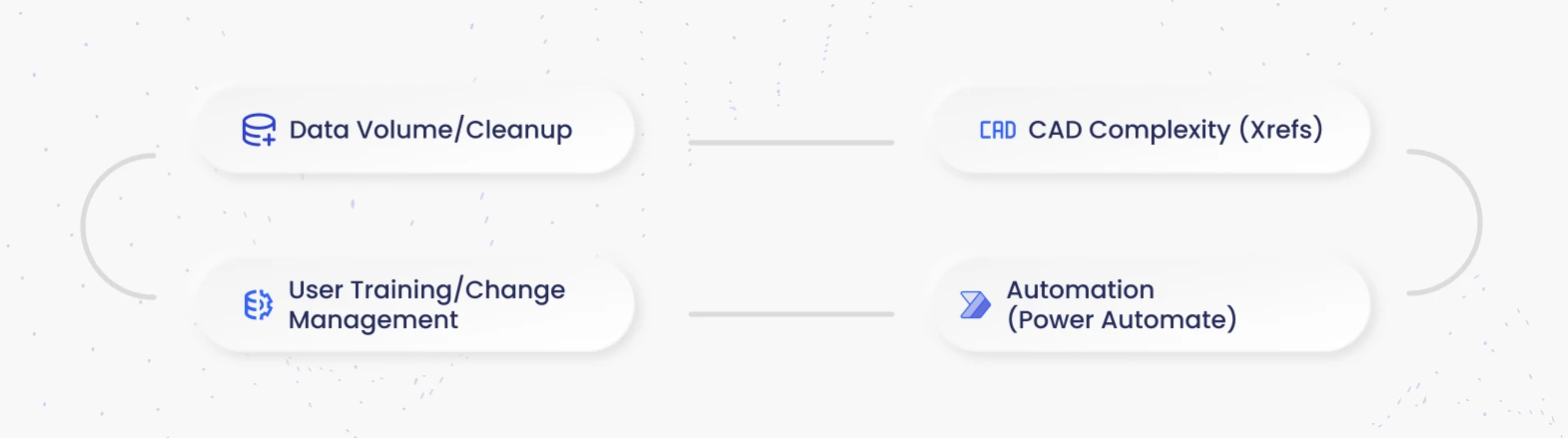
When calculating your SharePoint migration cost with engineering budget, don’t forget these three “hidden” factors that can impact your final bill:
1. Data Cleaning (The “Pre-Migration” Tax)
If your current server is a mess, moving it to SharePoint results in a “cloud-based mess.” Expect to spend roughly $1,500 – $5,000 on data auditing. Spending time to delete old versions and organize files before the move is a critical investment that prevents paying for unnecessary cloud storage.
2. The CAD Factor
CAD migration cost is often 20–30% higher than standard data moves because specialized tools are needed to scan drawings and maintain Xrefs. If a consultant is treating .DWG files with specialized care rather than as standard PDFs, protects your budget and keeps drawing links perfectly intact, saving your team from extensive manual rework.
3. Change Management
The software works, but do the people? Budgeting an additional 10–20% of the total project cost for staff training ensures engineers adopt the system. This investment prevents “shadow IT” where staff revert to saving files on local desktops, which compromises your business continuity.
How to Lower Your Migration Costs
You don’t always need the most expensive tier. Here is how to keep your SharePoint implementation pricing under control:
- Archive Locally: Prioritize your “active” SharePoint site for current work while moving projects closed over five years ago to cost-effective “Cold Storage” to maintain a fast, lean environment.
- Appoint Internal Champions: Train one or two “power users” in-house who can help their peers. This reduces the amount of paid consulting hours you need for support.
- Phased Approach: Start with one department or one specific project. Learn from that “pilot” migration before moving the entire firm.
Why Cheap Migrations End Up Costing More
While general IT providers may offer initial cost savings, investing in specialized SharePoint expertise ensures your engineering firm achieves a higher Return on Investment (ROI) through a system built specifically for your technical workflows. Forward-thinking engineering firms ensure a smooth, high-performance transition by partnering with specialists. Working with experts who master permission management engineering and complex CAD file interactions guarantees success from day one.
When a migration goes wrong:
- Engineers stop working: If they can’t find drawings, billable hours drop to zero.
- Links remain intact: Proactive link management ensures your Xrefs stay connected, saving you the high cost of manual repairs and keeping your projects moving forward without interruption.
- Enhanced Security: A professionally configured environment safeguards your intellectual property, ensuring that sensitive project bids and private client data remain strictly protected and accessible only to authorized team members.
Investing in an expert who understands the engineering document management cost and requirements up front saves you from these “recovery costs” later.
FAQs
1. Does SharePoint support AutoCAD and Revit files?
Yes. SharePoint stores CAD files easily, but it doesn’t natively manage External References (Xrefs). You must use a migration strategy that preserves these links or utilize the Autodesk Desktop Connector to ensure files open correctly for your team.
2. How much storage space do we get?
1 TB plus 10 GB per licensed user. Engineering firms with heavy datasets often exceed this. Instead of buying expensive extra SharePoint storage, we recommend moving archived projects to Azure Cold Storage to save costs.
3. Is external sharing secure?
Yes. You can create restricted “Guest” access for contractors. By using Microsoft 365 Groups, you can grant access to specific project folders without exposing your entire internal server, keeping your intellectual property safe.
Conclusion: Get Clarity and Confidence in Your Migration Budget
A SharePoint migration is a strategic investment in your firm’s future. It empowers your team to work from anywhere, collaborate in real-time, and maintain strict compliance with industry standards. Whether Tier 1 gets you in the door, Tier 2 makes you efficient, or Tier 3 establishes you as a digital leader, the right roadmap is essential.
The best way to determine your specific budget is to have an expert evaluate your data volume, your current “mess level,” and your specific goals for automation. Gain full confidence in your investment by requesting a custom quote that reflects your firm’s unique digital footprint. A tailored approach ensures you get exactly what you need with transparent pricing, eliminating surprises and maximizing your project’s value.
We specialize in helping engineering teams move to SharePoint without the drama. Schedule a free, no-obligation consultation with Code Creators today. We will review your current setup and provide a Professional SharePoint Migration Assessment to get your projects moving faster.