Half of winning intranet designs today are built on SharePoint. This tells us something important: SharePoint is the go-to platform for organizations worldwide. But here’s the real question: does that mean it’s right for your business? And more importantly, can you make it work without professional help?
SharePoint gives you powerful tools to build intranets with robust collaboration features, seamless integration with Microsoft 365, and enterprise-grade security. For new companies, there’s even an interactive demo to test drive these features before you commit. But like any platform, SharePoint has genuine strengths and real limitations. In this guide, we’ll walk through both sides so you can make an informed decision.
When is SharePoint the Right Choice?
SharePoint is ideal if your organization already uses Microsoft 365. It works beautifully with Teams, OneDrive, Power BI, and Power Automate. If you need a centralized employee portal that connects your entire Microsoft ecosystem, SharePoint is hard to beat. It scales from small teams to enterprise environments without requiring a platform change. Organizations managing large document volumes, needing strong compliance frameworks (like PIPEDA), or serving hybrid and remote workforces find SharePoint particularly valuable.
The right choice depends on alignment with your business needs, not just technology features. If your organization is already invested in Microsoft tools, SharePoint becomes a natural extension rather than an additional investment.
The Pros: What SharePoint Does Really Well
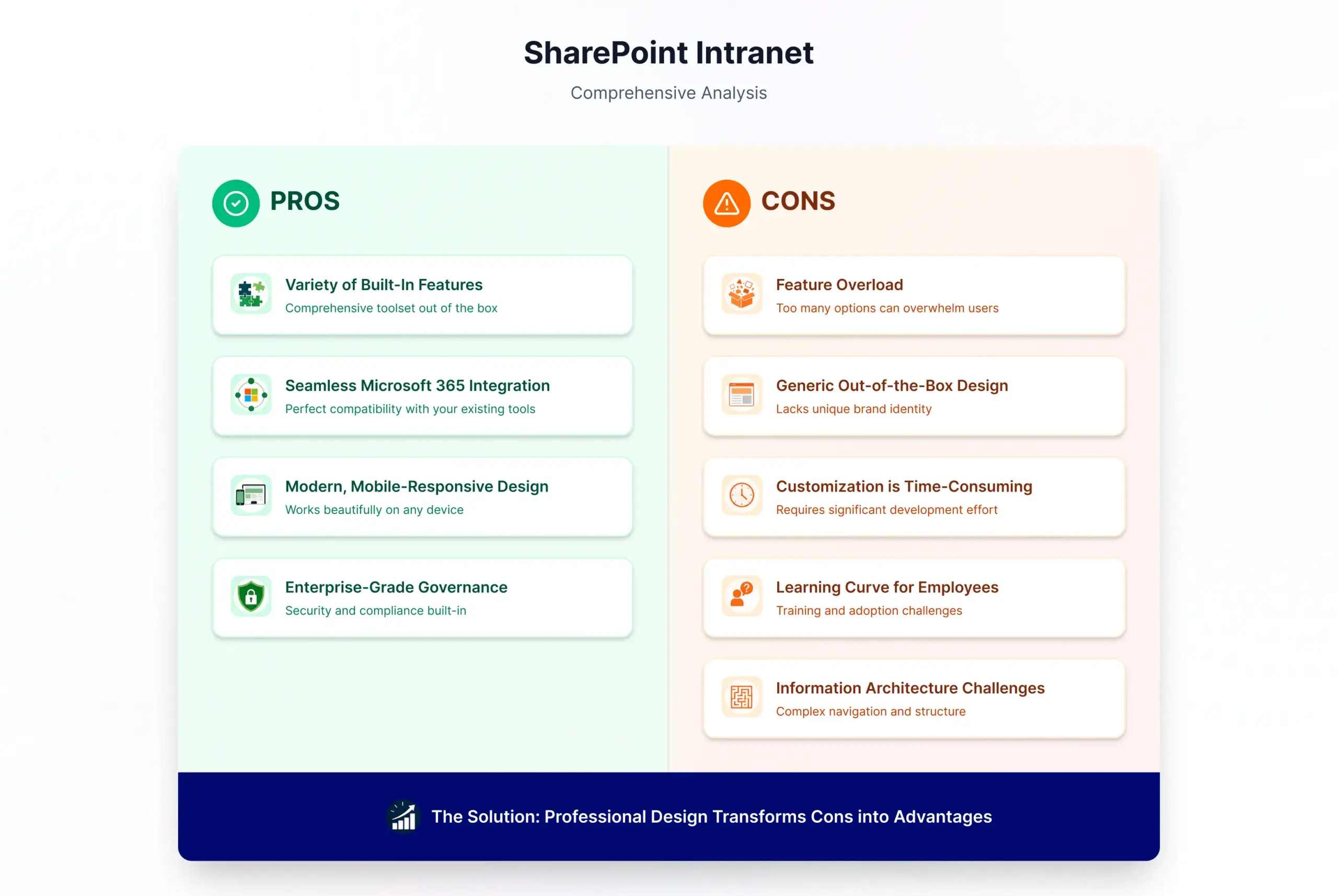
Variety of Built-In Features
Out-of-the-box SharePoint gives you access to communication sites, hub sites, news feeds, document management, version control, and collaboration tools. You don’t need to build these from scratch. These features handle workflows, content management, and organization-wide collaboration without custom development. SharePoint also includes AI capabilities that make processes smoother and faster.
Seamless Microsoft 365 Integration
SharePoint connects directly with Teams, OneDrive, Power BI, and Power Automate. This unified ecosystem means employees work within familiar tools. You can surface Power BI dashboards in your intranet, trigger workflows from departmental sites, and keep everything synchronized. This integration is one of SharePoint’s biggest advantages.
Modern, Mobile-Responsive Design
Modern SharePoint sites are flexible, adaptive, and beautiful. They work perfectly on mobile devices without separate development. The modern experience beats older SharePoint versions in layout, typography, and speed. Employees get a professional, contemporary interface they actually want to use.
Enterprise-Grade Governance and Compliance
SharePoint includes built-in governance, access control, and compliance capabilities. Organizations handling sensitive data appreciate the permission management, information governance, and audit trails. PIPEDA compliance is built in, not bolted on.
The Cons: Where SharePoint Falls Short
Feature Overload Without Clear Governance
SharePoint comes with so many features that organizations often feel overwhelmed. Too many options can confuse teams. Without clear governance and planning, things get messy quickly. Features sit unused while employees create workarounds.
Generic Out-of-the-Box Design
Default SharePoint design feels impersonal. It doesn’t reflect your company’s brand or culture. Employees see a generic platform, not a strategic business asset. This generic appearance contributes to low adoption rates.
Customization Requires Time and Money
While SharePoint is highly customizable, customization takes time and budget. Deep customization requires specialized expertise. The cost depends on how much customization you need. Many organizations underestimate this investment.
Learning Curve for Employees
Users unfamiliar with modern SharePoint need training and support. Without proper change management and training, adoption suffers. Employees don’t use platforms they don’t understand.
Information Architecture Challenges
Without professional planning, content organization becomes chaotic. Poor navigation makes information hard to find. Employees spend extra time searching instead of working. This discoverability problem directly impacts adoption rates.
How Design Impacts Adoption Rates
Here’s something important: design is the primary driver of intranet adoption, not technology capability. A poorly designed SharePoint intranet can have low adoption despite powerful features. A well-designed intranet drives engagement and daily usage.
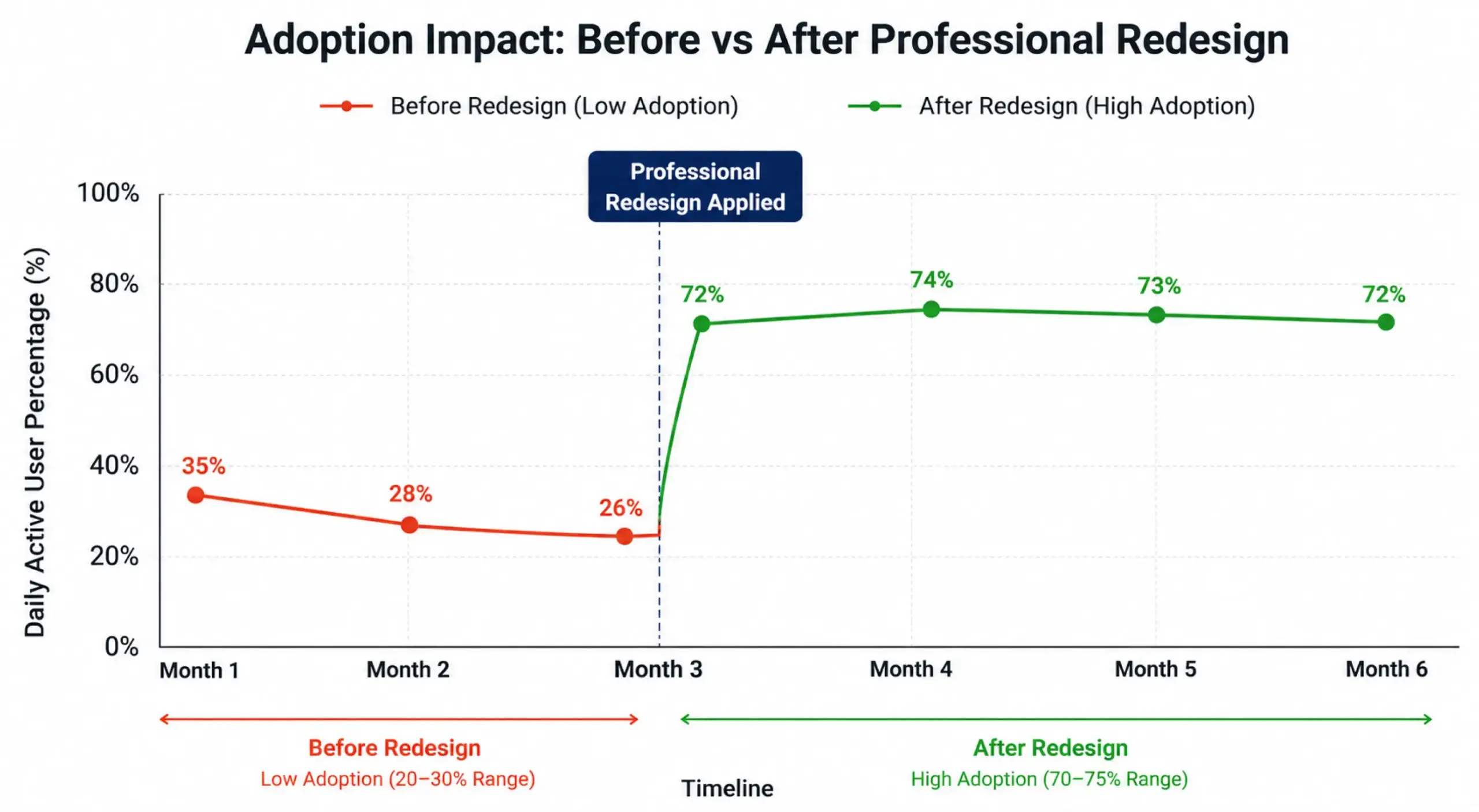
Professional design improves discoverability, reduces time-to-information, and increases user trust. Well-designed intranets typically achieve 60-80% daily active user rates. Poorly designed intranets often see only 20-30% adoption. That’s a massive difference.
Consider this real-world example: A mid-sized organization launched a SharePoint intranet with out-of-the-box design and minimal governance. After three months, adoption was only 35% of employees. They then engaged professional designers to redesign the intranet with proper information architecture, custom branding, and role-based personalization. Within three months of the redesign, adoption jumped to 72%. The platform didn’t change. The design did.
Learn more about user-friendly design principles to understand how navigation and UX directly influence how employees interact with your intranet.
When Businesses Should Hire Intranet Designers
Professional designers are essential when you want to maximize adoption. They’re necessary if you need custom branding aligned with your company identity. If you require role-based personalization, complex information architecture, or seamless Microsoft 365 integration, professional expertise matters.
You should hire designers if you’re redesigning an underperforming intranet. You should hire them if you want to avoid costly DIY mistakes. Early investment in professional design prevents expensive rework later. The difference between out-of-the-box capabilities and what requires professional expertise is significant.
Common Mistakes in DIY Intranet Design
Organizations often make predictable mistakes when building intranets without professional guidance. They overload with features without clear purpose. They ignore user research and feedback. They create inconsistent navigation and branding across sites. They fail to plan for change management and employee training.
Many overlook mobile users entirely. Poor information architecture leads to low discoverability. Inadequate governance causes content chaos. They neglect inclusive design practices that ensure all employees can access and navigate the intranet effectively. They underestimate the importance of ongoing optimization. These mistakes are expensive to fix after launch. Professional design prevents them from happening in the first place.
Why Modern SharePoint Intranets Are Better Than Old-Style Setups
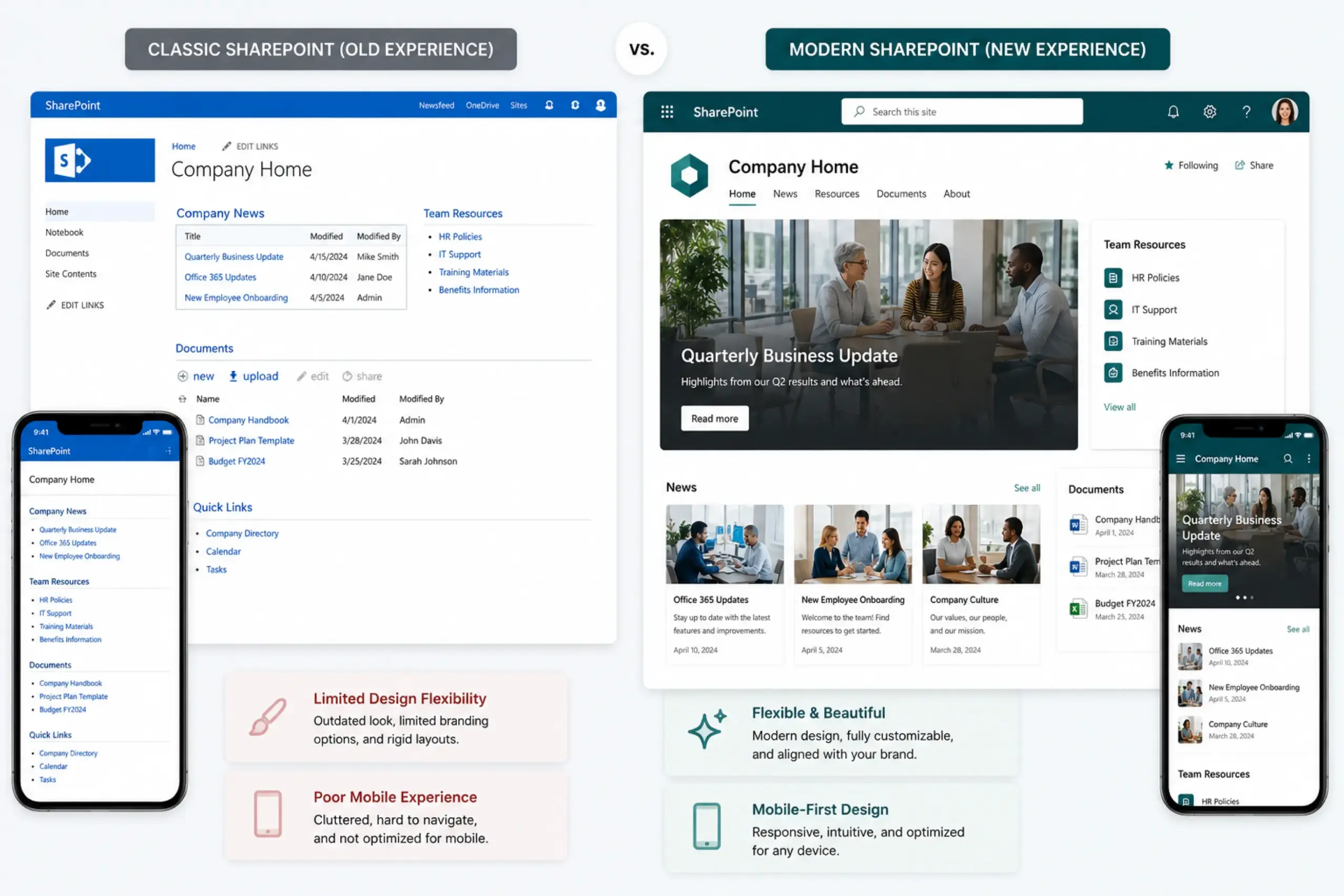
Classic SharePoint is outdated. It has limited design flexibility and poor mobile experience. Modern SharePoint is built for today’s workforce. Communication sites and hub sites provide superior user experience. Modern SharePoint is responsive, flexible, beautiful, and mobile-first.
Organizations still using classic SharePoint are losing adoption opportunities. Modern design is a competitive advantage for employee engagement. If your intranet still looks like it was built in 2013, it’s time for an upgrade.
Turning Cons into Solutions with Professional Design Help
Every “con” associated with SharePoint can be addressed with professional expertise. Professional designers handle feature overload through strategic governance. They create beautiful, branded experiences that reflect your company identity. They implement role-based personalization to increase relevance.
They design intuitive navigation that reduces time-to-information. They manage change and training to ensure adoption. They integrate Microsoft 365 tools seamlessly. They establish ongoing optimization practices. Professional design transforms SharePoint from a technology investment into a strategic business asset.
Ready to Build an Intranet Your Team Actually Uses?
SharePoint has tremendous potential when design is prioritized. The difference between a successful intranet and a forgotten filing cabinet is professional design and strategic implementation.
If the cons worry you, our design team can address each one. We understand the unique challenges of intranet adoption. We can identify design opportunities that internal teams might miss. We’ve helped organizations transform underperforming intranets into engagement platforms.
Download our SharePoint Intranet Design Checklist for quick wins and priority gaps. Get started with custom SharePoint intranet design services today. Let’s build an intranet your employees actually want to use.
Ready to get started? Contact us for a consultation.