
In the world of engineering, time is the most expensive resource. Whether you are managing a massive infrastructure project or a specialized mechanical design, streamlining your administrative tasks, like approvals and document filing empowers your team to work more efficiently and protects your project’s maximum profit potential.
Many firms use Microsoft 365, but they often use SharePoint as a basic digital filing cabinet. The real magic happens when you move from static storage to active automation. By implementing SharePoint workflows for engineering, you can stop managing folders and start managing projects.
Here is a guide to the five essential workflows that help engineering firms save time, reduce errors, and stay focused on design.
1. The CAD Drawing Approval Workflow
For any engineering firm, the drawing is the product. Transforming a draft into a “Stamping” or “Issued for Construction” (IFC) status provides a rewarding opportunity to refine your designs through collaborative feedback and clear communication.
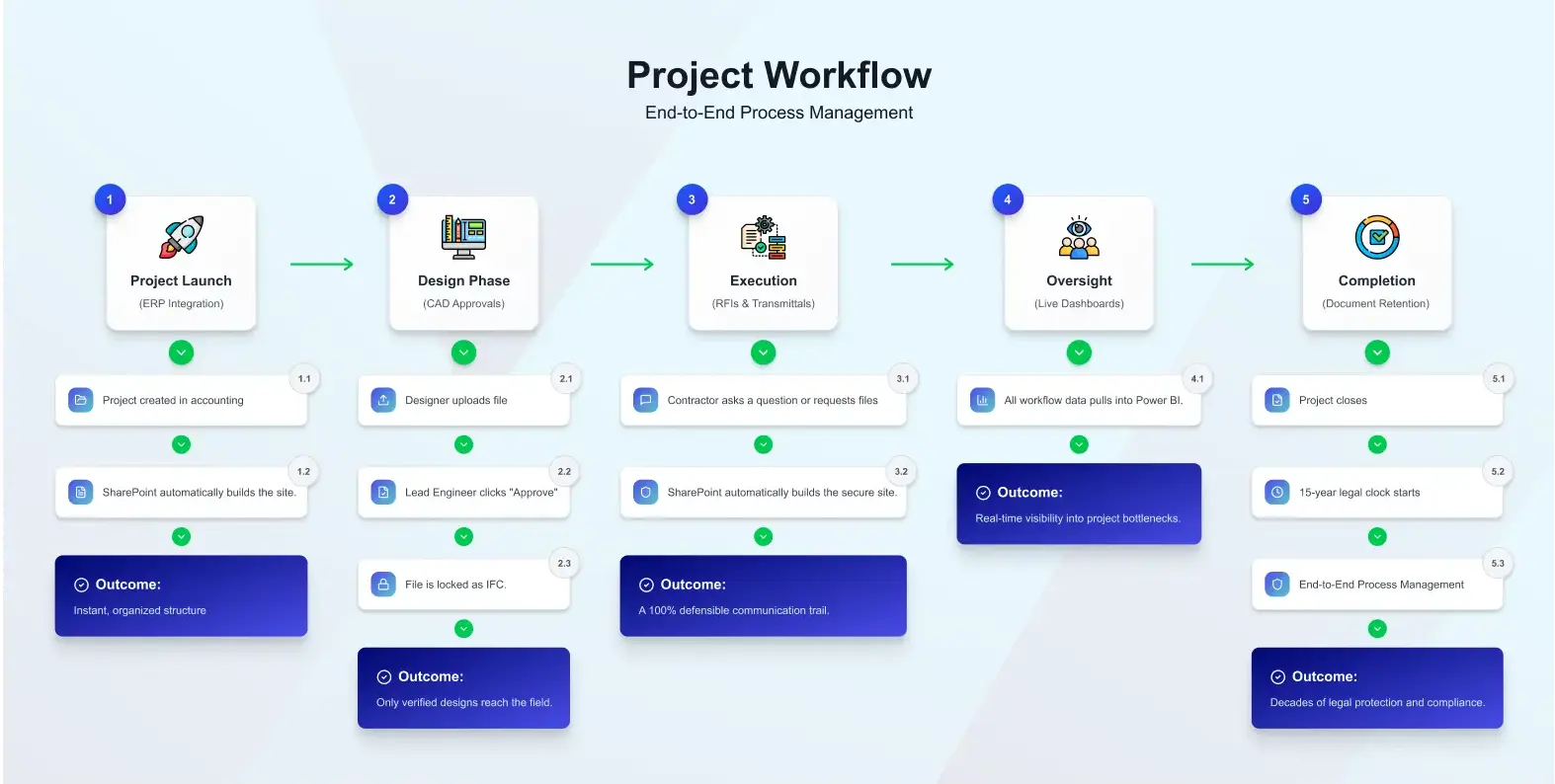
Using SharePoint automation for engineering, you can create a formal approval path. When a designer uploads a new version of a CAD file, an automated workflow notifies the Lead Engineer. They can review the file, add comments, and click “Approve” or “Reject” directly from their email or a SharePoint notification.
This process ensures that no drawing is ever used prematurely. It also creates a permanent record of who approved what and when. Since managing CAD files have unique requirements like external references (Xrefs) and large file sizes it is vital to have a system that understands these technical nuances.
2. Engineering RFI Automation
While Requests for Information (RFIs) are essential for clear project communication, automating them creates a fantastic opportunity to accelerate your timelines and keep every phase of your project moving forward smoothly. By automating your RFI process in SharePoint, you ensure every project question is captured and tracked clearly, fostering a culture of transparency and proactive collaboration that keeps your deadlines right on track.
Engineering RFI automation transforms this process into a structured database. Here is how it works:
- Centralized Entry: A contractor or team member fills out a simple SharePoint form.
- Automatic Routing: The workflow automatically assigns the RFI to the correct discipline lead (e.g., Structural vs. Electrical).
- Due Date Tracking: If the RFI isn’t answered within 48 hours, the system sends an automated reminder.
- The Audit Trail: Every response is logged, creating a searchable history of all project clarifications.
This keeps the project moving and ensures that the “latest word” is always documented in a single, accessible location.
3. Automated Document Retention & Compliance
Engineering firms are legally required to keep project records for long periods often 15 years or more to comply with provincial regulations and the statute of repose. Automating this process provides incredible peace of mind and ensures your firm stays consistently protected and compliant without the stress of manual oversight.
A specialized workflow can handle your document retention and compliance automatically. Instead of relying on a human to remember to archive a folder, you can set a workflow that triggers when a project is marked as “Closed.”
The workflow will:
- Lock the files: Convert them to a “Record” status so they cannot be edited.
- Apply the clock: Start a 15-year countdown.
- Notify for disposal: After 15 years, the system alerts a principal to review the data before it is permanently deleted, ensuring you meet PIPEDA and engineering standards without lifting a finger.
4. Transmittal and Submittal Tracking
Sending a package of documents to a client or contractor (a Transmittal) is a high-stakes task. You need to prove exactly what was sent, who received it, and which version of the documents were included.
With power automate engineering workflows, you can replace manual transmittal logs with an automated system. When you select a group of files in SharePoint and click “Generate Transmittal,” the workflow:
- Creates a professional cover sheet with your firm’s branding.
- Zips the files and sends a secure download link to the recipient.
- Logs the transaction in a master “Transmittal Registry.”
This eliminates the “I never got that file” excuse and ensures your firm is always protected by a clear paper trail.
5. The Multi-System Integration Workflow
Modern engineering firms use a variety of tools ERP systems for billing, Procore for construction management, and SharePoint for document control. By integrating your systems, you can ensure that valuable project data flows freely and remains accessible to everyone who needs it, creating a more connected and collaborative workspace.
This is where power automate engineering workflows become truly powerful. You can connect SharePoint to your other tools so that information flows seamlessly. For example, when a new project is created in your accounting software, Power Automate can automatically create the corresponding SharePoint Site, apply the correct folder structure, and set the security permissions.
Furthermore, you can pull data from these workflows into Power BI dashboards to see real-time project health. You can track how many RFIs are overdue, how many drawings are stuck in approval, and where the bottlenecks are. If your existing tools don’t talk to each other, custom application development can bridge the gap, creating a unified digital ecosystem for your firm.
Choosing the Right Workflow: An ROI Comparison
Not every firm needs to automate everything at once. Use this table to prioritize which SharePoint workflows for engineering will give you the fastest return on investment.
Workflow Impact Table
| Workflow | Challenge Solved | Time Saved | Priority |
| CAD Approval | Ensures the latest, verified designs are always used. | 4-6 hours per project per week | Medium |
| RFI Automation | Keeps project communication clear and on schedule. | 20% faster response times | Low |
| Document Retention | Maintains a pristine, audit-ready project archive. | Hundreds of hours during audits | Medium |
| Transmittal Logs | Provides a clear, professional record of file sharing. | 30 minutes per transmittal | Low |
| ERP Integration | Synchronizes data across systems for seamless accuracy. | 10+ hours of admin time/month | High |
Why Engineering Firms Choose SharePoint for Automation
Many firms ask why they should use SharePoint instead of a generic project management tool. The answer lies in integration and ownership.
High ROI and Low Cost
Because most firms already pay for Microsoft 365, the infrastructure for these workflows is already bought and paid for. You aren’t paying for another expensive software subscription; you are simply getting more value out of the tools you already own.
Built-in Security
Engineering data is sensitive. Using SharePoint for engineering firms means your workflows inherit the enterprise-grade security of the Microsoft cloud. Your intellectual property is protected by Multi-Factor Authentication (MFA), encryption, and data residency in Canada.
Scalability
A workflow that works for a 5-person team can easily scale to a 500-person firm. As your projects grow in complexity, your SharePoint environment grows with you, allowing for more advanced logic and deeper integrations.
How to Get Started with Engineering Workflows
Implementing automation is a rewarding journey that you can enjoy at your own pace, and the most successful firms thrive by using a thoughtful “crawl, walk, run” approach to build lasting confidence and success.
- Pinpoint Growth Opportunities: Discover where your team can gain the most momentum, such as streamlining RFI tracking or drawing approvals, to build an even more efficient and productive workflow.
- Standardize the Process: To ensure your automation is a complete success, start by capturing your team’s best practices in a clear, consistent process. By defining your steps first, you create a rock-solid foundation for a workflow that works perfectly every time.
- Build and Test: Launch an exciting pilot version of your workflow on a single project to collaborate with your engineers and gather their valuable insights for a perfect final result.
- Rollout and Train: Once the flow is refined, roll it out to the rest of the firm and provide simple training.
FAQs
What are the best SharePoint workflows for engineering?
The most effective workflows include CAD Drawing Approvals, RFI Automation, Transmittal Tracking, Document Retention, and Project Site Provisioning. These automate the “busy work” so engineers can focus on actual design.
Can SharePoint handle CAD file approvals?
Yes. Using Power Automate, you can create a workflow where uploading a CAD file triggers a notification to a Lead Engineer. They can approve or reject the drawing with one click, and the system automatically updates the file status to “Approved” or “IFC.”
How does RFI automation work in SharePoint?
Instead of using email, contractors fill out a simple SharePoint form. The workflow then routes that RFI to the right person, tracks the deadline, and sends reminders if it isn’t answered. This creates a clear, searchable history of all project questions.
Why should engineering firms use Power Automate?
Power Automate saves money and reduces risk by connecting SharePoint to your other tools (like accounting or ERP software) so you don’t have to enter data twice. It also ensures that legal requirements, like the 15-year retention rule, happen automatically.
Is a SharePoint workflow better than email for transmittals?
Definitely. Email doesn’t give you a “paper trail.” A SharePoint transmittal workflow automatically generates a cover sheet, logs exactly what was sent, and tracks when the recipient downloaded the files, which protects your firm in case of a dispute.
Conclusion: Build Your Defensible Future
Embracing a fully automated engineering environment is an exciting, evolving journey that continuously opens new doors for innovation and team growth. By utilizing SharePoint Power Automate, you turn your firm’s administrative burden into a competitive advantage. You gain better visibility, stronger compliance, and a more focused workforce.
If you are ready to stop fighting with folders and start optimizing your project delivery, it is time to look beyond basic storage. To get the best results, you need a system designed specifically for the unique lifecycle of engineering documents and the strict requirements of Canadian law.
Don’t let manual processes slow down your innovation. To get started, partner with a specialist to design your custom engineering workflows and ensure your firm is built on a foundation of efficiency and compliance.