
As engineering projects grow, structured metadata enables greater clarity, speed, and control beyond traditional folder structures. By introducing structured metadata, teams gain faster access to CAD files, drawings, and reports across projects. Clear classification and standardized tagging create consistency, improve delivery timelines, and strengthen compliance visibility.
A well-planned metadata strategy brings structure, visibility, and confidence. By tagging documents with organized information, firms enhance document discovery, strengthen consistency, and build a scalable SharePoint information architecture. Metadata ensures every file is clearly categorized, easy to search, and fully aligned with its project context. This approach saves time, strengthens collaboration, and enables confident project execution.
Taxonomy vs. Metadata: Understanding the Foundation
To implement an effective SharePoint metadata strategy, it’s important to understand the distinction between taxonomy and metadata. Imagine your organization as a city: taxonomy is the city map showing streets, districts, and neighborhoods, while metadata is the address on each building that tells you exactly where to find it. Without a clear map, how would anyone locate a specific building in a busy city?
What is Metadata?
Metadata is “data about data.” It empowers teams by providing clear, descriptive information about documents without altering their content. In SharePoint, metadata enables faster identification, organization, and retrieval of project files, making work more efficient and reliable.
For engineering teams, practical examples include:
- Project ID – uniquely identifies each project, ensuring seamless tracking across the firm
- Discipline – Civil, Structural, MEP, Architectural; supports consistent organization and discipline-specific reporting
- Document Type – Drawing, Specification, Report, Transmittal; enables quick classification and easy access
- Revision Number – tracks document iterations, ensuring accurate version control and transparency
- Approval Status – Draft, Submitted, Approved, Rejected; strengthens workflow visibility and compliance assurance
Using these metadata fields consistently ensures fast filtering and search across large libraries, strengthens file accuracy and traceability, and supports document lifecycle management.
What is Taxonomy?
Taxonomy is a structured classification system or controlled vocabulary that enables consistent, efficient, and reliable organization of metadata across the organization. By providing a set of predefined options instead of free-text entries, a taxonomy ensures uniform categorization, strengthens accuracy, and makes document retrieval faster and more dependable.
Key points about taxonomy:
- Predefined Values – Fields like Discipline might include Civil, Structural, MEP, or Architectural, while Document Type could include Drawings, Specifications, Reports, or Contracts; this standardization supports seamless organization and enhances team productivity
- Consistency – Ensures standardized naming and unified entries across teams
- Workflow Efficiency – Helps teams manage large volumes of technical documents, CAD files, and BIM models effectively
- Search Optimization – Supports accurate SharePoint search, making it easy to find critical project documents
- Reporting and Compliance – Ensures uniform metadata for analytics, reporting, and regulatory compliance
- Governance and Control – Serves as the backbone of an effective information management strategy by providing a clear framework for document classification
A strong taxonomy ensures that all users categorize documents in a uniform way, supporting both organizational efficiency and long-term scalability.
How They Work Together
Taxonomy defines the approved values, while metadata applies these values to individual documents. Together, they create a structured yet flexible system that supports powerful filtering, precise search, and confident information management. A well-defined taxonomy ensures consistent tagging, supports managed metadata SharePoint features, and improves overall information architecture.
Taxonomy vs Metadata Comparison
| Concept | Description | Engineering Example |
| Taxonomy | Classification system / controlled vocabulary | Discipline: Civil, Structural, MEP, Architectural |
| Metadata | Data applied to documents | Drawing 001, Specification Rev 3, Approved |
Key Metadata Fields for Engineering Projects
Designing the right metadata framework starts with identifying fields that improve findability, compliance, and project management. Each field plays a role in ensuring documents are both accessible and audit-ready.
Project-Level Metadata
Project-level fields apply to all documents within a project, enabling clear organization, efficient tracking, and confident project management:
- Project ID – unique identifier that ensures every project is fully traceable in audit logs and reporting systems
- Project Name – descriptive title that simplifies filtering and links documents to contracts and compliance records
- Client Name – supports client-specific reporting and enhances accountability for contractual obligations
- Project Manager – provides clarity on ownership, streamlines approvals, and strengthens compliance oversight
- Start Date / End Date – tracks project timelines to ensure milestones are met and deadlines are reliably aligned
- Project Status – Active, Completed, On Hold; enables effective governance and transparent reporting across all projects
These fields let teams filter and organize documents at the project level, helping maintain streamlined and easy-to-navigate folder structures. By applying project-level metadata thoughtfully, firms create organized, easy-to-navigate document libraries that support effective folder structure optimization and scalable project growth.
Document-Level Metadata
Document-specific fields provide granularity and precise control:
- Document Type – Drawing, Specification, Report, Transmittal; ensures proper classification for internal and external audits
- Discipline – Civil, Structural, MEP, Architectural; enables consistent organization and ensures discipline-specific compliance is efficiently maintained
- Revision Number – maintains version history, supporting accurate change control and transparent audit trails
- Approval Status – Draft, Submitted, Approved, Rejected; strengthens workflow visibility and ensures smooth regulatory compliance
- Document Owner – identifies the responsible party, enhancing accountability and streamlining approvals
- Last Modified Date – tracks updates, ensuring reliable version control, clear auditing, and confident compliance reporting
These fields enhance document control, streamline approvals through workflow automation, and improve search refiners in SharePoint, making it simple to locate critical project documents quickly while ensuring each file meets compliance requirements.
Discipline-Specific Metadata
Some metadata varies based on engineering discipline, helping teams work efficiently while maintaining high standards and compliance:
- Drawing Number – essential for CAD files, enabling precise linking to standards and supporting reliable compliance references
- Scale – relevant for drawings and schematics, facilitating accurate design verification and smooth regulatory review
- Sheet Number – identifies document sequence, ensuring organized documentation and easy audit readiness
- Discipline Code – aligns files with organizational standards, supporting consistent categorization and streamlined compliance
By thoughtfully applying these metadata fields, engineering teams enable fast document retrieval while confidently meeting internal and external compliance standards. Have you considered how easily your team could respond if an auditor requested a complete project file set tomorrow?
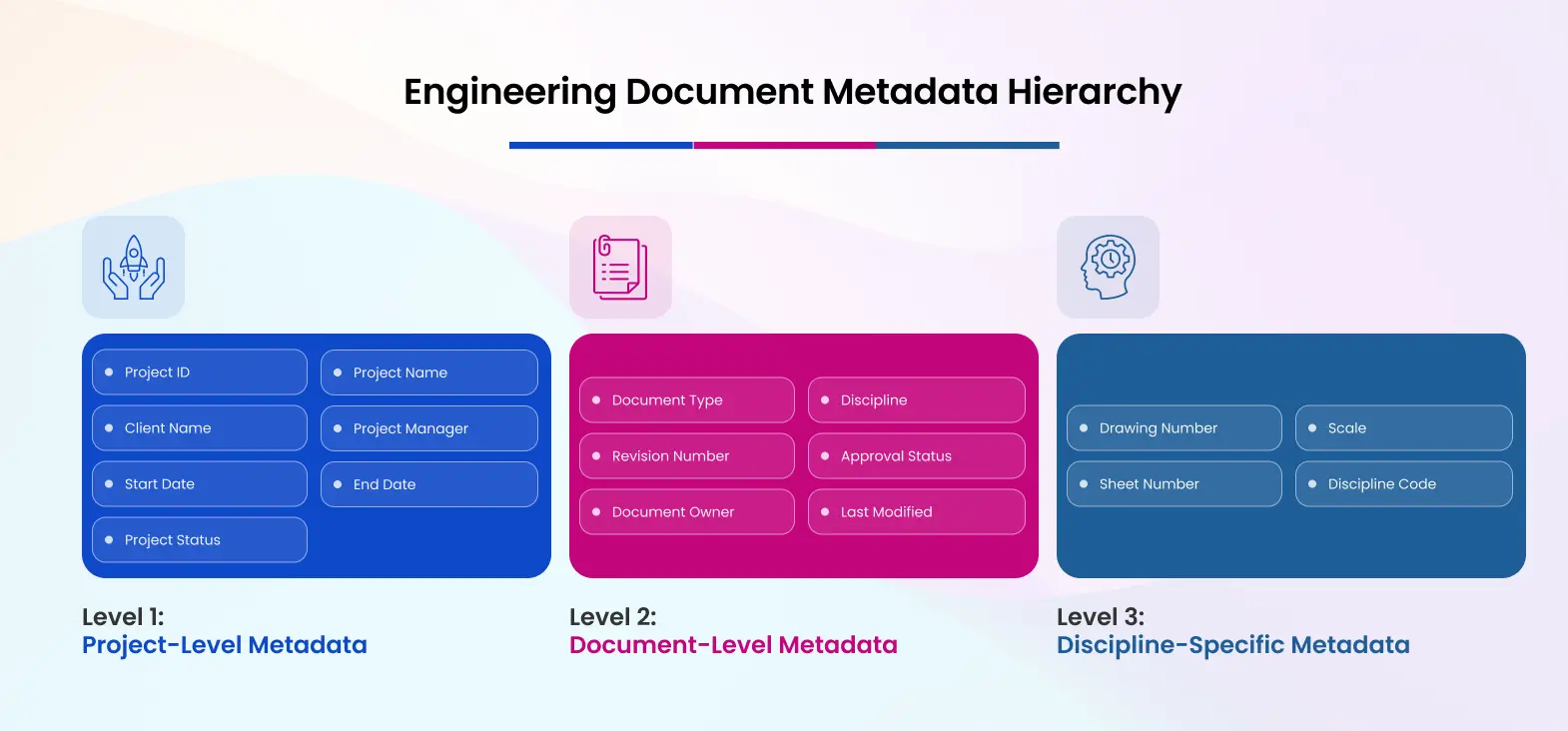
This diagram shows how metadata fields are organized by level, helping engineering teams manage documents efficiently and maintain compliance.
Building Your Metadata Strategy: Step-by-Step
A structured, phased approach ensures metadata is implemented successfully and consistently across your engineering projects. If your team needed to locate a critical drawing in seconds, how confident would you be in your current system?
Step 1: Audit Your Current Data
Start by reviewing existing documents to understand how teams currently organize and access information. Identify:
- What information teams already use to categorize and locate documents
- Existing metadata, even if informal or inconsistently applied
- Opportunities for enhancement in document discovery, such as improving retrieval of CAD files or organizing project reports
This step positions your metadata strategy to address real-world needs and strengthen how teams organize and access information. Understanding current practices helps prioritize which fields and structures will have the most immediate impact.
Step 2: Define Your Core Metadata Fields
Select 5–8 core fields that cover most documents and create clarity without overwhelming users. Focus on fields that:
- Support search and filtering across large libraries
- Meet compliance and audit requirements
- Track key project milestones and statuses
By distinguishing “essential” fields from “nice-to-have” ones, teams can adopt the system quickly without confusion, while still allowing room for discipline-specific metadata later.
Step 3: Create a Controlled Vocabulary
Define approved values for each metadata field to ensure consistency. For example:
- Project Status – Active, Completed, On Hold, Archived
A controlled vocabulary improves search accuracy, enables precise reporting, and supports compliance standards. It also ensures consistent data entry, making document retrieval faster and more reliable.
Step 4: Implement Managed Metadata in SharePoint
Configure SharePoint’s Managed Metadata features to enforce your controlled vocabulary. This ensures:
- Uniform data entry across teams and projects
- Enables consistent, accurate data entry across teams
- Strong support for metadata governance and auditability
If you are applying metadata to existing document libraries, plan your migration carefully to preserve data integrity and maintain version history. Proper implementation here ensures long-term stability and allows your metadata framework to scale confidently with your firm.
Step 5: Train Your Team
Metadata is only effective if users understand and consistently apply it. Training should cover:
- Why metadata is essential
- How to tag documents accurately
- How to use search refiners for quick access
Reinforce this as an ongoing practice, not a one-time event.

This flowchart provides a clear roadmap for implementing metadata in SharePoint. Each step builds on the previous, ensuring your metadata framework is consistent, compliant, and easy for teams to adopt.
Real-World Example: Engineering Firm Metadata Implementation
A structural engineering firm implemented a structured metadata strategy for CAD files, reports, and transmittals.
Before: Locating drawings and project reports took about 15 minutes, and compliance tracking required manual effort. Streamlining metadata practices made it possible to set the stage for faster, accurate ISO 9001 audit reporting and easy verification of local engineering standards.
After: By applying project-level, document-level, and discipline-specific metadata:
- Average search time dropped to 2 minutes, significantly improving project efficiency.
- Engineers could filter all structural drawings by lead designer, project phase, or approval status.
- Document review cycles became transparent, supporting ISO and local compliance requirements and ensuring audit readiness.
- The system scales seamlessly as new projects are added, keeping compliance checklists, revision histories, and approvals fully traceable.
This example demonstrates how a well-implemented metadata strategy organizes files with clarity, strengthens regulatory alignment, supports accurate documentation practices, and makes audits efficient and predictable. Have you considered how quickly your team could retrieve a critical project file if needed tomorrow?
Common Metadata Mistakes to Avoid
Engineering teams can maximize efficiency by following best practices and applying metadata thoughtfully:
- Start with essential metadata fields to ensure clarity, consistent tagging, and faster adoption, expanding only as needed.
- Use standardized, controlled values for all metadata fields to improve search accuracy, reliable filtering, and uniformity across teams.
- Provide ongoing team training so users confidently and correctly apply metadata, making it an integral part of daily workflows.
- Make core fields mandatory to maintain consistency, reliability, and strong governance, ensuring every document is properly classified.
- Schedule regular reviews of your metadata strategy to keep it aligned with evolving workflows, regulatory requirements, and project needs.
By applying these best practices, engineering firms maintain a clean, scalable, and efficient metadata framework that strengthens collaboration, ensures compliance, and supports long-term project success.
How Metadata Improves Search & Discovery
Metadata transforms SharePoint from a simple file repository into a powerful, organized system. When applied correctly, it allows teams to locate documents quickly, maintain compliance, and streamline project workflows.
- Filtering by Project, Discipline, Document Type, Approval Status – Quickly narrow down search results.
- Fast queries on large document libraries through indexed columns – Enables rapid document retrieval even for thousands of files.
- Enhanced SharePoint search optimization – Improves findability and relevance of search results.
- Faster project delivery, improved accuracy, and stronger compliance tracking – Supports audits, approvals, and collaboration
By linking metadata directly to business outcomes, engineering teams can measure efficiency gains, strengthen document integrity and version control, and ensure that critical project information is always accessible when needed.
Frequently Asked Questions
How many metadata fields should I start with?
Start with 5–8 core fields, adding discipline-specific fields as needed.
Can metadata work alongside existing folders?
Yes, metadata complements folders. Use metadata for search and filtering while minimizing deep folder structures.
How do I maintain consistency in metadata values?
Use a controlled vocabulary via Managed Metadata in SharePoint to enforce standard values.
What’s the best way to handle metadata for legacy documents?
Plan a migration strategy to tag existing files systematically, preserving version history and avoiding data loss.
How do I ensure metadata supports compliance requirements?
Map metadata fields to regulatory or contractual standards, include mandatory fields for approvals, and audit regularly to maintain traceability.
Next Steps: Getting Started with Metadata
Metadata is not just configuration. It is structural planning. When designed correctly, it creates structured, well-organized libraries, improves search accuracy, and keeps document control strong as projects grow.
For engineering teams, a strong metadata framework supports better CAD file management, smarter folder structure optimization, smoother migration planning, and effective workflow automation. If you are ready to move from theory to execution, work with Code Creators to implement your metadata framework and build a SharePoint environment that stays scalable and reliable over time.